HomeNext Gen IT-InfraMonitoring & ManagementCyber SecurityBCP / DRAutomationDecoded
Next Gen IT-Infra
Cato’s SASE Supports Cybersecurity Skills Development

How Cato’s SASE Supports Cybersecurity Skills Development

🕓 April 8, 2025

How SASE Supports the Security Needs of SMBs

How SASE Supports the Security Needs of SMBs

🕓 February 9, 2025

Attack Surface Reduction with Cato’s SASE

Attack Surface Reduction with Cato’s SASE

🕓 February 10, 2025

SASE for Digital Transformation in UAE

SASE for Digital Transformation in UAE

🕓 February 8, 2025

Monitoring & Management
Understanding Atera’s SLA Management

Understanding Atera’s SLA Management

🕓 February 7, 2025

Cost-Performance Ratio: Finding the Right Balance in IT Management Networks

Cost-Performance Ratio: Finding the Right Balance in IT Management Networks

🕓 June 16, 2025

Customizing Atera with APIs

Customizing Atera with APIs

🕓 March 3, 2025

Power Up Your IT Team’s Strategy with Atera’s Communication Tools

Power Up Your IT Team’s Strategy with Atera’s Communication Tools

🕓 February 8, 2025

Cyber Security
Visual guide showing Cato CMA interface for configuring Internet and WAN firewall rules, enabling threat protection, and monitoring security events in real time for UAE IT teams.

Enforcing Firewall and Threat Protection Policies in Cato

🕓 July 25, 2025

Isometric illustration of professionals managing network performance, bandwidth analytics, and cloud-based optimization around the Cato Networks platform, symbolizing bandwidth control and QoS visibility.

Mastering Bandwidth Control and QoS in Cato Networks

🕓 July 26, 2025

Illustration of the Cato Cloud architecture showing its role in delivering SASE for secure, optimized global connectivity.

Understanding the Cato Cloud and Its Role in SASE

🕓 January 29, 2025

Global network backbone powering Cato SASE solution for secure, high-performance connectivity across regions.

Global Backbone: The Engine Powering Cato’s SASE Solution

🕓 January 30, 2025

BCP / DR
Illustration showing diverse business and IT professionals collaborating with cloud, backup, and security icons, representing Vembu use cases for SMBs, MSPs, and IT teams.

Who Uses Vembu? Real-World Use Cases for SMBs, MSPs & IT Teams

🕓 July 12, 2025

Graphic showcasing Vembu’s all-in-one backup and disaster recovery platform with icons for cloud, data protection, and business continuity for IT teams and SMBs.

What Is Vembu? A Deep Dive Into the All in One Backup & Disaster Recovery Platform

🕓 July 6, 2025

Illustration showing Vembu backup and disaster recovery system with cloud storage, server racks, analytics dashboard, and IT professionals managing data.

The Rising Cost of Data Loss: Why Backup Is No Longer Optional?

🕓 August 14, 2025

3D isometric illustration of cloud backup and data recovery infrastructure with laptop, data center stack, and digital business icons — FSD Tech

RPO & RTO: The Heart of Business Continuity

🕓 August 15, 2025

Automation
Cross-Functional Collaboration with ClickUp

Fostering Cross-Functional Collaboration with ClickUp for Multi-Departmental Projects

🕓 February 11, 2025

ClickUp Project Reporting

Revolutionizing Enterprise Reporting with ClickUp’s Advanced Analytics and Dashboards

🕓 June 16, 2025

ClickUp’s Design Collaboration and Asset Management Tools

Empowering Creative Teams with ClickUp’s Design Collaboration and Asset Management Tools

🕓 February 26, 2025

ClickUp Communication and Collaboration Tools

ClickUp Communication and Collaboration Tools: Empowering Remote Teams

🕓 March 12, 2025

Decoded
Multi-Factor Authentication (MFA)

Multi-Factor Authentication (MFA): All You Need to Know

🕓 December 7, 2025

L3 Switch

What Is an L3 Switch? L2 vs L3 & Why You Need Layer 3?

🕓 December 8, 2025

IPSec

IPSec Explained: Protocols, Modes, IKE & VPN Security

🕓 December 3, 2025

 Datagram Transport Layer Security (DTLS)

What is Datagram Transport Layer Security (DTLS)? How it works?

🕓 December 4, 2025

    Subscribe to our newsletter!

    About Us

    Follow Us

    Copyright © 2024 | Powered by 

    Cato SASE Architecture

    Inside Cato’s SASE Architecture: A Blueprint for Modern Security

    🕓 January 26, 2025

    Enterprise Data Security and Privacy with ClickUp

    Ensuring Enterprise Data Security and Privacy with ClickUp

    🕓 February 9, 2025

    DDoS protection SASE

    DDoS Protection and Cato’s Defence Mechanisms

    🕓 February 11, 2025

    Table of Contents

    Automating Client Onboarding & Approvals with ClickUp AI Tools

    NHAIF NOUSHAD
    November 29, 2025
    Comments
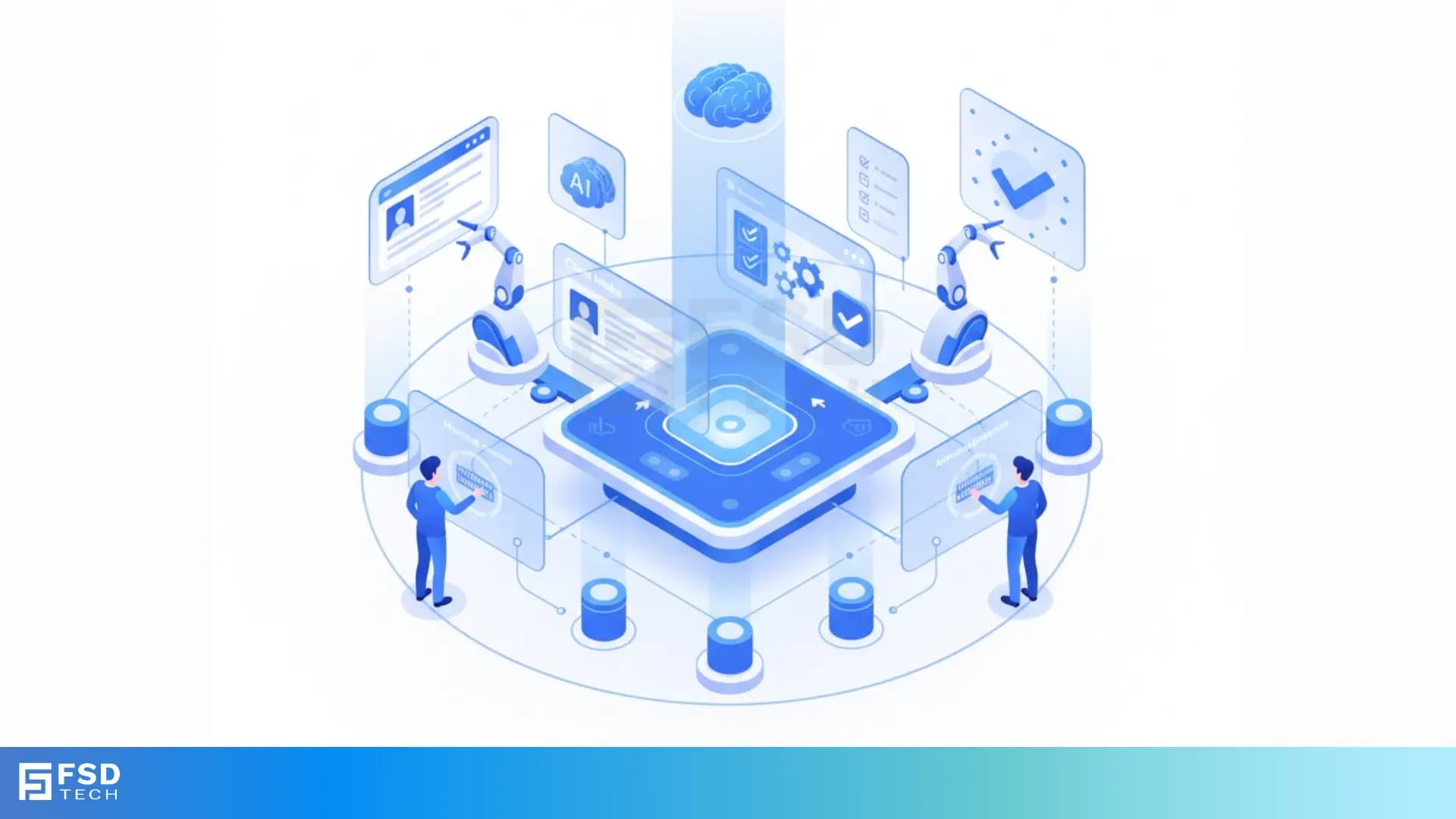
    Isometric illustration showing an AI-powered automation hub with robotic arms, digital screens, and two people interacting with a centralized workflow engine. Represents automated onboarding, approvals, and workflow intelligence.

    Key Takeaways

    •  Centralized workflow management:  ClickUp unifies client onboarding, approvals, and project delivery, reducing context switching and boosting agency productivity.
    •  AI-powered intake and personalization:  ClickUp Brain and AI Agents analyze client profiles and generate tailored onboarding plans, checklists, and communications, accelerating intake and minimizing manual effort.
    •  Automated form triggers and task creation:  Intake forms connected to ClickUp instantly generate client folders, onboarding tasks, and notifications, ensuring a seamless start to every client engagement.
    •  AI summaries and approval workflows:  ClickUp AI summarizes client documents and proposals, surfaces key action items, and automates approval requests for faster, more informed decision-making.
    •  Template-driven consistency and scalability:  Customizable project templates and automation rules standardize onboarding and approval workflows, allowing agencies to scale delivery without sacrificing quality.
    •  Real-time status tracking and milestone celebrations:  Automations track client progress, trigger reminders, and celebrate milestones, enhancing client satisfaction and team accountability.
       

    Introduction

    Client onboarding is the critical first impression for any agency relationship. Yet, manual intake, scattered communications, and slow approvals can delay delivery and erode client trust. For agency owners and operations managers, automating these workflows is essential to scale client delivery, maintain consistency, and stay competitive.

    ClickUp’s AI-powered automation suite transforms onboarding and approvals into seamless, repeatable processes. This guide explores how agencies can leverage ClickUp AI tools to automate client intake, streamline approvals, and deliver exceptional client experiences—whether you’re operating in the UAE, across the GCC, or in global markets.

    Why Automate Client Onboarding & Approvals?

    Manual onboarding is error-prone and time-consuming. Missed steps, inconsistent communications, and delays can frustrate clients and undermine your agency’s reputation. Automation addresses these pain points by:

    • Accelerating onboarding cycles
    • Reducing manual errors and missed tasks
    • Improving client satisfaction and retention
    • Enabling scalable processes for agency growth

    The Agency Challenge: Manual vs. Automated Workflows

    Agencies often juggle multiple platforms for CRM, project management, documentation, and communication. This fragmentation leads to context switching, duplicated effort, and lost information. By centralizing and automating workflows in ClickUp, agencies can:

    • Eliminate redundant manual work
    • Ensure every client receives a consistent, high-quality experience
    • Free up team capacity for higher-value activities
       

    ClickUp as a Workflow Automation Hub

    Centralizing Intake, Approvals, and Delivery

    ClickUp serves as a unified hub for all client-related workflows. Instead of toggling between CRMs, spreadsheets, and email threads, agencies manage everything in one place—intake, approvals, project delivery, and ongoing communications.

    Key Features for Agencies

    •  AI-powered CRM and project management:  Track leads, manage client data, and oversee projects in a single platform.
    •  Customizable templates:  Standardize onboarding and approval workflows for different client segments.
    •  Integrated docs, forms, and dashboards:  Capture information, collaborate on documents, and visualize progress.
    •  Real-time notifications and status tracking:  Keep all stakeholders informed and accountable.
       

    Also Read: How to Train Your Team on ClickUp Using Internal Docs & Automation
     

    Automating Client Intake with ClickUp AI

    Form Triggers and Instant Task Creation

    The onboarding journey begins with intake. Agencies can embed ClickUp forms on their website or send them directly to prospects. When a client submits a form:

    • ClickUp instantly generates a client folder
    • Onboarding tasks are auto-assigned to relevant team members
    • Notifications are sent to stakeholders, ensuring immediate action

     Example: 

    A digital marketing agency uses a ClickUp form for new client intake. Upon submission, ClickUp creates a dedicated folder, assigns tasks for contract review, kickoff call scheduling, and asset collection—no manual setup required.

    Personalization with ClickUp Brain

    ClickUp Brain analyzes submitted client data, extracts key requirements, and generates tailored onboarding checklists and communications. This ensures every client receives a personalized experience, aligned with their goals and expectations.

     Example: 

    After a SaaS client submits their onboarding form, ClickUp Brain reviews their profile and generates a personalized onboarding plan, highlighting training needs and compliance requirements.
     

    Streamlining Approval Workflows

    AI Summaries for Faster Decision-Making

    ClickUp AI can summarize lengthy client documents, proposals, or meeting notes, surfacing key action items, deliverables, and risks. Approvers receive concise summaries, enabling rapid, informed decision-making and reducing bottlenecks.

     Example: 

    A project manager uploads a client’s requirements document. ClickUp AI extracts deliverables, deadlines, and potential risks, presenting them in a digestible summary for quick approval.

    Automated Status Updates and Notifications

    Automations in ClickUp keep all stakeholders informed throughout the onboarding and approval process. Status changes trigger notifications, approval requests, and reminders—ensuring nothing falls through the cracks.

     Example: 

    When a client’s onboarding checklist reaches 80% completion, ClickUp automatically notifies the account manager to schedule a milestone celebration call.
     

    Leveraging Templates and Automations for Consistency

    Building Scalable, Repeatable Processes

    ClickUp’s customizable templates standardize onboarding and approval workflows. Agencies can create templates for different client types or service offerings, ensuring consistency and scalability as the business grows.

     Example: 

    A creative agency uses a ClickUp onboarding template for new design clients. The template includes tasks for asset collection, kickoff call, and design brief approval, all triggered automatically upon folder creation.

    Real-Time Progress Tracking and Milestone Celebrations

    ClickUp automations track client progress, trigger reminders, and celebrate milestones. This keeps clients engaged and teams accountable, while providing visibility into every stage of the onboarding process.

     Example: 

    As each onboarding phase is completed, ClickUp sends automated updates to the client and internal team, ensuring transparency and momentum.
     

    Integrations for End-to-End Automation

    Connecting CRMs, Docs, and Communication Tools

    ClickUp’s API and integrations enable seamless data flow across platforms. Agencies can connect their CRM, Google Drive, Slack, and more to automate handoffs and ensure all client information is actionable.

     Example: 

    A client signs a contract via the agency’s CRM. A webhook triggers ClickUp to create a project folder, import contract documents from Google Drive, and notify the team in Slack—initiating onboarding instantly.

    Example: Automated Handoff from Contract to Project Kickoff

    Using ClickUp’s API and Make’s webhook builder, agencies can automate the transition from signed contract to ready-to-go client environment in seconds. This eliminates manual setup and ensures a smooth, consistent client experience.
     

    Real-World Examples & Use Cases

    Hypothetical Agency Onboarding Scenario

    Imagine a web development agency onboarding a new client:

    • The client completes a ClickUp intake form.
    • ClickUp auto-generates a project folder, assigns onboarding tasks, and sends a personalized welcome email.
    • ClickUp Brain analyzes the client’s requirements and creates a tailored onboarding checklist.
    • AI summarizes the client’s proposal, surfacing key deliverables and risks for approval.
    • Status updates and milestone celebrations are triggered automatically as onboarding progresses.

    Case Study: Audrey Penninckx’s Streamlined Workflow

    Audrey Penninckx automated her client onboarding process with ClickUp, enabling her to take on more clients and enjoy the process. By eliminating repetitive manual steps, she improved both client satisfaction and team efficiency.
     

    Best Practices for AI-Powered Client Onboarding

    Prompting Strategies for Maximum Impact

    • Use clear, detailed prompts specifying client sector, objectives, and desired outcomes.
    • Request specific output formats (e.g., checklists, email templates) to streamline downstream workflows.
    • Compare options using prompts like “compare X vs Y” to assess and optimize onboarding processes.

    Avoiding Common Pitfalls

    • Avoid vague prompts; be specific about client needs and workflow goals.
    • Regularly review and update templates to reflect evolving best practices and regulatory requirements, especially for UAE-based or GCC-compliant operations.
    • Test automations thoroughly before rolling out to clients to prevent errors and ensure a smooth experience.
       

    Automate Your Entire Onboarding Workflow. Talk to Our ClickUp Implementation Experts Today.
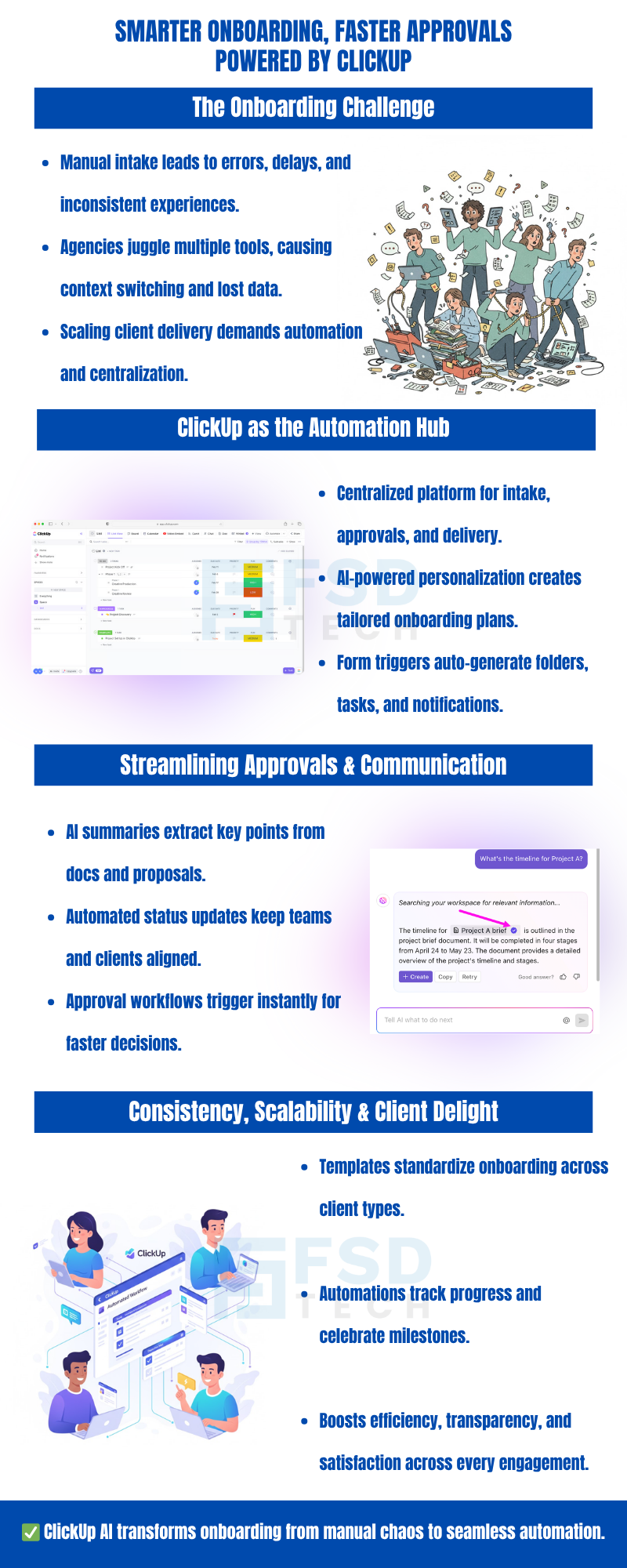
     

    Infographic explaining how ClickUp AI automates client onboarding and approvals. Highlights onboarding challenges, automation hub features, AI summaries, status updates, and scalable onboarding templates. Includes illustrations of teams, ClickUp interface, and workflow icons.


    FAQ

    What is ClickUp AI automation in the context of client onboarding?

    ClickUp AI automation refers to the use of ClickUp’s AI-powered tools and automations to streamline the client onboarding process. This includes automating intake forms, task assignments, document summarization, approval workflows, and real-time notifications—all within a centralized platform.
     

    How can agencies use ClickUp forms to automate client intake?

    Agencies can embed ClickUp forms on their website or share them with prospects. When a form is submitted, automations instantly generate client folders, assign onboarding tasks, and notify relevant team members, ensuring no step is missed and onboarding begins immediately.
     

    Can ClickUp AI personalize onboarding for each client?

    Yes. ClickUp Brain analyzes client data and communications to generate tailored onboarding plans, checklists, and messages. This ensures each client receives a personalized experience, aligned with their specific needs and objectives.
     

    What types of approval workflows can be automated in ClickUp?

    ClickUp can automate document reviews, proposal approvals, and task sign-offs. AI-powered summaries surface key points for review, while automations send approval requests and update statuses in real time.
     

    How does ClickUp help agencies track onboarding progress?

    ClickUp provides real-time dashboards and automated status updates. Agencies can track each client’s progress through onboarding phases, receive reminders for pending tasks, and trigger milestone celebrations to keep clients engaged.
     

    Are there pre-built templates for onboarding and approvals in ClickUp?

    Yes. ClickUp offers customizable project templates for onboarding and approval workflows. Agencies can adapt these templates to their specific processes, ensuring consistency and scalability as they grow.


    How does ClickUp integrate with other tools like CRMs and Slack?

    ClickUp’s API and native integrations allow agencies to connect with CRMs, Google Drive, Slack, and more. For example, a signed contract in a CRM can trigger ClickUp to create a project folder and notify the team in Slack, ensuring seamless handoffs.


    Can ClickUp automate onboarding for agencies operating in the UAE or GCC?

    Absolutely. ClickUp’s flexible automations and templates can be tailored for UAE-based operations or GCC compliance requirements, ensuring regional best practices and regulatory standards are met.


    What are the benefits of using AI summaries in approval workflows?

    AI summaries condense lengthy documents and proposals into actionable insights, highlighting key deliverables, risks, and next steps. This accelerates decision-making and reduces the risk of oversight.


    How do milestone celebrations work in ClickUp automations?

    ClickUp automations can trigger notifications or celebratory messages when key onboarding milestones are reached. This keeps clients motivated and teams accountable throughout the onboarding process.


    Is it possible to automate the entire onboarding process from intake to project kickoff?

    Yes. With ClickUp’s forms, automations, AI tools, and integrations, agencies can automate the full onboarding journey—from initial intake to project kickoff—minimizing manual intervention and ensuring a consistent client experience.


    How can agencies ensure data security and compliance when automating onboarding?

    ClickUp provides robust security features and compliance options. Agencies should configure permissions, use secure integrations, and regularly review workflows to ensure data privacy, especially for clients in regulated industries or regions like the Middle East.


    What are some common pitfalls to avoid when automating onboarding in ClickUp?

    Common pitfalls include using vague prompts, neglecting to update templates, and failing to test automations before deployment. Agencies should be specific about client needs, regularly review workflows, and conduct thorough testing to avoid errors.


    Can ClickUp automations handle multi-stage approvals or complex workflows?

    Yes. ClickUp supports multi-stage approval workflows, conditional automations, and branching logic. Agencies can design complex onboarding and approval processes that adapt to different client requirements and internal policies.


    How can agencies get started with ClickUp AI automation for client onboarding?

    Start by mapping your current onboarding process, identifying repetitive tasks, and selecting or customizing ClickUp templates. Set up forms, automations, and AI-powered summaries, then test the workflow with a pilot client before scaling across your agency. For agencies in the UAE or GCC, ensure regional compliance is reflected in your templates and automations.

    Automating Client Onboarding & Approvals with ClickUp AI Tools

    About The Author

    NHAIF NOUSHAD

    Nhaif is an AI Automation Engineer & Business Analyst focused on ClickUp, AI, Automation, and Workflow Optimization. He helps businesses shift from scattered processes to streamlined, data-driven operations. With hands-on expertise, he simplifies complex tools into clear, easy-to-apply solutions.

    Like This Story?

    Share it with friends!

    Subscribe to our newsletter!

    Atera

    (48)

    Cato Networks

    (113)

    ClickUp

    (68)

    FishOS

    (7)

    Miradore

    (21)

    PointGuard AI

    (9)

    Vembu

    (22)

    Xcitium

    (33)

    ZETA HRMS

    (71)

    Workflow Automation(5)

    Workforce Automation(1)

    AI Project Management(1)

    HR Data Automation(1)

    RMM(1)

    IT Workflow Automation(1)

    GCC compliance(4)

    IT security(2)

    Payroll Integration(2)

    IT support automation(3)

    procurement automation(1)

    lost device management(1)

    IT Management(5)

    IoT Security(2)

    Cato XOps(2)

    IT compliance(4)

    Task Automation(1)

    Workflow Management(1)

    Kubernetes lifecycle management(2)

    OpenStack automation(1)

    AI-powered cloud ops(1)

    SMB Security(8)

    Data Security(1)

    MDR (Managed Detection & Response)(4)

    Atera Integrations(2)

    MSP Automation(3)

    XDR Security(2)

    SMB Cyber Protection(1)

    Ransomware Defense(3)

    HR Tech Solutions(1)

    Zero Trust Network Access(3)

    Zero Trust Security(2)

    Endpoint Management(1)

    SaaS Security(1)

    Payroll Automation(5)

    IT Monitoring(2)

    Xcitium EDR SOC(15)

    Ransomware Protection GCC(1)

    M&A IT Integration(1)

    Network Consolidation UAE(1)

    MSSP for SMBs(1)

    FSD-Tech MSSP(25)

    Ransomware Protection(3)

    Antivirus vs EDR(1)

    SMB Cybersecurity GCC(1)

    Managed EDR FSD-Tech(1)

    Cybersecurity GCC(12)

    Endpoint Security(1)

    Data Breach Costs(1)

    Endpoint Protection(1)

    Managed Security Services(2)

    Xcitium EDR(30)

    SMB Cybersecurity(8)

    Zero Dwell Containment(31)

    Cloud Backup(1)

    Hybrid Backup(1)

    Backup & Recovery(1)

    pointguard ai(4)

    backup myths(1)

    vembu(9)

    SMB data protection(9)

    disaster recovery myths(1)

    Vembu BDR Suite(19)

    Disaster Recovery(4)

    DataProtection(1)

    GCCBusiness(1)

    Secure Access Service Edge(4)

    GCC HR software(16)

    Miradore EMM(15)

    Cato SASE(7)

    Cloud Security(8)

    Talent Development(1)

    AI Cybersecurity(12)

    AI Security(2)

    AI Governance(4)

    AI Risk Management(1)

    AI Compliance(2)

    GCC business security(1)

    GCC network integration(1)

    compliance automation(4)

    education security(1)

    GCC cybersecurity(2)

    Miradore EMM Premium+(5)

    BYOD security Dubai(8)

    App management UAE(1)

    HealthcareSecurity(1)

    MiddleEast(1)

    Team Collaboration(1)

    IT automation(10)

    Zscaler(1)

    SD-WAN(6)

    HR Integration(4)

    Cloud Networking(3)

    device management(9)

    RemoteWork(1)

    ZeroTrust(2)

    VPN(1)

    MPLS(1)

    Project Management(9)

    HR automation(16)

    share your thoughts

    Illustration showing ClickUp connected with Slack and Microsoft Teams, enabling real-time collaboration, automated task creation, secure workflows, and centralized communication for distributed teams.

    Using ClickUp with Slack & Teams: Real-Time Workflow Automation

    🕓 January 10, 2026

    ClickUp and Power BI integration infographic showing automated client reporting, real-time dashboards, secure API-based data sync, and compliance-focused analytics for UAE and GCC service providers.

    Powering Client Reports with ClickUp + Power BI Integration

    🕓 January 6, 2026

    Diagram illustrating ClickUp and Zapier integration for automating workflows, syncing CRMs, Google Sheets, forms, and notifications to improve productivity for business teams.

    Top Zapier Automations for ClickUp Power Users

    🕓 January 2, 2026

    Decoded(64)

    Cyber Security(112)

    BCP / DR(22)

    Zeta HRMS(70)

    SASE(21)

    Automation(68)

    Next Gen IT-Infra(113)

    Monitoring & Management(69)

    ITSM(22)

    HRMS(21)

    Automation(24)