HomeNext Gen IT-InfraMonitoring & ManagementCyber SecurityBCP / DRAutomationDecoded
Next Gen IT-Infra
Cato’s SASE Supports Cybersecurity Skills Development

How Cato’s SASE Supports Cybersecurity Skills Development

🕓 April 8, 2025

How SASE Supports the Security Needs of SMBs

How SASE Supports the Security Needs of SMBs

🕓 February 9, 2025

Attack Surface Reduction with Cato’s SASE

Attack Surface Reduction with Cato’s SASE

🕓 February 10, 2025

SASE for Digital Transformation in UAE

SASE for Digital Transformation in UAE

🕓 February 8, 2025

Monitoring & Management
Understanding Atera’s SLA Management

Understanding Atera’s SLA Management

🕓 February 7, 2025

Cost-Performance Ratio: Finding the Right Balance in IT Management Networks

Cost-Performance Ratio: Finding the Right Balance in IT Management Networks

🕓 June 16, 2025

Customizing Atera with APIs

Customizing Atera with APIs

🕓 March 3, 2025

Power Up Your IT Team’s Strategy with Atera’s Communication Tools

Power Up Your IT Team’s Strategy with Atera’s Communication Tools

🕓 February 8, 2025

Cyber Security
Illustration of the Cato Cloud architecture showing its role in delivering SASE for secure, optimized global connectivity.

Understanding the Cato Cloud and Its Role in SASE

🕓 January 29, 2025

Isometric illustration of professionals managing network performance, bandwidth analytics, and cloud-based optimization around the Cato Networks platform, symbolizing bandwidth control and QoS visibility.

Mastering Bandwidth Control and QoS in Cato Networks

🕓 July 26, 2025

Global network backbone powering Cato SASE solution for secure, high-performance connectivity across regions.

Global Backbone: The Engine Powering Cato’s SASE Solution

🕓 January 30, 2025

Illustration of team analyzing application traffic and usage insights on a large laptop screen using Cato’s dashboard, surrounded by network and cloud icons.

Cato Networks Application Visibility | Monitoring & Control

🕓 July 27, 2025

BCP / DR
Illustration showing diverse business and IT professionals collaborating with cloud, backup, and security icons, representing Vembu use cases for SMBs, MSPs, and IT teams.

Who Uses Vembu? Real-World Use Cases for SMBs, MSPs & IT Teams

🕓 July 12, 2025

Graphic showcasing Vembu’s all-in-one backup and disaster recovery platform with icons for cloud, data protection, and business continuity for IT teams and SMBs.

What Is Vembu? A Deep Dive Into the All in One Backup & Disaster Recovery Platform

🕓 July 6, 2025

Illustration showing Vembu backup and disaster recovery system with cloud storage, server racks, analytics dashboard, and IT professionals managing data.

The Rising Cost of Data Loss: Why Backup Is No Longer Optional?

🕓 August 14, 2025

3D isometric illustration of cloud backup and data recovery infrastructure with laptop, data center stack, and digital business icons — FSD Tech

RPO & RTO: The Heart of Business Continuity

🕓 August 15, 2025

Automation
Cross-Functional Collaboration with ClickUp

Fostering Cross-Functional Collaboration with ClickUp for Multi-Departmental Projects

🕓 February 11, 2025

ClickUp Project Reporting

Revolutionizing Enterprise Reporting with ClickUp’s Advanced Analytics and Dashboards

🕓 June 16, 2025

ClickUp’s Design Collaboration and Asset Management Tools

Empowering Creative Teams with ClickUp’s Design Collaboration and Asset Management Tools

🕓 February 26, 2025

ClickUp Communication and Collaboration Tools

ClickUp Communication and Collaboration Tools: Empowering Remote Teams

🕓 March 12, 2025

Decoded
Multi-Factor Authentication (MFA)

Multi-Factor Authentication (MFA): All You Need to Know

🕓 December 7, 2025

L3 Switch

What Is an L3 Switch? L2 vs L3 & Why You Need Layer 3?

🕓 December 8, 2025

IPSec

IPSec Explained: Protocols, Modes, IKE & VPN Security

🕓 December 3, 2025

 Datagram Transport Layer Security (DTLS)

What is Datagram Transport Layer Security (DTLS)? How it works?

🕓 December 4, 2025

    Subscribe to our newsletter!

    About Us

    Follow Us

    Copyright © 2024 | Powered by 

    Cato SASE Architecture

    Inside Cato’s SASE Architecture: A Blueprint for Modern Security

    🕓 January 26, 2025

    Enterprise Data Security and Privacy with ClickUp

    Ensuring Enterprise Data Security and Privacy with ClickUp

    🕓 February 9, 2025

    DDoS protection SASE

    DDoS Protection and Cato’s Defence Mechanisms

    🕓 February 11, 2025

    Table of Contents

    “The Invoice Looked Perfect”: Inside a Business Email Compromise (BEC) — and How to Stop It

    Anas Abdu Rauf
    September 3, 2025
    Comments
    Xcitium Email Security Illustration Showing Protection Against Business Email Compromise And Malware-Free Phishing Attacks

    A story that could happen tomorrow

    It’s 4:28 p.m. in Doha.

    Your finance officer, Aisha, is about to leave when an email lands:

    Subject: URGENT — Updated Banking Details for Tomorrow’s Transfer

    From: [email protected] (looks right)

    “Per new compliance rules, please use the attached form and send today. Our new IBAN is included.”
     

    The logo looks correct. The tone is professional. The file is a neat PDF.

    Aisha replies, “Received.” She schedules the transfer for USD 78,500.

    Five minutes later, your sales manager pings: “Supplier says payment is overdue. Did we pay?”

    Aisha answers confidently, “Yes—just sent.”
     

    The supplier replies, “We didn’t receive anything. Also, we never changed our bank.”

    Your stomach drops.
     

    That is Business Email Compromise (BEC)—not ransomware, not a virus pop-up, just convincing fraud using email and timing. It happens fast and, without preparation, the money is gone.

    Let’s make sure it never happens to you.


    What is BEC (in plain English)?

    Business Email Compromise is when criminals trick your team into sending money or data by pretending to be a trusted person—like your supplier, CFO, CEO, or payroll provider. It often involves:

    • Invoice / vendor fraud: “Here are our new bank details.”
    • CEO/CFO fraud: “Process this urgent payment; I’m boarding a flight.”
    • Payroll rerouting: “Please change my salary account.”
    • Account takeover: Criminals log into a real mailbox and reply inside the thread.

    There may be no malware, no attachment, no obvious signs—just credibility, speed, and pressure.


    Why it’s common in GCC & Africa

    • Cross-border payments & multiple currencies (IBANs change; “updates” feel normal).
    • Busy teams, multiple languages, and lots of supplier communications.
    • WhatsApp + Email culture: great for speed—also great for social engineering.
    • SMB finance processes not always formalized (single approver, no call-backs).
      • Look-alike domains (supplier-name․co vs supplier-name․com)
      • Compromised mailbox (real account, stolen password, sneaky forwarding rules)


    How criminals set it up (the anatomy of BEC)

    1. Reconnaissance — They learn your vendors, tone of voice, payment cycles, approvers (LinkedIn, websites, leaked emails).
    2. Impersonation or takeover —
    3. Pressure — “urgent,” “today,” “confidential,” “penalty,” “shipment stuck.”
    4. Mule account — Money is sent to a local/foreign account and then disappears.


    Red flags your team can spot

    • Bank change + urgency (today, end-of-day, before cut-off).
    • Reply-to mismatch (From says one domain; Reply-To is different).
    • Tone change (a normally polite contact sounds robotic or pushy).
    • New beneficiaries without a prior relationship.
    • Attachments with instructions to avoid calling anyone.
      • If a vendor’s account number changes, finance must call a known phone number on file (or independently verified) before paying. Never call a number listed in the email requesting the change.
      • Any payment ≥ your risk threshold (e.g., USD 5,000 / SAR 20,000 / AED 20,000) requires two approvers from different departments.
      • For first-time or changed accounts, schedule the payment for next business day unless a call-back verification clears it.
      • Keep a verified vendor master list (official emails, phone, bank). Only AP can edit; changes generate an approval workflow.
      • A CEO can fast-track—but only by following the same callback rule via a known number or in-person confirmation.

    Rule of thumb: If the money flow or banking details change, the communication channel must change too (email → phone call to a known number, never the number in the email).


    The 3-Layer Technical Safety Net (that doesn’t slow business)

    1) Zero Dwell Containment (Xcitium)

    If a PDF or form is malicious, Zero Dwell opens it in a safe bubble first. Unknown files can’t harm devices or steal session cookies—even if someone clicks. It’s instant, invisible to users, and critical when invoices and “forms” are flying around.

    2) EDR (Endpoint Detection & Response)

    EDR watches endpoints for weird behavior—like scripts that try to access email tokens, mass-forward mail, or plant persistence. It can block suspicious actions and gives your team a timeline of what happened.

    3) MDR (Managed Detection & Response)

    When minutes matter, a human SOC team validates alerts 24/7, isolates devices, hunts for mailbox rules, and acts now—not tomorrow morning.

    Together: Zero Dwell stops the booby-trapped document, EDR catches abnormal behavior, MDR ensures a swift response if anything slips through.


    The finance side: simple process controls that defeat BEC

    You don’t need an army of auditors. You need five practical rules:

    1. Out-of-band verification for bank changes
    2. Dual approval thresholds
    3. 24-hour “cooling-off” hold for new beneficiaries
    4. Vendor master hygiene
    5. No “urgent confidential” exceptions

    These five rules stop 90%+ of BEC attempts—because the criminal’s plan relies on email-only instructions.


    Worried your finance process could be tricked the same way? Get a free BEC risk review for your business.
     

    The first 24-hours playbook (pin this)

    0–15 minutes

    • Freeze the funds: Call your bank’s fraud line. Request a SWIFT recall or local recall immediately.
    • Pause all similar payments: Especially to the same vendor or new beneficiaries.
    • Reset the suspected user’s account: Force sign-out from all sessions; reset password; enforce MFA (if not already).
    • Check mailbox rules: Remove any forwarding/auto-delete rules.
    • Call the supplier on a known number: Confirm what they actually requested (usually nothing).
    • Notify MDR/SOC.
       

    15–60 minutes

    • Search your mail system: Look for similar messages, look-alike domains, and who else received them.
    • Quarantine suspicious emails company-wide.
    • EDR triage: Any device that opened the doc/link—scan and isolate if needed.
    • Block look-alike domains at the gateway/DNS level.
    • Open an incident ticket to document steps (essential for banks/insurers).
       

    Hours 1–4

    • Forensics: Sign-in logs, impossible travel, OAuth tokens, third-party app access.
    • Revoke tokens and reset app passwords (IMAP/POP if used).
    • Contact law enforcement (jurisdiction-specific) and your bank’s fraud team for trace actions.
    • Prepare communications: Clear message to staff (“what to look for”), to supplier (“we’re handling; please do not accept bank change requests by email without a callback”), and to impacted customers if needed.
       

    Day 1–3

    • Strengthen identity: Enforce MFA for all mailboxes; disable legacy protocols (IMAP/POP) where possible; restrict external auto-forwarding.
    • Email authentication: Ensure SPF/DKIM/DMARC are configured; raise DMARC policy over time (monitor → quarantine → reject).
    • Finance policy refresh: Train AP/AR on the 5 rules; post the callback script by every desk.
    • Post-incident review: What worked, what was slow, and who needs shortcuts fixed (e.g., faster vendor verification).


    Practical scripts your team can use

    Callback script (bank change verification)

    “Hi [Vendor Name], this is [Your Name] from [Company]. We received an email requesting a bank account change for future payments. We are calling the number on our existing vendor record to confirm.

    1) Did you request a change?

    2) What is the old account number ending with…?

    3) What is the new account number and bank name?

    We will update our system after this call and send a confirmation email.”
     

    Staff announcement (slack/teams/email)

    “Team: All bank account changes, payment method changes, and urgent payment requests must be verified by a phone call to a known number. Email alone is not enough. If you’re unsure, pause and ask Finance. No one will be penalized for delaying a suspicious request.”
     

    Vendor email (post-incident)

    “We are improving our payment security. From now on, any banking changes must be confirmed by a phone call to the number we already have on file. We will not accept changes confirmed by email or chat alone.”


    Technology checklist (non-technical, business-friendly)

    • Zero Dwell Containment on all endpoints (opens unknown files safely).
    • EDR deployed, with MDR monitoring 24/7.
    • MFA enforced for all mailboxes and admin accounts.
    • Disable legacy mail protocols that bypass MFA (IMAP/POP) where you can.
    • Block external auto-forwarding unless specifically approved.
    • SPF/DKIM/DMARC configured; plan to move DMARC policy to quarantine/reject after monitoring.
    • Conditional access: Extra checks for risky sign-ins (new country, TOR/VPN, impossible travel).
    • Finance system approvals: Dual approval rules, 24-hour hold for new/changed beneficiaries.


    Real SMB case: Mombasa marine supplier saves a six-figure loss

    • What happened: Finance received a “port fees update” with new bank info.
    • Why it almost worked: The criminals had replied inside a real email thread from a compromised mailbox.
    • What stopped it:
      • AP clerk followed the callback rule—vendor said, “No change.”
      • The attached “instruction” opened in Zero Dwell, which blocked a hidden credential stealer.
      • MDR found and removed a malicious forwarding rule placed weeks earlier in a user mailbox.
    • Outcome: No funds lost, process updated, DMARC tightened.


    KPIs leadership can track (so you see progress)

    • % mailboxes with MFA: aim for 100%.
    • DMARC policy level: monitoring → quarantine → reject.
    • Auto-forwarding disabled: % of mailboxes (target: 100%, except approved exceptions).
    • Dual-approval adherence: % of payments above threshold with two approvals.
    • Callback verification rate: % of bank changes verified by phone.
    • Mean time to contain (BEC): alert → payment freeze → contact bank.
    • Simulated BEC drill pass rate: staff who choose “pause & call.”


    What FSD-Tech delivers (so you don’t have to juggle this alone)

    • Xcitium Zero Dwell Containment for safe invoice/form handling.
    • Xcitium EDR with 24/7 MDR SOC to investigate and respond.
    • BEC Hardening Sprint (2 weeks): MFA everywhere, disable legacy protocols, mailbox rule sweep, external forwarding controls, DMARC/SPF/DKIM baseline, finance policy install, callback scripts, tabletop exercise.
    • Monthly executive report: clear metrics, incidents, and next steps—no jargon.


    Final word

    BEC doesn’t shout. It whispers “urgent” and “routine” at the same time.

    You don’t beat it with fear—you beat it with simple rules and quiet, always-on safety nets:

    • Change in money flow? Change the channel. (Email → phone call)
    • Two approvals, one cool-off day.
    • Zero Dwell + EDR + MDR to catch the tricks and respond fast.


    Book a quick strategy call with our experts to see how to apply these controls in your company. Book Now

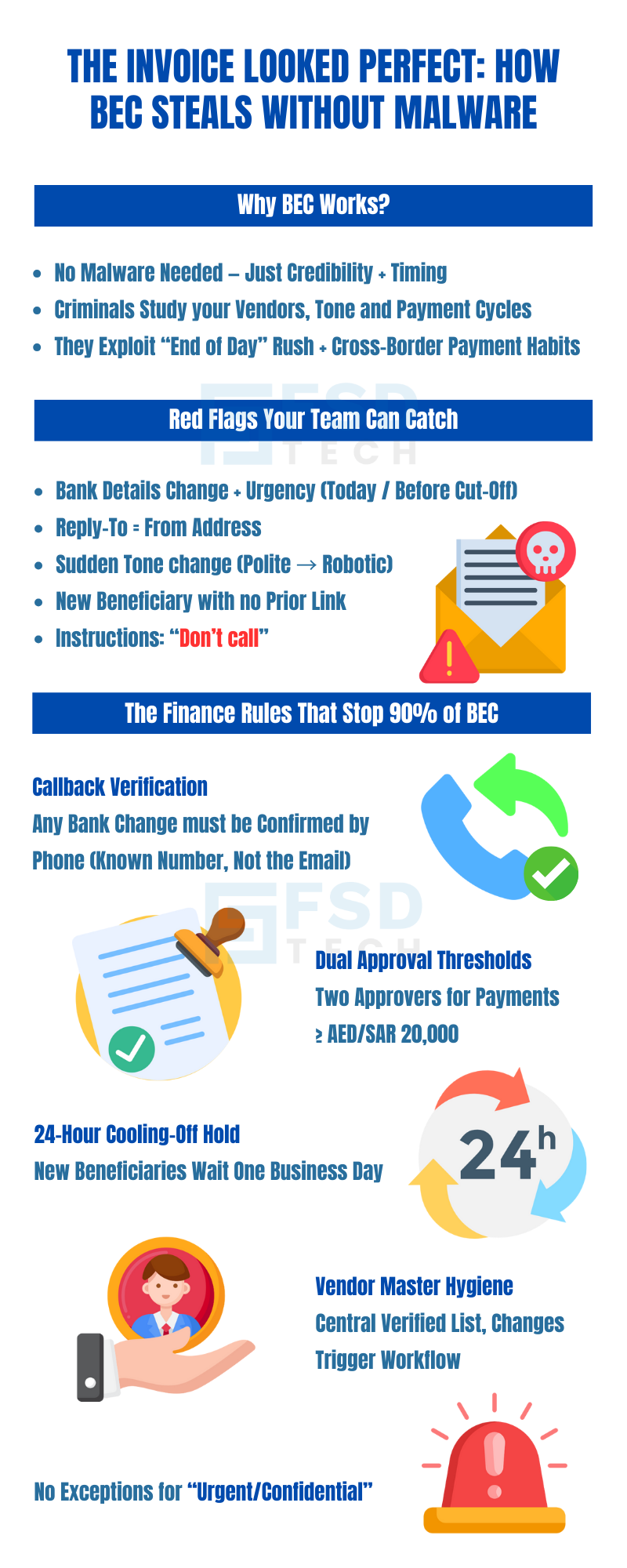
    BEC Attack Infographic Explaining Why Business Email Compromise Works, Red Flags To Catch, And Finance Rules That Stop 90 Percent Of Fraud

    FAQ

    1) What is Business Email Compromise (BEC)?

    Business Email Compromise (BEC) is a cybercrime where criminals trick your company into sending money or sensitive information by pretending to be someone you trust—like your CEO, CFO, supplier, or payroll provider. They often send emails that look completely genuine, sometimes even from real compromised accounts. BEC scams don’t always involve malware; they rely on social engineering—manipulating people’s trust to achieve their goals.


    2) How is BEC different from regular phishing?

    Phishing usually casts a wide net—hundreds or thousands of emails hoping someone clicks. BEC is highly targeted. Criminals research your business, know your payment habits, and time their emails to seem normal. While phishing often tries to steal login details, BEC’s main goal is to direct money transfers or gain access to valuable data.


    3) What is invoice fraud?

    Invoice fraud is a type of BEC where a scammer sends a fake invoice or changes the bank details on a real invoice. The goal is to get you to pay the money into the criminal’s account instead of the real supplier’s. Because invoices are common and expected in business, this method often goes unnoticed until it’s too late.


    4) Why is BEC common in GCC & Africa?

    Several factors make the region a target:

    • Frequent cross-border payments with changing bank details.
    • High use of email and WhatsApp for business communications.
    • Businesses operating in multiple languages, increasing miscommunication risk.
    • SMBs without formal finance controls (e.g., no dual approval or callback verification).


    5) How do criminals get access to our emails?

    They use several methods:

    • Phishing for credentials (fake login pages).
    • Buying leaked passwords from the dark web.
    • Guessing weak passwords (like companyname@123).
    • Infecting devices with malware that steals email session tokens.
       Once inside, they may set up auto-forwarding rules to spy on conversations without you knowing.
       

    6) What are the red flags of BEC or invoice fraud?

    • Urgent requests for payment changes.
    • Bank account changes that seem sudden or unusual.
    • “Reply-To” address different from the “From” address.
    • Unusual language or tone changes in emails.
    • Instructions not to confirm by phone or in person.
       

    7) What is the callback verification rule?

    It’s a simple but powerful safeguard: If payment details change, confirm it through a different communication channel. That means calling a known number (from your vendor master file, not the email) to verify before making the change. This one step can stop most invoice fraud attempts.


    8) How can Zero Dwell Containment help prevent BEC?

    If a malicious invoice or payment form arrives, Zero Dwell opens it in a safe, isolated environment—instantly—before it can interact with your system. This stops any embedded malware from stealing your email login or installing spyware, even if someone opens the file.


    9) How does EDR help in BEC cases?

    Answer:

    EDR (Endpoint Detection & Response) monitors computers and devices for suspicious behavior—like creating hidden email rules, logging in from unusual locations, or running scripts from invoice attachments. It blocks harmful actions and alerts your IT team for investigation.


    10) Why is MDR important for SMBs facing BEC?

    MDR (Managed Detection & Response) gives you 24/7 human security experts who can act immediately—isolating compromised devices, shutting down suspicious sessions, and removing malicious mailbox rules—even outside business hours. SMBs benefit because they don’t have to hire a full in-house security team.


    11) What are the finance process changes that can stop BEC?

    • Dual approval for payments above a set amount.
    • Mandatory callback verification for bank changes.
    • 24-hour waiting period for new beneficiaries.
    • Vendor master list with verified contacts.
    • No exceptions for “urgent confidential” payment requests.
       

    12) Can BEC happen without malware?

    Yes. Many BEC cases involve no malware at all—just a convincing email. That’s why it’s important to focus on human verification processes as well as technical defenses.


    13) What should we do if we think we’ve been hit by BEC?

    • Call your bank immediately to freeze the transfer.
    • Contact the receiving bank’s fraud team.
    • Isolate affected devices and reset passwords.
    • Remove suspicious email forwarding rules.
    • Inform your supplier and any impacted parties.
    • Notify your security team or MDR provider.
       

    14) How much can BEC cost a small business?

    Losses vary but can range from a few thousand dollars to hundreds of thousands—sometimes more than the company’s annual profit. The damage isn’t just financial; it also hits trust, relationships, and sometimes legal compliance.


    15) How fast can FSD-Tech protect us against BEC?

    Deployment is quick: Zero Dwell Containment and EDR can be installed within a day, and MDR monitoring starts immediately after setup. Finance process training can be completed in a week, ensuring both technical and human safeguards are in place fast.

    “The Invoice Looked Perfect”: Inside a Business Email Compromise (BEC) — and How to Stop It

    About The Author

    Anas Abdu Rauf

    Anas is an Expert in Network and Security Infrastructure, With over seven years of industry experience, holding certifications Including CCIE- Enterprise, PCNSE, Cato SASE Expert, and Atera Certified Master. Anas provides his valuable insights and expertise to readers.

    Like This Story?

    Share it with friends!

    Subscribe to our newsletter!

    Atera

    (49)

    Cato Networks

    (120)

    ClickUp

    (70)

    FishOS

    (7)

    Miradore

    (21)

    PointGuard AI

    (9)

    Vembu

    (22)

    Xcitium

    (33)

    ZETA HRMS

    (79)

    Workflow Automation(8)

    Workforce Automation(1)

    AI Project Management(1)

    HR Data Automation(1)

    RMM(1)

    IT Workflow Automation(1)

    IT security(2)

    GCC compliance(4)

    Payroll Integration(2)

    IT support automation(3)

    procurement automation(1)

    lost device management(1)

    IT Management(5)

    IoT Security(2)

    Cato XOps(2)

    IT compliance(4)

    Workflow Management(1)

    Task Automation(1)

    Kubernetes lifecycle management(2)

    OpenStack automation(1)

    AI-powered cloud ops(1)

    SMB Security(8)

    Data Security(1)

    MDR (Managed Detection & Response)(4)

    MSP Automation(3)

    Atera Integrations(2)

    XDR Security(2)

    SMB Cyber Protection(1)

    Ransomware Defense(3)

    HR Tech Solutions(1)

    Zero Trust Network Access(3)

    Zero Trust Security(2)

    Endpoint Management(1)

    SaaS Security(1)

    Payroll Automation(5)

    IT Monitoring(2)

    Xcitium EDR SOC(15)

    Ransomware Protection GCC(1)

    Network Consolidation UAE(1)

    M&A IT Integration(1)

    MSSP for SMBs(1)

    SMB Cybersecurity GCC(1)

    Managed EDR FSD-Tech(1)

    Ransomware Protection(3)

    Antivirus vs EDR(1)

    FSD-Tech MSSP(25)

    Cybersecurity GCC(12)

    Endpoint Security(1)

    Endpoint Protection(1)

    Data Breach Costs(1)

    SMB Cybersecurity(8)

    Zero Dwell Containment(31)

    Managed Security Services(2)

    Xcitium EDR(30)

    Hybrid Backup(1)

    Cloud Backup(1)

    Backup & Recovery(1)

    pointguard ai(4)

    backup myths(1)

    disaster recovery myths(1)

    SMB data protection(9)

    vembu(9)

    Disaster Recovery(4)

    Vembu BDR Suite(19)

    GCCBusiness(1)

    DataProtection(1)

    Secure Access Service Edge(4)

    GCC HR software(20)

    Miradore EMM(15)

    Cato SASE(7)

    Cloud Security(8)

    Talent Development(1)

    AI Compliance(2)

    AI Security(2)

    AI Risk Management(1)

    AI Cybersecurity(12)

    AI Governance(4)

    GCC business security(1)

    GCC network integration(1)

    compliance automation(5)

    education security(1)

    GCC cybersecurity(2)

    Miradore EMM Premium+(5)

    App management UAE(1)

    BYOD security Dubai(8)

    MiddleEast(1)

    HealthcareSecurity(1)

    Team Collaboration(1)

    IT automation(12)

    Zscaler(1)

    SD-WAN(6)

    HR Integration(4)

    Cloud Networking(3)

    device management(9)

    VPN(1)

    RemoteWork(1)

    ZeroTrust(2)

    MPLS(1)

    Project Management(9)

    HR automation(16)

    share your thoughts

    Illustration showing identity-centric Zero Trust security with the Cato Client acting as a continuous identity signal, connecting users, devices, cloud resources, and OT systems through unified policy enforcement.”

    How the Cato Client Becomes the Identity Anchor for Zero Trust Access

    🕓 January 25, 2026

    Context-aware firewall enforcement in Cato SASE illustrating how device platform, country, and origin of connection enhance Zero Trust security beyond basic device context.

    Platforms, Countries, and Origin of Connection: Advanced Device Criteria in Cato Firewall

    🕓 January 24, 2026

    Cato SASE platform visual showing device-aware WAN firewall enforcement with centralized security controls, analytics dashboards, IPS, and Zero Trust policy monitoring across enterprise infrastructure.

    Device-Aware WAN Firewall Policies in Cato SASE

    🕓 January 23, 2026

    Decoded(93)

    Cyber Security(118)

    BCP / DR(22)

    Zeta HRMS(78)

    SASE(21)

    Automation(70)

    Next Gen IT-Infra(118)

    Monitoring & Management(70)

    ITSM(22)

    HRMS(21)

    Automation(24)