HomeNext Gen IT-InfraMonitoring & ManagementCyber SecurityBCP / DRAutomationDecoded
Next Gen IT-Infra
Cato’s SASE Supports Cybersecurity Skills Development

How Cato’s SASE Supports Cybersecurity Skills Development

🕓 April 8, 2025

How SASE Supports the Security Needs of SMBs

How SASE Supports the Security Needs of SMBs

🕓 February 9, 2025

Attack Surface Reduction with Cato’s SASE

Attack Surface Reduction with Cato’s SASE

🕓 February 10, 2025

SASE for Digital Transformation in UAE

SASE for Digital Transformation in UAE

🕓 February 8, 2025

Monitoring & Management
Understanding Atera’s SLA Management

Understanding Atera’s SLA Management

🕓 February 7, 2025

Cost-Performance Ratio: Finding the Right Balance in IT Management Networks

Cost-Performance Ratio: Finding the Right Balance in IT Management Networks

🕓 June 16, 2025

Customizing Atera with APIs

Customizing Atera with APIs

🕓 March 3, 2025

Power Up Your IT Team’s Strategy with Atera’s Communication Tools

Power Up Your IT Team’s Strategy with Atera’s Communication Tools

🕓 February 8, 2025

Cyber Security
Illustration of the Cato Cloud architecture showing its role in delivering SASE for secure, optimized global connectivity.

Understanding the Cato Cloud and Its Role in SASE

🕓 January 29, 2025

Isometric illustration of professionals managing network performance, bandwidth analytics, and cloud-based optimization around the Cato Networks platform, symbolizing bandwidth control and QoS visibility.

Mastering Bandwidth Control and QoS in Cato Networks

🕓 July 26, 2025

Global network backbone powering Cato SASE solution for secure, high-performance connectivity across regions.

Global Backbone: The Engine Powering Cato’s SASE Solution

🕓 January 30, 2025

Illustration of team analyzing application traffic and usage insights on a large laptop screen using Cato’s dashboard, surrounded by network and cloud icons.

Cato Networks Application Visibility | Monitoring & Control

🕓 July 27, 2025

BCP / DR
Illustration showing diverse business and IT professionals collaborating with cloud, backup, and security icons, representing Vembu use cases for SMBs, MSPs, and IT teams.

Who Uses Vembu? Real-World Use Cases for SMBs, MSPs & IT Teams

🕓 July 12, 2025

Graphic showcasing Vembu’s all-in-one backup and disaster recovery platform with icons for cloud, data protection, and business continuity for IT teams and SMBs.

What Is Vembu? A Deep Dive Into the All in One Backup & Disaster Recovery Platform

🕓 July 6, 2025

Illustration showing Vembu backup and disaster recovery system with cloud storage, server racks, analytics dashboard, and IT professionals managing data.

The Rising Cost of Data Loss: Why Backup Is No Longer Optional?

🕓 August 14, 2025

3D isometric illustration of cloud backup and data recovery infrastructure with laptop, data center stack, and digital business icons — FSD Tech

RPO & RTO: The Heart of Business Continuity

🕓 August 15, 2025

Automation
Cross-Functional Collaboration with ClickUp

Fostering Cross-Functional Collaboration with ClickUp for Multi-Departmental Projects

🕓 February 11, 2025

ClickUp Project Reporting

Revolutionizing Enterprise Reporting with ClickUp’s Advanced Analytics and Dashboards

🕓 June 16, 2025

ClickUp’s Design Collaboration and Asset Management Tools

Empowering Creative Teams with ClickUp’s Design Collaboration and Asset Management Tools

🕓 February 26, 2025

ClickUp Communication and Collaboration Tools

ClickUp Communication and Collaboration Tools: Empowering Remote Teams

🕓 March 12, 2025

Decoded
Multi-Factor Authentication (MFA)

Multi-Factor Authentication (MFA): All You Need to Know

🕓 December 7, 2025

L3 Switch

What Is an L3 Switch? L2 vs L3 & Why You Need Layer 3?

🕓 December 8, 2025

IPSec

IPSec Explained: Protocols, Modes, IKE & VPN Security

🕓 December 3, 2025

 Datagram Transport Layer Security (DTLS)

What is Datagram Transport Layer Security (DTLS)? How it works?

🕓 December 4, 2025

    Subscribe to our newsletter!

    About Us

    Follow Us

    Copyright © 2024 | Powered by 

    Cato SASE Architecture

    Inside Cato’s SASE Architecture: A Blueprint for Modern Security

    🕓 January 26, 2025

    Enterprise Data Security and Privacy with ClickUp

    Ensuring Enterprise Data Security and Privacy with ClickUp

    🕓 February 9, 2025

    DDoS protection SASE

    DDoS Protection and Cato’s Defence Mechanisms

    🕓 February 11, 2025

    Table of Contents

    Why Businesses Need Both Local and Cloud Backups — The Hybrid Approach

    Anas Abdu Rauf
    September 3, 2025
    Comments
    Businessman Managing Hybrid Cloud Backup Solutions With Icons Representing Data Security, Compliance, Applications, And Cost Efficiency

    Two Companies, Two Painful Lessons

    Company A – Only Local Backups

    A mid-sized design agency in Dubai had a simple system: every night, all project files and client data were copied to an external hard drive kept in the office.

    This worked fine for years — until disaster struck.
     

    One night, a water pipe burst and flooded their storage room. The main server and the external backup drive were both destroyed in minutes.

    They quickly realized:

    “We had a backup — but it was in the same place as the original data. We lost everything.”


    Company B – Only Cloud Backups

    Across town, a marketing agency kept only cloud backups. All their files were stored on secure servers in the cloud.

    One day, a severe storm knocked out their internet connection for two full days.

    They couldn’t access a single file during that time, which brought all work to a standstill.


    Both companies made the same mistake — they relied on just one type of backup.

    If they had combined local and cloud backups — the hybrid approach — neither situation would have caused such massive downtime and loss.


    What Is the Hybrid Backup Approach?

    The hybrid approach means you keep two separate types of backups at the same time:

    1. Local backups – Stored on a device physically in your office or data center.
    2. Cloud backups – Stored on secure remote servers via the internet.
       

    This way, you get:

    • Speed from local backups.
    • Safety from cloud backups.


    Why Local Backups Are Important

    • Fast Recovery – You can restore files or entire systems in minutes without relying on internet speed.
    • Full Control – The storage device is in your possession, so you decide how it’s managed.
    • Great for Large Files – Restoring huge files from the cloud can take time; local copies make it much quicker.


    The Weakness of Local Backups

    • Physical Risks – Fire, flooding, or theft can destroy them.
    • Same Location Problem – If your office is inaccessible or destroyed, your local backup is too.


    Why Cloud Backups Are Important

    • Off-Site Protection – Even if your office is destroyed, the cloud copy remains safe.
    • Access from Anywhere – You can restore files from any location with internet access.
    • Scalable Storage – You can add more space instantly without buying new hardware.


    The Weakness of Cloud Backups

    • Internet Dependency – Without internet, you can’t access your backups.
    • Restore Speed – Downloading large amounts of data can take longer than from a local device.


    Protect against downtime — request your hybrid backup review Now.
     

    The Hybrid Advantage — Why You Need Both

    By combining local and cloud backups, you:

    • Have fast local restores for everyday issues like accidental file deletion.
    • Have cloud protection for major disasters like fire, theft, or natural events.
    • Avoid single points of failure — if one backup type fails, the other is still available.
    • Reduce downtime and data loss to the lowest possible level.


    How Vembu BDR Suite Supports Hybrid Backups

    • Dual Backup Locations – Automatically keeps one copy locally and one in the cloud.
    • Instant Local Recovery – Restore from your local device for speed.
    • Secure Cloud Storage – All data is encrypted before leaving your premises.
    • Centralized Management – Control both local and cloud backups from one dashboard.


    Real-World Example

    A retail chain in Abu Dhabi used Vembu’s hybrid backup system.

    • When a ransomware attack hit one store’s computer network, they restored the data instantly from local backups — no internet needed.
    • Months later, a flood damaged another store’s local systems. They restored everything from the cloud copy within hours.

    Because they had both local and cloud backups, they avoided major downtime in both situations.


    The Big Lesson

    No single backup method can protect you from every risk.

    • Local backups give you speed.
    • Cloud backups give you security.
       The hybrid approach gives you both — which is the only way to ensure your business can recover from anything.


    Do you only have local backups? Or only cloud backups? Let’s create a Vembu Hybrid Backup Plan so you get the best of both worlds. Book your free backup strategy call today


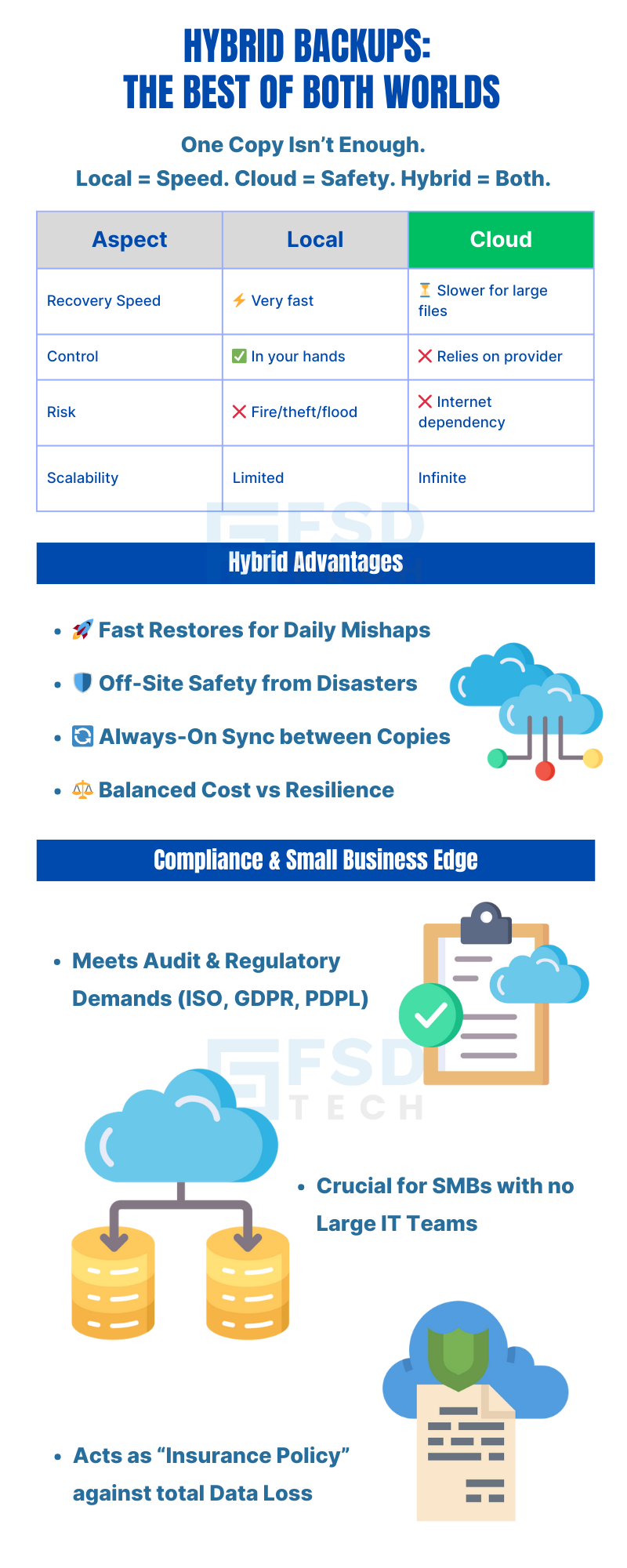
    Hybrid Backup Infographic Showing Local Vs Cloud Comparison, Recovery Speed, Risks, Scalability, Advantages, And Compliance Benefits For SMBs


    FAQ

    1. What is a hybrid backup?

    A hybrid backup means you keep two copies of your important data in two different places:

    • Local backup – A copy stored in your office or data center on a device like an external hard drive, NAS (network storage), or backup server.
    • Cloud backup – A copy stored on secure servers accessed over the internet.

    By using both together, you get:

    • Fast recovery from the local copy.
    • Disaster protection from the cloud copy.

    It’s like having both a spare tyre in your car (quick and nearby) and roadside assistance (help from far away if the tyre is gone).


    2. Why isn’t just a local backup enough?

    Local backups are great for speed — you can restore files quickly without internet.

    But they have a big weakness: they’re in the same place as your original data.

    If your office is hit by:

    • Fire
    • Flood
    • Theft
    • Hardware failure

    you could lose both the original and the backup at the same time.


    3. Why isn’t just a cloud backup enough?

    Cloud backups are safe from local disasters, but they rely on your internet connection.

    If your internet is slow or completely down, you can’t restore files quickly — or at all — until it’s fixed.

    This can cause:

    • Hours or days of downtime.
    • Frustration for employees and customers.
    • Lost revenue if you can’t work.


    4. What are the benefits of local backups?

    • Speed – Restoring files or systems is much faster because the data is right there in your office.
    • Full control – You own and manage the backup device.
    • Better for large files – Downloading large backups from the cloud can be slow; local copies are instant.


    5. What are the disadvantages of local backups?

    • Physical risks – Fire, flooding, power surges, or theft can destroy them.
    • Single location – If you can’t access your office, you can’t access your backups.


    6. What are the benefits of cloud backups?

    • Off-site protection – Safe from local disasters.
    • Remote access – Restore from anywhere with internet access.
    • Scalable storage – Add more space without buying new devices.


    7. What are the disadvantages of cloud backups?

    • Internet dependency – No internet means no immediate access.
    • Slower restore speeds – Downloading very large files can take time.


    8. How does the hybrid approach fix these problems?

    By having both local and cloud copies, you’re protected from every scenario:

    • If your office hardware is damaged, you can restore from the cloud.
    • If your internet is down, you can restore from your local copy.

    This means your business stays operational in almost any situation.


    9. Does the hybrid approach cost more?

    It can be slightly more expensive than using only one method, but the extra cost is small compared to the cost of:

    • Lost data
    • Business downtime
    • Damaged reputation

    Many businesses see it as an insurance policy for their data.


    10. How does Vembu BDR Suite handle hybrid backups?

    • Creates a local copy for quick recovery.
    • Creates a cloud copy for disaster protection.
    • Keeps both in sync automatically so they match.
    • Encrypts data before sending it to the cloud for security.


    11. Can I choose what gets backed up locally and to the cloud?

    Yes. You can select which files, folders, or entire systems go to:

    • Only the local backup.
    • Only the cloud backup.
    • Both (recommended for critical data).


    12. How often should both backups be updated?

    Ideally, both local and cloud backups should run on the same schedule so they always match.

    With Vembu, this process can be fully automated.


    13. What if ransomware infects my local backups?

    If ransomware reaches your local backups, you can still restore from your cloud backups — especially if they are stored with immutability (meaning no one can change or delete them before a set time).


    14. Should my cloud backups be in another country?

    Yes, storing cloud backups in a different region offers extra protection in case of regional disasters like earthquakes or major power failures.


    15. Is the hybrid approach good for small businesses?

    Absolutely. In fact, it’s often more important for small businesses because:

    • They may not have large IT teams to fix problems quickly.
    • A single data loss event can be devastating.

    Hybrid backups give them both quick recovery and protection from worst-case scenarios.

    Why Businesses Need Both Local and Cloud Backups — The Hybrid Approach

    About The Author

    Anas Abdu Rauf

    Anas is an Expert in Network and Security Infrastructure, With over seven years of industry experience, holding certifications Including CCIE- Enterprise, PCNSE, Cato SASE Expert, and Atera Certified Master. Anas provides his valuable insights and expertise to readers.

    Like This Story?

    Share it with friends!

    Subscribe to our newsletter!

    Atera

    (49)

    Cato Networks

    (120)

    ClickUp

    (70)

    FishOS

    (7)

    Miradore

    (21)

    PointGuard AI

    (9)

    Vembu

    (22)

    Xcitium

    (33)

    ZETA HRMS

    (79)

    Workflow Automation(8)

    Workforce Automation(1)

    AI Project Management(1)

    HR Data Automation(1)

    RMM(1)

    IT Workflow Automation(1)

    IT security(2)

    GCC compliance(4)

    Payroll Integration(2)

    IT support automation(3)

    procurement automation(1)

    lost device management(1)

    IT Management(5)

    IoT Security(2)

    Cato XOps(2)

    IT compliance(4)

    Workflow Management(1)

    Task Automation(1)

    Kubernetes lifecycle management(2)

    OpenStack automation(1)

    AI-powered cloud ops(1)

    SMB Security(8)

    Data Security(1)

    MDR (Managed Detection & Response)(4)

    MSP Automation(3)

    Atera Integrations(2)

    XDR Security(2)

    SMB Cyber Protection(1)

    Ransomware Defense(3)

    HR Tech Solutions(1)

    Zero Trust Network Access(3)

    Zero Trust Security(2)

    Endpoint Management(1)

    SaaS Security(1)

    Payroll Automation(5)

    IT Monitoring(2)

    Xcitium EDR SOC(15)

    Ransomware Protection GCC(1)

    Network Consolidation UAE(1)

    M&A IT Integration(1)

    MSSP for SMBs(1)

    SMB Cybersecurity GCC(1)

    Managed EDR FSD-Tech(1)

    Ransomware Protection(3)

    Antivirus vs EDR(1)

    FSD-Tech MSSP(25)

    Cybersecurity GCC(12)

    Endpoint Security(1)

    Endpoint Protection(1)

    Data Breach Costs(1)

    SMB Cybersecurity(8)

    Zero Dwell Containment(31)

    Managed Security Services(2)

    Xcitium EDR(30)

    Hybrid Backup(1)

    Cloud Backup(1)

    Backup & Recovery(1)

    pointguard ai(4)

    backup myths(1)

    disaster recovery myths(1)

    SMB data protection(9)

    vembu(9)

    Disaster Recovery(4)

    Vembu BDR Suite(19)

    GCCBusiness(1)

    DataProtection(1)

    Secure Access Service Edge(4)

    GCC HR software(20)

    Miradore EMM(15)

    Cato SASE(7)

    Cloud Security(8)

    Talent Development(1)

    AI Compliance(2)

    AI Security(2)

    AI Risk Management(1)

    AI Cybersecurity(12)

    AI Governance(4)

    GCC business security(1)

    GCC network integration(1)

    compliance automation(5)

    education security(1)

    GCC cybersecurity(2)

    Miradore EMM Premium+(5)

    App management UAE(1)

    BYOD security Dubai(8)

    MiddleEast(1)

    HealthcareSecurity(1)

    Team Collaboration(1)

    IT automation(12)

    Zscaler(1)

    SD-WAN(6)

    HR Integration(4)

    Cloud Networking(3)

    device management(9)

    VPN(1)

    RemoteWork(1)

    ZeroTrust(2)

    MPLS(1)

    Project Management(9)

    HR automation(16)

    share your thoughts

    Why Is Data Backup Crucial for Cybersecurity

    Why Is Data Backup Crucial for Cybersecurity? Protect Your Business from Ransomware & Data Loss

    🕓 November 24, 2025

    Vector illustration showcasing Vembu cloud backup solutions. A central laptop screen displays the Vembu logo, surrounded by connected cloud storage icons, files, and mobile devices representing seamless data synchronization. Additional graphics include a store with "3-2-1" backup signage, servers, and secure connections, symbolizing hybrid cloud storage and reliable data protection for SMBs.

    SMB Backup Starter Pack: What to Back Up, Where to Store It & How Often (3-2-1 Checklist)

    🕓 September 16, 2025

    Illustration showing data being backed up from two on-premise servers to the Vembu cloud, with two people sitting on the servers and looking at laptops. The image visually represents the concept of offsite data backup to a remote cloud location.

    The Importance of Offsite Backups in Disaster Recovery Planning

    🕓 September 5, 2025

    Decoded(93)

    Cyber Security(118)

    BCP / DR(22)

    Zeta HRMS(78)

    SASE(21)

    Automation(70)

    Next Gen IT-Infra(118)

    Monitoring & Management(70)

    ITSM(22)

    HRMS(21)

    Automation(24)