HomeNext Gen IT-InfraMonitoring & ManagementCyber SecurityBCP / DRAutomationDecoded
Next Gen IT-Infra
Cato’s SASE Supports Cybersecurity Skills Development

How Cato’s SASE Supports Cybersecurity Skills Development

🕓 April 8, 2025

How SASE Supports the Security Needs of SMBs

How SASE Supports the Security Needs of SMBs

🕓 February 9, 2025

Attack Surface Reduction with Cato’s SASE

Attack Surface Reduction with Cato’s SASE

🕓 February 10, 2025

SASE for Digital Transformation in UAE

SASE for Digital Transformation in UAE

🕓 February 8, 2025

Monitoring & Management
Understanding Atera’s SLA Management

Understanding Atera’s SLA Management

🕓 February 7, 2025

Cost-Performance Ratio: Finding the Right Balance in IT Management Networks

Cost-Performance Ratio: Finding the Right Balance in IT Management Networks

🕓 June 16, 2025

Customizing Atera with APIs

Customizing Atera with APIs

🕓 March 3, 2025

Power Up Your IT Team’s Strategy with Atera’s Communication Tools

Power Up Your IT Team’s Strategy with Atera’s Communication Tools

🕓 February 8, 2025

Cyber Security
Visual guide showing Cato CMA interface for configuring Internet and WAN firewall rules, enabling threat protection, and monitoring security events in real time for UAE IT teams.

Enforcing Firewall and Threat Protection Policies in Cato

🕓 July 25, 2025

Isometric illustration of professionals managing network performance, bandwidth analytics, and cloud-based optimization around the Cato Networks platform, symbolizing bandwidth control and QoS visibility.

Mastering Bandwidth Control and QoS in Cato Networks

🕓 July 26, 2025

Illustration of the Cato Cloud architecture showing its role in delivering SASE for secure, optimized global connectivity.

Understanding the Cato Cloud and Its Role in SASE

🕓 January 29, 2025

Global network backbone powering Cato SASE solution for secure, high-performance connectivity across regions.

Global Backbone: The Engine Powering Cato’s SASE Solution

🕓 January 30, 2025

BCP / DR
Illustration showing diverse business and IT professionals collaborating with cloud, backup, and security icons, representing Vembu use cases for SMBs, MSPs, and IT teams.

Who Uses Vembu? Real-World Use Cases for SMBs, MSPs & IT Teams

🕓 July 12, 2025

Graphic showcasing Vembu’s all-in-one backup and disaster recovery platform with icons for cloud, data protection, and business continuity for IT teams and SMBs.

What Is Vembu? A Deep Dive Into the All in One Backup & Disaster Recovery Platform

🕓 July 6, 2025

Illustration showing Vembu backup and disaster recovery system with cloud storage, server racks, analytics dashboard, and IT professionals managing data.

The Rising Cost of Data Loss: Why Backup Is No Longer Optional?

🕓 August 14, 2025

3D isometric illustration of cloud backup and data recovery infrastructure with laptop, data center stack, and digital business icons — FSD Tech

RPO & RTO: The Heart of Business Continuity

🕓 August 15, 2025

Automation
Cross-Functional Collaboration with ClickUp

Fostering Cross-Functional Collaboration with ClickUp for Multi-Departmental Projects

🕓 February 11, 2025

ClickUp Project Reporting

Revolutionizing Enterprise Reporting with ClickUp’s Advanced Analytics and Dashboards

🕓 June 16, 2025

ClickUp’s Design Collaboration and Asset Management Tools

Empowering Creative Teams with ClickUp’s Design Collaboration and Asset Management Tools

🕓 February 26, 2025

ClickUp Communication and Collaboration Tools

ClickUp Communication and Collaboration Tools: Empowering Remote Teams

🕓 March 12, 2025

Decoded
Multi-Factor Authentication (MFA)

Multi-Factor Authentication (MFA): All You Need to Know

🕓 December 7, 2025

L3 Switch

What Is an L3 Switch? L2 vs L3 & Why You Need Layer 3?

🕓 December 8, 2025

IPSec

IPSec Explained: Protocols, Modes, IKE & VPN Security

🕓 December 3, 2025

 Datagram Transport Layer Security (DTLS)

What is Datagram Transport Layer Security (DTLS)? How it works?

🕓 December 4, 2025

    Subscribe to our newsletter!

    About Us

    Follow Us

    Copyright © 2024 | Powered by 

    Cato SASE Architecture

    Inside Cato’s SASE Architecture: A Blueprint for Modern Security

    🕓 January 26, 2025

    Enterprise Data Security and Privacy with ClickUp

    Ensuring Enterprise Data Security and Privacy with ClickUp

    🕓 February 9, 2025

    DDoS protection SASE

    DDoS Protection and Cato’s Defence Mechanisms

    🕓 February 11, 2025

    Table of Contents

    What Is Antimalware? Your Guide to Threat Defense

    Surbhi Suhane
    November 22, 2025
    Comments
    Antimalware

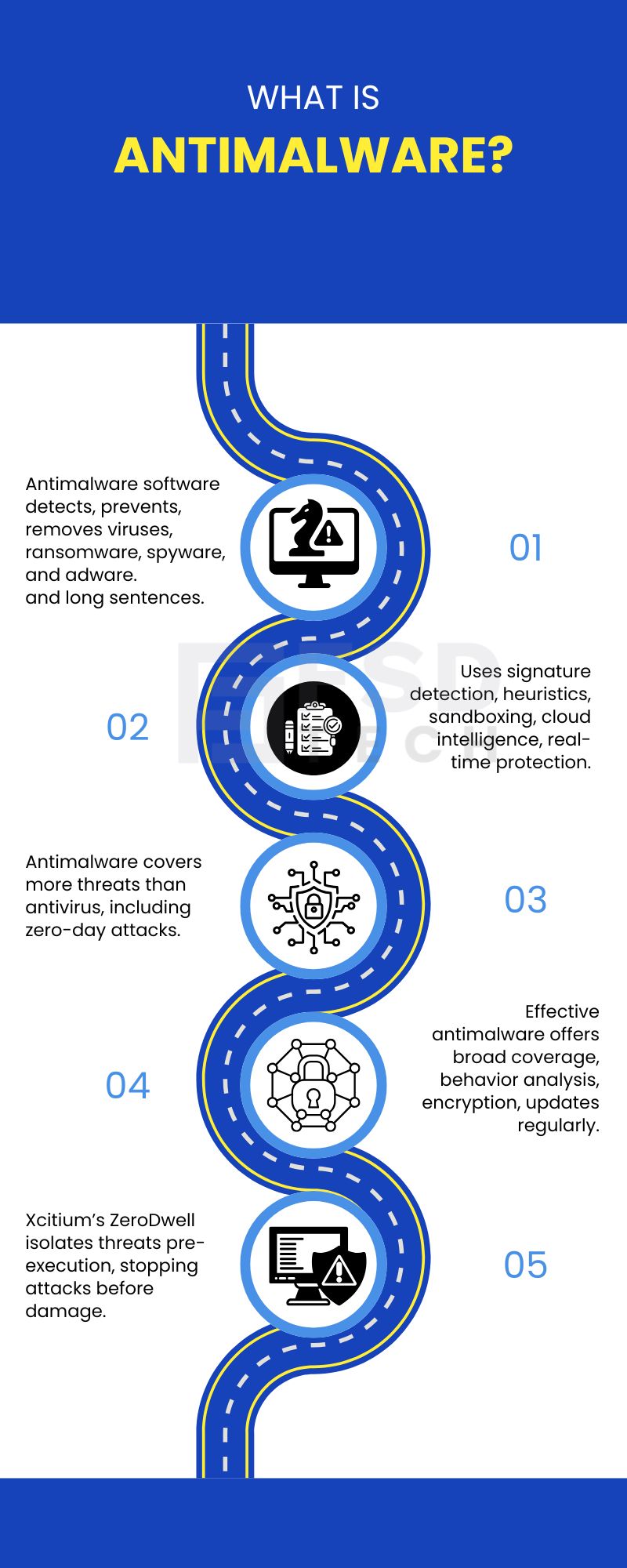
    Nowadays, a single malicious file is enough to stop your business cold. Malware isn’t just a threat—it’s the most common doorway into system compromise, data loss, and operational shutdowns. That’s why antimalware matters. It is the specialized software designed to detect, prevent, and remove harmful programs such as viruses, ransomware, spyware, and adware.


    But here’s something many organizations overlook:
     

    Most antimalware tools still rely on identifying the threat after it has begun executing.
     

    That tiny window—measured in milliseconds—is where ransomware wins.


    Modern antimalware must go beyond old detection logic. It needs stronger, smarter methods capable of defending against both known threats and completely new, never-seen-before attacks.


    Your data, systems, and business continuity depend on it.


    How Does Antimalware Work?

    To understand antimalware in clearer terms, you must know its different defense layers. Antimalware tools use various methods to keep your systems safe. They don't rely on just one trick.


    There are several steps to how anti-malware works:

    • Signature-Based Detection: As the name suggests, this method involves checking files against a huge database of known malware signatures. It offers fast protection against threats we already know about.
    • Heuristic Analysis: This method does not look for an exact signature. On the contrary, it examines the behavior and structure of files to find suspicious actions. This is key for spotting unknown malware variants.
    • Sandboxing: Take a read of this one. Sandboxing refers to running suspicious files in isolated environments, often called sandboxes. This allows the software to observe the file's actions safely before letting it near your real system.
    • Cloud-Based Threat Intelligence: This is a real-time defense. It checks files, domains, and IP addresses against global threat databases. This helps to identify new risks as they appear.
    • Real-Time Protection: This continuously monitors all system activity. It blocks threats as soon as they try to start.
    • Rootkit Detection & Automated Updates: Specialized scanners find hidden threats like rootkits. Further, regular updates keep your defenses strong against constantly evolving malware.


    But here’s the crucial limitation:
    all of these methods still depend on detection—meaning the file is allowed to start running.
     

    And modern threats don’t need long to cause damage.


    This is the gap Xcitium eliminates.
     

    Get Xcitium Today!


    Key Features of Effective Antimalware Protection

    Key Features of Effective Antimalware Protection

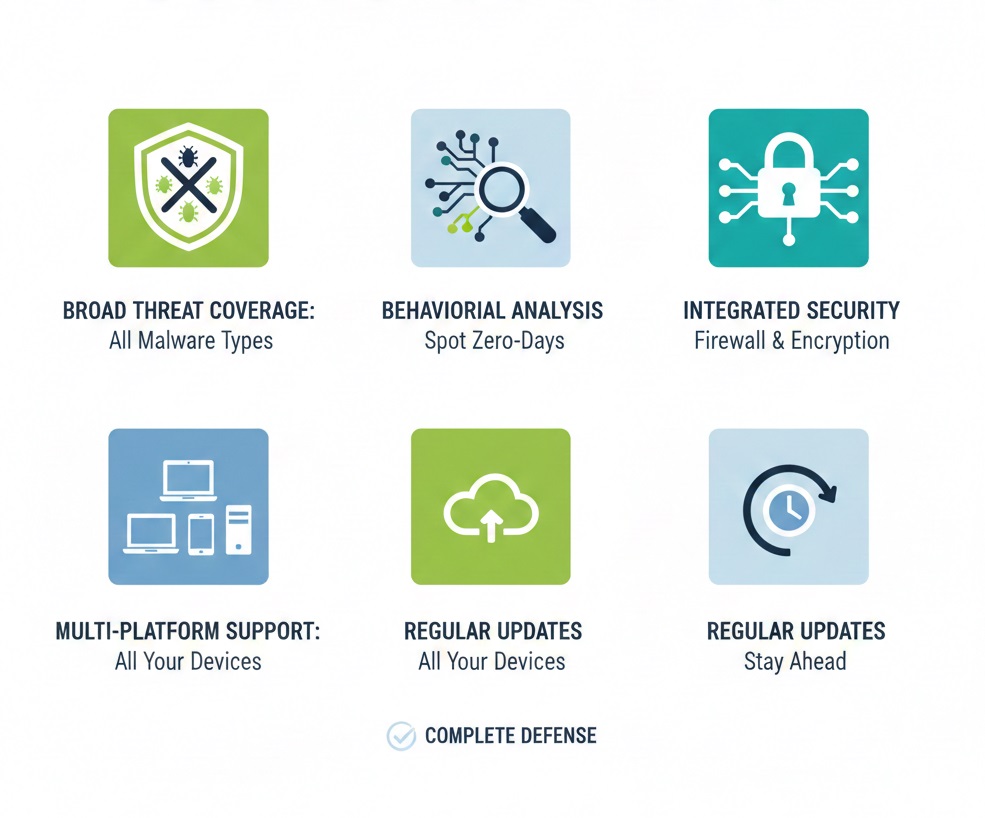
    A strong antimalware solution is more than just a basic scanner. It is to be noted that it must offer several key features for complete threat defense.


    Here are the most important characteristics:


    • Broad Threat Coverage: Protection against all major malware types: viruses, ransomware, spyware, adware, and more.
    • Behavioral Analysis: Ability to spot and block suspicious activities, not just the files that match known signatures. This protects against zero-day exploits.
    • Integrated Firewall and Encryption: Controls network traffic and protects sensitive data through encryption.
    • Multi-Platform Support: The software must work with all your operating systems, including Windows, macOS, Linux, and cloud environments.
    • Regular Updates: Frequent updates to threat databases and software features are a must. They ensure your defenses stay ahead of new malware strains.


    But even with all this, detection-based systems still leave a gap for unknown threats.
     

    This is where Xcitium’s approach becomes far more compelling.


    Also Read: Why Cybersecurity Is a Business Growth Strategy – Not Just a Cost


    Antimalware vs. Antivirus: What’s the Difference?

    The terms antimalware and antivirus are often used as if they mean the same thing. However, they are different tools. Antimalware can be understood as an evolution of traditional antivirus.


    To understand the difference between antimalware and antivirus in clearer terms, consider the following key points:


    1. Scope of Protection: Antimalware offers broad protection against a wide variety of malicious software. On the other hand, antivirus mainly focuses on protecting against viruses alone.
    2. Malware Types Covered: Antimalware covers viruses, spyware, ransomware, adware, trojans, etc. Conversely, antivirus software primarily focuses on viruses.
    3. Behavioral Analysis: Antimalware emphasizes behavior-based detection and advanced analysis. Whereas, antivirus is mostly signature-based.
    4. Real-Time Protection: Antimalware provides continuous real-time monitoring of all system processes. While, antivirus offers real-time scanning, but often only for known malware files.
    5. Scanning Techniques: Antimalware uses advanced techniques like heuristics, sandboxing, and cloud lookups. However, antivirus typically relies on simpler signature-based file scanning.
    6. Adaptability: Antimalware is more adaptable to new and quickly evolving threats. But, antivirus may lag when facing rapidly changing malware threats.


    FeatureAntimalwareAntivirus
    Scope of ProtectionBroad protection against various malware (ransomware, spyware, etc.)Mainly focused on viruses
    Malware Types CoveredViruses, spyware, ransomware, adware, etc.Primarily viruses
    Behavioral AnalysisEmphasizes behavior-based detectionMostly signature-based
    Scanning TechniquesHeuristics, sandboxing, cloud lookupsSignature-based file scanning


    Choosing the Right Antimalware Solution

    Selecting the right product is a critical decision for your security. Always remember, the best antimalware solution is one that meets your specific needs.


    When selecting an antimalware product, you should consider these specified factors:


    • Comprehensive Threat Detection: The system should identify and block a wide range of malware types, including fileless malware and emerging threats.
    • Frequent Updates: You need regular software and database updates to combat new threats as soon as they appear.
    • Ease of Use: An intuitive interface makes it simpler for you and your team to use and manage the software.
    • Reliable Support: Responsive customer service is necessary for quick troubleshooting and assistance when a threat occurs.


    And one more critical factor:
     

    How does the solution handle unknown threats?
     

    This is where Xcitium changes the entire equation.


    Also Read: Cybersecurity ROI – Why Investing in Protection Saves SMBs More Than It Costs


    Trusted Protection With Xcitium at FSD Tech

    At FSD Tech, we understand that modern cyber risks cannot be addressed with detection-based tools alone. That is why we partner with Xcitium, a leader in Zero Trust endpoint security, to provide advanced antimalware capabilities designed for today’s threat landscape.


    Xcitium’s patented ZeroDwell™ Containment technology brings a breakthrough approach that stops unknown threats before they ever touch your operating system. Instead of trying to detect whether an unknown file is malicious, Xcitium isolates it instantly — eliminating the risk of ransomware, zero-days, or fileless attacks causing damage.


    This pre-execution model is the key reason Xcitium stands out from traditional antimalware vendors.


    What Makes Xcitium Different?

    Xcitium uses a multi-layered, prevention-first approach that is fully aligned with Zero Trust principles. Here are the capabilities that make it unique:


    ZeroDwell™ Containment (Patented)


    Xcitium automatically isolates unknown or untrusted files in a secure virtual environment before they execute.
     

    This ensures that even if the file is malicious, it cannot impact the real system.
     

    No other vendor offers this patented, kernel-level containment technology.


    Valkyrie Cloud-Based Verdicting

    Suspicious files are analyzed using a combination of:

    • static analysis
    • dynamic analysis
    • machine learning
    • cloud sandboxing
    • human expert review

    This delivers fast, accurate verdicts without guesswork.


    Behavioral Monitoring (VirusScope)

    Monitors application behavior in real time to detect malicious actions such as privilege escalation, keylogging, or code injection.


    Next-Generation Antivirus (NGAV)

    Includes advanced heuristics, machine learning classification, and cloud lookups to identify known and emerging malware.


    Endpoint Protection & Hardening

    Xcitium includes additional security layers such as:

    • Host Intrusion Prevention (HIPS)
    • Script control
    • Device control
    • Application control
    • Auto-containment policies


    Integrated MDR (Optional)

    Xcitium offers 24/7 expert-led monitoring, threat hunting, and incident response for organizations that need continuous security operations support.


    All of these capabilities work together to ensure full visibility, rapid detection, and—most importantly—pre-execution protection that stops attacks before they begin.


    Why Xcitium Outperforms Other Vendors?

    Below is a clear comparison against traditional antimalware vendors:

    FeatureTraditional Antivirus / NGAVXcitium ZeroDwell™
    Unknown File HandlingAllowed to run → then detectedContained instantly → cannot harm
    Zero-Day ProtectionDepends on detection speedGuaranteed by isolation
    Ransomware PreventionOften too slowBlocked before encryption starts
    Fileless AttacksHard to identifyContained automatically
    False PositivesFrequentMinimal due to safe containment
    Dependency on SignaturesHighLow – uses verdicting


    Why Choose Xcitium Through FSD Tech?

    Technology alone is not enough. You need the right partner to deploy, configure, and optimize your cybersecurity stack.


    FSD Tech brings:


    Deployment Expertise

    We implement Xcitium’s ZeroDwell™, NGAV, and cloud-based analysis capabilities with the right policies for your environment.


    Security Architecture Tailored to Your Organization

    Proper containment rules, endpoint policies, access controls, and monitoring setups ensure maximum protection without interrupting productivity.


    Continuous Support & Monitoring

    Our team ensures your environment stays protected, updated, and fully optimized.


    Integration Across Your Entire IT Landscape

    We help integrate Xcitium with SIEMs, cloud workloads, on-premise systems, and your incident response workflows.


    Together, Xcitium and FSD Tech deliver a complete, prevention-first antimalware strategy designed for today’s rapidly evolving threat landscape.


    Final Thoughts

    Strong antimalware is essential to securing your business. But modern cyber threats demand more than detection-based tools. They require a prevention-first approach — one that stops unknown threats before they ever have the chance to execute.


    Xcitium’s ZeroDwell™ Containment brings exactly that.


    And with FSD Tech’s implementation expertise, your organization gets a tailored, fully optimized security experience that ensures business continuity, data protection, and long-term resilience.


    If you want prevention instead of reaction —
    Xcitium with FSD Tech is the right choice.
     

    Talk to Our Xcitium Expert!


    Frequently Asked Questions (FAQs) About Antimalware

    What is the difference between antimalware and antivirus?

    Antimalware: Offers broad protection against many types of malicious software, including viruses, ransomware, spyware, and adware, using advanced detection methods like heuristics.

    Antivirus: Primarily focuses on known viruses with signature-based detection.

    Do I need an antimalware program if I already have an antivirus program?

    Yes, it is to be noted that antivirus alone may not be enough for modern threats. Antimalware provides essential additional layers of protection, especially against advanced malware like ransomware, fileless malware, and zero-day exploits.

    Can antimalware stop ransomware attacks?

    Yes, modern antimalware solutions include real-time protection, behavioral analysis, and sandboxing. These features detect and block ransomware before it can encrypt your files or demand payment.


    What Is Antimalware? Your Guide to Threat Defense

    About The Author

    Surbhi Suhane

    Surbhi Suhane is an experienced digital marketing and content specialist with deep expertise in Getting Things Done (GTD) methodology and process automation. Adept at optimizing workflows and leveraging automation tools to enhance productivity and deliver impactful results in content creation and SEO optimization.

    Like This Story?

    Share it with friends!

    Subscribe to our newsletter!

    Atera

    (48)

    Cato Networks

    (111)

    ClickUp

    (68)

    FishOS

    (7)

    Miradore

    (21)

    PointGuard AI

    (9)

    Vembu

    (22)

    Xcitium

    (33)

    ZETA HRMS

    (69)

    Workflow Automation(5)

    Workforce Automation(1)

    AI Project Management(1)

    HR Data Automation(1)

    RMM(1)

    IT Workflow Automation(1)

    IT security(2)

    GCC compliance(4)

    Payroll Integration(2)

    IT support automation(3)

    procurement automation(1)

    lost device management(1)

    IT Management(5)

    IoT Security(2)

    Cato XOps(2)

    IT compliance(4)

    Task Automation(1)

    Workflow Management(1)

    OpenStack automation(1)

    Kubernetes lifecycle management(2)

    AI-powered cloud ops(1)

    SMB Security(8)

    Data Security(1)

    MDR (Managed Detection & Response)(4)

    Atera Integrations(2)

    MSP Automation(3)

    XDR Security(2)

    SMB Cyber Protection(1)

    Ransomware Defense(3)

    HR Tech Solutions(1)

    Zero Trust Network Access(3)

    Zero Trust Security(2)

    Endpoint Management(1)

    SaaS Security(1)

    Payroll Automation(5)

    IT Monitoring(2)

    Xcitium EDR SOC(15)

    Ransomware Protection GCC(1)

    M&A IT Integration(1)

    Network Consolidation UAE(1)

    MSSP for SMBs(1)

    FSD-Tech MSSP(25)

    SMB Cybersecurity GCC(1)

    Managed EDR FSD-Tech(1)

    Ransomware Protection(3)

    Antivirus vs EDR(1)

    Cybersecurity GCC(12)

    Endpoint Security(1)

    Endpoint Protection(1)

    Data Breach Costs(1)

    Managed Security Services(2)

    SMB Cybersecurity(8)

    Zero Dwell Containment(31)

    Xcitium EDR(30)

    Cloud Backup(1)

    Hybrid Backup(1)

    Backup & Recovery(1)

    pointguard ai(4)

    disaster recovery myths(1)

    backup myths(1)

    vembu(9)

    SMB data protection(9)

    Vembu BDR Suite(19)

    Disaster Recovery(4)

    DataProtection(1)

    GCCBusiness(1)

    Secure Access Service Edge(4)

    GCC HR software(15)

    Miradore EMM(15)

    Cato SASE(7)

    Cloud Security(8)

    Talent Development(1)

    AI Cybersecurity(12)

    AI Risk Management(1)

    AI Governance(4)

    AI Security(2)

    AI Compliance(2)

    GCC business security(1)

    GCC network integration(1)

    compliance automation(4)

    GCC cybersecurity(2)

    education security(1)

    App management UAE(1)

    BYOD security Dubai(8)

    Miradore EMM Premium+(5)

    HealthcareSecurity(1)

    MiddleEast(1)

    Team Collaboration(1)

    IT automation(10)

    Zscaler(1)

    SD-WAN(6)

    HR Integration(4)

    Cloud Networking(3)

    device management(9)

    RemoteWork(1)

    ZeroTrust(2)

    VPN(1)

    MPLS(1)

    Project Management(9)

    HR automation(16)

    share your thoughts

    Illustration of Zeta HRMS cloud-based HR platform showing integrated payroll automation, biometric attendance, mobile self-service, predictive workforce analytics, and secure compliance-ready HR workflows designed for UAE organizations.

    HR Tech Trends 2025: How Zeta HRMS Leads UAE’s Digital HR Transformation

    🕓 December 27, 2025

    Illustration showing the transition from manual spreadsheets and paper-based HR processes to the Zeta HRMS digital platform. Depicts HR teams moving data into a centralized, automated HR system with modules for payroll, attendance, compliance, and employee management, highlighting improved efficiency and collaboration. FSD Tech branding visible at the bottom.

    Cato SASE Implementation Roadmap 2025: A Step-by-Step Guide

    🕓 December 23, 2025

    Illustration showing Cato SASE’s global private backbone across the GCC region, with network nodes in Dubai, Riyadh, Jeddah, Kuwait, Muscat, and Bahrain. Depicts secure connectivity to cloud platforms such as AWS, Azure, and Google, with intelligent traffic routing, analytics, and high availability. FSD Tech branding visible at the bottom

    Strategies to Eliminate Network Downtime with Cato SASE’s Reliable Global Backbone

    🕓 December 19, 2025

    Decoded(52)

    Cyber Security(112)

    BCP / DR(22)

    Zeta HRMS(68)

    SASE(21)

    Automation(68)

    Next Gen IT-Infra(111)

    Monitoring & Management(69)

    ITSM(22)

    HRMS(21)

    Automation(24)