HomeNext Gen IT-InfraMonitoring & ManagementCyber SecurityBCP / DRAutomationDecoded
Next Gen IT-Infra
Cato’s SASE Supports Cybersecurity Skills Development

How Cato’s SASE Supports Cybersecurity Skills Development

🕓 April 8, 2025

How SASE Supports the Security Needs of SMBs

How SASE Supports the Security Needs of SMBs

🕓 February 9, 2025

Attack Surface Reduction with Cato’s SASE

Attack Surface Reduction with Cato’s SASE

🕓 February 10, 2025

SASE for Digital Transformation in UAE

SASE for Digital Transformation in UAE

🕓 February 8, 2025

Monitoring & Management
Understanding Atera’s SLA Management

Understanding Atera’s SLA Management

🕓 February 7, 2025

Cost-Performance Ratio: Finding the Right Balance in IT Management Networks

Cost-Performance Ratio: Finding the Right Balance in IT Management Networks

🕓 June 16, 2025

Customizing Atera with APIs

Customizing Atera with APIs

🕓 March 3, 2025

Power Up Your IT Team’s Strategy with Atera’s Communication Tools

Power Up Your IT Team’s Strategy with Atera’s Communication Tools

🕓 February 8, 2025

Cyber Security
Visual guide showing Cato CMA interface for configuring Internet and WAN firewall rules, enabling threat protection, and monitoring security events in real time for UAE IT teams.

Enforcing Firewall and Threat Protection Policies in Cato

🕓 July 25, 2025

Isometric illustration of professionals managing network performance, bandwidth analytics, and cloud-based optimization around the Cato Networks platform, symbolizing bandwidth control and QoS visibility.

Mastering Bandwidth Control and QoS in Cato Networks

🕓 July 26, 2025

Illustration of the Cato Cloud architecture showing its role in delivering SASE for secure, optimized global connectivity.

Understanding the Cato Cloud and Its Role in SASE

🕓 January 29, 2025

Global network backbone powering Cato SASE solution for secure, high-performance connectivity across regions.

Global Backbone: The Engine Powering Cato’s SASE Solution

🕓 January 30, 2025

BCP / DR
Illustration showing diverse business and IT professionals collaborating with cloud, backup, and security icons, representing Vembu use cases for SMBs, MSPs, and IT teams.

Who Uses Vembu? Real-World Use Cases for SMBs, MSPs & IT Teams

🕓 July 12, 2025

Graphic showcasing Vembu’s all-in-one backup and disaster recovery platform with icons for cloud, data protection, and business continuity for IT teams and SMBs.

What Is Vembu? A Deep Dive Into the All in One Backup & Disaster Recovery Platform

🕓 July 6, 2025

Illustration showing Vembu backup and disaster recovery system with cloud storage, server racks, analytics dashboard, and IT professionals managing data.

The Rising Cost of Data Loss: Why Backup Is No Longer Optional?

🕓 August 14, 2025

3D isometric illustration of cloud backup and data recovery infrastructure with laptop, data center stack, and digital business icons — FSD Tech

RPO & RTO: The Heart of Business Continuity

🕓 August 15, 2025

Automation
Cross-Functional Collaboration with ClickUp

Fostering Cross-Functional Collaboration with ClickUp for Multi-Departmental Projects

🕓 February 11, 2025

ClickUp Project Reporting

Revolutionizing Enterprise Reporting with ClickUp’s Advanced Analytics and Dashboards

🕓 June 16, 2025

ClickUp’s Design Collaboration and Asset Management Tools

Empowering Creative Teams with ClickUp’s Design Collaboration and Asset Management Tools

🕓 February 26, 2025

ClickUp Communication and Collaboration Tools

ClickUp Communication and Collaboration Tools: Empowering Remote Teams

🕓 March 12, 2025

Decoded
Multi-Factor Authentication (MFA)

Multi-Factor Authentication (MFA): All You Need to Know

🕓 December 7, 2025

L3 Switch

What Is an L3 Switch? L2 vs L3 & Why You Need Layer 3?

🕓 December 8, 2025

IPSec

IPSec Explained: Protocols, Modes, IKE & VPN Security

🕓 December 3, 2025

 Datagram Transport Layer Security (DTLS)

What is Datagram Transport Layer Security (DTLS)? How it works?

🕓 December 4, 2025

    Subscribe to our newsletter!

    About Us

    Follow Us

    Copyright © 2024 | Powered by 

    Cato SASE Architecture

    Inside Cato’s SASE Architecture: A Blueprint for Modern Security

    🕓 January 26, 2025

    Enterprise Data Security and Privacy with ClickUp

    Ensuring Enterprise Data Security and Privacy with ClickUp

    🕓 February 9, 2025

    DDoS protection SASE

    DDoS Protection and Cato’s Defence Mechanisms

    🕓 February 11, 2025

    Table of Contents

    Keeping HR Data Compliant with Document Management & Expiry Alerts in Zeta HRMS

    Anandhu Sivan
    November 12, 2025
    Comments
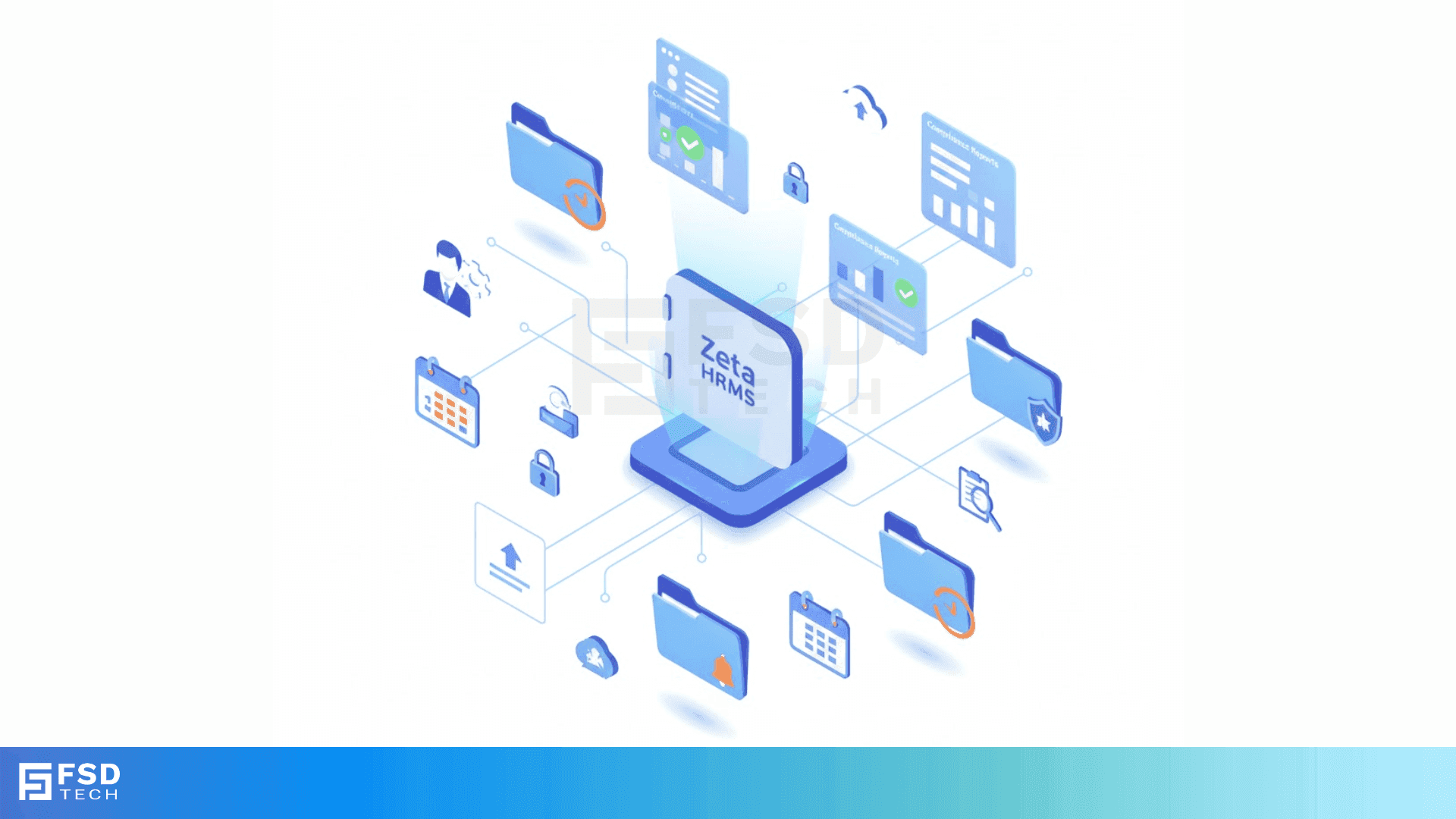
    Isometric illustration showing Zeta HRMS centralizing HR document management with secure storage, automated expiry alerts, and compliance dashboards.

    Introduction

    HR data compliance is not just about ticking regulatory boxes—it’s about maintaining trust, minimizing risk, and ensuring operational continuity. With evolving labor laws, regional data protection regulations, and internal audit requirements, organizations are expected to keep sensitive employee records updated, secure, and easily retrievable. Zeta HRMS offers a robust document management module with built-in expiry alert features to streamline compliance, automate reminders, and protect your business from unintentional violations.


    Understanding HR Document Compliance Challenges

    Compliance isn’t simply about storing documents digitally. It’s about tracking which documents are mandatory, when they expire, who owns them, and whether they meet the legal or internal standards. For instance:

    • Employee passports, visas, and IDs may have expiry dates that need tracking.
    • Certifications, licenses, or health clearances may need periodic renewals.
    • Internal policy documents such as NDAs or training acknowledgments must be version-controlled and acknowledged.

    Without automated workflows, HR teams often resort to manual spreadsheets or emails-systems prone to human error and missed deadlines.


    Key Features of Zeta HRMS Document Management

    Zeta HRMS simplifies these complexities with a centralized and automated solution designed for compliance-driven document workflows:

    Central Repository with Secure Access

    Zeta HRMS provides a centralized cloud-based storage system for all employee-related documents. Role-based access ensures that only authorized HR personnel or department managers can view or modify sensitive records.

    Document Classification & Metadata

    Every uploaded document can be tagged with metadata such as:

    • Document type (passport, license, contract, etc.)
    • Issue and expiry dates
    • Related employee ID or department
    • Verification status

    This metadata becomes the foundation for filtering, compliance checks, and reporting.

    Expiry Date Tracking and Alerts

    One of the standout features is Zeta’s expiry date tracking engine. HR teams can:

    • Set expiry dates for any document
    • Configure advance reminder periods (e.g., 30, 60, 90 days prior)
    • Assign responsible users for each alert
    • Receive in-system notifications and email alerts

    This automation ensures timely renewals and avoids last-minute surprises.

    Version Control and Audit Trails

    For documents that evolve over time (e.g., employment contracts, policy manuals), Zeta HRMS supports versioning. Every update is timestamped, with older versions archived. An integrated audit trail logs every action—upload, download, edit, delete—to support internal audits or external investigations.

    Custom Document Requirements by Role or Location

    Multinational or multi-branch organizations often have different documentation standards based on country, legal jurisdiction, or job roles. Zeta allows you to configure custom document checklists:

    • Define mandatory documents per location or role
    • Set specific compliance timelines
    • Run reports to identify missing or non-compliant records

    Automated Compliance Reporting

    Instead of spending hours compiling reports, Zeta HRMS lets HR generate real-time compliance dashboards and exportable summaries:

    • Documents nearing expiry
    • Expired documents pending action
    • Missing mandatory files by employee, location, or department

    These insights can also be used to drive performance KPIs for HR compliance officers.

    Integration with Onboarding and Offboarding

    Document compliance workflows are tightly integrated into the broader employee lifecycle. During onboarding, the system automatically prompts new hires (or their managers) to upload required documents based on job role. During offboarding, Zeta ensures exit documentation like experience letters or full-and-final statements are completed and archived.

    Security and Access Control

    Zeta HRMS adheres to top-tier data security protocols:

    • Encrypted document storage
    • Granular permission levels (view/edit/download/delete)
    • IP-based access restrictions for sensitive document categories
    • Secure mobile access with role-based document visibility

    These controls help you comply with regional data protection laws like the UAE PDPL or India's DPDP Act.


    Benefits of Document Compliance Automation

    Reducing Legal and Financial Risk

    Missed renewals of licenses or visas can lead to heavy penalties, visa rejections, or contract breaches. Zeta’s alerts and compliance reports mitigate these risks by ensuring nothing falls through the cracks.

    Improved HR Operational Efficiency

    Automated reminders and centralized access eliminate repetitive follow-ups. HR teams can spend more time on strategic initiatives rather than chasing documents.

    Audit Readiness

    Whether for ISO audits, labor inspections, or internal quality checks, having every document versioned, categorized, and time-stamped makes your organization instantly audit-ready.

    Higher Employee Trust

    When employees see that their sensitive information is securely managed, and their documents are handled professionally, it builds long-term trust in your HR processes.

    Real-World Use Case: Construction & Contracting Firm

    A regional contracting company using Zeta HRMS configured role-based document checklists:

    • Engineers required updated safety certificates every 6 months
    • Site workers had visa and health card renewals every year
    • Admin staff needed signed NDAs and IT policy acknowledgments

    With Zeta, their HR team received timely reminders, and non-compliant profiles were auto-flagged during internal reviews. Over 12 months, they reported zero missed renewals and passed external audits with flying colors.


    Best Practices for Implementing Document Expiry Alerts

    Start with a Document Audit

    Scan existing records and identify which documents need tracking. Classify them by:

    • Expiry relevance
    • Legal importance
    • Role or department relevance

    Define Alert Owners

    Each alert should have a responsible person (HR, line manager, compliance officer) assigned to avoid ambiguity.

    Automate Where Possible

    Use Zeta’s bulk upload, document templates, and pre-set alert rules to save time.

    Regularly Review Document Checklists

    Laws change. So do internal policies. Zeta HRMS allows you to update role-based checklists dynamically without disrupting past records.

    Train Managers on Compliance Responsibilities

    Make sure department heads or branch managers understand their role in the document renewal cycle. Zeta’s dashboard access can help them monitor team-level compliance.


    Ready to simplify your HR document compliance? Book a Free no-obligation session with our Zeta HRMS implementation experts.  
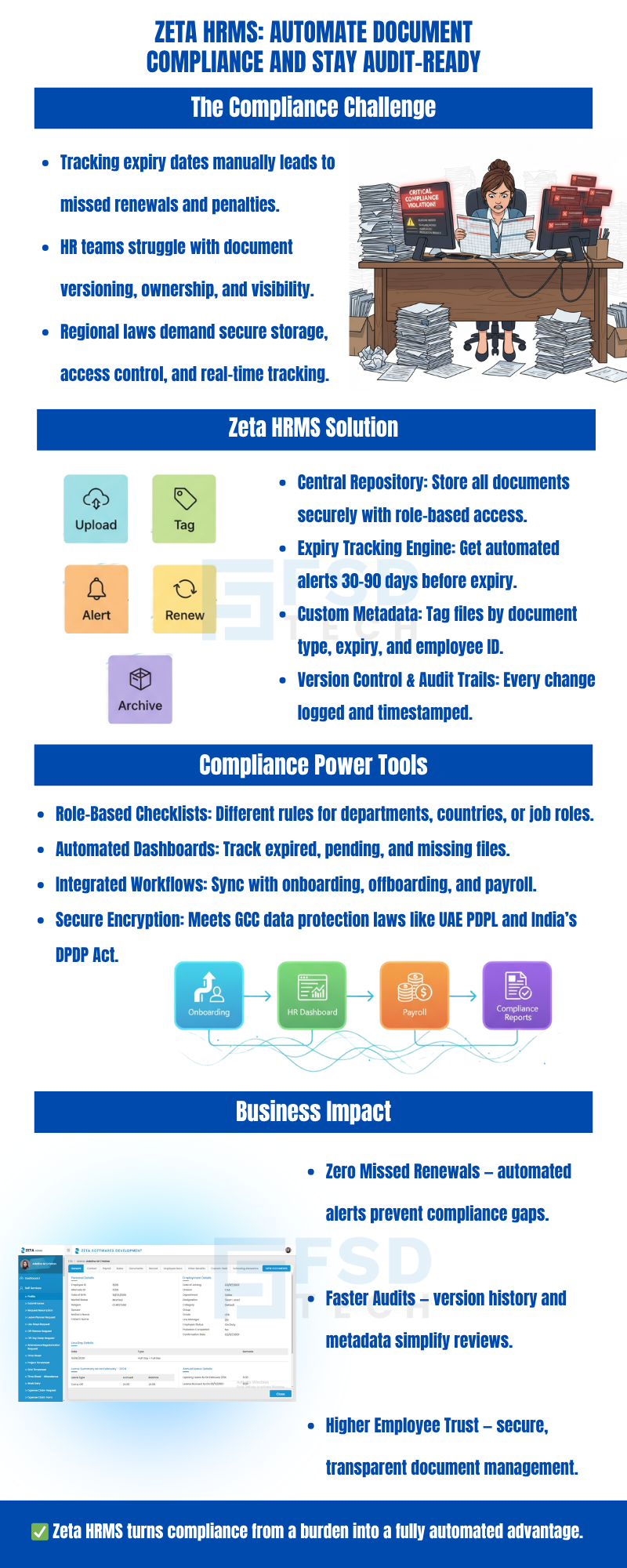
     

    Infographic explaining how Zeta HRMS automates document compliance with expiry tracking, version control, audit trails, and role-based access to ensure zero missed renewals and faster audits.


    FAQ

    What types of documents can Zeta HRMS track for expiry?

    Zeta HRMS can track any document with a definable expiry date including passports, licenses, certifications, insurance policies, health clearances, and more.


    Can we customize alerts for different roles or branches?

    Yes, Zeta HRMS allows you to create role-based or location-specific document requirements and associated expiry alerts.


    How secure are the documents stored in Zeta HRMS?

    Documents are stored with encryption at rest and in transit. Access is controlled by user roles, IP restrictions, and other advanced security settings.


    Is there an option to bulk upload employee documents?

    Yes, Zeta HRMS supports bulk document uploads and mapping via Excel templates, making migration fast and accurate.


    How does Zeta handle expired documents?

    Expired documents are flagged in reports and dashboards. HR can configure the system to restrict workflows until renewal is completed.


    Can employees upload their own documents?

    Yes, through the Employee Self-Service (ESS) portal, users can upload or update their own documents with automated prompts and validations.


    What happens if a document is missing or not uploaded?

    Non-compliant or missing documents are highlighted in compliance reports, and reminder alerts can be triggered to responsible users.


    Does Zeta support document version control?

    Yes, every update to a document is versioned, and older versions are archived for reference and audit trails.


    Are there audit logs available for document actions?

    Yes, all actions like upload, edit, delete, download are logged with user details and timestamps for audit purposes.


    Can we set different expiry timelines for the same document type?

    Absolutely. You can define expiry rules per document, per role, or per location for complete flexibility.

    Keeping HR Data Compliant with Document Management & Expiry Alerts in Zeta HRMS

    About The Author

    Anandhu Sivan

    Anandhu holds a Master's degree in Computer Science and brings extensive expertise in Business Analysis and Project Management, delivering innovative solutions and driving success across diverse projects.

    Like This Story?

    Share it with friends!

    Subscribe to our newsletter!

    Atera

    (48)

    Cato Networks

    (111)

    ClickUp

    (64)

    FishOS

    (7)

    Miradore

    (21)

    PointGuard AI

    (9)

    Vembu

    (22)

    Xcitium

    (33)

    ZETA HRMS

    (66)

    Workflow Automation(5)

    Workforce Automation(1)

    AI Project Management(1)

    HR Data Automation(1)

    RMM(1)

    IT Workflow Automation(1)

    GCC compliance(4)

    IT security(2)

    Payroll Integration(2)

    IT support automation(2)

    procurement automation(1)

    lost device management(1)

    IT Management(5)

    IoT Security(2)

    Cato XOps(2)

    IT compliance(4)

    Task Automation(1)

    Workflow Management(1)

    AI-powered cloud ops(1)

    OpenStack automation(1)

    Kubernetes lifecycle management(2)

    SMB Security(8)

    Data Security(1)

    MDR (Managed Detection & Response)(4)

    Atera Integrations(2)

    MSP Automation(2)

    XDR Security(2)

    SMB Cyber Protection(1)

    Ransomware Defense(3)

    HR Tech Solutions(1)

    Zero Trust Network Access(3)

    Zero Trust Security(2)

    Endpoint Management(1)

    SaaS Security(1)

    Payroll Automation(5)

    IT Monitoring(2)

    Xcitium EDR SOC(15)

    Ransomware Protection GCC(1)

    M&A IT Integration(1)

    Network Consolidation UAE(1)

    MSSP for SMBs(1)

    Antivirus vs EDR(1)

    Ransomware Protection(3)

    Managed EDR FSD-Tech(1)

    FSD-Tech MSSP(25)

    SMB Cybersecurity GCC(1)

    Cybersecurity GCC(12)

    Endpoint Security(1)

    Data Breach Costs(1)

    Endpoint Protection(1)

    Managed Security Services(2)

    SMB Cybersecurity(8)

    Zero Dwell Containment(31)

    Xcitium EDR(30)

    Hybrid Backup(1)

    Cloud Backup(1)

    Backup & Recovery(1)

    pointguard ai(4)

    disaster recovery myths(1)

    backup myths(1)

    vembu(9)

    SMB data protection(9)

    Vembu BDR Suite(19)

    Disaster Recovery(4)

    DataProtection(1)

    GCCBusiness(1)

    Secure Access Service Edge(4)

    GCC HR software(14)

    Miradore EMM(15)

    Cato SASE(7)

    Cloud Security(8)

    Talent Development(1)

    AI Cybersecurity(12)

    AI Risk Management(1)

    AI Governance(4)

    AI Security(2)

    AI Compliance(2)

    GCC business security(1)

    GCC network integration(1)

    compliance automation(4)

    GCC cybersecurity(2)

    education security(1)

    App management UAE(1)

    BYOD security Dubai(8)

    Miradore EMM Premium+(5)

    HealthcareSecurity(1)

    MiddleEast(1)

    Team Collaboration(1)

    IT automation(10)

    Zscaler(1)

    SD-WAN(6)

    HR Integration(4)

    Cloud Networking(3)

    device management(9)

    RemoteWork(1)

    ZeroTrust(2)

    VPN(1)

    MPLS(1)

    Project Management(9)

    HR automation(16)

    share your thoughts

    Illustration showing the transition from manual spreadsheets and paper-based HR processes to the Zeta HRMS digital platform. Depicts HR teams moving data into a centralized, automated HR system with modules for payroll, attendance, compliance, and employee management, highlighting improved efficiency and collaboration. FSD Tech branding visible at the bottom.

    Legal Teams & Case Management in ClickUp Workspaces

    🕓 December 25, 2025

    Illustration showing the transition from manual spreadsheets and paper-based HR processes to the Zeta HRMS digital platform. Depicts HR teams moving data into a centralized, automated HR system with modules for payroll, attendance, compliance, and employee management, highlighting improved efficiency and collaboration. FSD Tech branding visible at the bottom.

    ClickUp for Healthcare Operations & Patient Workflows

    🕓 December 22, 2025

    Illustration of a centralized financial audit and control hub showing interconnected digital panels for VAT reporting, documents, approvals, dashboards, and integrations. Depicts finance teams collaborating around a secure platform that manages audits, compliance data, accounting systems, and financial workflows. Represents automated audit management and financial oversight. FSD Tech branding visible at the bottom.

    Financial and Audit Workflow Tracking in ClickUp

    🕓 December 18, 2025

    Decoded(39)

    Cyber Security(112)

    BCP / DR(22)

    Zeta HRMS(65)

    SASE(21)

    Automation(64)

    Next Gen IT-Infra(111)

    Monitoring & Management(69)

    ITSM(22)

    HRMS(21)

    Automation(24)