HomeNext Gen IT-InfraMonitoring & ManagementCyber SecurityBCP / DRAutomationDecoded
Next Gen IT-Infra
Cato’s SASE Supports Cybersecurity Skills Development

How Cato’s SASE Supports Cybersecurity Skills Development

🕓 April 8, 2025

How SASE Supports the Security Needs of SMBs

How SASE Supports the Security Needs of SMBs

🕓 February 9, 2025

Attack Surface Reduction with Cato’s SASE

Attack Surface Reduction with Cato’s SASE

🕓 February 10, 2025

SASE for Digital Transformation in UAE

SASE for Digital Transformation in UAE

🕓 February 8, 2025

Monitoring & Management
Understanding Atera’s SLA Management

Understanding Atera’s SLA Management

🕓 February 7, 2025

Cost-Performance Ratio: Finding the Right Balance in IT Management Networks

Cost-Performance Ratio: Finding the Right Balance in IT Management Networks

🕓 June 16, 2025

Customizing Atera with APIs

Customizing Atera with APIs

🕓 March 3, 2025

Power Up Your IT Team’s Strategy with Atera’s Communication Tools

Power Up Your IT Team’s Strategy with Atera’s Communication Tools

🕓 February 8, 2025

Cyber Security
Illustration of the Cato Cloud architecture showing its role in delivering SASE for secure, optimized global connectivity.

Understanding the Cato Cloud and Its Role in SASE

🕓 January 29, 2025

Isometric illustration of professionals managing network performance, bandwidth analytics, and cloud-based optimization around the Cato Networks platform, symbolizing bandwidth control and QoS visibility.

Mastering Bandwidth Control and QoS in Cato Networks

🕓 July 26, 2025

Global network backbone powering Cato SASE solution for secure, high-performance connectivity across regions.

Global Backbone: The Engine Powering Cato’s SASE Solution

🕓 January 30, 2025

Illustration of IT team managing user roles and permissions on the Cato CMA dashboard via laptops and cloud interfaces.

Setting Up Role-Based Access Control (RBAC) in Cato

🕓 July 28, 2025

BCP / DR
Illustration showing diverse business and IT professionals collaborating with cloud, backup, and security icons, representing Vembu use cases for SMBs, MSPs, and IT teams.

Who Uses Vembu? Real-World Use Cases for SMBs, MSPs & IT Teams

🕓 July 12, 2025

Graphic showcasing Vembu’s all-in-one backup and disaster recovery platform with icons for cloud, data protection, and business continuity for IT teams and SMBs.

What Is Vembu? A Deep Dive Into the All in One Backup & Disaster Recovery Platform

🕓 July 6, 2025

Illustration showing Vembu backup and disaster recovery system with cloud storage, server racks, analytics dashboard, and IT professionals managing data.

The Rising Cost of Data Loss: Why Backup Is No Longer Optional?

🕓 August 14, 2025

3D isometric illustration of cloud backup and data recovery infrastructure with laptop, data center stack, and digital business icons — FSD Tech

RPO & RTO: The Heart of Business Continuity

🕓 August 15, 2025

Automation
Cross-Functional Collaboration with ClickUp

Fostering Cross-Functional Collaboration with ClickUp for Multi-Departmental Projects

🕓 February 11, 2025

ClickUp Project Reporting

Revolutionizing Enterprise Reporting with ClickUp’s Advanced Analytics and Dashboards

🕓 June 16, 2025

ClickUp’s Design Collaboration and Asset Management Tools

Empowering Creative Teams with ClickUp’s Design Collaboration and Asset Management Tools

🕓 February 26, 2025

ClickUp Communication and Collaboration Tools

ClickUp Communication and Collaboration Tools: Empowering Remote Teams

🕓 March 12, 2025

Decoded
Multi-Factor Authentication (MFA)

Multi-Factor Authentication (MFA): All You Need to Know

🕓 December 7, 2025

L3 Switch

What Is an L3 Switch? L2 vs L3 & Why You Need Layer 3?

🕓 December 8, 2025

IPSec

IPSec Explained: Protocols, Modes, IKE & VPN Security

🕓 December 3, 2025

 Datagram Transport Layer Security (DTLS)

What is Datagram Transport Layer Security (DTLS)? How it works?

🕓 December 4, 2025

    Subscribe to our newsletter!

    About Us

    Follow Us

    Copyright © 2024 | Powered by 

    Cato SASE Architecture

    Inside Cato’s SASE Architecture: A Blueprint for Modern Security

    🕓 January 26, 2025

    Enterprise Data Security and Privacy with ClickUp

    Ensuring Enterprise Data Security and Privacy with ClickUp

    🕓 February 9, 2025

    DDoS protection SASE

    DDoS Protection and Cato’s Defence Mechanisms

    🕓 February 11, 2025

    Table of Contents

    ClickUp vs. Spreadsheets: Why Teams Are Making the Switch for Project Tracking

    NHAIF NOUSHAD
    August 28, 2025
    Comments
    FSD Tech illustration of professionals with charts, gears, and workflow icons beside the colorful ClickUp logo, symbolizing productivity and collaboration."

    Spreadsheets have long been the go-to tool for managing projects, tracking timelines, and listing deliverables. Their flexibility, accessibility, and familiarity make them a natural choice for teams just getting started with project management. But as businesses scale, teams collaborate more, and workflows become complex, spreadsheets begin to reveal their limitations.

    Enter ClickUp, an all-in-one productivity platform that’s redefining how teams plan, track, and execute their work. In this article, we’ll explore the key differences between ClickUp and spreadsheets, the drawbacks of relying on Excel or Google Sheets for project management, and why thousands of teams are switching to ClickUp for a smarter, more scalable project tracking experience.


    The Limitations of Spreadsheets in Project Management

    Spreadsheets are useful — until they aren’t. While they provide a simple grid-like structure to capture data, they lack critical functionality when managing ongoing projects or collaborating with cross-functional teams.

    Common Frustrations with Spreadsheets

    • Lack of real-time collaboration: While Google Sheets provides some collaborative ability, it can still lead to version confusion and overwrites.
    • No task automation: Spreadsheets require manual updates, which increases the risk of human error and delays.
    • Poor visibility: There’s no intuitive timeline view, dependencies, or visual representation of project health.
    • No accountability: Assigning tasks and tracking ownership in a spreadsheet becomes messy and unreliable.
    • Difficult scaling: As teams grow and data increases, spreadsheets become cluttered and harder to maintain.

    Spreadsheets were never built to manage modern workflows, and it shows when teams try to stretch them beyond their intended use.


    Wondering how these spreadsheet challenges map to your workflows? Share your details and we’ll show you practical ClickUp use cases tailored to your team. Click Here
     

    Why ClickUp is the Smarter Alternative

    ClickUp is more than a project management tool — it’s a work management platform that combines tasks, documents, timelines, goals, automations, reporting, and communication in one place.

    Unlike spreadsheets, ClickUp is built for collaboration, visibility, and efficiency.

    Real-Time Collaboration

    ClickUp allows multiple users to collaborate simultaneously on tasks, docs, and whiteboards. You can:

    • Assign team members
    • Set due dates and priorities
    • Leave threaded comments
    • Mention teammates
    • Track activity history
    • Collaborate using Docs or Whiteboards without switching platforms

    No more emailing spreadsheet versions or worrying about who made the latest update.

    Visual Project Tracking

    ClickUp gives you multiple views to manage projects:

    • List View: Perfect for task details and subtasks
    • Board View: Kanban-style project flow
    • Gantt View: Visualize timelines and dependencies
    • Calendar View: Plan content, events, or deadlines
    • Box View: Manage workload and team performance

    With ClickUp, you can visualize progress instantly — something no spreadsheet offers natively.

    Automations to Eliminate Manual Work

    ClickUp’s built-in automation engine helps reduce repetitive updates. For example:

    • Move a task to “Done” when a checklist is complete
    • Change priority when status is updated
    • Alert stakeholders when a due date is changed

    These workflows not only save time but reduce the chances of missing critical actions — something spreadsheets cannot do without complex scripting.

    Built-In Accountability

    Each ClickUp task is assigned to one or more owners, ensuring clear accountability. Task descriptions, due dates, priorities, comments, and attachments make responsibilities transparent.

    With spreadsheets, there’s no native way to enforce ownership, leading to finger-pointing and confusion.

    Task Relationships and Dependencies

    ClickUp allows you to create:

    • Task dependencies
    • Linked subtasks
    • Parent-child relationships
    • Blocking/waiting tasks

    This structure enables complex project mapping — without building intricate formulas like in spreadsheets.


    ClickUp vs. Spreadsheets: A Side-by-Side Comparison
     

    Feature

    Spreadsheets

    ClickUp

    Real-time task collaborationLimited (Google Sheets only)Full collaboration with comments, assignments, notifications
    Task ownershipManual and unclearAssignable with notifications and tracking
    Project visibilityStatic data viewsMultiple dynamic views (Gantt, Calendar, Board, List)
    AutomationRequires scriptingBuilt-in no-code automations
    Timeline and dependenciesManual formattingBuilt-in Gantt and task relationships
    Documentation supportExternal tools neededNative Docs, Wikis, and comments
    Dashboards and reportingNeeds manual setupVisual dashboards and widgets
    Goal tracking and OKRsNot structuredBuilt-in Goals feature
    Time trackingAdd-ons requiredNative time tracking with reporting
    ScalabilityBecomes clutteredScales with team and complexity


    Want a deeper comparison for your exact processes? Share your details and we’ll prepare a customized walkthrough. Click Here
     

    Real-World Scenarios Where ClickUp Outperforms Spreadsheets

    Marketing Campaign Management

    Spreadsheets can’t show campaign stages visually, nor can they support creative approvals or copy feedback. ClickUp allows marketing teams to:

    • Manage briefs
    • Attach creative files
    • Assign stakeholders
    • Set deadlines
    • Review assets in one place

    Product Road mapping

    Product teams need to track timelines, features, bug fixes, and dependencies. Spreadsheets lack clarity here. With ClickUp, teams use Gantt charts, milestones, and custom fields to keep product timelines clean and dynamic.

    HR Onboarding

    Spreadsheets for onboarding checklists get outdated fast. ClickUp lets HR teams create onboarding templates with checklists, forms, and reminders to standardize and scale the process.

    Client Work and Agencies

    Managing client deliverables in spreadsheets can lead to missed deadlines or duplicate efforts. ClickUp centralizes all client work in separate folders, with shareable views and statuses that keep clients and internal teams aligned.


    How to Migrate from Spreadsheets to ClickUp

    Making the move doesn’t have to be difficult. Here’s a basic plan to switch:

    1. Identify spreadsheet-based workflows: What do you currently manage in Excel/Google Sheets? 
    2. Map them to ClickUp spaces and folders: Create a structure that mirrors your real-world processes.
    3. Use Custom Fields: Convert spreadsheet columns into ClickUp Custom Fields.
    4. Build Views: Replace static tabs with dynamic List, Board, or Gantt Views.
    5. Set up Automations: Automate repetitive updates or alerts.
    6. Train your team: Introduce ClickUp gradually through templates or pilot projects. 

    ClickUp even offers CSV import capabilities, so you can easily bring over your existing spreadsheet data.

    Overcoming Resistance to Change

    Some teams hesitate to leave spreadsheets behind — and that’s understandable. Familiarity is comforting. But ClickUp’s intuitive interface and flexible customization make the transition smoother than expected.

    You don’t need to abandon spreadsheets altogether. Use ClickUp for day-to-day tracking and keep spreadsheets for financial modeling or external audits. It’s not about replacing — it’s about optimizing where it makes sense.

    Long-Term Benefits of Switching to ClickUp

    Here’s what teams report after moving from spreadsheets to ClickUp:

    • 30%+ time saved from manual updates
    • Better cross-team visibility
    • Higher accountability and ownership
    • Clearer project timelines
    • Reduced risk of missed deadlines
    • Enhanced reporting and decision-making
    • Happier, more productive teams

    Modern work demands more than static grids. With ClickUp, you get a dynamic platform built for real collaboration, automation, and clarity.


    Ready to see how ClickUp can transform your project tracking? Schedule a quick session with our experts today. Schedule Now
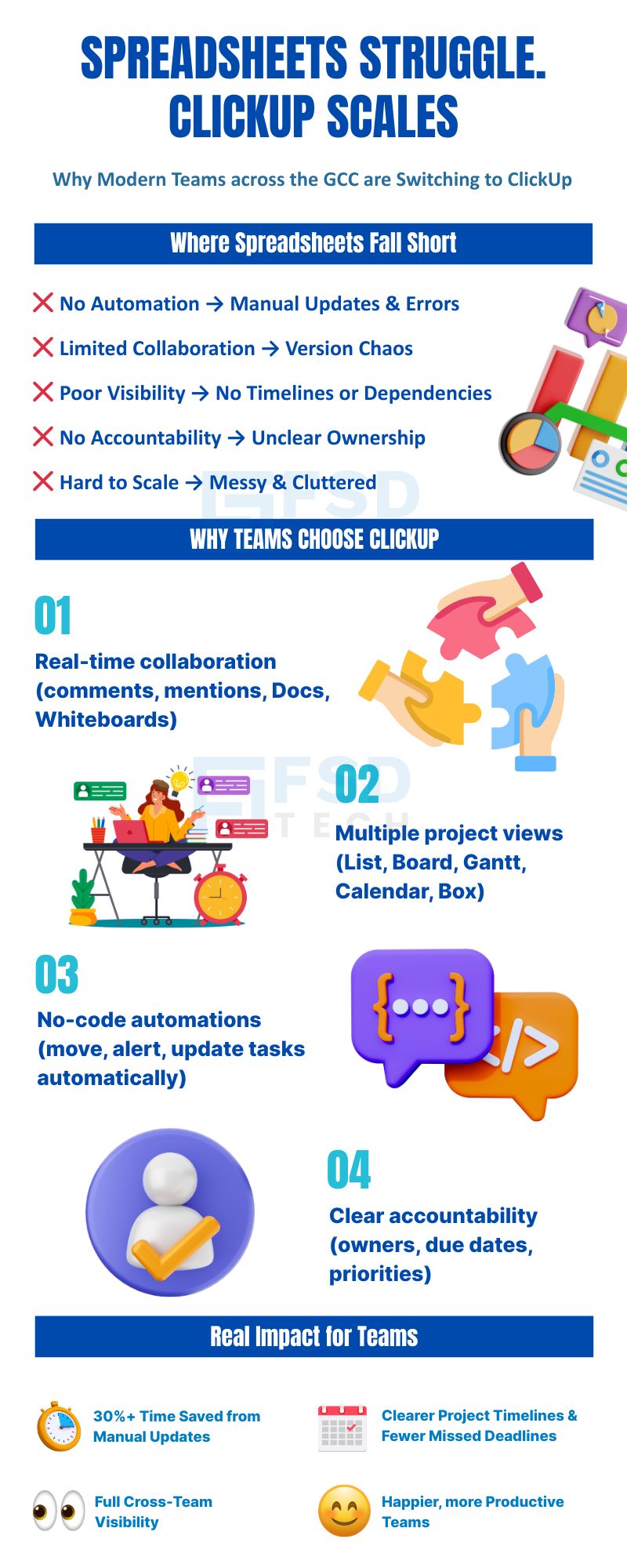
     

    Infographic comparing spreadsheets and ClickUp. Highlights spreadsheet challenges like no automation, limited collaboration, poor visibility, unclear ownership, and clutter. Showcases ClickUp benefits: real-time collaboration, multiple project views, no-code automation, clear accountability, and impact such as time saved, better timelines, and happier teams.

    FAQs

    What makes ClickUp better than spreadsheets for project tracking?

    ClickUp offers real-time collaboration, automation, dynamic views, task ownership, and reporting — features that spreadsheets simply don’t support natively.


    Can I import my Excel or Google Sheets into ClickUp?

    Yes, ClickUp allows you to import tasks and data from CSV files or integrate with Google Sheets using available tools.


    Is ClickUp suitable for small teams?

    Absolutely. ClickUp scales from individuals to large enterprises. Even small teams benefit from its structure and productivity enhancements.


    Will I still need spreadsheets after moving to ClickUp?

    You may still use spreadsheets for data analysis or finance, but ClickUp will handle your operational and collaborative workflows far better.


    Does ClickUp replace the need for other project management tools?

    Yes, ClickUp consolidates task management, docs, timelines, forms, and reporting — replacing the need for multiple separate tools.

    ClickUp vs. Spreadsheets: Why Teams Are Making the Switch for Project Tracking

    About The Author

    NHAIF NOUSHAD

    Nhaif is an AI Automation Engineer & Business Analyst focused on ClickUp, AI, Automation, and Workflow Optimization. He helps businesses shift from scattered processes to streamlined, data-driven operations. With hands-on expertise, he simplifies complex tools into clear, easy-to-apply solutions.

    Like This Story?

    Share it with friends!

    Subscribe to our newsletter!

    Atera

    (48)

    Cato Networks

    (118)

    ClickUp

    (70)

    FishOS

    (7)

    Miradore

    (21)

    PointGuard AI

    (9)

    Vembu

    (22)

    Xcitium

    (33)

    ZETA HRMS

    (76)

    Workflow Automation(8)

    Workforce Automation(1)

    AI Project Management(1)

    HR Data Automation(1)

    RMM(1)

    IT Workflow Automation(1)

    IT security(2)

    GCC compliance(4)

    Payroll Integration(2)

    IT support automation(3)

    procurement automation(1)

    lost device management(1)

    IT Management(5)

    IoT Security(2)

    Cato XOps(2)

    IT compliance(4)

    Workflow Management(1)

    Task Automation(1)

    OpenStack automation(1)

    Kubernetes lifecycle management(2)

    AI-powered cloud ops(1)

    SMB Security(8)

    Data Security(1)

    MDR (Managed Detection & Response)(4)

    Atera Integrations(2)

    MSP Automation(3)

    XDR Security(2)

    SMB Cyber Protection(1)

    Ransomware Defense(3)

    HR Tech Solutions(1)

    Zero Trust Network Access(3)

    Zero Trust Security(2)

    Endpoint Management(1)

    SaaS Security(1)

    Payroll Automation(5)

    IT Monitoring(2)

    Xcitium EDR SOC(15)

    Ransomware Protection GCC(1)

    M&A IT Integration(1)

    Network Consolidation UAE(1)

    MSSP for SMBs(1)

    Managed EDR FSD-Tech(1)

    Ransomware Protection(3)

    SMB Cybersecurity GCC(1)

    FSD-Tech MSSP(25)

    Antivirus vs EDR(1)

    Endpoint Security(1)

    Cybersecurity GCC(12)

    Data Breach Costs(1)

    Endpoint Protection(1)

    SMB Cybersecurity(8)

    Zero Dwell Containment(31)

    Managed Security Services(2)

    Xcitium EDR(30)

    Cloud Backup(1)

    Hybrid Backup(1)

    Backup & Recovery(1)

    pointguard ai(4)

    backup myths(1)

    vembu(9)

    SMB data protection(9)

    disaster recovery myths(1)

    Disaster Recovery(4)

    Vembu BDR Suite(19)

    GCCBusiness(1)

    DataProtection(1)

    Secure Access Service Edge(4)

    GCC HR software(18)

    Miradore EMM(15)

    Cato SASE(7)

    Cloud Security(8)

    Talent Development(1)

    AI Cybersecurity(12)

    AI Governance(4)

    AI Security(2)

    AI Compliance(2)

    AI Risk Management(1)

    GCC business security(1)

    GCC network integration(1)

    compliance automation(5)

    education security(1)

    GCC cybersecurity(2)

    BYOD security Dubai(8)

    App management UAE(1)

    Miradore EMM Premium+(5)

    MiddleEast(1)

    HealthcareSecurity(1)

    Team Collaboration(1)

    IT automation(12)

    Zscaler(1)

    SD-WAN(6)

    HR Integration(4)

    Cloud Networking(3)

    device management(9)

    VPN(1)

    RemoteWork(1)

    ZeroTrust(2)

    MPLS(1)

    Project Management(9)

    HR automation(16)

    share your thoughts

    Illustration depicting a structured ClickUp workspace architecture with multiple departments connected to a central system, highlighting scalable workflows, data visibility, security controls, and cross-team collaboration

    Structuring Multi-Department Workspaces in ClickUp for Scalable Team Management

    🕓 January 18, 2026

    Illustration showing ClickUp as a central work management platform connected to dashboards, automations, security controls, and cross-functional teams to improve workspace performance and productivity at scale.

    How to Boost ClickUp Workspace Speed and Efficiency for Large Teams

    🕓 January 17, 2026

    Illustration of ClickUp integrated with Google Workspace tools like Gmail, Google Drive, Calendar, and Sheets, enabling real-time collaboration, task automation, secure access, and centralized workflows.

    Integrating ClickUp with Google Workspace for Streamlined Collaboration

    🕓 January 15, 2026

    Decoded(85)

    Cyber Security(118)

    BCP / DR(22)

    Zeta HRMS(75)

    SASE(21)

    Automation(70)

    Next Gen IT-Infra(118)

    Monitoring & Management(69)

    ITSM(22)

    HRMS(21)

    Automation(24)