HomeNext Gen IT-InfraMonitoring & ManagementCyber SecurityBCP / DRAutomationDecoded
Next Gen IT-Infra
Cato’s SASE Supports Cybersecurity Skills Development

How Cato’s SASE Supports Cybersecurity Skills Development

🕓 April 8, 2025

How SASE Supports the Security Needs of SMBs

How SASE Supports the Security Needs of SMBs

🕓 February 9, 2025

Attack Surface Reduction with Cato’s SASE

Attack Surface Reduction with Cato’s SASE

🕓 February 10, 2025

SASE for Digital Transformation in UAE

SASE for Digital Transformation in UAE

🕓 February 8, 2025

Monitoring & Management
Understanding Atera’s SLA Management

Understanding Atera’s SLA Management

🕓 February 7, 2025

Cost-Performance Ratio: Finding the Right Balance in IT Management Networks

Cost-Performance Ratio: Finding the Right Balance in IT Management Networks

🕓 June 16, 2025

Customizing Atera with APIs

Customizing Atera with APIs

🕓 March 3, 2025

Power Up Your IT Team’s Strategy with Atera’s Communication Tools

Power Up Your IT Team’s Strategy with Atera’s Communication Tools

🕓 February 8, 2025

Cyber Security
Visual guide showing Cato CMA interface for configuring Internet and WAN firewall rules, enabling threat protection, and monitoring security events in real time for UAE IT teams.

Enforcing Firewall and Threat Protection Policies in Cato

🕓 July 25, 2025

Isometric illustration of professionals managing network performance, bandwidth analytics, and cloud-based optimization around the Cato Networks platform, symbolizing bandwidth control and QoS visibility.

Mastering Bandwidth Control and QoS in Cato Networks

🕓 July 26, 2025

Illustration of the Cato Cloud architecture showing its role in delivering SASE for secure, optimized global connectivity.

Understanding the Cato Cloud and Its Role in SASE

🕓 January 29, 2025

Global network backbone powering Cato SASE solution for secure, high-performance connectivity across regions.

Global Backbone: The Engine Powering Cato’s SASE Solution

🕓 January 30, 2025

BCP / DR
Illustration showing diverse business and IT professionals collaborating with cloud, backup, and security icons, representing Vembu use cases for SMBs, MSPs, and IT teams.

Who Uses Vembu? Real-World Use Cases for SMBs, MSPs & IT Teams

🕓 July 12, 2025

Graphic showcasing Vembu’s all-in-one backup and disaster recovery platform with icons for cloud, data protection, and business continuity for IT teams and SMBs.

What Is Vembu? A Deep Dive Into the All in One Backup & Disaster Recovery Platform

🕓 July 6, 2025

Illustration showing Vembu backup and disaster recovery system with cloud storage, server racks, analytics dashboard, and IT professionals managing data.

The Rising Cost of Data Loss: Why Backup Is No Longer Optional?

🕓 August 14, 2025

3D isometric illustration of cloud backup and data recovery infrastructure with laptop, data center stack, and digital business icons — FSD Tech

RPO & RTO: The Heart of Business Continuity

🕓 August 15, 2025

Automation
Cross-Functional Collaboration with ClickUp

Fostering Cross-Functional Collaboration with ClickUp for Multi-Departmental Projects

🕓 February 11, 2025

ClickUp Project Reporting

Revolutionizing Enterprise Reporting with ClickUp’s Advanced Analytics and Dashboards

🕓 June 16, 2025

ClickUp’s Design Collaboration and Asset Management Tools

Empowering Creative Teams with ClickUp’s Design Collaboration and Asset Management Tools

🕓 February 26, 2025

ClickUp Communication and Collaboration Tools

ClickUp Communication and Collaboration Tools: Empowering Remote Teams

🕓 March 12, 2025

Decoded
Multi-Factor Authentication (MFA)

Multi-Factor Authentication (MFA): All You Need to Know

🕓 December 7, 2025

L3 Switch

What Is an L3 Switch? L2 vs L3 & Why You Need Layer 3?

🕓 December 8, 2025

IPSec

IPSec Explained: Protocols, Modes, IKE & VPN Security

🕓 December 3, 2025

 Datagram Transport Layer Security (DTLS)

What is Datagram Transport Layer Security (DTLS)? How it works?

🕓 December 4, 2025

    Subscribe to our newsletter!

    About Us

    Follow Us

    Copyright © 2024 | Powered by 

    Cato SASE Architecture

    Inside Cato’s SASE Architecture: A Blueprint for Modern Security

    🕓 January 26, 2025

    Enterprise Data Security and Privacy with ClickUp

    Ensuring Enterprise Data Security and Privacy with ClickUp

    🕓 February 9, 2025

    DDoS protection SASE

    DDoS Protection and Cato’s Defence Mechanisms

    🕓 February 11, 2025

    Table of Contents

    Legal Teams & Case Management in ClickUp Workspaces

    NHAIF NOUSHAD
    December 25, 2025
    Comments
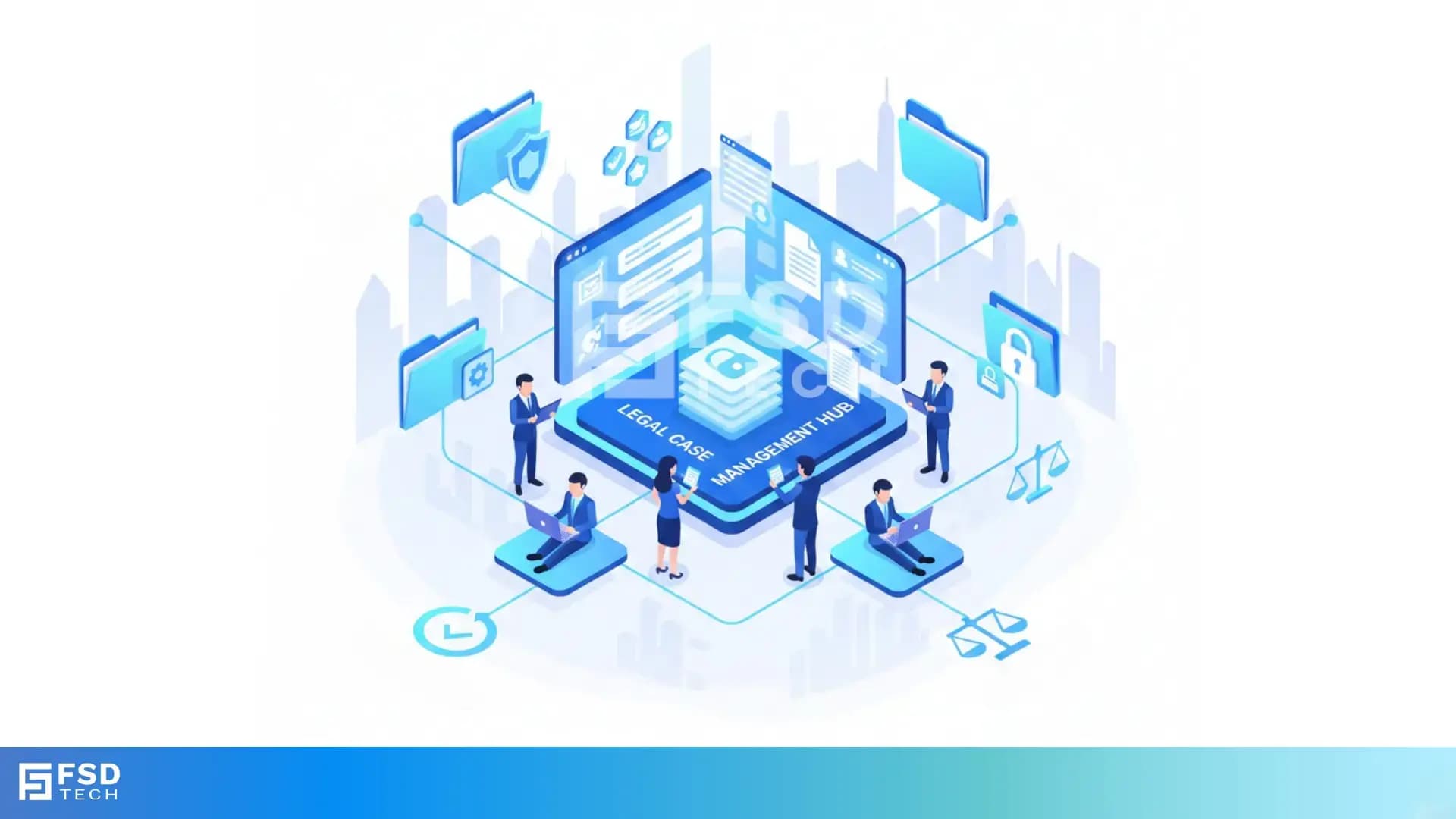
    Illustration showing the transition from manual spreadsheets and paper-based HR processes to the Zeta HRMS digital platform. Depicts HR teams moving data into a centralized, automated HR system with modules for payroll, attendance, compliance, and employee management, highlighting improved efficiency and collaboration. FSD Tech branding visible at the bottom.

    Key Takeaways

    • Centralize all legal operations:  ClickUp enables UAE legal teams to manage case files, client communications, deadlines, and documents in a single, secure workspace—streamlining workflows for law firms and in-house departments.
    • Enhance collaboration and accountability:  Built-in messaging, comments, and task assignments ensure every team member is aligned and all client communications are logged, reducing risk and improving client service.
    • Automate deadlines and approvals:  ClickUp’s automation tools help legal operations managers set up recurring tasks, reminders, and approval workflows, minimizing manual follow-up and ensuring compliance with court schedules.
    • Maintain rigorous document control:  Versioning, proofing, and audit trails support document integrity, compliance, and reduce the risk of outdated information in high-stakes legal matters.
    • Uphold data security and regional compliance:  Role-based permissions, secure logins, and audit features help UAE legal teams protect sensitive data and meet local data protection regulations.
    • Drive efficiency with analytics and billing:  Time tracking, billing integrations, and dashboards provide actionable insights into case progress and resource allocation, supporting continuous improvement in legal operations.


    Introduction

    The digital transformation of legal operations in the UAE is accelerating. Law firms and legal departments face mounting caseloads, complex regulatory requirements, and the imperative to protect sensitive client data. In this environment, robust digital case management is no longer optional—it’s essential. ClickUp has emerged as a leading platform for legal operations managers and consultants building secure, efficient, and collaborative case management systems tailored to the needs of UAE-based legal teams.

    This guide explores how ClickUp empowers legal professionals to centralize case management, streamline communication, automate workflows, and maintain compliance—all while driving operational excellence.


    Centralizing Case Management in ClickUp

    Setting Up Your Legal Workspace

    Legal work involves managing a vast array of documents, deadlines, and communications. ClickUp’s centralized workspace brings clarity and control to this complexity. Legal teams can create dedicated folders or projects for each case, ensuring all related files, notes, and tasks are stored in one accessible location.

    Custom fields capture every relevant detail—client contact information, court dates, case types, and billing status. Tags allow for easy categorization (e.g., “Civil Litigation,” “Real Estate,” “Family Law”), while custom views such as Kanban boards or timelines provide instant visibility into case progress.

    Custom Fields, Tags, and Folders for UAE Law Firms

    UAE law firms benefit from ClickUp’s flexible organizational tools:

    •  Custom fields: Track court deadlines, matter types, client status, and billing details.
    •  Tags: Instantly filter cases by jurisdiction, urgency, or legal area.
    •  Folders: Separate cases by client, matter type, or department for streamlined access.

    This structure supports both boutique practices and large, multi-practice firms, ensuring every detail is captured and retrievable.

    Real-World Example: Organizing a Multi-Party Litigation

    A Dubai-based law firm represents several clients in a complex litigation. Each party’s documents are stored in separate ClickUp folders, tags track key evidence, and custom fields log court deadlines. Automated reminders ensure filings are never late, and every team member has a clear view of their responsibilities.


    Streamlining Client Communication and Collaboration

    Centralized Communication Channels

    Effective legal service hinges on clear, timely communication. ClickUp centralizes all client interactions—task comments, built-in messaging, and email integrations—creating a complete, searchable record of communications. This reduces the risk of missed messages or lost context, especially in fast-moving or multi-party matters.

    Assigning Tasks and Managing Team Responsibilities

    Legal work is collaborative by nature. ClickUp enables managers to assign tasks, use checklists and subtasks for complex processes, and set deadlines for each action item. This clarity of responsibility reduces the risk of missed steps and ensures everyone is aligned.

    Example: Coordinating Client Updates in a Corporate Transaction

    An in-house legal team at a UAE technology company manages a major acquisition in ClickUp. All client feedback is logged as comments on relevant tasks, and automated reminders prompt follow-ups. The result: seamless collaboration, a clear audit trail, and improved client satisfaction.


    Document Management and Version Control

    Uploading and Sharing Legal Documents

    ClickUp allows legal teams to upload, store, and collaborate on documents directly within each case file. Attachments can be added to tasks, and notes can be nested for detailed case histories. This eliminates the chaos of scattered email attachments and lost drafts.

    Proofing, Commenting, and Version History

    ClickUp’s proofing and commenting features enable lawyers to review contracts, add feedback, and control the master copy without risking overwriting important drafts. Version history and audit trails ensure every change is tracked, supporting compliance and reducing the risk of errors.

    Example: Managing Contract Drafts and Approvals

    A legal department handling a high-value merger uploads contract drafts to ClickUp tasks. Team members use proofing to add comments and suggest changes, while version history keeps a record of every revision. Final approvals are logged, creating a clear, defensible audit trail.


    Automation: Deadlines, Approvals, and Workflows

    Automating Recurring Tasks and Reminders

    Manual tracking of deadlines is risky in high-stakes legal work. ClickUp’s automation tools allow legal operations managers to set up recurring tasks, reminders, and notifications for every critical date—from court filings to client meetings. This ensures nothing falls through the cracks.

    Approval Workflows for Legal Documents

    Custom workflows can be built to route documents for review and approval, ensuring that nothing moves forward without the necessary sign-offs. Automated status updates keep everyone informed of progress, reducing bottlenecks and delays.

    Example: Automated Deadline Tracking for Court Filings

    A UAE law firm configures ClickUp to automatically create tasks for each court deadline, assign them to the responsible attorney, and send reminders as the date approaches. Missed deadlines become a thing of the past, freeing the team to focus on legal strategy.


    Ensuring Data Security and Compliance in the UAE

    Role-Based Permissions and Access Controls

    Data security is non-negotiable for legal teams, especially in the UAE where data protection laws are stringent. ClickUp supports role-based permissions, allowing you to control who can view, edit, or share sensitive case files. User authentication and secure logins add another layer of protection.

    Data Backup, Audit Trails, and Compliance Features

    ClickUp’s auto-backup and audit features ensure all data is securely stored and recoverable in the event of an incident. Audit trails log every action, supporting compliance with UAE regulations and providing peace of mind for clients.

    Example: Protecting Sensitive Data in High-Profile Cases

    A legal department handling a high-profile government contract uses ClickUp’s permissions to restrict access to confidential documents. Only authorized team members can view or edit files, and every action is logged for compliance.


    Time Tracking, Billing, and Analytics

    Logging Billable Hours and Generating Invoices

    ClickUp’s time tracking features allow lawyers to log billable hours directly within each case file. Time entries can be marked as billable, notes added for context, and logs exported for invoicing. This streamlines billing and ensures accuracy.

    Using Dashboards for Performance Monitoring

    Dashboards and reporting tools provide real-time insights into case progress, team workload, and resource allocation. Legal operations managers can identify bottlenecks, allocate resources more effectively, and continuously improve workflows.

    Example: Analyzing Case Progress and Resource Allocation

    A UAE law firm uses ClickUp dashboards to monitor the status of all open cases, track time spent on each matter, and identify areas for improvement. This data-driven approach leads to better client outcomes and more efficient operations.


    Getting Started: Best Practices for UAE Legal Teams

    Template Recommendations

    ClickUp offers legal-specific templates for case tracking, client management, and document review. These templates provide a head start, with pre-built fields, statuses, and views tailored to legal workflows.

    Onboarding and Training Tips

    • Start with a pilot project to familiarize your team with ClickUp’s features.
    • Customize templates to match your firm’s unique needs and regulatory requirements.
    • Provide training sessions and create internal guides for best practices.
    • Use ClickUp’s support resources, including video demos and live chat, to resolve any issues quickly.


    Build secure, compliant legal workflows with ClickUp.→ Schedule a Free no-obligation call with our ClickUp specialists.
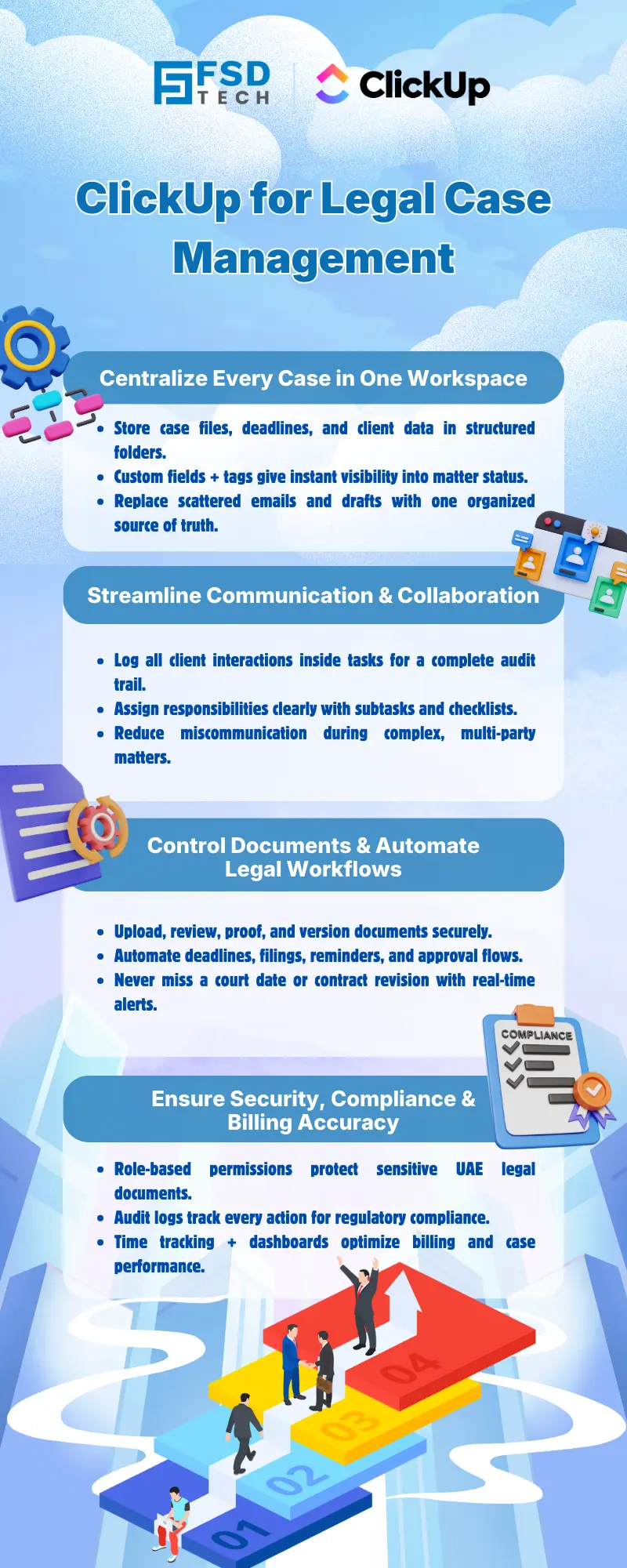
     

    Illustration showing the transition from manual spreadsheets and paper-based HR processes to the Zeta HRMS digital platform. Depicts HR teams moving data into a centralized, automated HR system with modules for payroll, attendance, compliance, and employee management, highlighting improved efficiency and collaboration. FSD Tech branding visible at the bottom.


    FAQ

    Is ClickUp compliant with UAE data protection laws?

    ClickUp offers robust security features such as user authentication, role-based permissions, and audit trails, supporting compliance with UAE data protection requirements. This makes it a suitable choice for legal teams operating within the region’s regulatory framework.


    Can ClickUp handle Arabic-language documents and communications?

    Yes, ClickUp supports file uploads and communications in multiple languages, including Arabic. This capability is particularly beneficial for UAE-based law firms and legal departments working with diverse clients and documentation.


    How does ClickUp help prevent missed court deadlines?

    ClickUp’s automated reminders, recurring tasks, and calendar integrations ensure that all key dates and deadlines are tracked and notified to relevant team members. This minimizes the risk of missed filings or appointments, which is critical for legal compliance.


    What about document version control?

    ClickUp’s proofing, commenting, and version history features help legal teams manage document changes and maintain a clear audit trail. This is essential for ensuring that only the latest, approved versions of documents are used in legal proceedings.


    Can ClickUp integrate with other legal or billing software?

    ClickUp offers integrations with popular billing, CRM, and document management tools, streamlining legal operations and reducing the need for manual data entry. This flexibility supports a more connected legal tech ecosystem.


    How does ClickUp support secure document sharing within a legal team?

    ClickUp’s role-based permissions and secure sharing options allow legal teams to control who can view, edit, or download sensitive documents. This ensures that confidential information remains protected and only accessible to authorized personnel.


    Is ClickUp suitable for both small law firms and large legal departments in the UAE?

    Yes, ClickUp’s scalable architecture and customizable features make it suitable for both boutique law practices and large, multi-practice legal departments. UAE-based teams can tailor the platform to their specific size and workflow requirements.


    How can ClickUp help with legal workflow automation in the UAE context?

    ClickUp’s automation tools enable legal operations managers to create custom workflows for approvals, recurring tasks, and deadline reminders. This reduces manual work and ensures compliance with local legal processes and court schedules.


    What audit features does ClickUp provide for legal compliance?

    ClickUp maintains detailed audit trails of all actions taken within the platform, including document edits, task updates, and user access. This supports legal teams in meeting UAE regulatory requirements and provides transparency for internal and external audits.


    Can ClickUp be used for managing multi-party or cross-jurisdictional cases?

    Absolutely. ClickUp’s flexible folder and tagging system allows legal teams to organize cases by party, jurisdiction, or matter type. This is particularly useful for UAE law firms handling complex, multi-party litigation or cross-border transactions.


    How does ClickUp facilitate client communication tracking?

    All client communications—whether via comments, emails, or messages—can be logged and tracked within ClickUp. This creates a comprehensive record of interactions, which is essential for client service, compliance, and dispute resolution.


    What are the benefits of ClickUp’s dashboards for legal operations managers?

    ClickUp’s dashboards provide real-time insights into case progress, team workload, and resource allocation. Legal operations managers in the UAE can use these analytics to optimize workflows, identify bottlenecks, and improve overall efficiency.


    How does ClickUp ensure data integrity and disaster recovery for legal teams?

    ClickUp’s auto-backup features and secure cloud infrastructure help ensure that all data is protected against loss or corruption. This is critical for legal teams who must maintain the integrity of sensitive case files and client information.


    Are there ClickUp templates specifically designed for legal case management?

    Yes, ClickUp offers legal-specific templates that include pre-built fields, statuses, and workflows for case tracking, client management, and document review. These templates help UAE legal teams get started quickly and standardize their processes.


    What onboarding resources does ClickUp provide for legal teams?

    ClickUp provides a range of onboarding resources, including video tutorials, live chat support, and detailed documentation. Legal teams in the UAE can leverage these resources to train staff and ensure a smooth transition to digital case management.


    How does ClickUp support time tracking and billing for law firms?

    ClickUp’s built-in time tracking allows lawyers to log billable hours directly within each case. Time logs can be exported for invoicing, and billing integrations streamline financial operations for UAE law firms seeking to improve accuracy and efficiency.


    Can ClickUp help legal teams in the UAE with compliance reporting?

    Yes, ClickUp’s reporting and audit trail features support compliance reporting by providing detailed records of all actions, document changes, and communications. This helps legal teams demonstrate adherence to UAE regulations and internal policies.


    How does ClickUp compare to traditional legal case management tools?

    ClickUp offers a modern, cloud-based alternative to traditional legal case management systems, with greater flexibility, automation, and integration capabilities. UAE law firms benefit from streamlined workflows, enhanced security, and improved collaboration.


    What steps should UAE legal teams take to implement ClickUp successfully?

    Start with a pilot project, customize legal templates, provide comprehensive training, and leverage ClickUp’s support resources. Regularly review and optimize workflows to ensure the platform continues to meet evolving legal and regulatory needs.


    Is ClickUp a good fit for legal consultants advising UAE-based clients?

    Yes, ClickUp’s customizable features, robust security, and regional compliance make it an excellent choice for legal consultants building digital case management systems for UAE-based clients. The platform’s flexibility supports a wide range of legal practices and client requirements.

    Legal Teams & Case Management in ClickUp Workspaces

    About The Author

    NHAIF NOUSHAD

    Nhaif is an AI Automation Engineer & Business Analyst focused on ClickUp, AI, Automation, and Workflow Optimization. He helps businesses shift from scattered processes to streamlined, data-driven operations. With hands-on expertise, he simplifies complex tools into clear, easy-to-apply solutions.

    Like This Story?

    Share it with friends!

    Subscribe to our newsletter!

    Atera

    (48)

    Cato Networks

    (111)

    ClickUp

    (63)

    FishOS

    (7)

    Miradore

    (21)

    PointGuard AI

    (9)

    Vembu

    (22)

    Xcitium

    (33)

    ZETA HRMS

    (66)

    Workflow Automation(4)

    Workforce Automation(1)

    AI Project Management(1)

    HR Data Automation(1)

    RMM(1)

    IT Workflow Automation(1)

    GCC compliance(4)

    IT security(2)

    Payroll Integration(2)

    IT support automation(2)

    procurement automation(1)

    lost device management(1)

    IT Management(5)

    IoT Security(2)

    Cato XOps(2)

    IT compliance(4)

    Task Automation(1)

    Workflow Management(1)

    OpenStack automation(1)

    AI-powered cloud ops(1)

    Kubernetes lifecycle management(2)

    SMB Security(8)

    Data Security(1)

    MDR (Managed Detection & Response)(4)

    MSP Automation(2)

    Atera Integrations(2)

    XDR Security(2)

    SMB Cyber Protection(1)

    Ransomware Defense(3)

    HR Tech Solutions(1)

    Zero Trust Network Access(3)

    Zero Trust Security(2)

    Endpoint Management(1)

    SaaS Security(1)

    Payroll Automation(5)

    IT Monitoring(2)

    Xcitium EDR SOC(15)

    Ransomware Protection GCC(1)

    M&A IT Integration(1)

    Network Consolidation UAE(1)

    MSSP for SMBs(1)

    Antivirus vs EDR(1)

    Managed EDR FSD-Tech(1)

    SMB Cybersecurity GCC(1)

    FSD-Tech MSSP(25)

    Ransomware Protection(3)

    Cybersecurity GCC(12)

    Endpoint Security(1)

    Data Breach Costs(1)

    Endpoint Protection(1)

    Managed Security Services(2)

    Xcitium EDR(30)

    SMB Cybersecurity(8)

    Zero Dwell Containment(31)

    Cloud Backup(1)

    Hybrid Backup(1)

    Backup & Recovery(1)

    pointguard ai(4)

    backup myths(1)

    vembu(9)

    disaster recovery myths(1)

    SMB data protection(9)

    Disaster Recovery(4)

    Vembu BDR Suite(19)

    GCCBusiness(1)

    DataProtection(1)

    Secure Access Service Edge(4)

    GCC HR software(14)

    Miradore EMM(15)

    Cato SASE(7)

    Cloud Security(8)

    Talent Development(1)

    AI Cybersecurity(12)

    AI Security(2)

    AI Risk Management(1)

    AI Governance(4)

    AI Compliance(2)

    GCC business security(1)

    GCC network integration(1)

    compliance automation(4)

    GCC cybersecurity(2)

    education security(1)

    App management UAE(1)

    Miradore EMM Premium+(5)

    BYOD security Dubai(8)

    HealthcareSecurity(1)

    MiddleEast(1)

    Team Collaboration(1)

    IT automation(9)

    Zscaler(1)

    SD-WAN(6)

    HR Integration(4)

    Cloud Networking(3)

    device management(9)

    RemoteWork(1)

    ZeroTrust(2)

    VPN(1)

    MPLS(1)

    Project Management(9)

    HR automation(16)

    share your thoughts

    Illustration showing the transition from manual spreadsheets and paper-based HR processes to the Zeta HRMS digital platform. Depicts HR teams moving data into a centralized, automated HR system with modules for payroll, attendance, compliance, and employee management, highlighting improved efficiency and collaboration. FSD Tech branding visible at the bottom.

    Legal Teams & Case Management in ClickUp Workspaces

    🕓 December 25, 2025

    Illustration showing the transition from manual spreadsheets and paper-based HR processes to the Zeta HRMS digital platform. Depicts HR teams moving data into a centralized, automated HR system with modules for payroll, attendance, compliance, and employee management, highlighting improved efficiency and collaboration. FSD Tech branding visible at the bottom.

    ClickUp for Healthcare Operations & Patient Workflows

    🕓 December 22, 2025

    Illustration of a centralized financial audit and control hub showing interconnected digital panels for VAT reporting, documents, approvals, dashboards, and integrations. Depicts finance teams collaborating around a secure platform that manages audits, compliance data, accounting systems, and financial workflows. Represents automated audit management and financial oversight. FSD Tech branding visible at the bottom.

    Financial and Audit Workflow Tracking in ClickUp

    🕓 December 18, 2025

    Decoded(35)

    Cyber Security(112)

    BCP / DR(22)

    Zeta HRMS(65)

    SASE(21)

    Automation(63)

    Next Gen IT-Infra(111)

    Monitoring & Management(69)

    ITSM(22)

    HRMS(21)

    Automation(24)