HomeNext Gen IT-InfraMonitoring & ManagementCyber SecurityBCP / DRAutomationDecoded
Next Gen IT-Infra
Cato’s SASE Supports Cybersecurity Skills Development

How Cato’s SASE Supports Cybersecurity Skills Development

🕓 April 8, 2025

How SASE Supports the Security Needs of SMBs

How SASE Supports the Security Needs of SMBs

🕓 February 9, 2025

Attack Surface Reduction with Cato’s SASE

Attack Surface Reduction with Cato’s SASE

🕓 February 10, 2025

SASE for Digital Transformation in UAE

SASE for Digital Transformation in UAE

🕓 February 8, 2025

Monitoring & Management
Understanding Atera’s SLA Management

Understanding Atera’s SLA Management

🕓 February 7, 2025

Cost-Performance Ratio: Finding the Right Balance in IT Management Networks

Cost-Performance Ratio: Finding the Right Balance in IT Management Networks

🕓 June 16, 2025

Customizing Atera with APIs

Customizing Atera with APIs

🕓 March 3, 2025

Power Up Your IT Team’s Strategy with Atera’s Communication Tools

Power Up Your IT Team’s Strategy with Atera’s Communication Tools

🕓 February 8, 2025

Cyber Security
Visual guide showing Cato CMA interface for configuring Internet and WAN firewall rules, enabling threat protection, and monitoring security events in real time for UAE IT teams.

Enforcing Firewall and Threat Protection Policies in Cato

🕓 July 25, 2025

Isometric illustration of professionals managing network performance, bandwidth analytics, and cloud-based optimization around the Cato Networks platform, symbolizing bandwidth control and QoS visibility.

Mastering Bandwidth Control and QoS in Cato Networks

🕓 July 26, 2025

Illustration of the Cato Cloud architecture showing its role in delivering SASE for secure, optimized global connectivity.

Understanding the Cato Cloud and Its Role in SASE

🕓 January 29, 2025

Global network backbone powering Cato SASE solution for secure, high-performance connectivity across regions.

Global Backbone: The Engine Powering Cato’s SASE Solution

🕓 January 30, 2025

BCP / DR
Illustration showing diverse business and IT professionals collaborating with cloud, backup, and security icons, representing Vembu use cases for SMBs, MSPs, and IT teams.

Who Uses Vembu? Real-World Use Cases for SMBs, MSPs & IT Teams

🕓 July 12, 2025

Graphic showcasing Vembu’s all-in-one backup and disaster recovery platform with icons for cloud, data protection, and business continuity for IT teams and SMBs.

What Is Vembu? A Deep Dive Into the All in One Backup & Disaster Recovery Platform

🕓 July 6, 2025

Illustration showing Vembu backup and disaster recovery system with cloud storage, server racks, analytics dashboard, and IT professionals managing data.

The Rising Cost of Data Loss: Why Backup Is No Longer Optional?

🕓 August 14, 2025

3D isometric illustration of cloud backup and data recovery infrastructure with laptop, data center stack, and digital business icons — FSD Tech

RPO & RTO: The Heart of Business Continuity

🕓 August 15, 2025

Automation
Cross-Functional Collaboration with ClickUp

Fostering Cross-Functional Collaboration with ClickUp for Multi-Departmental Projects

🕓 February 11, 2025

ClickUp Project Reporting

Revolutionizing Enterprise Reporting with ClickUp’s Advanced Analytics and Dashboards

🕓 June 16, 2025

ClickUp’s Design Collaboration and Asset Management Tools

Empowering Creative Teams with ClickUp’s Design Collaboration and Asset Management Tools

🕓 February 26, 2025

ClickUp Communication and Collaboration Tools

ClickUp Communication and Collaboration Tools: Empowering Remote Teams

🕓 March 12, 2025

Decoded
Multi-Factor Authentication (MFA)

Multi-Factor Authentication (MFA): All You Need to Know

🕓 December 7, 2025

L3 Switch

What Is an L3 Switch? L2 vs L3 & Why You Need Layer 3?

🕓 December 8, 2025

IPSec

IPSec Explained: Protocols, Modes, IKE & VPN Security

🕓 December 3, 2025

 Datagram Transport Layer Security (DTLS)

What is Datagram Transport Layer Security (DTLS)? How it works?

🕓 December 4, 2025

    Subscribe to our newsletter!

    About Us

    Follow Us

    Copyright © 2024 | Powered by 

    Cato SASE Architecture

    Inside Cato’s SASE Architecture: A Blueprint for Modern Security

    🕓 January 26, 2025

    Enterprise Data Security and Privacy with ClickUp

    Ensuring Enterprise Data Security and Privacy with ClickUp

    🕓 February 9, 2025

    DDoS protection SASE

    DDoS Protection and Cato’s Defence Mechanisms

    🕓 February 11, 2025

    Table of Contents

    ClickUp API: Automation, Integration & Custom Project Management

    Surbhi Suhane
    November 15, 2025
    Comments
    Clickup API

    What is ClickUp API?

    ClickUp API is a powerful tool that lets developers and teams expand the features of the ClickUp project management platform. It offers programmatic access to tasks, lists, folders, and more. This opens up many options for automation and custom integrations, making project workflows more efficient and personalized.


    The ClickUp API gives developers detailed control. They can manage projects, lists, tasks, and more directly within the platform while automating workflows through various features. Whether you are building custom integrations or streamlining repetitive tasks, this developer-focused API creates countless opportunities to improve productivity.

    Did You Know?

    With nearly 2 million teams relying on the platform, ClickUp's worldwide user count exceeds 20 million.

    What is ClickUp API?

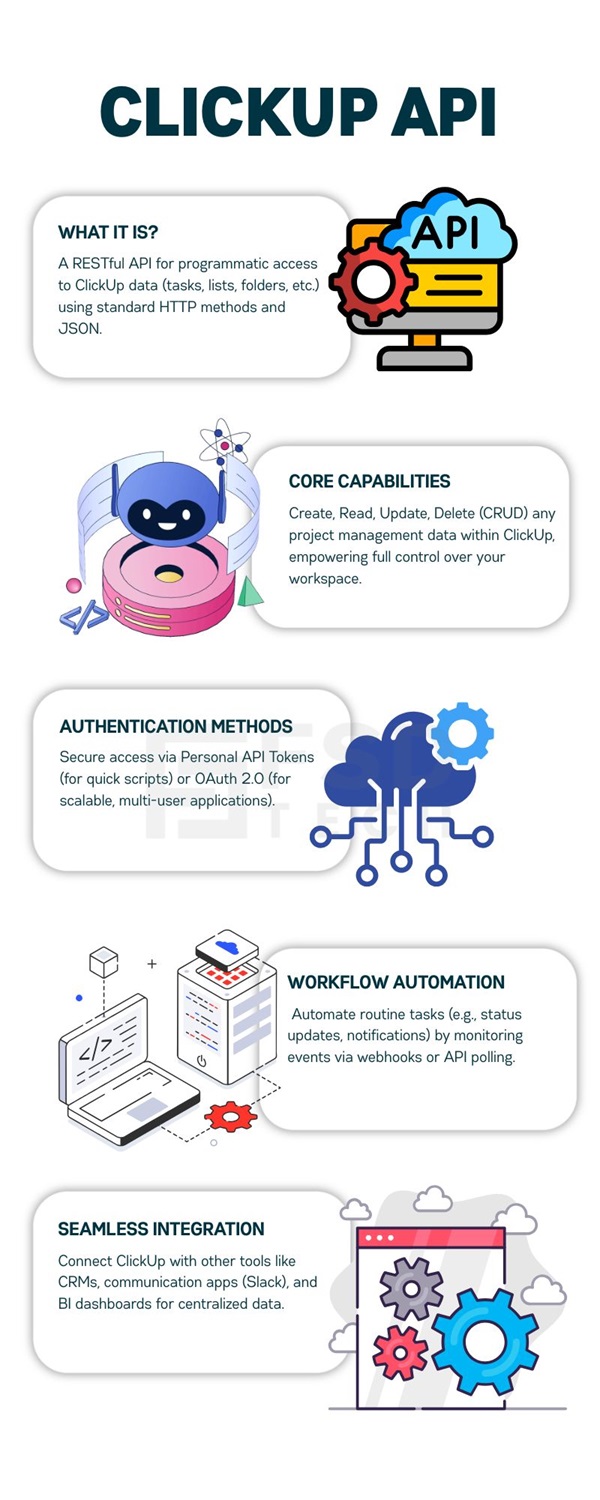
    The ClickUp API is a RESTful interface designed for interacting with ClickUp’s main resources. It allows users to create, read, update, and delete project management data using standard HTTP methods like GET, POST, PUT, and DELETE. It communicates via JSON, making it accessible for many programming languages.


    The API supports managing tasks, lists, folders, spaces, users, time tracking, comments, attachments, and custom fields. It has rate limits to ensure fair usage, which requires good error handling and thoughtful call design.

    Quick Go Through

    FeatureDescription
    InterfaceRESTful
    CommunicationStandard HTTP Methods (GET, POST, PUT, DELETE)
    Data FormatJSON (accessible by all major programming languages)
    PurposeCreate, Read, Update, and Delete project management data.
    Key LimitationRate Limits for fair usage (requires error handling).


    Also Read:

    Managing Internal IT Requests and Approvals in ClickUp Without a Ticketing System
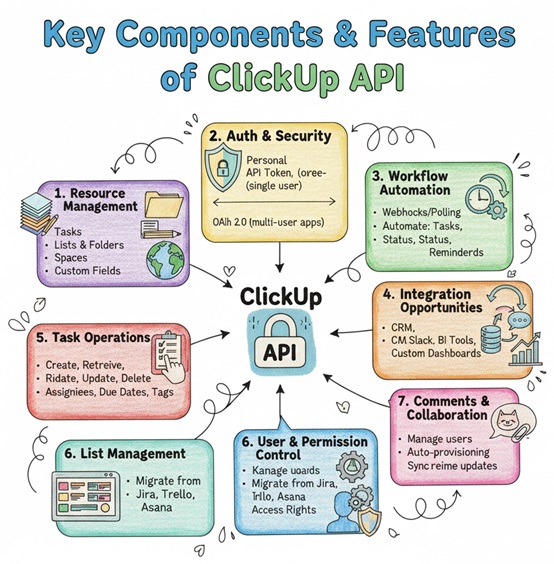
     

    Key Components and Features of ClickUp API

    ClickUp API

    1. Resource Management

    ClickUp API enables detailed manipulation of

    • Tasks: Create new tasks, update statuses, assign users, set priorities, and add comments or attachments.

    • Lists and Folders: Organize tasks in lists inside folders for structured project layouts.

    • Spaces: Manage workspace divisions that contain folders and lists for clear team boundaries.

    • Custom Fields: Access and modify user-defined fields on tasks for tracking specialized workflows.

    2. Authentication and Security

    Two authentication methods ensure secure access:

    • Personal API Token: Easier to obtain and linked to a user’s ClickUp account, ideal for automation scripts or personal integrations.

    • OAuth 2.0: Best for multi-user apps or public applications, offering secure, delegated access with proper authorization flow, including client IDs, secrets, and redirect URIs.

    Proper token management is essential for maintaining data security and controlling access permissions.

    3. Workflow Automation

    By monitoring changes through webhooks or polling APIs for events, developers can automate task creation, status updates, reminders, and notifications. For example, when a task is marked "Done," the API can automatically trigger following processes without human intervention.

    4. Integration Opportunities

    The ClickUp API is often integrated with CRM systems, communication platforms like Slack, BI tools, and custom dashboards. This allows teams to centralize project data and improve visibility.

    5. Task Operations

    You can create, retrieve, update, and delete tasks programmatically. Specify assignees, due dates, priorities, tags, and custom field values. This flexibility allows you to replicate any action users perform manually, but on a larger scale.

    6. List Management

    Lists in ClickUp represent task lists and Kanban boards. The API enables integration of list structures and task organization from other tools. This makes migrating from platforms like Jira, Trello, or Asana quite easy.

    7. User and Permission Control

    The ClickUp API allows you to manage users and permissions programmatically. This allows for automatic provisioning based on HR system data or role changes, keeping access rights updated without manual work.

    8. Comments and Collaboration

    The Comments API keeps discussions in sync across platforms. For instance, GitHub pull request comments can show up directly on related ClickUp tasks, or Slack conversations can link to specific project items. All updates occur in real time.


    How to Get Started with ClickUp API?

    1. Generate Personal API Token: This can be quickly done from ClickUp user settings to start experimenting with the API.

    2. Register an App: For OAuth-based integration, register your application in ClickUp to get client credentials.

    3. Understand Endpoints: Examine the comprehensive documentation to learn the endpoints’ URL structure, required parameters, and supported HTTP methods.

    4. Respect Rate Limits: Implement retry and backoff strategies to handle HTTP 429 responses indicating rate limiting.

    5. Test APIs: Use tools like Postman, Insomnia, or curl for initial tests to understand request and response patterns.


    Also Read:

    Using ClickUp Docs to Replace Word/Google Docs for Real-Time Team Writing


    Practical Use Cases of ClickUp API

    Automating Task Creation

    Automatically create tasks based on external triggers like new support tickets or sales inquiries. Populate tasks with detailed information and assign priorities or tags programmatically.


    Synchronizing Data

    Keep ClickUp data updated with financial systems, customer databases, or other project tools. This bidirectional flow ensures consistency and reduces manual errors.


    Building Custom Dashboards

    Use API data endpoints to fetch task status, deadlines, and user productivity metrics. Create custom dashboards that offer insights beyond native ClickUp reports.


    Creating Notifications and Alerts

    Develop integrations that send real-time alerts to team chat apps whenever tasks are assigned or deadlines approach. This improves response time and collaboration.

    Best Practices for Efficient API Usage

    • Use Webhooks Over Polling: Webhooks transmit real-time event data, reducing unnecessary API calls and improving efficiency.

    • Cache Data Locally: When possible, store API responses locally to limit call frequency and improve application responsiveness.

    • Handle Errors Gracefully: Differentiate between client errors (HTTP 400 series) and server errors (HTTP 500 series). Retry or report them accordingly.

    • Secure Credentials: Avoid hardcoding tokens or secrets; use environment variables and secure vaults in production.

    Testing Your API Implementation

    ClickUp offers a simple way to test the API directly in your web browser. You can experiment with various endpoints without writing code.


    The interactive documentation includes a "Try It" feature on each endpoint page. Switch between live ClickUp data and mock server responses.


    This browser-based testing environment helps you learn request structures and response formats before writing production code. Additionally, a Postman collection is available for viewing and testing all ClickUp API endpoints, providing a structured way to explore the API..

    Common Challenges and Solutions

    • Rate Limits: Create retry mechanisms with exponential backoff and respect limits for each user or space.

    • Complex Data Structures: Break down large responses with pagination and request only the fields you need.

    • Authentication Management: Regularly rotate personal tokens and use OAuth for scalable, secure applications.

    Final Thoughts

    The ClickUp API is a detailed and flexible interface that makes project management automation and integration accessible to developers and teams of all sizes. By understanding its core features, authentication methods, practical use cases, and best practices, you can build secure, efficient applications or workflows.


    Whether automating routine tasks or integrating ClickUp with your enterprise systems, mastering the API boosts productivity and project transparency. Start today by exploring the documentation and trying out simple requests before creating more complex automated experiences tailored to your needs.

    Ready to automate your team training with ClickUp? Schedule a no-obligation call with Our Expert Now.
     

    ClickUp API

    Frequently Asked Questions (FAQs)

    Q: Which programming languages can use the ClickUp API?

    Any language capable of making HTTP requests and parsing JSON can work with the ClickUp API, including Python, JavaScript, Java, Ruby, and PHP.

    Q: Is the API available for free users?

    Yes, but with different rate limits and possible feature restrictions depending on the ClickUp subscription plan.

    Q: Can I automate task updates with the API?

    Yes, the API supports changing task status, assignees, due dates, and more on demand.

    Q: How do webhooks work with ClickUp API?

    Webhooks send HTTP POST payloads to your custom URL endpoints when specific events occur, such as task creation or updates, enabling easy automation triggers.

    Q: Where can I find detailed API documentation?

    The official ClickUp developer portal (developer.clickup.com) offers comprehensive endpoint references, examples, and best practices.


    ClickUp API: Automation, Integration & Custom Project Management

    About The Author

    Surbhi Suhane

    Surbhi Suhane is an experienced digital marketing and content specialist with deep expertise in Getting Things Done (GTD) methodology and process automation. Adept at optimizing workflows and leveraging automation tools to enhance productivity and deliver impactful results in content creation and SEO optimization.

    Like This Story?

    Share it with friends!

    Subscribe to our newsletter!

    Atera

    (48)

    Cato Networks

    (111)

    ClickUp

    (65)

    FishOS

    (7)

    Miradore

    (21)

    PointGuard AI

    (9)

    Vembu

    (22)

    Xcitium

    (33)

    ZETA HRMS

    (67)

    Workflow Automation(5)

    Workforce Automation(1)

    AI Project Management(1)

    HR Data Automation(1)

    RMM(1)

    IT Workflow Automation(1)

    IT security(2)

    GCC compliance(4)

    Payroll Integration(2)

    IT support automation(3)

    procurement automation(1)

    lost device management(1)

    IT Management(5)

    IoT Security(2)

    Cato XOps(2)

    IT compliance(4)

    Task Automation(1)

    Workflow Management(1)

    OpenStack automation(1)

    Kubernetes lifecycle management(2)

    AI-powered cloud ops(1)

    SMB Security(8)

    Data Security(1)

    MDR (Managed Detection & Response)(4)

    Atera Integrations(2)

    MSP Automation(3)

    XDR Security(2)

    SMB Cyber Protection(1)

    Ransomware Defense(3)

    HR Tech Solutions(1)

    Zero Trust Network Access(3)

    Zero Trust Security(2)

    Endpoint Management(1)

    SaaS Security(1)

    Payroll Automation(5)

    IT Monitoring(2)

    Xcitium EDR SOC(15)

    Ransomware Protection GCC(1)

    M&A IT Integration(1)

    Network Consolidation UAE(1)

    MSSP for SMBs(1)

    FSD-Tech MSSP(25)

    SMB Cybersecurity GCC(1)

    Managed EDR FSD-Tech(1)

    Ransomware Protection(3)

    Antivirus vs EDR(1)

    Cybersecurity GCC(12)

    Endpoint Security(1)

    Endpoint Protection(1)

    Data Breach Costs(1)

    Managed Security Services(2)

    SMB Cybersecurity(8)

    Zero Dwell Containment(31)

    Xcitium EDR(30)

    Cloud Backup(1)

    Hybrid Backup(1)

    Backup & Recovery(1)

    pointguard ai(4)

    disaster recovery myths(1)

    backup myths(1)

    vembu(9)

    SMB data protection(9)

    Vembu BDR Suite(19)

    Disaster Recovery(4)

    DataProtection(1)

    GCCBusiness(1)

    Secure Access Service Edge(4)

    GCC HR software(15)

    Miradore EMM(15)

    Cato SASE(7)

    Cloud Security(8)

    Talent Development(1)

    AI Cybersecurity(12)

    AI Risk Management(1)

    AI Governance(4)

    AI Security(2)

    AI Compliance(2)

    GCC business security(1)

    GCC network integration(1)

    compliance automation(4)

    GCC cybersecurity(2)

    education security(1)

    App management UAE(1)

    BYOD security Dubai(8)

    Miradore EMM Premium+(5)

    HealthcareSecurity(1)

    MiddleEast(1)

    Team Collaboration(1)

    IT automation(10)

    Zscaler(1)

    SD-WAN(6)

    HR Integration(4)

    Cloud Networking(3)

    device management(9)

    RemoteWork(1)

    ZeroTrust(2)

    VPN(1)

    MPLS(1)

    Project Management(9)

    HR automation(16)

    share your thoughts

    Illustration of ClickUp construction project management platform connecting multiple Dubai construction sites with real-time dashboards, scheduling, contractor workflows, document control, and enterprise collaboration.

    ClickUp for Construction Project Management in Dubai

    🕓 December 29, 2025

    Illustration showing the transition from manual spreadsheets and paper-based HR processes to the Zeta HRMS digital platform. Depicts HR teams moving data into a centralized, automated HR system with modules for payroll, attendance, compliance, and employee management, highlighting improved efficiency and collaboration. FSD Tech branding visible at the bottom.

    Legal Teams & Case Management in ClickUp Workspaces

    🕓 December 25, 2025

    Illustration showing the transition from manual spreadsheets and paper-based HR processes to the Zeta HRMS digital platform. Depicts HR teams moving data into a centralized, automated HR system with modules for payroll, attendance, compliance, and employee management, highlighting improved efficiency and collaboration. FSD Tech branding visible at the bottom.

    ClickUp for Healthcare Operations & Patient Workflows

    🕓 December 22, 2025

    Decoded(43)

    Cyber Security(112)

    BCP / DR(22)

    Zeta HRMS(66)

    SASE(21)

    Automation(65)

    Next Gen IT-Infra(111)

    Monitoring & Management(69)

    ITSM(22)

    HRMS(21)

    Automation(24)