HomeNext Gen IT-InfraMonitoring & ManagementCyber SecurityBCP / DRAutomationDecoded
Next Gen IT-Infra
Cato’s SASE Supports Cybersecurity Skills Development

How Cato’s SASE Supports Cybersecurity Skills Development

🕓 April 8, 2025

How SASE Supports the Security Needs of SMBs

How SASE Supports the Security Needs of SMBs

🕓 February 9, 2025

Attack Surface Reduction with Cato’s SASE

Attack Surface Reduction with Cato’s SASE

🕓 February 10, 2025

SASE for Digital Transformation in UAE

SASE for Digital Transformation in UAE

🕓 February 8, 2025

Monitoring & Management
Understanding Atera’s SLA Management

Understanding Atera’s SLA Management

🕓 February 7, 2025

Cost-Performance Ratio: Finding the Right Balance in IT Management Networks

Cost-Performance Ratio: Finding the Right Balance in IT Management Networks

🕓 June 16, 2025

Customizing Atera with APIs

Customizing Atera with APIs

🕓 March 3, 2025

Power Up Your IT Team’s Strategy with Atera’s Communication Tools

Power Up Your IT Team’s Strategy with Atera’s Communication Tools

🕓 February 8, 2025

Cyber Security
Illustration of the Cato Cloud architecture showing its role in delivering SASE for secure, optimized global connectivity.

Understanding the Cato Cloud and Its Role in SASE

🕓 January 29, 2025

Isometric illustration of professionals managing network performance, bandwidth analytics, and cloud-based optimization around the Cato Networks platform, symbolizing bandwidth control and QoS visibility.

Mastering Bandwidth Control and QoS in Cato Networks

🕓 July 26, 2025

Global network backbone powering Cato SASE solution for secure, high-performance connectivity across regions.

Global Backbone: The Engine Powering Cato’s SASE Solution

🕓 January 30, 2025

Illustration of team analyzing application traffic and usage insights on a large laptop screen using Cato’s dashboard, surrounded by network and cloud icons.

Cato Networks Application Visibility | Monitoring & Control

🕓 July 27, 2025

BCP / DR
Illustration showing diverse business and IT professionals collaborating with cloud, backup, and security icons, representing Vembu use cases for SMBs, MSPs, and IT teams.

Who Uses Vembu? Real-World Use Cases for SMBs, MSPs & IT Teams

🕓 July 12, 2025

Graphic showcasing Vembu’s all-in-one backup and disaster recovery platform with icons for cloud, data protection, and business continuity for IT teams and SMBs.

What Is Vembu? A Deep Dive Into the All in One Backup & Disaster Recovery Platform

🕓 July 6, 2025

Illustration showing Vembu backup and disaster recovery system with cloud storage, server racks, analytics dashboard, and IT professionals managing data.

The Rising Cost of Data Loss: Why Backup Is No Longer Optional?

🕓 August 14, 2025

3D isometric illustration of cloud backup and data recovery infrastructure with laptop, data center stack, and digital business icons — FSD Tech

RPO & RTO: The Heart of Business Continuity

🕓 August 15, 2025

Automation
Cross-Functional Collaboration with ClickUp

Fostering Cross-Functional Collaboration with ClickUp for Multi-Departmental Projects

🕓 February 11, 2025

ClickUp Project Reporting

Revolutionizing Enterprise Reporting with ClickUp’s Advanced Analytics and Dashboards

🕓 June 16, 2025

ClickUp’s Design Collaboration and Asset Management Tools

Empowering Creative Teams with ClickUp’s Design Collaboration and Asset Management Tools

🕓 February 26, 2025

ClickUp Communication and Collaboration Tools

ClickUp Communication and Collaboration Tools: Empowering Remote Teams

🕓 March 12, 2025

Decoded
Multi-Factor Authentication (MFA)

Multi-Factor Authentication (MFA): All You Need to Know

🕓 December 7, 2025

L3 Switch

What Is an L3 Switch? L2 vs L3 & Why You Need Layer 3?

🕓 December 8, 2025

IPSec

IPSec Explained: Protocols, Modes, IKE & VPN Security

🕓 December 3, 2025

 Datagram Transport Layer Security (DTLS)

What is Datagram Transport Layer Security (DTLS)? How it works?

🕓 December 4, 2025

    Subscribe to our newsletter!

    About Us

    Follow Us

    Copyright © 2024 | Powered by 

    Cato SASE Architecture

    Inside Cato’s SASE Architecture: A Blueprint for Modern Security

    🕓 January 26, 2025

    Enterprise Data Security and Privacy with ClickUp

    Ensuring Enterprise Data Security and Privacy with ClickUp

    🕓 February 9, 2025

    DDoS protection SASE

    DDoS Protection and Cato’s Defence Mechanisms

    🕓 February 11, 2025

    Table of Contents

    What is Bandwidth? | Types, Working, and Network Capacity Explained

    Surbhi Suhane
    February 12, 2026
    Comments
    Bandwidth

    Bandwidth is defined as the maximum amount of data that can be transmitted over a communication channel or network connection in a given amount of time. It acts as a measurement of the data transfer rate and is usually expressed in bits per second (bps). In the world of networking, bandwidth represents the capacity of the link, determining how much information you can send from one point to another simultaneously.


    Have you ever wondered why your internet slows down when everyone in the house starts streaming videos? It is because you've hit the limit of your connection's capacity. Think of it as a pipe; the wider the pipe, the more water can flow through it at once. In a digital sense, a high bandwidth connection allows more packets of data to travel through the network, leading to faster downloads and smoother browsing.


    To be honest, many people confuse speed with bandwidth. While they are related, they aren't the same thing. Speed refers to how fast the data travels, while bandwidth refers to how much data can travel. In my experience, understanding this distinction is the first step toward optimizing any network, whether it's for a small home office or a large enterprise system.


    Comparison Chart: Bandwidth vs Latency

    To understand how networks perform, we must look at both capacity and delay. Here is a comparison between bandwidth and latency:


    Basis for ComparisonBandwidthLatency
    MeaningThe volume of information that can be sent over a connection in a measured amount of time.The time it takes for a data packet to travel from the source to the destination.
    Measurement UnitBits per second (bps, Mbps, Gbps).Milliseconds (ms).
    AnalogyThe width of a highway (how many cars fit).The speed limit of the highway (how fast a car moves).
    Core ConcernThroughput and capacity of the link.Delay and response time of the network.
    Impact on UserAffects how much data can be downloaded at once.Affects real-time interaction like gaming or video calls.
    Primary GoalMaximize the data flow.Minimize the time delay.


    What is Bandwidth?

    Bandwidth represents the transmission capacity of a digital or analog communication link. It is the fundamental resource that governs how we consume digital content today. When you sign up for an internet plan, the "100 Mbps" or "1 Gbps" label you see is the advertised bandwidth. This figure tells you the upper limit of data your line can handle.
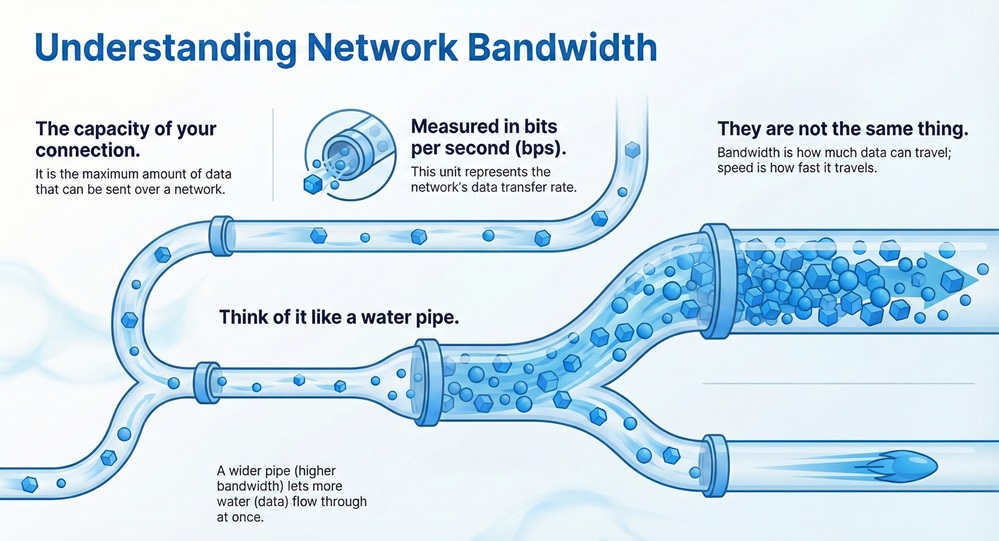
     

    Bandwidth infographic


    One must understand that bandwidth is a finite resource. In any given medium—be it copper wire, fiber optics, or wireless radio waves—there is a physical limit to how many bits can be encoded and sent per second. 


    In technical terms, bandwidth is often categorized into two distinct but related fields:


    1. Digital Bandwidth: Measured in bits per second, focusing on data throughput.
    2. Analog Bandwidth: Measured in Hertz (Hz), focusing on the range of frequencies a signal occupies.


    Does having more bandwidth always mean a better experience? Not necessarily, but it provides the "headroom" needed for modern applications to function without congestion.


    Let our experts analyze your current bandwidth utilization


    Types of Bandwidth

    Let us discuss the different ways bandwidth is categorized in professional networking and telecommunications:


    1. Symmetrical Bandwidth

    Symmetrical bandwidth refers to a connection where the upload speed and download speed are identical. This is common in fiber-optic enterprise connections. If you are a business that hosts servers or frequently uploads large files to the cloud, symmetrical bandwidth is essential. It ensures that sending data out is just as fast as pulling it in.


    2. Asymmetrical Bandwidth

    Asymmetrical bandwidth is what most residential users have. In this setup, the download speed is significantly higher than the upload speed. This is based on the logic that average users consume more data (streaming, browsing) than they produce. Most cable and DSL providers use this model to manage network traffic efficiently for the masses.


    3. Shared Bandwidth

    Shared bandwidth occurs when multiple users or households pull from the same "pool" of capacity. Public Wi-Fi or certain cable internet neighborhoods operate this way. Here's the thing: during peak hours, your available bandwidth might drop because your neighbors are consuming the same resource.


    4. Dedicated Bandwidth

    Dedicated bandwidth provides a reserved path for a single user. It is a premium service where the capacity is guaranteed and never fluctuates based on other people's usage. This is the gold standard for data centers and mission-critical operations.


    Also Read: What is Access Point in Networking? 7 Key Benefits


    How Bandwidth Works?

    Bandwidth operates through the physical properties of the transmission medium. To explain this to a colleague, I usually describe it as a series of lanes on a bridge. Each lane can carry a specific number of "data vehicles." If you add more lanes (increase bandwidth), you can move more vehicles across the bridge at the same time.


    In digital systems, data is broken down into small packets. These packets are sent across the wire or through the air using electrical pulses, light flashes, or radio waves. The bandwidth utilization refers to how much of that lane space is actually being used at any given moment. 


    When you initiate a download, your computer and the server perform a "handshake" to determine the best rate of transfer. If the bandwidth is high, the server can push more packets simultaneously without causing a bottleneck.


    Bandwidth in Networking vs. Signal Processing

    It is noteworthy that the term bandwidth has slightly different meanings depending on the context. One should note the distinction between the networking definition and the signal processing definition.


    Signal Processing Perspective

    In signal processing, bandwidth is the difference between the upper and lower frequencies in a continuous band of frequencies. It is measured in Hertz (Hz). For instance, a standard voice-grade telephone channel has a bandwidth of about 3 kHz. This range is necessary to capture the human voice clearly. 


    Networking Perspective

    In networking, we focus on the bit rate. While the underlying signal uses Hertz, the user cares about how many Megabits (Mb) can be moved per second. We often use the term "throughput" to describe the actual bandwidth achieved during a real-world transfer, which is usually lower than the theoretical maximum bandwidth.


    Measuring Bandwidth Utilization

    The bandwidth utilization is a critical metric for network administrators to monitor. It is expressed as a percentage of the total available capacity. If your utilization is constantly at 90%, you are going to experience "packet loss" and significant slowdowns.


    Let us look at how utilization is calculated:
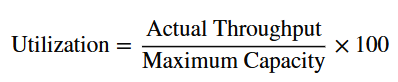
    utilization calculation


    For example, if you have a 100 Mbps link but are only moving 10 Mbps of data, your utilization is 10%. Keeping this number under control is vital for maintaining a healthy network. Various tools can track this in real-time, showing spikes during video conferences or large system updates.


    Also Read: Metropolitan Area Network (MAN) - Meaning & Examples


    Factors Affecting Bandwidth Performance

    Many variables can eat into your available capacity. In my experience, users often blame their ISP when the problem is actually internal.


    • Network Congestion: Too many devices on one network will naturally deplete the available bandwidth.
    • Hardware Limitations: An old router or a low-quality Ethernet cable (like Cat5 vs Cat6) can bottleneck a high-speed connection.
    • Signal Interference: In wireless setups, walls, microwave ovens, and even neighboring Wi-Fi signals can reduce effective bandwidth.
    • Background Processes: Software updates, cloud syncing, and malware can consume bandwidth without you even realizing it.
    • ISP Throttling: Some providers intentionally slow down certain types of traffic (like torrents or high-def streaming) to manage their overall network load.


    Benefits of High Bandwidth

    Bandwidth is the backbone of the modern digital economy. Without sufficient capacity, the technologies we rely on today would simply fail.


    1. Improved User Experience

    High bandwidth ensures that websites load instantly and videos play in 4K resolution without buffering. It removes the friction from digital interactions, making everything feel "snappy."


    2. Support for Multiple Devices

    In today's smart homes, we have phones, laptops, TVs, and even refrigerators connected to the internet. A high-bandwidth connection allows all these devices to operate simultaneously without competing for scraps of data.


    3. Enhanced Collaboration

    For businesses, bandwidth facilitates high-quality video conferencing and real-time cloud collaboration. It allows teams to work on the same documents from across the globe as if they were in the same room.


    4. Scalability

    Investing in high bandwidth means your network is ready for future technologies. As VR, AR, and 8K streaming become more common, having that extra capacity becomes a necessity rather than a luxury.

    Conclusion

    Bandwidth is much more than just a technical specification; it is the lifeblood of our connected world. Whether you are a student attending online classes or a professional managing global data transfers, the capacity of your connection dictates your efficiency. To be honest, as we move toward a more data-intensive future with AI and IoT, our hunger for more bandwidth will only grow.


    At our core, we believe that understanding these technical foundations empowers you to make better decisions for your home or business. We focus on providing clear, actionable insights so you can navigate the complexities of modern networking with confidence. Our goal is to ensure your connection never holds you back from your potential.


    Stop guessing about your connection quality. Contact our technical team today for a comprehensive network audit and find the perfect bandwidth solution tailored to your business needs.
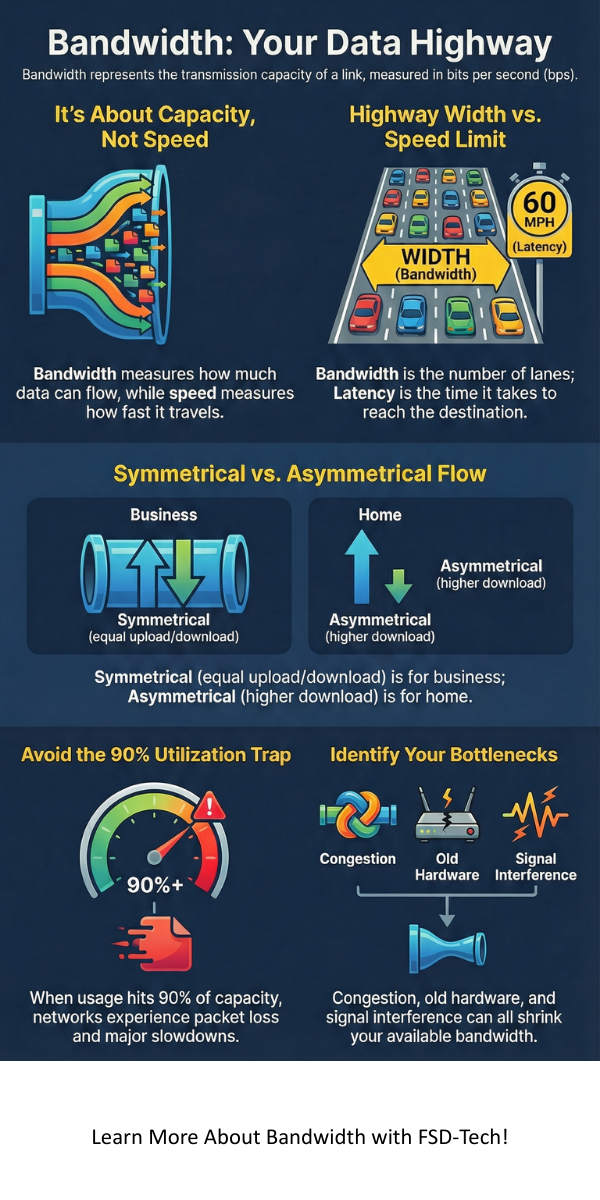


    Bandwidth

    Key Takeaways

    • Bandwidth measures the maximum capacity of a communication link in bits per second.
    • It is distinct from latency, which measures the time delay of data travel.
    • Bandwidth utilization helps determine if a network is overloaded or underperforming.
    • Both physical hardware and software configurations play a role in how much bandwidth is actually available to the end user.
    • Symmetrical connections are preferred for businesses, while asymmetrical ones are standard for home use.


    Frequently Asked Questions (FAQs)

    Q: Is bandwidth the same as internet speed?

    A: Not exactly. Bandwidth is the capacity (how much), while speed is the transfer rate (how fast). However, in casual conversation, people often use them interchangeably.


    Q: Why is my bandwidth lower than what I pay for?

    A: Advertised speeds are "up to" maximums under perfect conditions. Real-world factors like distance from the exchange, hardware quality, and network overhead usually reduce the actual throughput.


    Q: Does a VPN affect my bandwidth?

    A: A VPN doesn't change your physical bandwidth, but the encryption process and the distance to the VPN server can reduce your effective speed and increase latency.


    Q: How much bandwidth do I need for 4K streaming?

    A: Typically, you need a consistent 25 Mbps of available bandwidth for a single 4K stream. If other people are using the internet at the same time, you'll need more.

    What is Bandwidth? | Types, Working, and Network Capacity Explained

    About The Author

    Surbhi Suhane

    Surbhi Suhane is an experienced digital marketing and content specialist with deep expertise in Getting Things Done (GTD) methodology and process automation. Adept at optimizing workflows and leveraging automation tools to enhance productivity and deliver impactful results in content creation and SEO optimization.

    Like This Story?

    Share it with friends!

    Subscribe to our newsletter!

    Atera

    (55)

    Cato Networks

    (121)

    ClickUp

    (72)

    FishOS

    (7)

    Miradore

    (21)

    PointGuard AI

    (9)

    Vembu

    (22)

    Xcitium

    (33)

    ZETA HRMS

    (79)

    Workflow Automation(8)

    Workforce Automation(1)

    AI Project Management(1)

    HR Data Automation(1)

    RMM(1)

    IT Workflow Automation(1)

    IT security(2)

    GCC compliance(4)

    Payroll Integration(2)

    IT support automation(3)

    procurement automation(1)

    lost device management(1)

    IT Management(5)

    IoT Security(2)

    Cato XOps(2)

    IT compliance(4)

    Task Automation(1)

    Workflow Management(1)

    AI-powered cloud ops(1)

    Kubernetes lifecycle management(2)

    OpenStack automation(1)

    SMB Security(8)

    Data Security(1)

    MDR (Managed Detection & Response)(4)

    MSP Automation(3)

    Atera Integrations(2)

    XDR Security(2)

    Ransomware Defense(3)

    SMB Cyber Protection(1)

    HR Tech Solutions(1)

    Zero Trust Network Access(3)

    Zero Trust Security(2)

    Endpoint Management(1)

    SaaS Security(1)

    Payroll Automation(5)

    IT Monitoring(2)

    Xcitium EDR SOC(15)

    Ransomware Protection GCC(1)

    M&A IT Integration(1)

    Network Consolidation UAE(1)

    MSSP for SMBs(1)

    Antivirus vs EDR(1)

    Managed EDR FSD-Tech(1)

    FSD-Tech MSSP(25)

    SMB Cybersecurity GCC(1)

    Ransomware Protection(3)

    Cybersecurity GCC(12)

    Endpoint Security(1)

    Endpoint Protection(1)

    Data Breach Costs(1)

    SMB Cybersecurity(8)

    Zero Dwell Containment(31)

    Xcitium EDR(30)

    Managed Security Services(2)

    Hybrid Backup(1)

    Cloud Backup(1)

    Backup & Recovery(1)

    pointguard ai(4)

    backup myths(1)

    SMB data protection(9)

    vembu(9)

    disaster recovery myths(1)

    Vembu BDR Suite(19)

    Disaster Recovery(4)

    GCCBusiness(1)

    DataProtection(1)

    Secure Access Service Edge(4)

    GCC HR software(20)

    Miradore EMM(15)

    Cato SASE(7)

    Hybrid Learning(1)

    GCC Education(1)

    Cloud Security(9)

    Talent Development(1)

    AI Risk Management(1)

    AI Compliance(2)

    AI Governance(4)

    AI Cybersecurity(12)

    AI Security(2)

    GCC business security(1)

    GCC network integration(1)

    compliance automation(5)

    GCC cybersecurity(3)

    education security(1)

    BYOD security Dubai(8)

    Miradore EMM Premium+(5)

    App management UAE(1)

    MiddleEast(1)

    HealthcareSecurity(1)

    Team Collaboration(1)

    IT automation(12)

    Zscaler(1)

    SD-WAN(7)

    HR Integration(4)

    Cloud Networking(4)

    device management(9)

    VPN(1)

    ZeroTrust(2)

    RemoteWork(1)

    MPLS(1)

    share your thoughts

    Latency in Networking

    What is Latency in Networking? Definition, Causes & Solutions

    🕓 February 12, 2026

    Bandwidth

    What is Bandwidth? | Types, Working, and Network Capacity Explained

    🕓 February 12, 2026

    Wireless LAN Controller

    What is a Wireless LAN Controller? Configuration & Setup 101

    🕓 February 11, 2026

    Decoded(107)

    Cyber Security(118)

    BCP / DR(22)

    Zeta HRMS(78)

    SASE(21)

    Automation(72)

    Next Gen IT-Infra(118)

    Monitoring & Management(76)

    ITSM(22)

    HRMS(21)

    Automation(24)