HomeNext Gen IT-InfraMonitoring & ManagementCyber SecurityBCP / DRAutomationDecoded
Next Gen IT-Infra
Cato’s SASE Supports Cybersecurity Skills Development

How Cato’s SASE Supports Cybersecurity Skills Development

🕓 April 8, 2025

How SASE Supports the Security Needs of SMBs

How SASE Supports the Security Needs of SMBs

🕓 February 9, 2025

Attack Surface Reduction with Cato’s SASE

Attack Surface Reduction with Cato’s SASE

🕓 February 10, 2025

SASE for Digital Transformation in UAE

SASE for Digital Transformation in UAE

🕓 February 8, 2025

Monitoring & Management
Understanding Atera’s SLA Management

Understanding Atera’s SLA Management

🕓 February 7, 2025

Cost-Performance Ratio: Finding the Right Balance in IT Management Networks

Cost-Performance Ratio: Finding the Right Balance in IT Management Networks

🕓 June 16, 2025

Customizing Atera with APIs

Customizing Atera with APIs

🕓 March 3, 2025

Power Up Your IT Team’s Strategy with Atera’s Communication Tools

Power Up Your IT Team’s Strategy with Atera’s Communication Tools

🕓 February 8, 2025

Cyber Security
Visual guide showing Cato CMA interface for configuring Internet and WAN firewall rules, enabling threat protection, and monitoring security events in real time for UAE IT teams.

Enforcing Firewall and Threat Protection Policies in Cato

🕓 July 25, 2025

Isometric illustration of professionals managing network performance, bandwidth analytics, and cloud-based optimization around the Cato Networks platform, symbolizing bandwidth control and QoS visibility.

Mastering Bandwidth Control and QoS in Cato Networks

🕓 July 26, 2025

Illustration of the Cato Cloud architecture showing its role in delivering SASE for secure, optimized global connectivity.

Understanding the Cato Cloud and Its Role in SASE

🕓 January 29, 2025

Global network backbone powering Cato SASE solution for secure, high-performance connectivity across regions.

Global Backbone: The Engine Powering Cato’s SASE Solution

🕓 January 30, 2025

BCP / DR
Illustration showing diverse business and IT professionals collaborating with cloud, backup, and security icons, representing Vembu use cases for SMBs, MSPs, and IT teams.

Who Uses Vembu? Real-World Use Cases for SMBs, MSPs & IT Teams

🕓 July 12, 2025

Graphic showcasing Vembu’s all-in-one backup and disaster recovery platform with icons for cloud, data protection, and business continuity for IT teams and SMBs.

What Is Vembu? A Deep Dive Into the All in One Backup & Disaster Recovery Platform

🕓 July 6, 2025

Illustration showing Vembu backup and disaster recovery system with cloud storage, server racks, analytics dashboard, and IT professionals managing data.

The Rising Cost of Data Loss: Why Backup Is No Longer Optional?

🕓 August 14, 2025

3D isometric illustration of cloud backup and data recovery infrastructure with laptop, data center stack, and digital business icons — FSD Tech

RPO & RTO: The Heart of Business Continuity

🕓 August 15, 2025

Automation
Cross-Functional Collaboration with ClickUp

Fostering Cross-Functional Collaboration with ClickUp for Multi-Departmental Projects

🕓 February 11, 2025

ClickUp Project Reporting

Revolutionizing Enterprise Reporting with ClickUp’s Advanced Analytics and Dashboards

🕓 June 16, 2025

ClickUp’s Design Collaboration and Asset Management Tools

Empowering Creative Teams with ClickUp’s Design Collaboration and Asset Management Tools

🕓 February 26, 2025

ClickUp Communication and Collaboration Tools

ClickUp Communication and Collaboration Tools: Empowering Remote Teams

🕓 March 12, 2025

Decoded
Multi-Factor Authentication (MFA)

Multi-Factor Authentication (MFA): All You Need to Know

🕓 December 7, 2025

L3 Switch

What Is an L3 Switch? L2 vs L3 & Why You Need Layer 3?

🕓 December 8, 2025

IPSec

IPSec Explained: Protocols, Modes, IKE & VPN Security

🕓 December 3, 2025

 Datagram Transport Layer Security (DTLS)

What is Datagram Transport Layer Security (DTLS)? How it works?

🕓 December 4, 2025

    Subscribe to our newsletter!

    About Us

    Follow Us

    Copyright © 2024 | Powered by 

    Cato SASE Architecture

    Inside Cato’s SASE Architecture: A Blueprint for Modern Security

    🕓 January 26, 2025

    Enterprise Data Security and Privacy with ClickUp

    Ensuring Enterprise Data Security and Privacy with ClickUp

    🕓 February 9, 2025

    DDoS protection SASE

    DDoS Protection and Cato’s Defence Mechanisms

    🕓 February 11, 2025

    Table of Contents

    Why Is Data Backup Crucial for Cybersecurity? Protect Your Business from Ransomware & Data Loss

    Surbhi Suhane
    November 24, 2025
    Comments
    Why Is Data Backup Crucial for Cybersecurity

    Always remember, in the digital world, losing your data is not just a problem; it is a major business disaster. Today, more than ever, cybersecurity needs a solid safety net. This is why backup is essential for cybersecurity. It is the first line of defense when everything else fails.


    With ransomware attacks growing bigger and accidental file deletions happening daily, losing important information is a real risk. A trustworthy backup solution acts as your safety net. It makes sure you can get your critical data back fast and safely.


    Take a read of this to find out why backup is a cornerstone for protecting your digital assets. You will also get to know about the best ways to set up a robust backup plan to guard against modern threats.


    What Is Data Backup?

    Data backup refers to making exact copies of your important files and storing them in a secure place away from your main computer or server.


    Data backup can be understood as: creating a spare copy of all your digital things—documents, photos, emails, address books, videos, and system files. It explains the purpose of ensuring that this data can be retrieved quickly and safely in the event of an issue with the original. 


    To understand data backup in clearer terms, it’s about making sure your business operations do not stop because of a lost file. 


    A strong backup strategy can be the main difference between a small issue and a major, costly loss of data.


    So, how do you make sure you have the right copies in the right places?


    Get Started with Vembu Backup!


    Backup as a Foundation for Strong Cybersecurity

    You likely use firewalls, antivirus software, and access controls as part of your cybersecurity plan. These tools focus mainly on prevention—stopping threats before they enter your system.


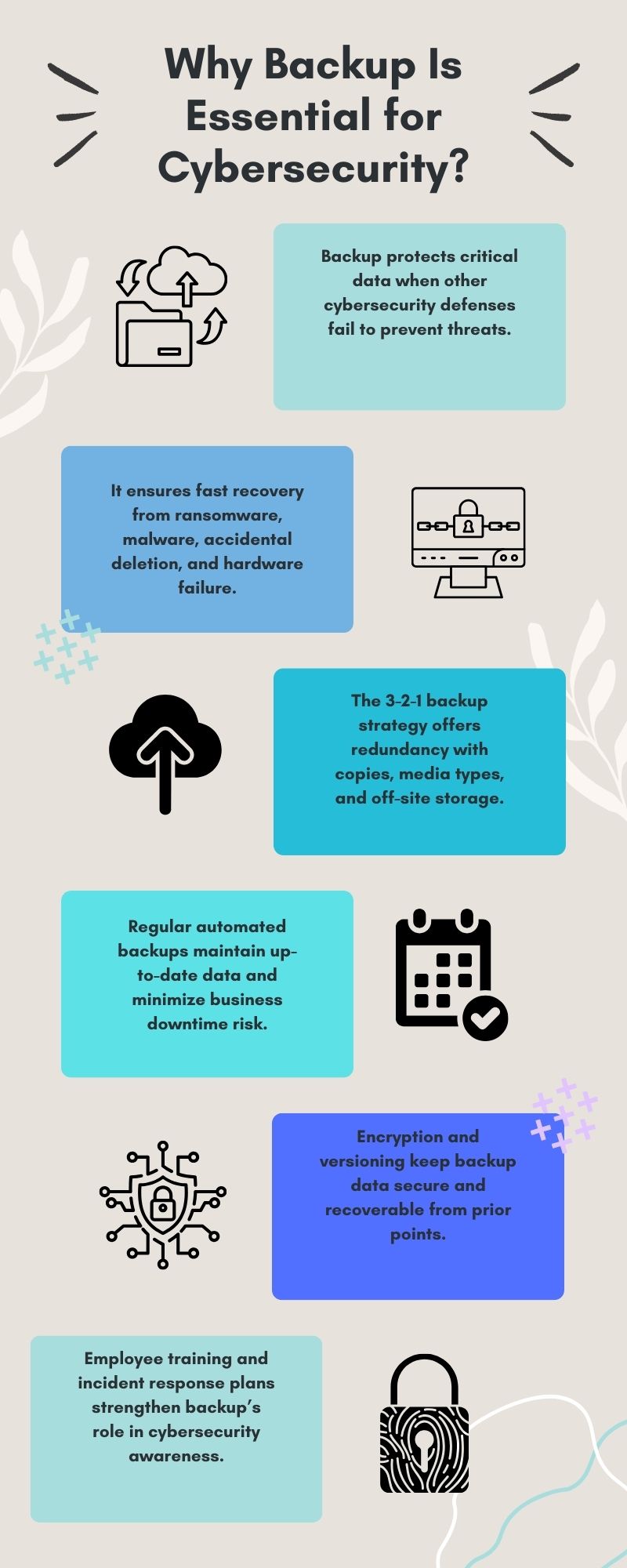
    On the other hand, backup is different. It acts as a crucial recovery layer. It protects your data even when your prevention methods fail. 


    When a cyberattack happens and sensitive information is compromised, or your systems crash, backup provides the ultimate safety net. It allows your organization to restore operations with minimal disturbance, saving you time and money.


    It is to be noted that without a good backup, you are fully exposed to losing your business data forever.


    Also Read: What Is Vembu? A Deep Dive Into the All in One Backup & Disaster Recovery Platform


    Understanding Cyber Threats That Demand a Reliable Backup

    Why is backup so important today? Because the threats are real and constant. Several categories of threats exist that make a reliable backup solution non-negotiable:


    • Ransomware: As the name suggests, this is a major threat. Ransomware encrypts your files and then demands money for their release. The practical implication? With a recent, clean backup, your business can simply restore the files without paying a cent to criminals.
    • Malware: Malicious software can corrupt, delete, or steal your data slowly over time. A well-maintained backup ensures that your clean files are preserved and can be recovered quickly before the malware causes lasting damage.
    • Accidental Data Loss: You might be surprised to learn that human error is a very common cause of data loss. This includes accidental deletion or wrong system setup. Regular backups help recover these lost files fast, keeping your team's productivity intact.
    • Hardware Failure: Hard drives, servers, and other system parts can fail without warning. When they do, access to your critical data stops. Backup reduces downtime and makes sure this information is not permanently lost.


     The 3-2-1 Backup Strategy for Maximum Protection

    Experts agree on a gold standard for making sure your data is always safe. It is called the 3-2-1 backup strategy. This simple rule greatly increases the chance that your data will be recoverable, even if one backup method fails.


    To understand the strategy in clearer terms, here are the three parts:

    1. Three Copies: You must keep three copies of your data. This includes your original data (the one you work with) and two separate backups. This ensures redundancy.
    2. Two Types: Use two different kinds of storage mediums. For instance, you could use cloud storage and an external hard drive, or a local server and tape. This minimizes the risk of a failure that affects only one type of media.
    3. One Off-Site: You need to store at least one copy away from your main location. This guards your data against local disasters, such as a fire, flood, or a physical break-in at your office.


    By using this strategy, you build a layered defense for your digital assets.


    How Backup Strengthens Cyber Resilience?

    Backup is about more than just getting your files back. It is about cyber resilience—the ability of your organization to quickly bounce back from an incident. Organizations that invest in a solid backup plan can respond to issues faster, cut down on downtime, and ensure business continuity.


    A strong strategy includes specific key features:


    • Regular Scheduling: Automated backups should run on a set schedule. This is important to keep your backup data as up-to-date as possible.
    • Multiple Storage Locations: Data should be backed up in different places, like cloud storage and physical drives. This protects against physical damage or a localized disaster.
    • Versioning: Keeping multiple historical versions of your backups is very important. This allows your team to recover data from a point before an incident occurred, avoiding the risk of restoring files that might already be infected.
    • Encryption: Encrypting your backups is critical. This keeps your sensitive data protected, even if the backup media itself is lost or stolen.


    Also Read: Who Uses Vembu? Real-World Use Cases for SMBs, MSPs & IT Teams


    Role of Backup in Cybersecurity Awareness


    Cybersecurity awareness is an ongoing need for every company. Employees must understand that backup is not just an "IT thing." It is a shared responsibility that protects the entire business.


    • User Education: Employees should get training on how to handle their files, how to check if their data is backed up, and what to do if they suspect a cyber incident. This is a crucial element.
    • Incident Response: All organizations must create an incident response plan. This plan should include clear backup procedures, making sure recovery is quick and effective when disaster strikes.
    • Testing: How do you know your backup will work when you need it most? You test it! Regular testing of backup and recovery processes helps to find and fix potential issues before a real-world incident happens.


     Best Practices for Backup Implementation

    Implementing a robust backup strategy involves more than just buying software. It requires a thoughtful approach.


    • Assess Your Needs: Every business has specific backup requirements. You should do a thorough check to find out which data is the most critical and what your goal is for the fastest recovery time.
    • Choose the Right Solution: Select a backup solution that offers features like automation, strong encryption, and easy cloud storage integration. You must consider both on-premise (local) and cloud-based options based on your specific operational needs.
    • Monitor and Update: You should regularly check your backup processes to ensure they are working correctly every single time. Also, remember to update your backup strategies as new cyber threats appear and your business needs change.
    • Compliance: Many industries, especially in finance and healthcare, have strict rules about data protection and backup. You must ensure your strategy follows all relevant laws and standards.


    Link Between Backup and Business Continuity

    Backup is essential for business continuity planning. In the event of a cyberattack, system failure, or a physical disaster, a good backup ensures your operations can resume quickly. 


    This keeps your financial losses low, protects your customer trust, and maintains your organization’s strong reputation.


    • Reduced Downtime: With a trusted backup, your organization can restore data fast. This greatly reduces downtime and minimizes the disruptive impact of the problem.
    • Customer Trust: Your customers expect their data to be safe. A strong backup strategy shows a deep commitment to data security and reliability, which builds lasting trust.
    • Reputation: Organizations that recover quickly from cyber incidents sustain their reputation. They avoid the negative publicity that comes with prolonged outages or public data loss events.


    Why Vembu Backup Is the Right Data Protection Choice?

    Here at FSD Tech, we know that great data protection is critical for your success. We offer Vembu Backup as a powerful, flexible solution for businesses and individuals seeking complete and easy-to-manage data protection.


    Vembu Backup uses cutting-edge technology to give you automated, real-time backups across all your different platforms. This ensures your data is always up-to-date and ready for recovery.


    With strong AES-256 encryption, flexible cloud integration, and full support for the 3-2-1 backup rule, Vembu helps your organization meet modern cybersecurity needs and maintain full business continuity.


    By choosing Vembu Backup through FSD Tech, you get a scalable, secure, and reliable backup solution. This choice simplifies your data protection efforts and keeps your critical information safe from cyber threats, device failures, and accidental loss. You should take a read of the following features to see why Vembu stands out.


    Key Features of Vembu Backup Solutions

    Vembu’s BDRSuite and BDRCloud bring complete, flexible, and affordable data protection for every environment you can imagine. Let's look at what makes them shine and stand out from the crowd.


    • Backup for Every Setup:

    Protect everything you rely on: virtual machines (VMware, Hyper-V), physical servers, endpoints (laptops/desktops), SaaS applications (Google Workspace), databases, and cloud VMs (Azure, AWS). It is to be noted that Vembu supports your entire modern IT environment.

    • Store Backups Anywhere:

    You have complete control over where your data lives. Keep it on-premise (local), in the cloud, or use a flexible mix of both. Storage options include AWS, Azure, Google Cloud, Wasabi, or any storage target that is S3-compatible.

    • Centralized Management:

    Manage all your backups from one simple dashboard. This helps simplify monitoring, reporting, and control across all your different environments. You can pick between the BDRCloud-hosted or the BDRSuite self-hosted console for full flexibility.

    • Ransomware Protection & Fast Recovery:

    Recover from data loss in minutes, not hours or days. Built-in ransomware detection, encryption, and data immutability secure your backups end-to-end. This power helps keep your business running even when disaster strikes.


    Why Vembu Stands Out in Data Protection?

    So, what exactly makes Vembu different from other backup vendors?

    • All-In-One Platform:

    You do not need to juggle multiple, separate tools. You manage all your workloads—virtual, physical, SaaS, and cloud—under one unified solution.

    • Affordability Without Compromise:

    You get enterprise-grade security and performance that is available at SMB-friendly prices. Importantly, there are no hidden charges.

    • Custom Fit for Every Business:

    From small startups to large enterprises, Vembu scales easily to match your exact data protection needs today and as you grow tomorrow.

    • Simplicity Meets Power:

    Every feature is built around ease of use, speed, and complete control. Therefore, you spend less time managing backups and more time working to grow your business.


    When your business's uptime is most important, Vembu delivers peace of mind with proven, trusted backup solutions that are built for today’s complex hybrid IT world.


    Final Thoughts

    So, to conclude, a solid backup is not optional; it is a must-have part of any serious cybersecurity strategy. It acts as the key recovery layer, protecting your critical data against every kind of threat, from ransomware and malware to simple accidental loss and hardware failure.


    By investing in strong backup solutions, your organization can quickly improve its cyber resilience, ensure business continuity, and maintain the trust you have built with your customers. 


    As cyber threats continue to change and become more complex, backup remains an essential part of effective cybersecurity, providing both peace of mind and operational stability in this unpredictable digital world.


    When the stakes are high, you need the right partner.


    Ready to secure your business's future? 

    Contact FSD Tech today to implement Vembu Backup.
     

    Why Backup Is Essential for Cybersecurity


    Frequently Asked Questions (FAQs)

    1. What types of data can Vembu Backup protect?

    Vembu Backup supports a wide and comprehensive range of data. This includes files, folders, system state, registry settings, virtual machines (VMs), and application servers such as Exchange, SQL, and SharePoint. Furthermore, it offers robust backup for cloud instances like AWS and Azure VMs.


    2. How often can I schedule backups with Vembu Backup?

    You can schedule backups as frequently as your business requires—hourly, daily, or weekly. This flexibility ensures your data is always up-to-date and protected against sudden loss.


    3. Is my backup data secure with Vembu Backup?

    Yes, your data is highly secure. Vembu Backup utilizes strong AES-256 encryption to protect your data both in transit and at rest. This ensures that your sensitive information remains protected, meeting all modern security standards.


    4. Can I restore data from Vembu Backup easily?

    Vembu Backup offers flexible and fast restore options. This includes instant boot recovery for virtual machines and file-level recovery for individual files or folders. These features make data restoration both fast and efficient, minimizing your downtime.


    5. Does Vembu Backup support off-site and cloud storage?

    Yes, it fully supports the 3-2-1 backup strategy. Vembu Backup allows you to store backups in multiple locations, including public cloud storage and private off-site repositories, for maximum protection against localized disasters.


    Why Is Data Backup Crucial for Cybersecurity? Protect Your Business from Ransomware & Data Loss

    About The Author

    Surbhi Suhane

    Surbhi Suhane is an experienced digital marketing and content specialist with deep expertise in Getting Things Done (GTD) methodology and process automation. Adept at optimizing workflows and leveraging automation tools to enhance productivity and deliver impactful results in content creation and SEO optimization.

    Like This Story?

    Share it with friends!

    Subscribe to our newsletter!

    Atera

    (48)

    Cato Networks

    (111)

    ClickUp

    (68)

    FishOS

    (7)

    Miradore

    (21)

    PointGuard AI

    (9)

    Vembu

    (22)

    Xcitium

    (33)

    ZETA HRMS

    (70)

    Workflow Automation(5)

    Workforce Automation(1)

    AI Project Management(1)

    HR Data Automation(1)

    RMM(1)

    IT Workflow Automation(1)

    GCC compliance(4)

    IT security(2)

    Payroll Integration(2)

    IT support automation(3)

    procurement automation(1)

    lost device management(1)

    IT Management(5)

    IoT Security(2)

    Cato XOps(2)

    IT compliance(4)

    Workflow Management(1)

    Task Automation(1)

    OpenStack automation(1)

    AI-powered cloud ops(1)

    Kubernetes lifecycle management(2)

    SMB Security(8)

    Data Security(1)

    MDR (Managed Detection & Response)(4)

    Atera Integrations(2)

    MSP Automation(3)

    XDR Security(2)

    SMB Cyber Protection(1)

    Ransomware Defense(3)

    HR Tech Solutions(1)

    Zero Trust Network Access(3)

    Zero Trust Security(2)

    Endpoint Management(1)

    SaaS Security(1)

    Payroll Automation(5)

    IT Monitoring(2)

    Xcitium EDR SOC(15)

    Ransomware Protection GCC(1)

    M&A IT Integration(1)

    Network Consolidation UAE(1)

    MSSP for SMBs(1)

    FSD-Tech MSSP(25)

    Ransomware Protection(3)

    SMB Cybersecurity GCC(1)

    Managed EDR FSD-Tech(1)

    Antivirus vs EDR(1)

    Cybersecurity GCC(12)

    Endpoint Security(1)

    Endpoint Protection(1)

    Data Breach Costs(1)

    Managed Security Services(2)

    SMB Cybersecurity(8)

    Zero Dwell Containment(31)

    Xcitium EDR(30)

    Cloud Backup(1)

    Hybrid Backup(1)

    Backup & Recovery(1)

    pointguard ai(4)

    disaster recovery myths(1)

    backup myths(1)

    vembu(9)

    SMB data protection(9)

    Vembu BDR Suite(19)

    Disaster Recovery(4)

    DataProtection(1)

    GCCBusiness(1)

    Secure Access Service Edge(4)

    GCC HR software(16)

    Miradore EMM(15)

    Cato SASE(7)

    Cloud Security(8)

    Talent Development(1)

    AI Cybersecurity(12)

    AI Risk Management(1)

    AI Governance(4)

    AI Security(2)

    AI Compliance(2)

    GCC business security(1)

    GCC network integration(1)

    compliance automation(4)

    GCC cybersecurity(2)

    education security(1)

    App management UAE(1)

    BYOD security Dubai(8)

    Miradore EMM Premium+(5)

    HealthcareSecurity(1)

    MiddleEast(1)

    Team Collaboration(1)

    IT automation(10)

    Zscaler(1)

    SD-WAN(6)

    HR Integration(4)

    Cloud Networking(3)

    device management(9)

    RemoteWork(1)

    ZeroTrust(2)

    VPN(1)

    MPLS(1)

    Project Management(9)

    HR automation(16)

    share your thoughts

    Why Is Data Backup Crucial for Cybersecurity

    Why Is Data Backup Crucial for Cybersecurity? Protect Your Business from Ransomware & Data Loss

    🕓 November 24, 2025

    Vector illustration showcasing Vembu cloud backup solutions. A central laptop screen displays the Vembu logo, surrounded by connected cloud storage icons, files, and mobile devices representing seamless data synchronization. Additional graphics include a store with "3-2-1" backup signage, servers, and secure connections, symbolizing hybrid cloud storage and reliable data protection for SMBs.

    SMB Backup Starter Pack: What to Back Up, Where to Store It & How Often (3-2-1 Checklist)

    🕓 September 16, 2025

    Illustration showing data being backed up from two on-premise servers to the Vembu cloud, with two people sitting on the servers and looking at laptops. The image visually represents the concept of offsite data backup to a remote cloud location.

    The Importance of Offsite Backups in Disaster Recovery Planning

    🕓 September 5, 2025

    Decoded(58)

    Cyber Security(112)

    BCP / DR(22)

    Zeta HRMS(69)

    SASE(21)

    Automation(68)

    Next Gen IT-Infra(111)

    Monitoring & Management(69)

    ITSM(22)

    HRMS(21)

    Automation(24)