HomeNext Gen IT-InfraMonitoring & ManagementCyber SecurityBCP / DRAutomationDecoded
Next Gen IT-Infra
Cato’s SASE Supports Cybersecurity Skills Development

How Cato’s SASE Supports Cybersecurity Skills Development

🕓 April 8, 2025

How SASE Supports the Security Needs of SMBs

How SASE Supports the Security Needs of SMBs

🕓 February 9, 2025

Attack Surface Reduction with Cato’s SASE

Attack Surface Reduction with Cato’s SASE

🕓 February 10, 2025

SASE for Digital Transformation in UAE

SASE for Digital Transformation in UAE

🕓 February 8, 2025

Monitoring & Management
Understanding Atera’s SLA Management

Understanding Atera’s SLA Management

🕓 February 7, 2025

Cost-Performance Ratio: Finding the Right Balance in IT Management Networks

Cost-Performance Ratio: Finding the Right Balance in IT Management Networks

🕓 June 16, 2025

Customizing Atera with APIs

Customizing Atera with APIs

🕓 March 3, 2025

Power Up Your IT Team’s Strategy with Atera’s Communication Tools

Power Up Your IT Team’s Strategy with Atera’s Communication Tools

🕓 February 8, 2025

Cyber Security
Illustration of the Cato Cloud architecture showing its role in delivering SASE for secure, optimized global connectivity.

Understanding the Cato Cloud and Its Role in SASE

🕓 January 29, 2025

Isometric illustration of professionals managing network performance, bandwidth analytics, and cloud-based optimization around the Cato Networks platform, symbolizing bandwidth control and QoS visibility.

Mastering Bandwidth Control and QoS in Cato Networks

🕓 July 26, 2025

Global network backbone powering Cato SASE solution for secure, high-performance connectivity across regions.

Global Backbone: The Engine Powering Cato’s SASE Solution

🕓 January 30, 2025

Illustration of team analyzing application traffic and usage insights on a large laptop screen using Cato’s dashboard, surrounded by network and cloud icons.

Cato Networks Application Visibility | Monitoring & Control

🕓 July 27, 2025

BCP / DR
Illustration showing diverse business and IT professionals collaborating with cloud, backup, and security icons, representing Vembu use cases for SMBs, MSPs, and IT teams.

Who Uses Vembu? Real-World Use Cases for SMBs, MSPs & IT Teams

🕓 July 12, 2025

Graphic showcasing Vembu’s all-in-one backup and disaster recovery platform with icons for cloud, data protection, and business continuity for IT teams and SMBs.

What Is Vembu? A Deep Dive Into the All in One Backup & Disaster Recovery Platform

🕓 July 6, 2025

Illustration showing Vembu backup and disaster recovery system with cloud storage, server racks, analytics dashboard, and IT professionals managing data.

The Rising Cost of Data Loss: Why Backup Is No Longer Optional?

🕓 August 14, 2025

3D isometric illustration of cloud backup and data recovery infrastructure with laptop, data center stack, and digital business icons — FSD Tech

RPO & RTO: The Heart of Business Continuity

🕓 August 15, 2025

Automation
Cross-Functional Collaboration with ClickUp

Fostering Cross-Functional Collaboration with ClickUp for Multi-Departmental Projects

🕓 February 11, 2025

ClickUp Project Reporting

Revolutionizing Enterprise Reporting with ClickUp’s Advanced Analytics and Dashboards

🕓 June 16, 2025

ClickUp’s Design Collaboration and Asset Management Tools

Empowering Creative Teams with ClickUp’s Design Collaboration and Asset Management Tools

🕓 February 26, 2025

ClickUp Communication and Collaboration Tools

ClickUp Communication and Collaboration Tools: Empowering Remote Teams

🕓 March 12, 2025

Decoded
Multi-Factor Authentication (MFA)

Multi-Factor Authentication (MFA): All You Need to Know

🕓 December 7, 2025

L3 Switch

What Is an L3 Switch? L2 vs L3 & Why You Need Layer 3?

🕓 December 8, 2025

IPSec

IPSec Explained: Protocols, Modes, IKE & VPN Security

🕓 December 3, 2025

 Datagram Transport Layer Security (DTLS)

What is Datagram Transport Layer Security (DTLS)? How it works?

🕓 December 4, 2025

    Subscribe to our newsletter!

    About Us

    Follow Us

    Copyright © 2024 | Powered by 

    Cato SASE Architecture

    Inside Cato’s SASE Architecture: A Blueprint for Modern Security

    🕓 January 26, 2025

    Enterprise Data Security and Privacy with ClickUp

    Ensuring Enterprise Data Security and Privacy with ClickUp

    🕓 February 9, 2025

    DDoS protection SASE

    DDoS Protection and Cato’s Defence Mechanisms

    🕓 February 11, 2025

    Table of Contents

    Why Regular Backup Testing Is Just as Important as the Backup Itself

    Nasmal
    September 1, 2025
    Comments
    FSD Tech visual with Vembu logo and global data protection concept. Illustration shows secure cloud backup, restore management, and automated disaster recovery across global data centers, highlighting Vembu’s role in ensuring reliable backup testing and compliance.

    The Company That Thought They Were Safe

    A medium-sized accounting firm in Nairobi felt confident about their data protection.

    They had invested in a good backup system, and every night it automatically saved all their files to a secure storage location.

    Whenever management asked, the IT team reassured them:

    “Don’t worry, our backups run every night — your data is safe.”

    Months passed without incident. Then, during the busiest time of the year — tax season — disaster struck.

    Their main server failed completely.
     

    When the IT team tried to restore the most recent backup, they discovered:

    • Several backup files were incomplete.
    • Others were corrupted and could not be opened.
    • The most recent backup they could actually restore was three months old.

    The company lost months of client data. Staff had to re-enter information manually, costing weeks of extra work.

    Some clients left permanently, questioning the firm’s reliability.

    The root cause? They never tested their backups.


    What Does “Testing a Backup” Mean?

    Backup testing is the process of actually restoring data from your backup system — either partially or fully — to confirm:

    • The backup file is complete.
    • It is not corrupted.
    • It can be restored quickly and without errors.

    Think of it like having a fire extinguisher in your office.

    Owning it isn’t enough — you need to check it regularly to ensure it works when you need it most.


    Why Testing Backups Is Critical

    1. Backups Can Fail Without Warning
       Sometimes, a backup looks like it completed successfully, but files are missing or damaged.
    2. Technology and Systems Change
       Updates to your operating systems or applications can make older backups harder or even impossible to restore.
    3. Human Mistakes Happen
       An employee may accidentally set up the backup incorrectly — but you won’t know unless you test it.
    4. Real Recovery Is Different from Theory
       Testing shows you the actual time it will take to get your systems running again, which is critical during a real emergency.


    Don’t wait until it’s too late. Check how Vembu can keep your backups verified and safe — fill out the form now
     

    The Risks of Not Testing Backups

    • Data Loss – You may think you have yesterday’s backup, but find it unusable when you need it.
    • Long Downtime – Recovery can take far longer if problems are discovered during the crisis.
    • Loss of Customer Trust – Clients expect you to protect their data — failing to do so damages relationships.
    • Regulatory Fines – Some industries legally require you to prove your backups are tested and functional.
      • Minimum: every three months.
      • Better: every month.
      • Best: automate testing so it happens after every backup.
      • Sometimes you’ll only need one file.
      • Other times you’ll need the entire system.
      • Test both situations.
      • Pretend your server has crashed.
      • Restore your data in a test environment and see how long it takes.
      • Keep a record of test dates, what was restored, and whether it worked.
      • If you find problems, fix them immediately.
      • Adjust backup schedules or storage locations if needed.


    Best Practices for Backup Testing

    1. Test on a Schedule
    2. Test Full and Partial Restores
    3. Simulate Real Emergencies
    4. Document the Results
    5. Improve the Process


    How Vembu BDR Suite Makes Backup Testing Easier

    • Automatic Verification – After every backup, Vembu can check whether the file is complete and not corrupted.
    • Test Restores in a Safe Environment – You can test backups without affecting your live systems.
    • Detailed Reporting – Shows proof of successful tests for compliance and audits.
    • Instant Recovery Options – If there is a real problem, you can restore quickly from the verified backups.


    Ready to automate your backup testing? Click Here
     

    Real Example

    A law firm in Muscat began doing quarterly backup tests after implementing Vembu BDR Suite.

    In their very first test, they discovered a database backup was incomplete due to a misconfiguration.

    They fixed it immediately.

    Six months later, when a real outage occurred, they restored all data in under an hour — saving both client trust and thousands in potential losses.


    The Big Lesson

    A backup that hasn’t been tested is like a parachute you’ve never opened — you can’t be sure it will work when you need it.

    Testing regularly is the only way to be confident your backups will save your business in a crisis.


    When was the last time you tested your backups? With Vembu BDR Suite, you can automate verification and ensure your backups are ready when disaster strikes. [Book your free backup health check today]


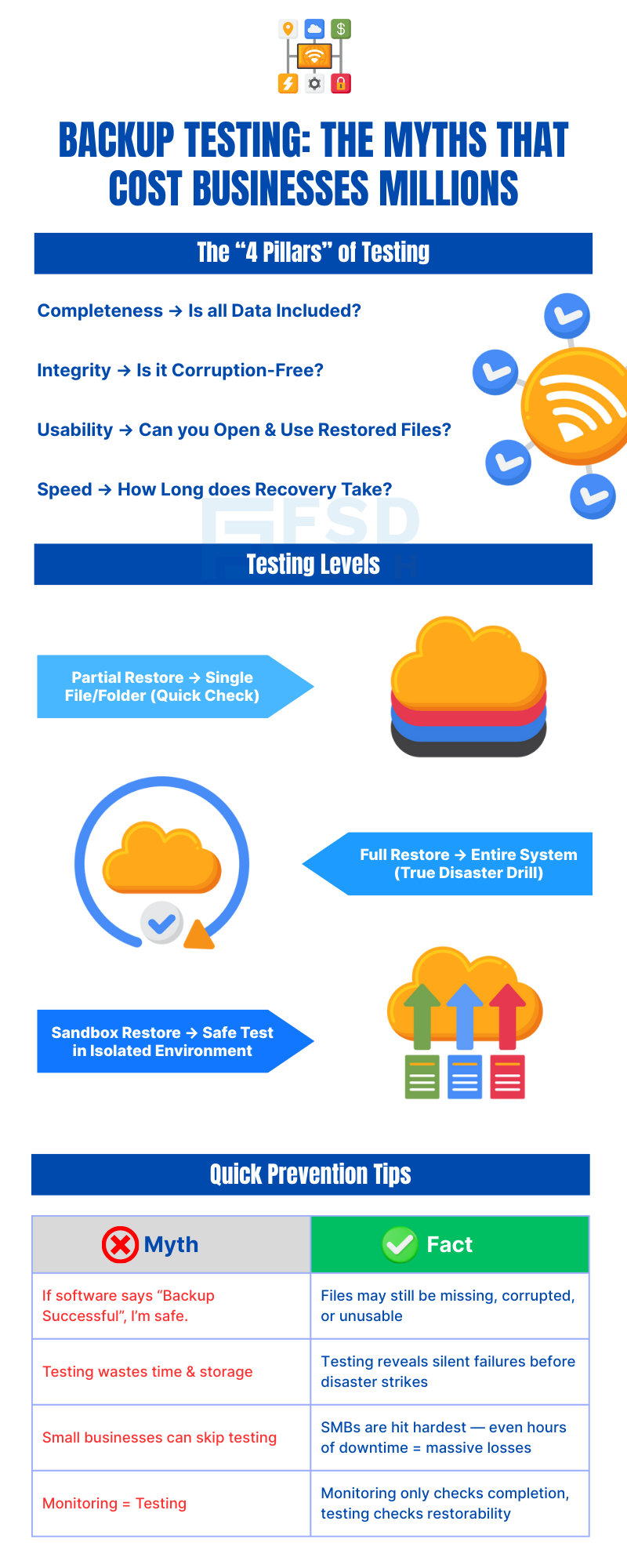
    Infographic by FSD Tech on backup testing myths and best practices. Explains the four pillars of testing: completeness, integrity, usability, and recovery speed. Shows testing levels from partial restore and full disaster drill to sandbox restore. Debunks myths like ‘backup success means safety’ and ‘monitoring equals testing,’ highlighting facts about silent failures, SMB risks, and the need for real restore validation.

    FAQ

    1. What exactly is “backup testing”?

    Backup testing means restoring data from your backup to check that it works properly.

    It’s not just about creating a backup — it’s about proving that the backup can actually be used in a real emergency.

    Think of it like having a spare tyre in your car. It’s not enough to own one — you should check it regularly to make sure it’s not flat and that the tools to change it are ready.


    2. Why is backup testing important?

    Because backups can fail silently without you knowing.

    Everything may look fine — your backup software might even say “Backup Completed Successfully” — but when you try to restore, you might find:

    • Files are missing.
    • Data is corrupted.
    • The backup can’t be restored because of an error.

    By testing regularly, you confirm that your backups are complete, usable, and can be restored quickly when needed.


    3. How often should I test my backups?

    • Minimum: Every 3 months.
    • Better: Once a month.
    • Best: Automatically after every backup using software that verifies the backup’s integrity.

    The more critical your data, the more often you should test. Some businesses with high transaction volumes test weekly or even daily.


    4. What happens if I don’t test my backups?

    If you skip testing, you risk:

    • Discovering your backup is broken when it’s too late.
    • Losing important files permanently.
    • Longer downtime while you fix problems during an emergency.
    • Customers losing confidence in your ability to protect their data.
    • Fines if your industry requires tested backups for compliance.


    5. Can backups fail even if the software shows “success”?

    Yes. A “success” message only means the process finished — it doesn’t guarantee the data is complete or usable.

    Examples of silent failures:

    • A power cut in the middle of backup corrupts files.
    • A folder is skipped because of incorrect settings.
    • A network issue causes files to transfer incompletely.


    6. What are the most common reasons backups fail?

    • Power failures or internet outages during backup.
    • Storage device problems like a failing hard drive or full disk.
    • Software updates that change file formats or locations.
    • Misconfigured settings that leave out important data.
    • Human error, such as forgetting to include new folders in the backup plan.


    7. What should I check during a backup test?

    When testing, confirm:

    1. Restoration success – Can you restore without errors?
    2. Data completeness – Are all expected files there?
    3. File usability – Can you open and use restored files?
    4. Restore speed – How long did it take to get systems back online?


    8. Should I test both full and partial restores?

    Yes.

    • Partial restore – Restoring a few files checks if individual items are retrievable.
    • Full restore – Restoring an entire system checks if you can recover from total failure.

    Testing both ensures you’re ready for any kind of problem — from a single deleted file to a complete server crash.


    9. What is a “sandbox restore” and why is it useful?

    A sandbox restore means restoring your backup into a safe, isolated environment where it can’t interfere with your live systems.

    This allows you to test without risking your operational setup.


    10. Can small businesses skip backup testing to save time?

    No. In fact, small businesses are often more at risk.

    They have fewer backup systems, and even a short downtime can cause major financial and reputational damage.


    11. How does backup testing help reduce downtime?

    When you test, you:

    • Discover and fix problems before an emergency happens.
    • Learn the exact recovery process and time needed.
    • Train your staff on what to do during real incidents.

    This preparation helps restore systems faster, reducing costly downtime.


    12. How does Vembu BDR Suite make testing easier?

    Vembu provides:

    • Automatic backup verification – The software checks integrity after each backup.
    • Sandbox restore capabilities – Test without touching live systems.
    • Detailed reports – Show proof of successful tests for compliance.
    • Instant restore – If disaster strikes, run systems directly from your backup.


    13. Is backup testing legally required?

    In certain industries — like healthcare, finance, and government services — yes.

    Regulations such as HIPAA, GDPR, and ISO standards require not just having backups but proving they work.


    14. What’s the difference between backup testing and backup monitoring?

    • Backup monitoring – Checks that backups happen on time.
    • Backup testing – Confirms that backups can be restored and actually work.

    Both are important, but testing is the only way to be sure your data is safe.


    15. How can I start backup testing today?

    1. Choose your testing schedule.
    2. Decide whether you’ll test partial restores, full restores, or both.
    3. Document the results.
    4. Use backup software like Vembu BDR Suite to automate verification and keep detailed logs.
    Why Regular Backup Testing Is Just as Important as the Backup Itself

    About The Author

    Nasmal

    Nasmal is a Solution Architect & Business Analyst focused on AI, Data, Automation, BCP, and Process Optimization. He helps businesses evolve from reactive to proactive, data-driven, and resilient operations. With hands-on expertise, he simplifies complex tech into clear, easy-to-understand blogs.

    Like This Story?

    Share it with friends!

    Subscribe to our newsletter!

    Atera

    (49)

    Cato Networks

    (120)

    ClickUp

    (70)

    FishOS

    (7)

    Miradore

    (21)

    PointGuard AI

    (9)

    Vembu

    (22)

    Xcitium

    (33)

    ZETA HRMS

    (79)

    Workflow Automation(8)

    Workforce Automation(1)

    AI Project Management(1)

    HR Data Automation(1)

    RMM(1)

    IT Workflow Automation(1)

    IT security(2)

    GCC compliance(4)

    Payroll Integration(2)

    IT support automation(3)

    procurement automation(1)

    lost device management(1)

    IT Management(5)

    IoT Security(2)

    Cato XOps(2)

    IT compliance(4)

    Workflow Management(1)

    Task Automation(1)

    Kubernetes lifecycle management(2)

    OpenStack automation(1)

    AI-powered cloud ops(1)

    SMB Security(8)

    Data Security(1)

    MDR (Managed Detection & Response)(4)

    MSP Automation(3)

    Atera Integrations(2)

    XDR Security(2)

    SMB Cyber Protection(1)

    Ransomware Defense(3)

    HR Tech Solutions(1)

    Zero Trust Network Access(3)

    Zero Trust Security(2)

    Endpoint Management(1)

    SaaS Security(1)

    Payroll Automation(5)

    IT Monitoring(2)

    Xcitium EDR SOC(15)

    Ransomware Protection GCC(1)

    Network Consolidation UAE(1)

    M&A IT Integration(1)

    MSSP for SMBs(1)

    SMB Cybersecurity GCC(1)

    Managed EDR FSD-Tech(1)

    Ransomware Protection(3)

    Antivirus vs EDR(1)

    FSD-Tech MSSP(25)

    Cybersecurity GCC(12)

    Endpoint Security(1)

    Endpoint Protection(1)

    Data Breach Costs(1)

    SMB Cybersecurity(8)

    Zero Dwell Containment(31)

    Managed Security Services(2)

    Xcitium EDR(30)

    Hybrid Backup(1)

    Cloud Backup(1)

    Backup & Recovery(1)

    pointguard ai(4)

    backup myths(1)

    disaster recovery myths(1)

    SMB data protection(9)

    vembu(9)

    Disaster Recovery(4)

    Vembu BDR Suite(19)

    GCCBusiness(1)

    DataProtection(1)

    Secure Access Service Edge(4)

    GCC HR software(20)

    Miradore EMM(15)

    Cato SASE(7)

    Cloud Security(8)

    Talent Development(1)

    AI Compliance(2)

    AI Security(2)

    AI Risk Management(1)

    AI Cybersecurity(12)

    AI Governance(4)

    GCC business security(1)

    GCC network integration(1)

    compliance automation(5)

    education security(1)

    GCC cybersecurity(2)

    Miradore EMM Premium+(5)

    App management UAE(1)

    BYOD security Dubai(8)

    MiddleEast(1)

    HealthcareSecurity(1)

    Team Collaboration(1)

    IT automation(12)

    Zscaler(1)

    SD-WAN(6)

    HR Integration(4)

    Cloud Networking(3)

    device management(9)

    VPN(1)

    RemoteWork(1)

    ZeroTrust(2)

    MPLS(1)

    Project Management(9)

    HR automation(16)

    share your thoughts

    Why Is Data Backup Crucial for Cybersecurity

    Why Is Data Backup Crucial for Cybersecurity? Protect Your Business from Ransomware & Data Loss

    🕓 November 24, 2025

    Vector illustration showcasing Vembu cloud backup solutions. A central laptop screen displays the Vembu logo, surrounded by connected cloud storage icons, files, and mobile devices representing seamless data synchronization. Additional graphics include a store with "3-2-1" backup signage, servers, and secure connections, symbolizing hybrid cloud storage and reliable data protection for SMBs.

    SMB Backup Starter Pack: What to Back Up, Where to Store It & How Often (3-2-1 Checklist)

    🕓 September 16, 2025

    Illustration showing data being backed up from two on-premise servers to the Vembu cloud, with two people sitting on the servers and looking at laptops. The image visually represents the concept of offsite data backup to a remote cloud location.

    The Importance of Offsite Backups in Disaster Recovery Planning

    🕓 September 5, 2025

    Decoded(93)

    Cyber Security(118)

    BCP / DR(22)

    Zeta HRMS(78)

    SASE(21)

    Automation(70)

    Next Gen IT-Infra(118)

    Monitoring & Management(70)

    ITSM(22)

    HRMS(21)

    Automation(24)