HomeNext Gen IT-InfraMonitoring & ManagementCyber SecurityBCP / DRAutomationDecoded
Next Gen IT-Infra
Cato’s SASE Supports Cybersecurity Skills Development

How Cato’s SASE Supports Cybersecurity Skills Development

🕓 April 8, 2025

How SASE Supports the Security Needs of SMBs

How SASE Supports the Security Needs of SMBs

🕓 February 9, 2025

Attack Surface Reduction with Cato’s SASE

Attack Surface Reduction with Cato’s SASE

🕓 February 10, 2025

SASE for Digital Transformation in UAE

SASE for Digital Transformation in UAE

🕓 February 8, 2025

Monitoring & Management
Understanding Atera’s SLA Management

Understanding Atera’s SLA Management

🕓 February 7, 2025

Cost-Performance Ratio: Finding the Right Balance in IT Management Networks

Cost-Performance Ratio: Finding the Right Balance in IT Management Networks

🕓 June 16, 2025

Customizing Atera with APIs

Customizing Atera with APIs

🕓 March 3, 2025

Power Up Your IT Team’s Strategy with Atera’s Communication Tools

Power Up Your IT Team’s Strategy with Atera’s Communication Tools

🕓 February 8, 2025

Cyber Security
Illustration of the Cato Cloud architecture showing its role in delivering SASE for secure, optimized global connectivity.

Understanding the Cato Cloud and Its Role in SASE

🕓 January 29, 2025

Isometric illustration of professionals managing network performance, bandwidth analytics, and cloud-based optimization around the Cato Networks platform, symbolizing bandwidth control and QoS visibility.

Mastering Bandwidth Control and QoS in Cato Networks

🕓 July 26, 2025

Global network backbone powering Cato SASE solution for secure, high-performance connectivity across regions.

Global Backbone: The Engine Powering Cato’s SASE Solution

🕓 January 30, 2025

Illustration of team analyzing application traffic and usage insights on a large laptop screen using Cato’s dashboard, surrounded by network and cloud icons.

Cato Networks Application Visibility | Monitoring & Control

🕓 July 27, 2025

BCP / DR
Illustration showing diverse business and IT professionals collaborating with cloud, backup, and security icons, representing Vembu use cases for SMBs, MSPs, and IT teams.

Who Uses Vembu? Real-World Use Cases for SMBs, MSPs & IT Teams

🕓 July 12, 2025

Graphic showcasing Vembu’s all-in-one backup and disaster recovery platform with icons for cloud, data protection, and business continuity for IT teams and SMBs.

What Is Vembu? A Deep Dive Into the All in One Backup & Disaster Recovery Platform

🕓 July 6, 2025

Illustration showing Vembu backup and disaster recovery system with cloud storage, server racks, analytics dashboard, and IT professionals managing data.

The Rising Cost of Data Loss: Why Backup Is No Longer Optional?

🕓 August 14, 2025

3D isometric illustration of cloud backup and data recovery infrastructure with laptop, data center stack, and digital business icons — FSD Tech

RPO & RTO: The Heart of Business Continuity

🕓 August 15, 2025

Automation
Cross-Functional Collaboration with ClickUp

Fostering Cross-Functional Collaboration with ClickUp for Multi-Departmental Projects

🕓 February 11, 2025

ClickUp Project Reporting

Revolutionizing Enterprise Reporting with ClickUp’s Advanced Analytics and Dashboards

🕓 June 16, 2025

ClickUp’s Design Collaboration and Asset Management Tools

Empowering Creative Teams with ClickUp’s Design Collaboration and Asset Management Tools

🕓 February 26, 2025

ClickUp Communication and Collaboration Tools

ClickUp Communication and Collaboration Tools: Empowering Remote Teams

🕓 March 12, 2025

Decoded
Multi-Factor Authentication (MFA)

Multi-Factor Authentication (MFA): All You Need to Know

🕓 December 7, 2025

L3 Switch

What Is an L3 Switch? L2 vs L3 & Why You Need Layer 3?

🕓 December 8, 2025

IPSec

IPSec Explained: Protocols, Modes, IKE & VPN Security

🕓 December 3, 2025

 Datagram Transport Layer Security (DTLS)

What is Datagram Transport Layer Security (DTLS)? How it works?

🕓 December 4, 2025

    Subscribe to our newsletter!

    About Us

    Follow Us

    Copyright © 2024 | Powered by 

    Cato SASE Architecture

    Inside Cato’s SASE Architecture: A Blueprint for Modern Security

    🕓 January 26, 2025

    Enterprise Data Security and Privacy with ClickUp

    Ensuring Enterprise Data Security and Privacy with ClickUp

    🕓 February 9, 2025

    DDoS protection SASE

    DDoS Protection and Cato’s Defence Mechanisms

    🕓 February 11, 2025

    Table of Contents

    The Role of Backup Encryption in Keeping Your Data Safe from Hackers

    Nasmal
    September 2, 2025
    Comments
    Isometric illustration of a central server surrounded by floating blue cubes, symbolizing secure data storage and encryption. FSD Tech branding is shown at the bottom.

    The Scary Lesson from a Data Breach

    In 2023, a small healthcare provider in Abu Dhabi became the target of a cyberattack.

    Hackers managed to break into the company’s network and steal copies of their backup files from a connected server.


    At first, it seemed like the company was facing disaster:

    • The stolen files included sensitive patient records.
    • If those files were exposed, the company could face lawsuits, government fines, and permanent loss of trust.

    But when the hackers tried to open the files, all they saw was unreadable gibberish.

    Why? Because the backups were encrypted.

    Without the secret key to decrypt them, the data was useless to the attackers.

    This one layer of protection saved the business from financial ruin and public embarrassment.
     

    What Is Backup Encryption?

    Backup encryption is the process of scrambling your backup data so no one can read it unless they have the correct password or decryption key.

    It works much like locking your valuables in a safe:

    • If someone steals the safe (your backup files), they still can’t get inside without the right combination (your encryption key).
      • Protects your data while it’s stored — whether on hard drives, tapes, USB devices, or cloud servers.
      • Ensures that even if someone physically steals the backup device, they can’t read the files.
      • Protects your data while it’s being sent from one location to another, such as from your office to a cloud server.
      • Prevents hackers from intercepting and reading the data during transfer.


    Why Encryption Is Critical for Backups

    1. Protects Against Theft
       If backups are stolen — either through hacking or physical theft — encryption makes them useless without the key.
       
    2. Stops Unauthorized Access
       Even if someone inside your organization tries to view or copy the data, encryption ensures they can’t read it without permission.
       
    3. Meets Legal and Compliance Rules
       Many industries (healthcare, finance, government) require encrypted backups under laws like HIPAA, GDPR, and ISO standards.
       
    4. Secures Cloud Backups
       When you store backups in the cloud, encryption ensures even your cloud provider can’t see the contents.


    Not sure if your backups are really secure? Get a free backup security checklist today
     

    Two Types of Backup Encryption You Need

    1. At-Rest Encryption
    2. In-Transit Encryption

    The best protection comes from using both types together.


    What Happens Without Encryption?

    If backups aren’t encrypted, you’re essentially leaving your data in an unlocked box.

    If that box is stolen — whether by a cybercriminal or through lost equipment — the thief can immediately read everything.

    This can lead to:

    • Exposure of sensitive customer information.
    • Leaked financial records and contracts.
    • Loss of intellectual property.
    • Expensive fines for violating privacy laws.
    • Loss of customer trust that may never be regained.


    Best Practices for Backup Encryption

    1. Always Turn On Encryption
       Whether your backups are stored locally or in the cloud, encryption should be active.
       
    2. Use Strong Encryption Keys
       The longer and more complex the key, the harder it is to crack.
       
    3. Store Keys Separately
       Keep encryption keys in a secure password manager or a different physical location from the backups themselves.
       
    4. Encrypt Before Transfer
       Always encrypt your data before it leaves your device or server.
       
    5. Rotate Keys Regularly
       Change your encryption keys periodically for extra security.


    How Vembu BDR Suite Protects Your Backups

    • AES-256 Encryption – This is the same encryption standard used by banks, governments, and military organizations.
    • End-to-End Protection – Data is encrypted before it leaves your device, stays encrypted in storage, and is only decrypted when you restore it.
    • Custom Key Management – You control who can decrypt the backups, with options to store keys securely.
    • Compliance Ready – Meets the security requirements for industries that demand the highest levels of data protection.


    Real Example

    A law firm in Doha stored its client case files in cloud backups protected by Vembu’s AES-256 encryption.

    When their cloud provider suffered a security breach, hackers managed to copy some backup files — but without the encryption keys, they couldn’t read a single document.

    This protection saved the firm from potential lawsuits and kept their clients’ trust intact.


    The Big Lesson

    Creating backups is only half the job — securing them is the other half.

    Without encryption, your backups are vulnerable.

    With encryption, even if someone steals them, they’re just holding a pile of unreadable code.


    Is your backup data truly safe from hackers? With Vembu BDR Suite, encryption is built-in from start to finish, giving you peace of mind that your backups can’t be read without your key. Book your free security review today
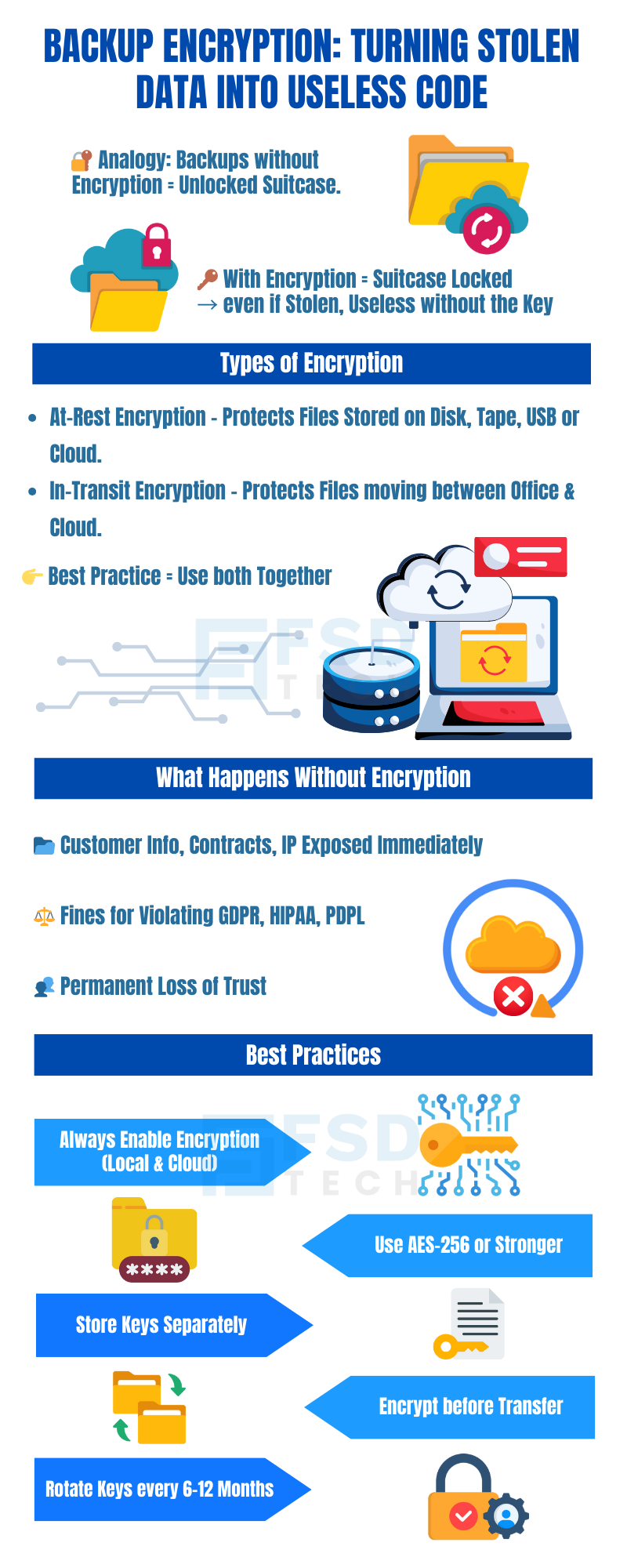
     

    Infographic titled 'Backup Encryption: Turning Stolen Data into Useless Code.' Explains analogy of encryption as a locked suitcase, types of encryption (at-rest, in-transit), risks without encryption such as exposure, fines, and loss of trust, and best practices like enabling encryption, storing keys separately, using AES-256, encrypting before transfer, and rotating keys every 6–12 months. Icons illustrate suitcases, servers, cloud, keys, and locks.

    FAQ

    1. What is backup encryption?

    Backup encryption is a way of locking your backup data so that no one can read it unless they have the special password or “key” to unlock it.

    When you encrypt your backup, the files are turned into unreadable code. Even if someone steals them, they won’t be able to see anything useful without the key.

    Think of it like storing important documents in a safe — without the combination, it’s just a heavy box full of useless paper to a thief.


    2. Why is encryption important for backups?

    Your backups often hold the most important and sensitive information in your business, such as:

    • Customer contact details and personal information.
    • Financial records.
    • Business contracts.
    • Internal company files.

    If someone got access to your backups without encryption, they could open and read all of this instantly.

    With encryption, even if your backup is stolen, it’s just scrambled data without the decryption key.


    3. How does encryption work?

    Encryption uses a mathematical formula to scramble your readable data into unreadable code.

    When you need the files back, the encryption key reverses the process, turning the scrambled code into readable information again.

    Without that exact key, it’s nearly impossible to make sense of the scrambled data.


    4. What’s the difference between “at-rest” and “in-transit” encryption?

    • At-rest encryption protects your data while it’s stored somewhere — like on a hard drive, USB, tape, or cloud storage.
    • In-transit encryption protects your data while it’s moving — for example, while it’s being uploaded to the cloud or transferred to another office.

    For complete safety, you need both: protection during storage and during transfer.


    5. What happens if backups are not encrypted?

    Without encryption, backups are just like files on a regular computer — anyone who gets them can open and read them.

    If they’re stolen through hacking or physical theft, the thief could see:

    • Customer information.
    • Bank account details.

    Confidential contracts.

    Internal plans and strategies.

    This could lead to fines, lawsuits, and permanent damage to your company’s reputation.


    6. What is AES-256 encryption?

    AES-256 is one of the strongest encryption methods available today.

    It’s used by banks, governments, and the military to protect sensitive information.

    The “256” refers to the key length — longer keys are much harder to break.
     

    7. Who can decrypt encrypted backups?

    Only someone with the exact encryption key or password can decrypt the backups.

    Without it, even the most advanced hacker would find it nearly impossible to read the files.


    8. How should I store my encryption keys?

    Keep them separate from the backups and in a very secure place.

    Best options include:

    • A password manager.
    • An encrypted USB drive locked in a safe.
    • A secure, offline location.

    If you lose your encryption key, you won’t be able to restore your data — so store it safely.


    9. Can encryption slow down backups?

    Encryption does require some processing power, so it might add a few seconds or minutes to the backup process.

    However, with modern systems like Vembu BDR Suite, the slowdown is minimal and the security benefit is huge.


    10. Does encryption protect against ransomware?

    Encryption doesn’t stop ransomware from infecting your live systems, but it protects your backups if attackers try to steal them.

    Even if ransomware operators take your backups, they won’t be able to read them without the key.


    11. Is encryption required by law?

    In many industries — including healthcare, finance, and government contracting — yes.

    Regulations like HIPAA, GDPR, and various ISO standards require businesses to encrypt their backups to protect sensitive data.


    12. Can cloud providers see my encrypted backups?

    If you encrypt your backups before sending them to the cloud, your cloud provider cannot read them.

    They will only see scrambled data, which is useless without your key.


    13. Should I encrypt local backups too, or just cloud backups?

    You should encrypt all backups — both local and cloud.

    Physical theft is just as real a threat as hacking.

    For example, if someone steals a hard drive or tape from your office, encryption keeps it safe.


    14. How often should I change my encryption keys?

    Changing your keys periodically (every 6–12 months) adds an extra layer of security.

    This is called key rotation and is a good practice for long-term data protection.


    15. How does Vembu BDR Suite handle encryption?

    Vembu BDR Suite offers:

    • AES-256 encryption for top-level security.
    • End-to-end encryption – Data is encrypted before it leaves your system, stays encrypted in storage, and is only decrypted when restored.
    • Custom key management so you have full control.
    • Compliance with international standards so you meet legal requirements.
       

    16. What is backup encryption for SMBs?

    Backup encryption is the process of securing business data using advanced encryption algorithms (like AES-256). This ensures that even if backups are stolen or accessed without permission, the data remains unreadable to unauthorized users.
     

    17. Why do SMBs in GCC & Africa need encrypted backups?

    SMBs in GCC and Africa face rising cyber threats, ransomware, and strict compliance requirements. Encrypted backups not only safeguard critical data but also help meet regional and global regulations such as GDPR and local data protection laws.
     

    18. How does Vembu BDR Suite secure backups?

    Vembu BDR Suite provides end-to-end protection by encrypting backups both in-transit and at rest with AES-256 encryption. This guarantees secure data across on-premises, cloud, and hybrid environments.
     

    19. Can encrypted backups help with compliance?

    Yes. Encrypted backups play a vital role in ensuring compliance with data security regulations. They help SMBs avoid penalties and protect sensitive customer and business information.
     

    20. What happens if encrypted backups are stolen?

    If encrypted backups are stolen, the data is still safe. Without the encryption key, the stolen files remain unreadable, preventing breaches, reputational damage, and financial loss.

    The Role of Backup Encryption in Keeping Your Data Safe from Hackers

    About The Author

    Nasmal

    Nasmal is a Solution Architect & Business Analyst focused on AI, Data, Automation, BCP, and Process Optimization. He helps businesses evolve from reactive to proactive, data-driven, and resilient operations. With hands-on expertise, he simplifies complex tech into clear, easy-to-understand blogs.

    Like This Story?

    Share it with friends!

    Subscribe to our newsletter!

    Atera

    (49)

    Cato Networks

    (120)

    ClickUp

    (70)

    FishOS

    (7)

    Miradore

    (21)

    PointGuard AI

    (9)

    Vembu

    (22)

    Xcitium

    (33)

    ZETA HRMS

    (79)

    Workflow Automation(8)

    Workforce Automation(1)

    AI Project Management(1)

    HR Data Automation(1)

    RMM(1)

    IT Workflow Automation(1)

    IT security(2)

    GCC compliance(4)

    Payroll Integration(2)

    IT support automation(3)

    procurement automation(1)

    lost device management(1)

    IT Management(5)

    IoT Security(2)

    Cato XOps(2)

    IT compliance(4)

    Workflow Management(1)

    Task Automation(1)

    Kubernetes lifecycle management(2)

    OpenStack automation(1)

    AI-powered cloud ops(1)

    SMB Security(8)

    Data Security(1)

    MDR (Managed Detection & Response)(4)

    MSP Automation(3)

    Atera Integrations(2)

    XDR Security(2)

    SMB Cyber Protection(1)

    Ransomware Defense(3)

    HR Tech Solutions(1)

    Zero Trust Network Access(3)

    Zero Trust Security(2)

    Endpoint Management(1)

    SaaS Security(1)

    Payroll Automation(5)

    IT Monitoring(2)

    Xcitium EDR SOC(15)

    Ransomware Protection GCC(1)

    Network Consolidation UAE(1)

    M&A IT Integration(1)

    MSSP for SMBs(1)

    SMB Cybersecurity GCC(1)

    Managed EDR FSD-Tech(1)

    Ransomware Protection(3)

    Antivirus vs EDR(1)

    FSD-Tech MSSP(25)

    Cybersecurity GCC(12)

    Endpoint Security(1)

    Endpoint Protection(1)

    Data Breach Costs(1)

    SMB Cybersecurity(8)

    Zero Dwell Containment(31)

    Managed Security Services(2)

    Xcitium EDR(30)

    Hybrid Backup(1)

    Cloud Backup(1)

    Backup & Recovery(1)

    pointguard ai(4)

    backup myths(1)

    disaster recovery myths(1)

    SMB data protection(9)

    vembu(9)

    Disaster Recovery(4)

    Vembu BDR Suite(19)

    GCCBusiness(1)

    DataProtection(1)

    Secure Access Service Edge(4)

    GCC HR software(20)

    Miradore EMM(15)

    Cato SASE(7)

    Cloud Security(8)

    Talent Development(1)

    AI Compliance(2)

    AI Security(2)

    AI Risk Management(1)

    AI Cybersecurity(12)

    AI Governance(4)

    GCC business security(1)

    GCC network integration(1)

    compliance automation(5)

    education security(1)

    GCC cybersecurity(2)

    Miradore EMM Premium+(5)

    App management UAE(1)

    BYOD security Dubai(8)

    MiddleEast(1)

    HealthcareSecurity(1)

    Team Collaboration(1)

    IT automation(12)

    Zscaler(1)

    SD-WAN(6)

    HR Integration(4)

    Cloud Networking(3)

    device management(9)

    VPN(1)

    RemoteWork(1)

    ZeroTrust(2)

    MPLS(1)

    Project Management(9)

    HR automation(16)

    share your thoughts

    Why Is Data Backup Crucial for Cybersecurity

    Why Is Data Backup Crucial for Cybersecurity? Protect Your Business from Ransomware & Data Loss

    🕓 November 24, 2025

    Vector illustration showcasing Vembu cloud backup solutions. A central laptop screen displays the Vembu logo, surrounded by connected cloud storage icons, files, and mobile devices representing seamless data synchronization. Additional graphics include a store with "3-2-1" backup signage, servers, and secure connections, symbolizing hybrid cloud storage and reliable data protection for SMBs.

    SMB Backup Starter Pack: What to Back Up, Where to Store It & How Often (3-2-1 Checklist)

    🕓 September 16, 2025

    Illustration showing data being backed up from two on-premise servers to the Vembu cloud, with two people sitting on the servers and looking at laptops. The image visually represents the concept of offsite data backup to a remote cloud location.

    The Importance of Offsite Backups in Disaster Recovery Planning

    🕓 September 5, 2025

    Decoded(93)

    Cyber Security(118)

    BCP / DR(22)

    Zeta HRMS(78)

    SASE(21)

    Automation(70)

    Next Gen IT-Infra(118)

    Monitoring & Management(70)

    ITSM(22)

    HRMS(21)

    Automation(24)