HomeNext Gen IT-InfraMonitoring & ManagementCyber SecurityBCP / DRAutomationDecoded
Next Gen IT-Infra
Cato’s SASE Supports Cybersecurity Skills Development

How Cato’s SASE Supports Cybersecurity Skills Development

🕓 April 8, 2025

How SASE Supports the Security Needs of SMBs

How SASE Supports the Security Needs of SMBs

🕓 February 9, 2025

Attack Surface Reduction with Cato’s SASE

Attack Surface Reduction with Cato’s SASE

🕓 February 10, 2025

SASE for Digital Transformation in UAE

SASE for Digital Transformation in UAE

🕓 February 8, 2025

Monitoring & Management
Understanding Atera’s SLA Management

Understanding Atera’s SLA Management

🕓 February 7, 2025

Cost-Performance Ratio: Finding the Right Balance in IT Management Networks

Cost-Performance Ratio: Finding the Right Balance in IT Management Networks

🕓 June 16, 2025

Customizing Atera with APIs

Customizing Atera with APIs

🕓 March 3, 2025

Power Up Your IT Team’s Strategy with Atera’s Communication Tools

Power Up Your IT Team’s Strategy with Atera’s Communication Tools

🕓 February 8, 2025

Cyber Security
Illustration of the Cato Cloud architecture showing its role in delivering SASE for secure, optimized global connectivity.

Understanding the Cato Cloud and Its Role in SASE

🕓 January 29, 2025

Isometric illustration of professionals managing network performance, bandwidth analytics, and cloud-based optimization around the Cato Networks platform, symbolizing bandwidth control and QoS visibility.

Mastering Bandwidth Control and QoS in Cato Networks

🕓 July 26, 2025

Global network backbone powering Cato SASE solution for secure, high-performance connectivity across regions.

Global Backbone: The Engine Powering Cato’s SASE Solution

🕓 January 30, 2025

Illustration of team analyzing application traffic and usage insights on a large laptop screen using Cato’s dashboard, surrounded by network and cloud icons.

Cato Networks Application Visibility | Monitoring & Control

🕓 July 27, 2025

BCP / DR
Illustration showing diverse business and IT professionals collaborating with cloud, backup, and security icons, representing Vembu use cases for SMBs, MSPs, and IT teams.

Who Uses Vembu? Real-World Use Cases for SMBs, MSPs & IT Teams

🕓 July 12, 2025

Graphic showcasing Vembu’s all-in-one backup and disaster recovery platform with icons for cloud, data protection, and business continuity for IT teams and SMBs.

What Is Vembu? A Deep Dive Into the All in One Backup & Disaster Recovery Platform

🕓 July 6, 2025

Illustration showing Vembu backup and disaster recovery system with cloud storage, server racks, analytics dashboard, and IT professionals managing data.

The Rising Cost of Data Loss: Why Backup Is No Longer Optional?

🕓 August 14, 2025

3D isometric illustration of cloud backup and data recovery infrastructure with laptop, data center stack, and digital business icons — FSD Tech

RPO & RTO: The Heart of Business Continuity

🕓 August 15, 2025

Automation
Cross-Functional Collaboration with ClickUp

Fostering Cross-Functional Collaboration with ClickUp for Multi-Departmental Projects

🕓 February 11, 2025

ClickUp Project Reporting

Revolutionizing Enterprise Reporting with ClickUp’s Advanced Analytics and Dashboards

🕓 June 16, 2025

ClickUp’s Design Collaboration and Asset Management Tools

Empowering Creative Teams with ClickUp’s Design Collaboration and Asset Management Tools

🕓 February 26, 2025

ClickUp Communication and Collaboration Tools

ClickUp Communication and Collaboration Tools: Empowering Remote Teams

🕓 March 12, 2025

Decoded
Multi-Factor Authentication (MFA)

Multi-Factor Authentication (MFA): All You Need to Know

🕓 December 7, 2025

L3 Switch

What Is an L3 Switch? L2 vs L3 & Why You Need Layer 3?

🕓 December 8, 2025

IPSec

IPSec Explained: Protocols, Modes, IKE & VPN Security

🕓 December 3, 2025

 Datagram Transport Layer Security (DTLS)

What is Datagram Transport Layer Security (DTLS)? How it works?

🕓 December 4, 2025

    Subscribe to our newsletter!

    About Us

    Follow Us

    Copyright © 2024 | Powered by 

    Cato SASE Architecture

    Inside Cato’s SASE Architecture: A Blueprint for Modern Security

    🕓 January 26, 2025

    Enterprise Data Security and Privacy with ClickUp

    Ensuring Enterprise Data Security and Privacy with ClickUp

    🕓 February 9, 2025

    DDoS protection SASE

    DDoS Protection and Cato’s Defence Mechanisms

    🕓 February 11, 2025

    Table of Contents

    Thresholds and Auto-Healing in Atera: Fixing Small Problems Before They Become Tickets

    Anas Abdu Rauf
    February 2, 2026
    Comments
    Illustration showing Atera’s centralized IT operations platform connecting servers, laptops, dashboards, and monitoring tools with automated alerts and security controls.

    Most IT issues don’t start as incidents.
    They start as small deviations that go unnoticed.

    Disk space slowly fills up.
    A service stops and doesn’t restart.
    CPU usage stays high just long enough to cause complaints.

    Thresholds and auto-healing in Atera exist to deal with these exact situations — not outages, not complex failures, but the repetitive, predictable problems that waste technician time.


    What Thresholds Are in Atera (Plainly)

    A threshold in Atera is simply a rule:

    “If this condition happens, do something.”

    The condition might be:

    • CPU usage above X%
    • Disk space below Y GB
    • A service not running
    • A specific Windows event appearing
    • Antivirus becoming inactive

    Thresholds don’t diagnose.
    They don’t investigate.
    They just watch.


    How Thresholds Are Actually Used Day to Day

    Most teams don’t create dozens of thresholds.
    They create a small, stable set that covers:

    • Performance degradation
    • Storage exhaustion
    • Security drift
    • Critical services

    Once configured, these thresholds quietly monitor every assigned device.

    When nothing happens, nothing happens.
    When a condition is breached, Atera reacts.


    Alerts vs Auto-Healing: The Important Distinction

    A threshold breach always creates an alert.

    What happens next depends on configuration.

    Without auto-healing:

    • Alert is generated
    • Ticket may be created
    • Technician investigates

    With auto-healing:

    • Alert is generated
    • A predefined script runs automatically
    • Issue may be resolved before anyone looks at it

    Auto-healing doesn’t replace alerts.
    It acts immediately instead of waiting.


    What Auto-Healing Scripts Can Actually Do

    Auto-healing scripts in Atera are not special scripts.
    They are regular scripts that you explicitly attach to a threshold.

    Common examples:

    • Clear temporary files when disk space drops
    • Restart a stopped service
    • Restart a stuck application
    • Reset a failed component
    • Clean up known problem folders

    You can attach up to three scripts to a single threshold item, and they run sequentially.

    Nothing runs unless:

    • The threshold is breached
    • The device is online
    • The script is approved


    Supported Platforms (Important for Planning)

    Auto-healing scripts run on:

    • Windows devices
    • macOS devices

    Linux devices can be monitored, but auto-healing via thresholds is limited.

    This matters for MSPs managing mixed environments and for internal IT teams planning consistency.


    Where AI Copilot Fits (Carefully)

    AI Copilot does not automatically create thresholds.

    What it can help with:

    • Explaining why a threshold triggered
    • Summarizing alerts
    • Suggesting actions based on context

    The threshold logic itself remains rule-based and predictable.

    This is intentional.


    Why Teams Trust Threshold-Based Auto-Healing

    Because it’s deterministic.

    You know:

    • When it triggers
    • What script runs
    • What outcome to expect

    There’s no guessing.

    For MSPs, this reduces ticket volume.
    For internal IT, this prevents “background noise” incidents.


    Auto-Healing Is Not for Everything

    Good teams don’t auto-heal complex issues.

    They don’t auto-heal:

    • Security breaches
    • Data corruption
    • Hardware failures
    • Multi-system dependencies

    Auto-healing is for:

    • Known problems
    • Known fixes
    • Known outcomes

    That’s where it works best.


    Logging, Visibility, and Control

    Every auto-healing action:

    • Is logged
    • Appears in device activity
    • Can be reviewed later

    Nothing is hidden.

    If a script fails, it’s visible.
    If it succeeds, it’s recorded.

    This is critical for audits and reviews.


    How MSPs Use Thresholds in Practice

    MSPs typically use thresholds to:

    • Reduce low-value tickets
    • Protect SLA response times
    • Standardize fixes across customers

    They don’t advertise auto-healing to clients.
    They use it quietly to keep environments stable.


    How Internal IT Teams Use Thresholds

    Internal IT teams use thresholds to:

    • Prevent repeat complaints
    • Stabilize older devices
    • Reduce after-hours alerts

    It’s about control, not automation for its own sake.


    The Real Value of Thresholds and Auto-Healing

    Thresholds don’t make IT smarter.
    They make it quieter.

    And quiet environments are easier to manage.


    Reduce background noise without adding complexity → Schedule a 30-minute Atera thresholds session.
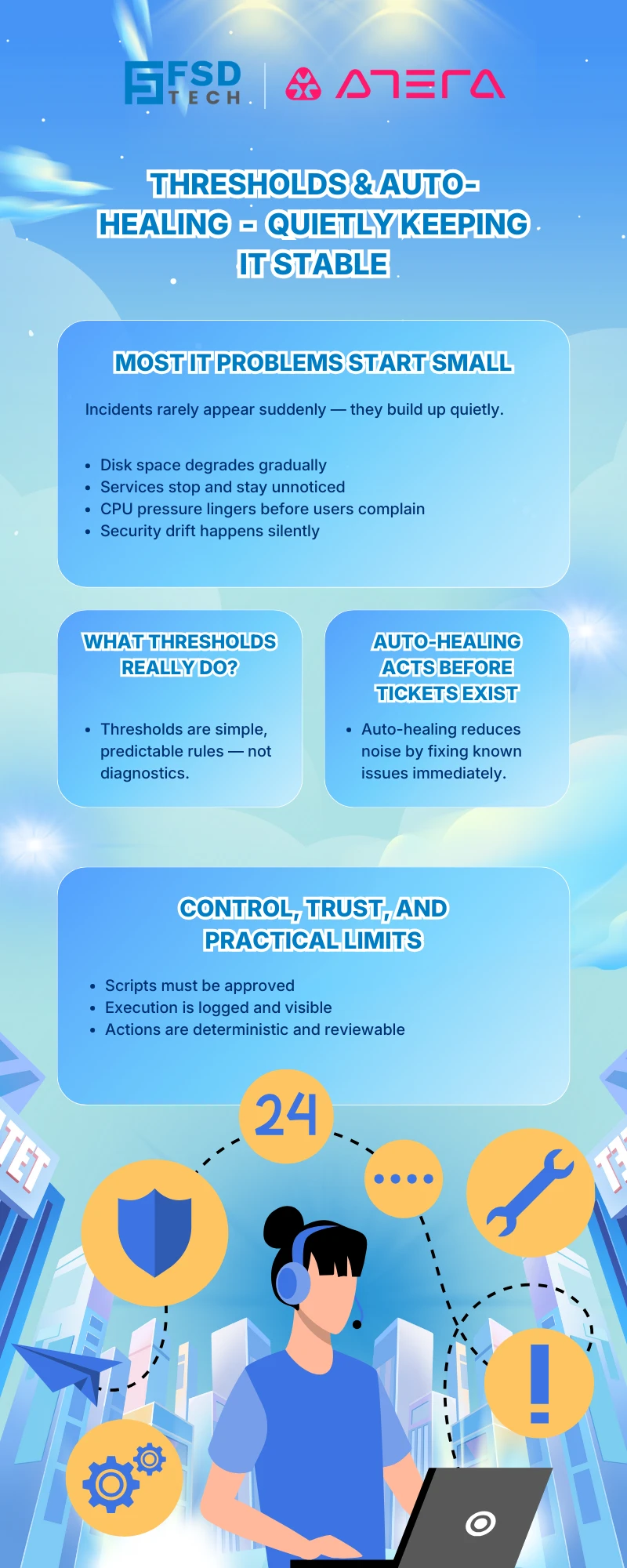
     

    Infographic explaining thresholds and auto-healing in Atera, showing proactive IT monitoring, automated fixes, and controlled remediation to keep systems stable without manual intervention.


    FAQs


    How do thresholds work in Atera RMM?

    In Atera RMM, thresholds are predefined monitoring rules that continuously watch specific device conditions such as CPU usage, disk space, service status, or security events. When a condition crosses the defined limit, Atera generates an alert and triggers any configured follow-up actions.


    What is auto-healing in Atera, and how is it different from alerts?

    Auto-healing in Atera uses scripts attached to threshold rules to automatically resolve known issues when a threshold is breached. Alerts notify technicians, while auto-healing attempts to fix the issue immediately without waiting for manual intervention.


    What types of issues can Atera auto-healing scripts fix?

    Atera auto-healing scripts are commonly used to address predictable, repeat issues such as clearing temporary files, restarting stopped services, resetting applications, or performing routine cleanup tasks. They are best suited for known problems with reliable fixes.


    Does Atera AI Copilot automatically create or modify thresholds?

    No. Threshold creation and configuration in Atera remain manual and rule-based. Atera AI Copilot can help explain alerts or summarize why a threshold triggered, but it does not automatically create, modify, or enforce threshold logic.


    Which operating systems support auto-healing in Atera RMM?

    Atera auto-healing scripts triggered by thresholds are supported on Windows and macOS devices. Linux devices can be monitored with thresholds, but automated remediation through threshold-based scripts is limited.


    Are auto-healing actions logged for auditing and troubleshooting?

    Yes. Every auto-healing action executed in Atera is logged in the device activity history. This includes script execution status, timestamps, and results, allowing teams to review what ran and verify outcomes during audits or incident reviews.


    How do MSPs typically use thresholds and auto-healing in Atera?

    MSPs use Atera thresholds and auto-healing to reduce repetitive tickets, stabilize client environments, and protect SLA response times. These automations are usually kept internal and focused on routine maintenance rather than complex incident handling.


    Can auto-healing scripts in Atera cause unintended changes?

    Only if they are poorly designed. Atera requires scripts to be explicitly approved and attached to thresholds by administrators. Because execution is deterministic and logged, teams retain full control and visibility over what actions run and when.

    Thresholds and Auto-Healing in Atera: Fixing Small Problems Before They Become Tickets

    About The Author

    Anas Abdu Rauf

    Anas is an Expert in Network and Security Infrastructure, With over seven years of industry experience, holding certifications Including CCIE- Enterprise, PCNSE, Cato SASE Expert, and Atera Certified Master. Anas provides his valuable insights and expertise to readers.

    Like This Story?

    Share it with friends!

    Subscribe to our newsletter!

    Atera

    (49)

    Cato Networks

    (120)

    ClickUp

    (70)

    FishOS

    (7)

    Miradore

    (21)

    PointGuard AI

    (9)

    Vembu

    (22)

    Xcitium

    (33)

    ZETA HRMS

    (79)

    Workflow Automation(8)

    Workforce Automation(1)

    AI Project Management(1)

    HR Data Automation(1)

    RMM(1)

    IT Workflow Automation(1)

    IT security(2)

    GCC compliance(4)

    Payroll Integration(2)

    IT support automation(3)

    procurement automation(1)

    lost device management(1)

    IT Management(5)

    IoT Security(2)

    Cato XOps(2)

    IT compliance(4)

    Workflow Management(1)

    Task Automation(1)

    Kubernetes lifecycle management(2)

    OpenStack automation(1)

    AI-powered cloud ops(1)

    SMB Security(8)

    Data Security(1)

    MDR (Managed Detection & Response)(4)

    MSP Automation(3)

    Atera Integrations(2)

    XDR Security(2)

    SMB Cyber Protection(1)

    Ransomware Defense(3)

    HR Tech Solutions(1)

    Zero Trust Network Access(3)

    Zero Trust Security(2)

    Endpoint Management(1)

    SaaS Security(1)

    Payroll Automation(5)

    IT Monitoring(2)

    Xcitium EDR SOC(15)

    Ransomware Protection GCC(1)

    Network Consolidation UAE(1)

    M&A IT Integration(1)

    MSSP for SMBs(1)

    SMB Cybersecurity GCC(1)

    Managed EDR FSD-Tech(1)

    Ransomware Protection(3)

    Antivirus vs EDR(1)

    FSD-Tech MSSP(25)

    Cybersecurity GCC(12)

    Endpoint Security(1)

    Endpoint Protection(1)

    Data Breach Costs(1)

    SMB Cybersecurity(8)

    Zero Dwell Containment(31)

    Managed Security Services(2)

    Xcitium EDR(30)

    Hybrid Backup(1)

    Cloud Backup(1)

    Backup & Recovery(1)

    pointguard ai(4)

    backup myths(1)

    disaster recovery myths(1)

    SMB data protection(9)

    vembu(9)

    Disaster Recovery(4)

    Vembu BDR Suite(19)

    GCCBusiness(1)

    DataProtection(1)

    Secure Access Service Edge(4)

    GCC HR software(20)

    Miradore EMM(15)

    Cato SASE(7)

    Cloud Security(8)

    Talent Development(1)

    AI Compliance(2)

    AI Security(2)

    AI Risk Management(1)

    AI Cybersecurity(12)

    AI Governance(4)

    GCC business security(1)

    GCC network integration(1)

    compliance automation(5)

    education security(1)

    GCC cybersecurity(2)

    Miradore EMM Premium+(5)

    App management UAE(1)

    BYOD security Dubai(8)

    MiddleEast(1)

    HealthcareSecurity(1)

    Team Collaboration(1)

    IT automation(12)

    Zscaler(1)

    SD-WAN(6)

    HR Integration(4)

    Cloud Networking(3)

    device management(9)

    VPN(1)

    RemoteWork(1)

    ZeroTrust(2)

    MPLS(1)

    Project Management(9)

    HR automation(16)

    share your thoughts

    Illustration showing Atera’s centralized IT operations platform connecting servers, laptops, dashboards, and monitoring tools with automated alerts and security controls.

    Thresholds and Auto-Healing in Atera: Fixing Small Problems Before They Become Tickets

    🕓 February 2, 2026

    Isometric illustration of Atera operational reporting platform with centralized dashboards, SLA metrics, device data, and automated workflows connected into a single IT operations view.

    Operational Reports in Atera: Getting Answers Without Digging Through Tickets

    🕓 February 1, 2026

    Isometric illustration showing Atera Copilot generating AI-powered remote session summaries, connecting multiple devices, dashboards, and IT teams to automate documentation, improve visibility, and support MSP operations.

    AI-Driven Remote Session Summaries in Atera: Turning Hands-On Support Into Instant Documentation

    🕓 January 1, 2026

    Decoded(93)

    Cyber Security(118)

    BCP / DR(22)

    Zeta HRMS(78)

    SASE(21)

    Automation(70)

    Next Gen IT-Infra(118)

    Monitoring & Management(70)

    ITSM(22)

    HRMS(21)

    Automation(24)








