.webp&w=3840&q=75)
How ClickUp Enables Outcome-Based Project Management (Not Just Task Tracking)
🕓 February 15, 2026
Atera’s AI Copilot does not replace Automation Profiles or Patch Management. Instead, it operates alongside existing RMM workflows by assisting technicians with script creation, diagnostics, summaries, and execution support—while automation logic, approvals, and schedules remain fully controlled by administrators.
Automation and patch management are foundational components of Atera’s RMM platform. They are designed to execute predictable, repeatable actions across devices—such as software updates, maintenance scripts, and remediation tasks—based on rules defined by IT teams.
AI Copilot does not alter this architecture.
Automation Profiles, Patch Management policies, and Thresholds continue to function exactly as configured.
What AI Copilot introduces is assistance, not control.
Atera separates decision-making from execution.
AI Copilot does not run scheduled tasks on its own and does not approve patches. It operates in technician-initiated workflows and supports actions that are already permitted by role-based access control.
AI Copilot can be used inside the Script Editor to generate scripts from plain-language instructions. These scripts:
Once added to an Automation Profile, the script behaves like any other scheduled task.
AI Copilot does not modify its schedule, scope, or execution conditions.
When automation profiles run:
AI Copilot does not alter these logs.
It can assist technicians in reviewing outcomes, but the data itself is generated by the automation engine.
Atera’s patch management follows a structured lifecycle:
This process remains unchanged with AI Copilot enabled.
Patch behavior is always governed by Patch Management settings and Automation Profiles.
Atera provides multiple operational reports related to automation and patching, including:
These reports are generated by the RMM engine.
AI Copilot does not change the underlying reporting logic.
Technicians can use Copilot to help interpret outcomes, but reporting accuracy and data integrity come from the platform itself.
Atera’s documentation emphasizes human oversight:
AI Copilot operates only within these boundaries.
This design ensures that automation remains predictable, repeatable, and compliant—especially in MSP environments managing multiple customers.
MSP environments
Internal IT teams
In both cases, Copilot functions as a tool, not a decision-maker.
All automation and patching activity in Atera is governed by:
AI Copilot cannot bypass these controls.
Every action—whether manual or automated—is recorded with technician identity, device context, and execution outcome.
Atera’s approach keeps automation stable while making it easier for technicians to work with it.
Keep automation predictable. Make preparation faster→ See how AI Copilot supports Atera automation in 30 minutes.
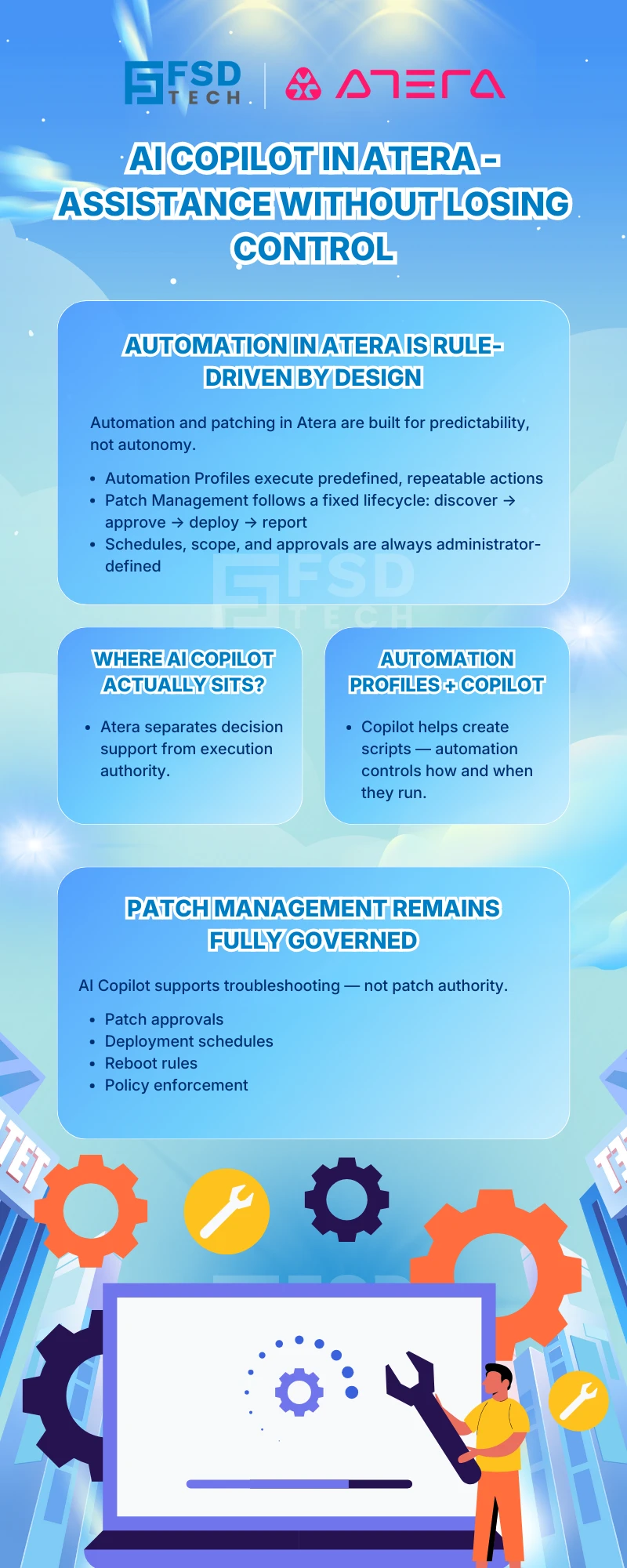
AI Copilot can assist technicians during the script creation and preparation stage, but Automation Profiles themselves operate independently. Once a script is created—either manually or with Copilot assistance—it behaves like any other script in Atera. The Automation Profile determines when, where, and how the script runs. AI Copilot does not modify Automation Profile schedules, targets, or execution logic.
No. Scripts generated using AI Copilot are saved to My Scripts and must be manually assigned to Automation Profiles by a technician with the appropriate permissions. There is no documented capability for Copilot to attach scripts to profiles automatically or alter existing profiles.
No. Patch Management in Atera continues to function exactly as configured. Patch discovery, approval rules, deployment schedules, and reboot behavior are governed by Patch Management settings and Automation Profiles. Enabling AI Copilot does not change patch workflows, approvals, or enforcement mechanisms.
No. Patch approval and deployment remain administrative actions. AI Copilot does not approve patches, trigger deployments, or override patch policies. All patching actions must be explicitly defined and approved through Patch Management configuration.
When patch deployments fail or devices remain non-compliant, technicians can use AI Copilot to assist with diagnosis and remediation preparation, such as generating scripts to resolve common blockers (for example, service restarts or disk cleanup). Any remediation script must still be reviewed, approved, and executed according to existing automation or manual workflows.
Execution results are recorded through Atera’s standard reporting and logging mechanisms, including:
AI Copilot does not replace or alter these records. The data shown in reports comes directly from the RMM engine.
Yes, technicians can use AI Copilot to assist with reviewing and understanding outcomes, but the report content itself is generated by Atera’s reporting system. AI Copilot does not generate, modify, or suppress report data.
Yes. Atera documentation explicitly advises that all generated scripts must be reviewed and tested before deployment. Scripts must be manually saved, categorized, and—if required—explicitly enabled for AI Copilot or IT Autopilot use.
AI Copilot can only execute scripts that:
Execution rights are still governed by role-based permissions and script settings. Copilot cannot execute scripts that are not approved.
Yes. Any script execution—whether manual, scheduled, or AI-assisted—is logged in the same way as technician actions. Logs include device context, execution status, timestamps, and results. This ensures accountability and traceability.
No. AI Copilot does not create, edit, or delete Automation Profiles or Patch Management policies. Those actions require explicit technician or administrator input through the platform UI.
For MSPs, the benefit lies in reducing manual effort during preparation, not execution. Scripts can be created faster, troubleshooting is supported, and reporting remains consistent—while customer isolation, permissions, and approval controls remain unchanged.
Internal IT teams gain faster script preparation and easier troubleshooting support without compromising governance. Automation schedules, patching rules, and auditability remain fully controlled by IT administrators.
No. Based on verified documentation, AI Copilot operates as an assistant, not an autonomous executor. All automation and patching actions remain rule-driven and human-approved.

Anas is an Expert in Network and Security Infrastructure, With over seven years of industry experience, holding certifications Including CCIE- Enterprise, PCNSE, Cato SASE Expert, and Atera Certified Master. Anas provides his valuable insights and expertise to readers.
Share it with friends!




.webp&w=3840&q=75)

.webp&w=3840&q=75)
🕓 March 25, 2026

🕓 March 22, 2026

🕓 March 20, 2026


share your thoughts