HomeNext Gen IT-InfraMonitoring & ManagementCyber SecurityBCP / DRAutomationDecoded
Next Gen IT-Infra
Cato’s SASE Supports Cybersecurity Skills Development

How Cato’s SASE Supports Cybersecurity Skills Development

🕓 April 8, 2025

How SASE Supports the Security Needs of SMBs

How SASE Supports the Security Needs of SMBs

🕓 February 9, 2025

Attack Surface Reduction with Cato’s SASE

Attack Surface Reduction with Cato’s SASE

🕓 February 10, 2025

SASE for Digital Transformation in UAE

SASE for Digital Transformation in UAE

🕓 February 8, 2025

Monitoring & Management
Understanding Atera’s SLA Management

Understanding Atera’s SLA Management

🕓 February 7, 2025

Cost-Performance Ratio: Finding the Right Balance in IT Management Networks

Cost-Performance Ratio: Finding the Right Balance in IT Management Networks

🕓 June 16, 2025

Customizing Atera with APIs

Customizing Atera with APIs

🕓 March 3, 2025

Power Up Your IT Team’s Strategy with Atera’s Communication Tools

Power Up Your IT Team’s Strategy with Atera’s Communication Tools

🕓 February 8, 2025

Cyber Security
Illustration of the Cato Cloud architecture showing its role in delivering SASE for secure, optimized global connectivity.

Understanding the Cato Cloud and Its Role in SASE

🕓 January 29, 2025

Isometric illustration of professionals managing network performance, bandwidth analytics, and cloud-based optimization around the Cato Networks platform, symbolizing bandwidth control and QoS visibility.

Mastering Bandwidth Control and QoS in Cato Networks

🕓 July 26, 2025

Global network backbone powering Cato SASE solution for secure, high-performance connectivity across regions.

Global Backbone: The Engine Powering Cato’s SASE Solution

🕓 January 30, 2025

Illustration of IT team managing user roles and permissions on the Cato CMA dashboard via laptops and cloud interfaces.

Setting Up Role-Based Access Control (RBAC) in Cato

🕓 July 28, 2025

BCP / DR
Illustration showing diverse business and IT professionals collaborating with cloud, backup, and security icons, representing Vembu use cases for SMBs, MSPs, and IT teams.

Who Uses Vembu? Real-World Use Cases for SMBs, MSPs & IT Teams

🕓 July 12, 2025

Graphic showcasing Vembu’s all-in-one backup and disaster recovery platform with icons for cloud, data protection, and business continuity for IT teams and SMBs.

What Is Vembu? A Deep Dive Into the All in One Backup & Disaster Recovery Platform

🕓 July 6, 2025

Illustration showing Vembu backup and disaster recovery system with cloud storage, server racks, analytics dashboard, and IT professionals managing data.

The Rising Cost of Data Loss: Why Backup Is No Longer Optional?

🕓 August 14, 2025

3D isometric illustration of cloud backup and data recovery infrastructure with laptop, data center stack, and digital business icons — FSD Tech

RPO & RTO: The Heart of Business Continuity

🕓 August 15, 2025

Automation
Cross-Functional Collaboration with ClickUp

Fostering Cross-Functional Collaboration with ClickUp for Multi-Departmental Projects

🕓 February 11, 2025

ClickUp Project Reporting

Revolutionizing Enterprise Reporting with ClickUp’s Advanced Analytics and Dashboards

🕓 June 16, 2025

ClickUp’s Design Collaboration and Asset Management Tools

Empowering Creative Teams with ClickUp’s Design Collaboration and Asset Management Tools

🕓 February 26, 2025

ClickUp Communication and Collaboration Tools

ClickUp Communication and Collaboration Tools: Empowering Remote Teams

🕓 March 12, 2025

Decoded
Multi-Factor Authentication (MFA)

Multi-Factor Authentication (MFA): All You Need to Know

🕓 December 7, 2025

L3 Switch

What Is an L3 Switch? L2 vs L3 & Why You Need Layer 3?

🕓 December 8, 2025

IPSec

IPSec Explained: Protocols, Modes, IKE & VPN Security

🕓 December 3, 2025

 Datagram Transport Layer Security (DTLS)

What is Datagram Transport Layer Security (DTLS)? How it works?

🕓 December 4, 2025

    Subscribe to our newsletter!

    About Us

    Follow Us

    Copyright © 2024 | Powered by 

    Cato SASE Architecture

    Inside Cato’s SASE Architecture: A Blueprint for Modern Security

    🕓 January 26, 2025

    Enterprise Data Security and Privacy with ClickUp

    Ensuring Enterprise Data Security and Privacy with ClickUp

    🕓 February 9, 2025

    DDoS protection SASE

    DDoS Protection and Cato’s Defence Mechanisms

    🕓 February 11, 2025

    Table of Contents

    Remote Work Security with Miradore – Enforcing VPN, Encryption & Trusted Networks

    Anas Abdu Rauf
    September 6, 2025
    Comments
    Miradore Device Management And Security Illustration Showing Cloud Management, Data Protection, Remote Device Control, And Endpoint Security Features. FSD Tech Visual Highlighting Unified IT Management And Remote Work Enablement With Miradore.

    Introduction

    Remote work is no longer a perk — it's the norm. But with laptops and smartphones connecting from coffee shops, airports, and home networks, the attack surface has exploded. The IT challenge? Protect sensitive company data without locking down flexibility for distributed teams.
     

    Miradore EMM solves this by enforcing critical security policies remotely — including mandatory VPN configurations, encryption standards, and trusted network access — without requiring constant admin oversight. This ensures remote workers remain protected, compliant, and productive, no matter where they are.

    In this blog, we’ll dive deep into how Miradore helps IT teams create a secure remote work environment, reduce endpoint risk, and align with regional compliance mandates — all from a single cloud console.
     

    Key Takeaways

    • Enforce VPN profiles across remote devices to secure all data in transit
    • Require device encryption and screen lock for endpoint protection
    • Define trusted networks and restrict access from unapproved sources
    • Automate policy enforcement for remote and hybrid workforces
    • Reduce compliance risk while maintaining productivity
       

    Why Remote Work Requires a Different Security Model

    In-office security relies on perimeter defenses: firewalls, managed Wi-Fi, physical access. But for remote workers, the perimeter doesn’t exist.

    Without visibility into where a device connects from or whether security protocols are active, IT teams can’t trust the connection.

    Common risks include:

    • Public Wi-Fi sniffing or MITM attacks
    • Unencrypted file syncs
    • Lost/stolen laptops without passcodes
    • VPN not in use, exposing internal resources

    This is where Miradore’s centralized security enforcement for remote endpoints becomes essential.


    How Miradore Enforces VPN Configurations

    VPNs secure data in transit between remote devices and internal services. Miradore lets you:

    • Push VPN profiles to devices with preset server addresses and authentication
    • Lock VPN settings to prevent user modification
    • Require VPN connection before launching business-critical apps
    • Apply split-tunneling rules or full-tunnel enforcement based on user role or OS

    Whether you're using native Android/iOS VPN clients or third-party providers like Cisco AnyConnect or OpenVPN, Miradore supports integration through policy profiles.

     Use Case: Enforce VPN on all sales team laptops accessing CRM data from external networks.


    Mandatory Encryption and Device Security Controls

    Miradore enables you to enforce full-disk encryption and essential device-level protections:

    • Check and enforce encryption status on Windows (BitLocker), macOS (FileVault), iOS, and Android
    • Require strong passcodes, biometric locks, or multi-layer authentication
    • Remotely lock or wipe non-compliant devices
    • Monitor device health in real time from a centralized compliance dashboard

    These controls ensure that if a remote device is lost, stolen, or compromised, your corporate data stays protected — even offline.

     Real-World Scenario: An HR manager in loses their iPad. Miradore enforces encryption and remote wipe, preventing any data leak.


    Restricting Access to Trusted Networks Only

    For higher-risk operations or departments handling sensitive data, Miradore lets you create trusted network policies:

    • Define known corporate IP ranges or Wi-Fi SSIDs
    • Block access to business apps or email unless connected to approved networks or via VPN
    • Trigger alerts or auto-disable access for suspicious activity
    • Segment access rules by group, role, or geography

    This is particularly useful for financial, legal, or executive teams working from various regions.

     Example: A finance analyst connects from an unlisted home Wi-Fi. Miradore disables access to financial apps until VPN or corporate Wi-Fi is used.


    Curious how secure your remote setup really is? Get your free remote work security checklist.
     

    Dynamic Policy Application for Remote Teams

    With Miradore, you can automate security rules based on:

    • Ownership (BYOD vs corporate)
    • OS platform (iOS, Android, Windows, macOS)
    • Device tags (e.g., “Remote”, “Field Sales”, “Contractor”)
    • Network connection type or location

    Once configured, these policies adapt to the device’s context — perfect for hybrid work environments.

     Bonus: Policy changes take effect in real time without user intervention.


    Monitoring Compliance & Remediation

    Miradore continuously monitors device compliance. When a policy is violated:

    • IT receives alerts via the dashboard or email
    • Devices can be moved to restricted access groups
    • Automated actions (like lock or wipe) can trigger instantly
    • Audit logs record all actions for regulatory reporting

    This is critical for organizations that must comply with regulations like NESA, SAMA, or ISO 27001, where endpoint security must be auditable and enforced.


    Real-World Case: Securing Remote Work in a GCC Enterprise

    A Dubai-based logistics company transitioned to hybrid work across four countries. Using Miradore, they:

    • Deployed VPN settings to all laptops via Windows Autopilot
    • Required encryption and biometric authentication
    • Created geofenced access for internal tools (VPN-only)
    • Received real-time alerts when contractors accessed corporate resources from unknown networks

    The result: faster onboarding, lower compliance risk, and a secure environment — all without constant manual oversight.


    Next Steps

    Remote work isn’t going anywhere — and neither are the security risks. Miradore offers an elegant, automated way to keep your distributed workforce compliant and protected, without slowing them down.


    See Miradore in action — book your free Consultation today
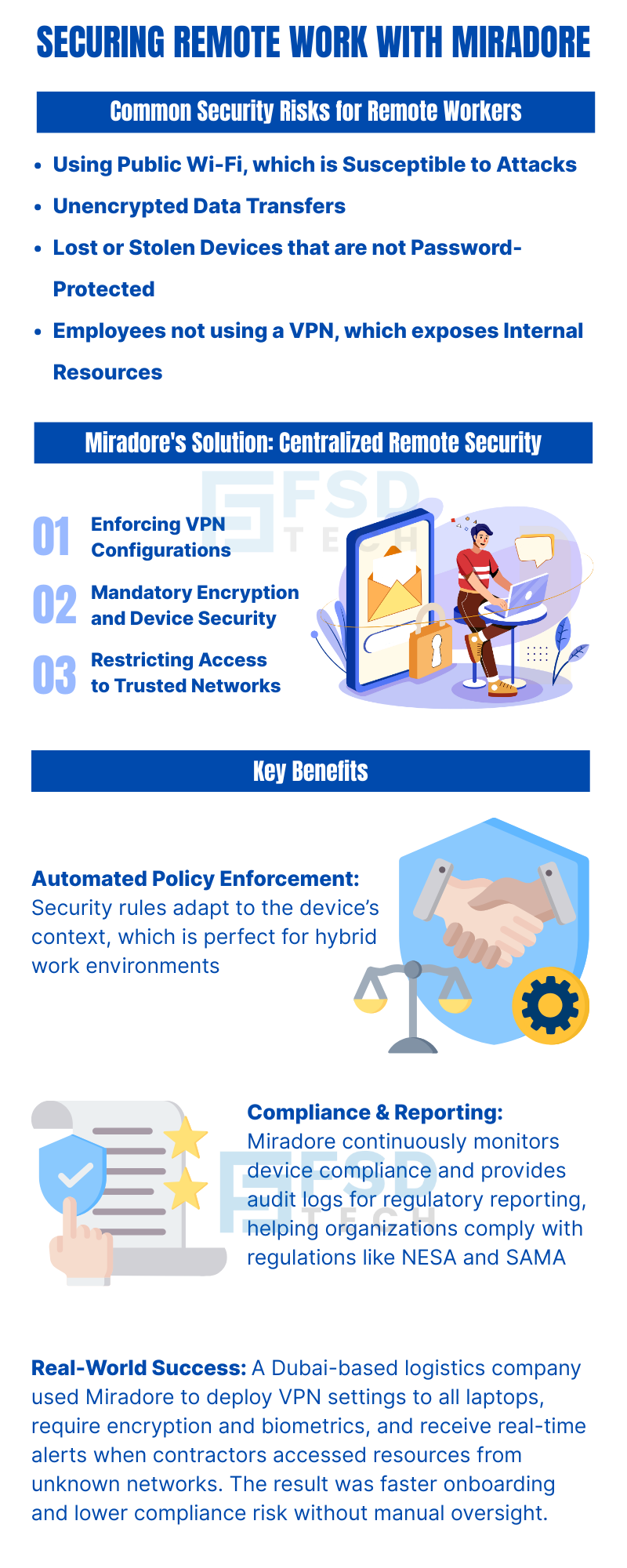
     

    Infographic On Securing Remote Work With Miradore. Highlights Common Security Risks For Remote Workers Including Public Wi-Fi, Unencrypted Data Transfers, And Lost Devices. Shows Miradore’s Centralized Remote Security Features Like VPN Enforcement, Device Encryption, And Trusted Network Access. Benefits Include Automated Policy Enforcement, Compliance Reporting, And Real-World Success In Dubai-Based Enterprises

    FAQs

    Can Miradore enforce VPN settings automatically?

    Yes. You can deploy preconfigured VPN profiles to devices and require their usage for accessing apps or internal resources. These profiles can be locked to prevent tampering.
     

    Does Miradore check if device encryption is enabled?

    Absolutely. Miradore monitors and enforces encryption status across supported OS platforms. Devices without encryption can be flagged, blocked, or auto-restricted.
     

    Can I restrict access unless a device is on a specific Wi-Fi network or behind VPN?

    Yes. You can define trusted networks (Wi-Fi SSIDs or IP ranges) and restrict app or data access unless the device connects through VPN or those networks.
     

    What happens if a device fails to meet the remote security policies?

    Miradore can trigger automatic actions such as locking the device, alerting the admin, moving it to a restricted group, or even performing selective wipe operations.
     

    Can I create different VPN or encryption rules for different teams or departments?

    Yes. Using dynamic groups and tags, you can apply unique security profiles based on user role, department, or geography, ensuring tailored protection for each segment.
     

    Does Miradore maintain audit logs for security policy enforcement?

    Yes. Every policy enforcement, compliance failure, and admin action is logged and exportable, helping you stay aligned with regulatory frameworks like SAMA, NESA, or ISO 27001.
     

    Is this setup compatible with remote BYOD devices?

    Yes. Miradore allows selective enforcement on managed work profiles or apps without affecting personal data — ensuring privacy on BYOD devices while enforcing corporate rules.
     

    Can we enforce VPN usage before accessing specific corporate apps?

    Yes. You can restrict access to apps or resources unless the VPN is connected. This helps prevent data exposure when users connect from untrusted networks.

    Remote Work Security with Miradore – Enforcing VPN, Encryption & Trusted Networks

    About The Author

    Anas Abdu Rauf

    Anas is an Expert in Network and Security Infrastructure, With over seven years of industry experience, holding certifications Including CCIE- Enterprise, PCNSE, Cato SASE Expert, and Atera Certified Master. Anas provides his valuable insights and expertise to readers.

    Like This Story?

    Share it with friends!

    Subscribe to our newsletter!

    Atera

    (48)

    Cato Networks

    (118)

    ClickUp

    (70)

    FishOS

    (7)

    Miradore

    (21)

    PointGuard AI

    (9)

    Vembu

    (22)

    Xcitium

    (33)

    ZETA HRMS

    (76)

    Decoded(86)

    Cyber Security(118)

    BCP / DR(22)

    Zeta HRMS(75)

    SASE(21)

    Automation(70)

    Next Gen IT-Infra(118)

    Monitoring & Management(69)

    ITSM(22)

    HRMS(21)

    Automation(24)

    Workflow Automation(8)

    Workforce Automation(1)

    AI Project Management(1)

    HR Data Automation(1)

    RMM(1)

    IT Workflow Automation(1)

    IT security(2)

    GCC compliance(4)

    Payroll Integration(2)

    IT support automation(3)

    procurement automation(1)

    lost device management(1)

    IT Management(5)

    IoT Security(2)

    Cato XOps(2)

    IT compliance(4)

    Workflow Management(1)

    Task Automation(1)

    OpenStack automation(1)

    Kubernetes lifecycle management(2)

    AI-powered cloud ops(1)

    SMB Security(8)

    Data Security(1)

    MDR (Managed Detection & Response)(4)

    Atera Integrations(2)

    MSP Automation(3)

    XDR Security(2)

    SMB Cyber Protection(1)

    Ransomware Defense(3)

    HR Tech Solutions(1)

    Zero Trust Network Access(3)

    Zero Trust Security(2)

    Endpoint Management(1)

    SaaS Security(1)

    Payroll Automation(5)

    IT Monitoring(2)

    Xcitium EDR SOC(15)

    Ransomware Protection GCC(1)

    M&A IT Integration(1)

    Network Consolidation UAE(1)

    MSSP for SMBs(1)

    Managed EDR FSD-Tech(1)

    Ransomware Protection(3)

    SMB Cybersecurity GCC(1)

    FSD-Tech MSSP(25)

    Antivirus vs EDR(1)

    Endpoint Security(1)

    Cybersecurity GCC(12)

    Data Breach Costs(1)

    Endpoint Protection(1)

    SMB Cybersecurity(8)

    Zero Dwell Containment(31)

    Managed Security Services(2)

    Xcitium EDR(30)

    Cloud Backup(1)

    Hybrid Backup(1)

    Backup & Recovery(1)

    pointguard ai(4)

    backup myths(1)

    vembu(9)

    SMB data protection(9)

    disaster recovery myths(1)

    Disaster Recovery(4)

    Vembu BDR Suite(19)

    GCCBusiness(1)

    DataProtection(1)

    Secure Access Service Edge(4)

    GCC HR software(18)

    Miradore EMM(15)

    Cato SASE(7)

    Cloud Security(8)

    Talent Development(1)

    AI Cybersecurity(12)

    AI Governance(4)

    AI Security(2)

    AI Compliance(2)

    AI Risk Management(1)

    GCC business security(1)

    GCC network integration(1)

    compliance automation(5)

    education security(1)

    GCC cybersecurity(2)

    BYOD security Dubai(8)

    App management UAE(1)

    Miradore EMM Premium+(5)

    MiddleEast(1)

    HealthcareSecurity(1)

    Team Collaboration(1)

    IT automation(12)

    Zscaler(1)

    SD-WAN(6)

    HR Integration(4)

    Cloud Networking(3)

    device management(9)

    VPN(1)

    RemoteWork(1)

    ZeroTrust(2)

    MPLS(1)

    Project Management(9)

    HR automation(16)

    share your thoughts

    Isometric illustration showing Atera Copilot generating AI-powered remote session summaries, connecting multiple devices, dashboards, and IT teams to automate documentation, improve visibility, and support MSP operations.

    AI-Driven Remote Session Summaries in Atera: Turning Hands-On Support Into Instant Documentation

    🕓 January 1, 2026

    Illustration showing Atera’s AI Diagnostic Core performing automated health checks, root-cause analysis, and device actions across multiple endpoints for IT teams and MSP environments.

    Health Checks & Device Actions in Atera: From Detection to Autonomous Remediation

    🕓 December 15, 2025

    Illustration showing Atera’s AI automation hub with a glowing blue sphere connected to multiple screens displaying tickets, device data, scripts, instant response times, and technician dashboards. Two IT technicians sit at workstations monitoring hours saved and ticket analytics.

    AI Copilot 3.0 and Action Mode: From Recommendations to Fully Autonomous IT

    🕓 December 12, 2025