HomeNext Gen IT-InfraMonitoring & ManagementCyber SecurityBCP / DRAutomationDecoded
Next Gen IT-Infra
Cato’s SASE Supports Cybersecurity Skills Development

How Cato’s SASE Supports Cybersecurity Skills Development

🕓 April 8, 2025

How SASE Supports the Security Needs of SMBs

How SASE Supports the Security Needs of SMBs

🕓 February 9, 2025

Attack Surface Reduction with Cato’s SASE

Attack Surface Reduction with Cato’s SASE

🕓 February 10, 2025

SASE for Digital Transformation in UAE

SASE for Digital Transformation in UAE

🕓 February 8, 2025

Monitoring & Management
Understanding Atera’s SLA Management

Understanding Atera’s SLA Management

🕓 February 7, 2025

Cost-Performance Ratio: Finding the Right Balance in IT Management Networks

Cost-Performance Ratio: Finding the Right Balance in IT Management Networks

🕓 June 16, 2025

Customizing Atera with APIs

Customizing Atera with APIs

🕓 March 3, 2025

Power Up Your IT Team’s Strategy with Atera’s Communication Tools

Power Up Your IT Team’s Strategy with Atera’s Communication Tools

🕓 February 8, 2025

Cyber Security
Illustration of the Cato Cloud architecture showing its role in delivering SASE for secure, optimized global connectivity.

Understanding the Cato Cloud and Its Role in SASE

🕓 January 29, 2025

Isometric illustration of professionals managing network performance, bandwidth analytics, and cloud-based optimization around the Cato Networks platform, symbolizing bandwidth control and QoS visibility.

Mastering Bandwidth Control and QoS in Cato Networks

🕓 July 26, 2025

Global network backbone powering Cato SASE solution for secure, high-performance connectivity across regions.

Global Backbone: The Engine Powering Cato’s SASE Solution

🕓 January 30, 2025

Illustration of team analyzing application traffic and usage insights on a large laptop screen using Cato’s dashboard, surrounded by network and cloud icons.

Cato Networks Application Visibility | Monitoring & Control

🕓 July 27, 2025

BCP / DR
Illustration showing diverse business and IT professionals collaborating with cloud, backup, and security icons, representing Vembu use cases for SMBs, MSPs, and IT teams.

Who Uses Vembu? Real-World Use Cases for SMBs, MSPs & IT Teams

🕓 July 12, 2025

Graphic showcasing Vembu’s all-in-one backup and disaster recovery platform with icons for cloud, data protection, and business continuity for IT teams and SMBs.

What Is Vembu? A Deep Dive Into the All in One Backup & Disaster Recovery Platform

🕓 July 6, 2025

Illustration showing Vembu backup and disaster recovery system with cloud storage, server racks, analytics dashboard, and IT professionals managing data.

The Rising Cost of Data Loss: Why Backup Is No Longer Optional?

🕓 August 14, 2025

3D isometric illustration of cloud backup and data recovery infrastructure with laptop, data center stack, and digital business icons — FSD Tech

RPO & RTO: The Heart of Business Continuity

🕓 August 15, 2025

Automation
Cross-Functional Collaboration with ClickUp

Fostering Cross-Functional Collaboration with ClickUp for Multi-Departmental Projects

🕓 February 11, 2025

ClickUp Project Reporting

Revolutionizing Enterprise Reporting with ClickUp’s Advanced Analytics and Dashboards

🕓 June 16, 2025

ClickUp’s Design Collaboration and Asset Management Tools

Empowering Creative Teams with ClickUp’s Design Collaboration and Asset Management Tools

🕓 February 26, 2025

ClickUp Communication and Collaboration Tools

ClickUp Communication and Collaboration Tools: Empowering Remote Teams

🕓 March 12, 2025

Decoded
Multi-Factor Authentication (MFA)

Multi-Factor Authentication (MFA): All You Need to Know

🕓 December 7, 2025

L3 Switch

What Is an L3 Switch? L2 vs L3 & Why You Need Layer 3?

🕓 December 8, 2025

IPSec

IPSec Explained: Protocols, Modes, IKE & VPN Security

🕓 December 3, 2025

 Datagram Transport Layer Security (DTLS)

What is Datagram Transport Layer Security (DTLS)? How it works?

🕓 December 4, 2025

    Subscribe to our newsletter!

    About Us

    Follow Us

    Copyright © 2024 | Powered by 

    Atera

    (56)

    Cato Networks

    (131)

    ClickUp

    (78)

    FishOS

    (7)

    Miradore

    (21)

    PointGuard AI

    (9)

    Vembu

    (22)

    Xcitium

    (33)

    ZETA HRMS

    (79)

    Table of Contents

    Maximum Transmission Unit: MTU Settings for Faster Networks

    Surbhi Suhane
    March 18, 2026
    Comments
    Maximum Transmission Unit

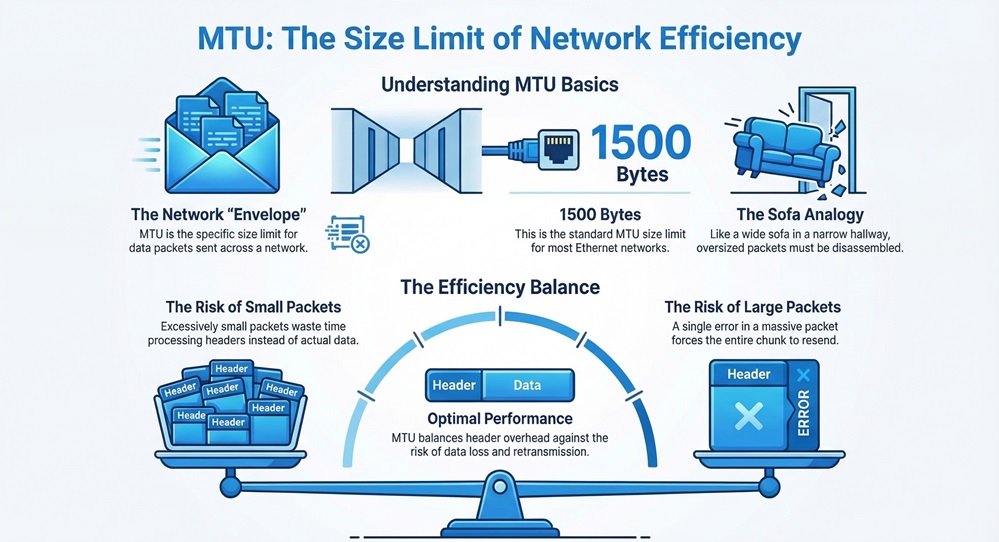
    The Maximum Transmission Unit (MTU) represents the largest size of a data packet that a network device can accept. Imagine you’re trying to move a large sofa through a narrow hallway. If the sofa is too wide, it won't fit unless you take it apart. In networking, data works the same way. If a packet is larger than the limit, the system has to break it down.


    Have you ever wondered why your internet feels sluggish even when your "bars" are full? Often, the culprit isn't your speed, but how your data is sliced and diced. When we talk about the MTU, we're discussing the efficiency of every click, stream, and download you perform.


    What is the Maximum Transmission Unit?

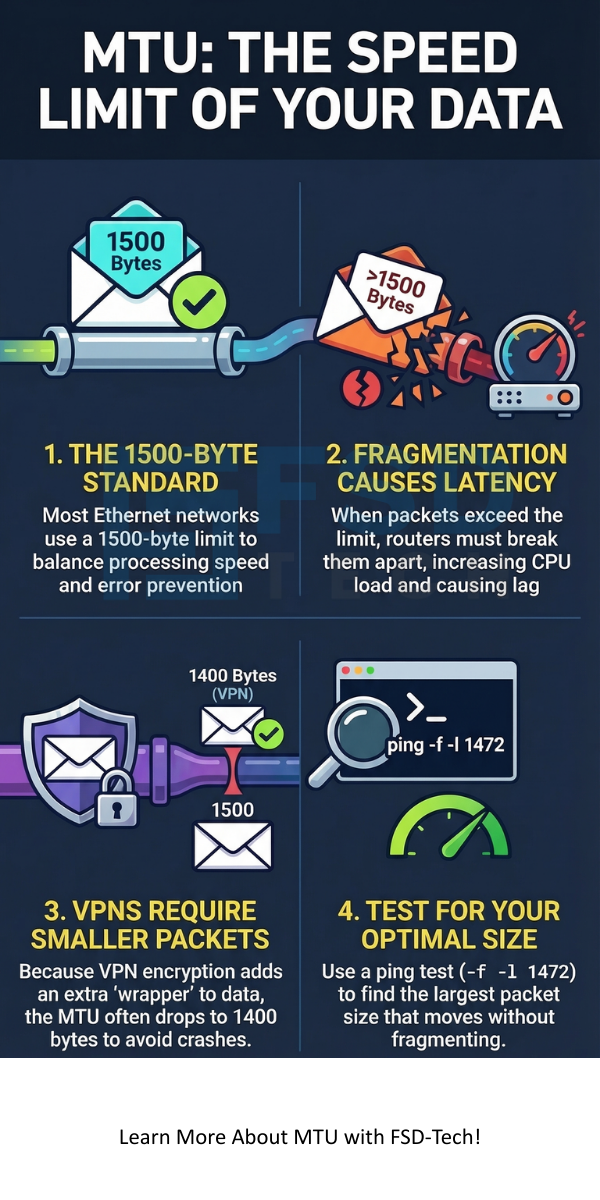
    To be honest, the concept is simpler than the name suggests. Every time you send an email or watch a video, that information travels in small "envelopes" called packets. The Maximum Transmission Unit is the specific size limit for these envelopes. In most standard Ethernet networks, this limit is 1500 bytes.


    Maximum Transmission Unit


    Why 1500? Well, it’s a balance. If packets are too small, your computer spends too much time processing headers (the "address" on the envelope) instead of the actual data. If they're too large, a single error can ruin a massive chunk of data, forcing the whole thing to resend.


    Optimize My Network 


    Why Does MTU Size Matter for Your Connection?

    In my experience, people ignore these settings until something breaks. Here's the thing: if your MTU is set incorrectly, you run into a problem called fragmentation.


    Picture this: Your computer sends a 1500-byte packet, but a router along the way only allows 1400 bytes. That router must now chop your packet into two pieces. This takes extra CPU power and adds "latency" (lag).


    Is it possible that your gaming lag or slow file transfers come from poor packet sizing? It’s very likely. When routers have to work harder to "re-package" your data, you feel the delay.


    The Role of Fragmentation in Networking

    When we discuss the Maximum Transmission Unit, we must talk about fragmentation. This is the process where a router breaks a large packet into smaller ones to fit the next link.


    While fragmentation sounds like a good "fix," it’s actually a performance killer. Each fragment needs its own header. This increases overhead. Furthermore, if even one small fragment gets lost, your computer has to ask for the entire original large packet again. We've all been there, staring at a loading circle because a tiny bit of data went missing.


    Also Read: What is Managed Detection and Response (MDR)?


    What is Path MTU Discovery (PMTUD)?

    How does your computer know the limit of a server halfway across the world? It uses a trick called Path MTU Discovery, or PMTUD.


    Essentially, your device sends packets with a "Don't Fragment" (DF) flag. If a router hits a limit it can't handle, it sends back an error message saying, "Too big! Try a smaller size." Your device then shrinks the packet and tries again until it fits. It’s a bit like a game of "hot or cold" for data packets.


    Jumbo Frames: When Bigger Is Better

    In specific environments, like a high-speed office data center, we use something called Jumbo Frames. These allow a Maximum Transmission Unit of up to 9000 bytes.


    Using larger frames reduces the number of packets the CPU has to handle. It's much more efficient for moving massive files. However, there’s a catch. Every single device on that network must support Jumbo Frames. If one old switch doesn't "speak" 9000 bytes, the whole system collapses into a mess of errors.


    Common MTU Values You Should Know

    Depending on how you connect to the web, your MTU might change. Here is a quick breakdown of what you'll usually see:


    As we can see, the limit isn't always the same. If you use a VPN for work, your MTU is usually lower because the VPN "wraps" your data in an extra layer of encryption. That extra layer takes up space, leaving less room for your actual data.


    How to Find Your Optimal MTU Size

    You don't need to be a rocket scientist to find your perfect setting. You can use a simple ping test in your command prompt. We use the following logic:


    1. Start with 1472 bytes (1472 data + 28 header = 1500).
    2. Use the command: ping google.com -f -l 1472.
    3. If it says "Packet needs to be fragmented," lower the number by 10 and try again.
    4. Once it works, add 28 to that number. That is your ideal Maximum Transmission Unit.


    It’s roughly a five-minute task that can significantly stabilize a shaky connection.


    Also Read: Network Firewalls vs. Next-Generation Firewalls: Which One Wins?


    The Impact of MTU on VPN Performance

    Many users experience "black holes" when using a VPN. This happens when the Maximum Transmission Unit is too high for the encrypted tunnel. The packet plus the encryption header exceeds the physical line limit.


    Because many firewalls block the "Too Big" error messages (ICMP), your computer never knows it needs to shrink the packets. The result? Your connection stays "active," but no websites load. To be honest, lowering your MTU to 1400 is often the magic fix for VPN dropouts.


    Troubleshooting MTU Issues

    How do you know if you have an MTU problem? Look for these signs:


    • Certain websites (like Facebook or YouTube) won't load, but others do.
    • Large email attachments always fail.
    • Secure (HTTPS) sites hang, while simple HTTP sites work.
    • Your VOIP calls drop or sound robotic.


    If you notice these, your packets are likely getting dropped because they are too "fat" for the pipe.


    Configurable MTU in Modern Switches

    Modern Cisco switches allow us to set the Maximum Transmission Unit globally or per interface. In a professional setting, we usually set the "System MTU" to accommodate the largest expected traffic.


    For example, if you're running a storage area network (SAN), you'll want that MTU set to 9000. But remember, if you change it on the switch, you must also change it on the servers. Inconsistency is the enemy of a fast network.


    Conclusion: Why Balance Matters

    At the end of the day, the Maximum Transmission Unit is about finding the "Goldilocks" zone. You want packets that are large enough to be efficient but small enough to travel anywhere without being broken apart.


    By understanding these limits, you're not just a passive user; you're an informed navigator of the digital world. Whether you're a gamer looking for lower ping or a business owner wanting stable connections, the MTU is your secret weapon.


    Maximum Transmission Unit


    Get Expert Support


    Key Takeaways

    • MTU defines the largest packet size allowed on a network link.
    • The standard limit for most home and office internet is 1500 bytes.
    • Fragmentation happens when packets are too large, which slows down your speed.
    • VPNs usually require a lower MTU (around 1400) due to encryption overhead.
    • You can manually test and set your MTU to improve stability.


    Frequently Asked Questions

    1. Does a higher MTU increase internet speed? 

    Not necessarily. While larger packets mean less overhead, they also increase the risk of errors. For most people, sticking to 1500 is best.


    2. Should I enable Jumbo Frames at home?

    Probably not. Unless every device (laptop, router, NAS) supports it, you will cause more problems than you solve.


    3. What happens if my MTU is too low?

    Your network will still work, but it will be slightly less efficient. Your CPU will have to process more headers for the same amount of data.


    4. Why do some websites fail to load with a high MTU?

    Small packets (like a request to load a site) get through, but the large data packets sent back by the site get dropped if they exceed the MTU.

    Maximum Transmission Unit:  MTU Settings for Faster Networks

    About The Author

    Surbhi Suhane

    Surbhi Suhane is an experienced digital marketing and content specialist with deep expertise in Getting Things Done (GTD) methodology and process automation. Adept at optimizing workflows and leveraging automation tools to enhance productivity and deliver impactful results in content creation and SEO optimization.

    TRY OUR PRODUCTS

    Like This Story?

    Share it with friends!

    Subscribe to our newsletter!

    FishOSCato SASEVembuXcitiumZeta HRMSAtera
    Isometric illustration of a centralized performance platform connected to analytics dashboards and team members, representing goal alignment, measurable outcomes, risk visibility, and strategic project tracking within ClickUp.

    How ClickUp Enables Outcome-Based Project Management (Not Just Task Tracking)

    🕓 February 15, 2026
    Isometric illustration of a centralized executive dashboard platform connected to analytics panels, performance charts, security indicators, and strategic milestones, representing real-time business visibility and decision control within ClickUp.

    Executive Visibility in ClickUp – How CXOs Gain Real-Time Control Without Micromanaging

    🕓 February 13, 2026

    Cato SASE Architecture

    Inside Cato’s SASE Architecture: A Blueprint for Modern Security

    🕓 January 26, 2025

    Workflow Automation(8)

    Workforce Automation(1)

    AI Project Management(1)

    HR Data Automation(1)

    RMM(2)

    IT Workflow Automation(1)

    GCC compliance(4)

    IT security(2)

    Payroll Integration(2)

    IT support automation(3)

    procurement automation(1)

    lost device management(1)

    IT Management(5)

    IoT Security(2)

    Cato XOps(1)

    IT compliance(4)

    Task Automation(1)

    Workflow Management(1)

    Kubernetes lifecycle management(2)

    AI-powered cloud ops(1)

    OpenStack automation(1)

    SMB Security(8)

    Data Security(1)

    MDR (Managed Detection & Response)(3)

    MSP Automation(3)

    Atera Integrations(2)

    Threat Detection & Response(1)

    XDR Security(2)

    SMB Cyber Protection(1)

    Ransomware Defense(3)

    HR Tech Solutions(1)

    Zero Trust Network Access(3)

    Quantum Security(1)

    Quantum Threat UAE & GCC(1)

    Post-Quantum Cryptography(1)

    Cloud IDE Security(1)

    Zero Trust Security(2)

    Endpoint Management(1)

    SaaS Security(2)

    Payroll Automation(5)

    IT Monitoring(2)

    Xcitium EDR SOC(15)

    Ransomware Protection GCC(1)

    Network Consolidation UAE(1)

    M&A IT Integration(1)

    MSSP for SMBs(1)

    Antivirus vs EDR(1)

    SMB Cybersecurity GCC(1)

    Ransomware Protection(3)

    Managed EDR FSD-Tech(1)

    FSD-Tech MSSP(25)

    Endpoint Security(1)

    Cybersecurity GCC(14)

    Data Breach Costs(1)

    Endpoint Protection(1)

    SMB Cybersecurity(8)

    Zero Dwell Containment(31)

    Xcitium EDR(30)

    Managed Security Services(2)

    Hybrid Backup(1)

    Cloud Backup(1)

    Backup & Recovery(1)

    pointguard ai(4)

    vembu(9)

    backup myths(1)

    SMB data protection(9)

    disaster recovery myths(1)

    Disaster Recovery(4)

    Vembu BDR Suite(19)

    GCCBusiness(1)

    DataProtection(1)

    Secure Access Service Edge(4)

    GCC IT Solutions(1)

    Unified Network Management(1)

    GCC HR software(20)

    open banking(1)

    financial cybersecurity(2)

    CC compliance(1)

    Miradore EMM(15)

    Government Security(1)

    Cato SASE(9)

    GCC Education(1)

    Hybrid Learning(1)

    Cloud Security(9)

    Talent Development(1)

    AI Governance(4)

    AI Compliance(2)

    AI Cybersecurity(13)

    AI Risk Management(1)

    AI Security(2)

    Secure Remote Access(1)

    GCC business security(1)

    GCC network integration(1)

    compliance automation(5)

    GCC cybersecurity(3)

    education security(1)

    App management UAE(1)

    BYOD security Dubai(8)

    Miradore EMM Premium+(5)

    MiddleEast(1)

    share your thoughts

    Maximum Transmission Unit

    Maximum Transmission Unit: MTU Settings for Faster Networks

    🕓 March 18, 2026

    Predictive Maintenance Logic and Systems

    Predictive Maintenance Logic and Systems: Smart Repair

    🕓 March 18, 2026

    Anycast

    Anycast: How It Powers Global Content Delivery

    🕓 March 17, 2026

    Decoded(162)

    Cyber Security(128)

    BCP / DR(22)

    Zeta HRMS(78)

    SASE(21)

    Automation(78)

    Next Gen IT-Infra(128)

    Monitoring & Management(77)

    ITSM(22)

    HRMS(21)

    Automation(24)