.webp&w=3840&q=75)
How ClickUp Enables Outcome-Based Project Management (Not Just Task Tracking)
🕓 February 15, 2026
.png&w=3840&q=75)
Identity-First Security is the most important shift in how we protect our digital lives today. Think back ten years. We kept our data safe by building a "moat" around the office. If you were inside the building, you were trusted. If you were outside, you weren't. But look at how we work now. We use coffee shop Wi-Fi, personal laptops, and dozens of cloud apps like Slack or Zoom. The "moat" is gone because the "office" is everywhere.
So, how do we stay safe? In my experience, the only thing that stays constant is you—your identity. Whether you are at home or in London, your login stays the same. That is why smart companies are moving away from protecting "places" and starting to protect "people." It’s a bit like having a high-tech bouncer who follows you around. They don't care where you are; they only care if you are who you say you are.
But here is the thing: hackers know this too. They don't "break in" anymore; they "log in" using stolen passwords. This makes identity the biggest target and the strongest shield at the same time. Are you ready to see how this changes everything?
When we talk about Identity-First Security, we mean a strategy where the identity of a user or device is the primary gatekeeper. In the old days, we relied on firewalls. Today, we rely on verified credentials. This approach assumes that the network is already compromised. Because we can't trust the network, we must trust the identity.
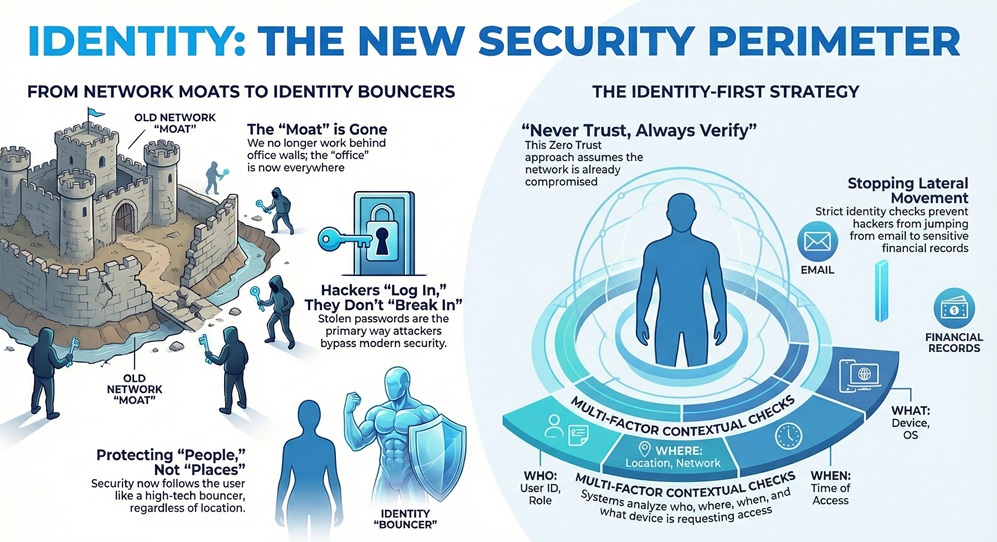
This isn't just a fancy name for a password. It's a whole system. It looks at who is trying to access what, from where, and on what device. For example, if I usually log in from New York at 9 AM, but suddenly my account tries to access a database from another country at 3 AM, the system should stop me.
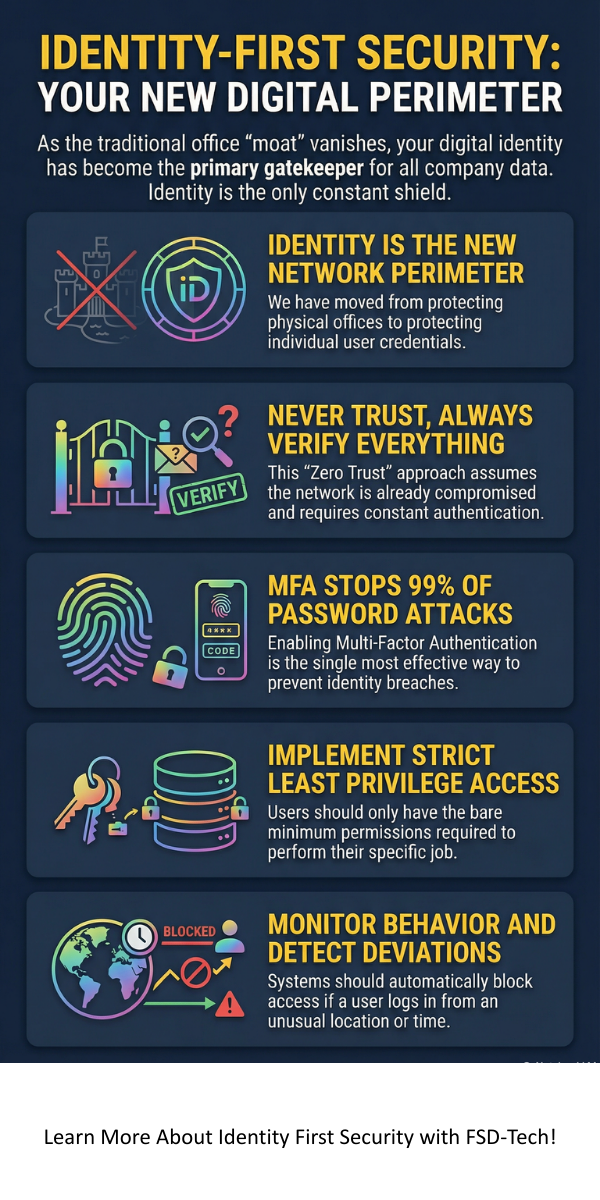
You might have heard the term "Zero Trust." Identity-First Security is basically the heart of Zero Trust. The motto is: "Never trust, always verify."
To be honest, it’s a relief. We've all been there where a single weak password let a virus into a whole company. By putting identity first, we stop that "lateral movement." Even if a hacker gets into one person’s email, they can't just jump into the financial records without a new, strict identity check.
The world changed fast. We moved to the cloud, and remote work became the norm. This created "identity sprawl." We have too many accounts and too many ways to access data.
To build a solid house, you need a good foundation. The same goes for your digital safety. Let's look at the four main pillars that make this work.
1. Strong Authentication (MFA)
We've all used Multi-Factor Authentication (MFA). It’s that annoying code sent to your phone. But in an Identity-First Security world, basic SMS codes aren't enough. We need "Phishing-Resistant" MFA. This includes things like fingerprint scans or physical security keys.
2. Least Privilege Access
This is a simple rule: give people only what they need. Does the marketing intern need access to the payroll server? Of course not. By limiting access, you limit the damage a hacker can do. We often call this Just-In-Time (JIT) access. You get the "key" to the room only when you need to go inside, and then the key expires.
3. Continuous Monitoring
In the past, you logged in once and were good for the day. That’s dangerous. Now, the system watches you. If your behavior changes—like downloading 5,000 files in one minute—the system asks for your ID again. It’s like a bank asking for your PIN again if you try to withdraw all your money at once.
4. Identity Governance
This is the "manager" of the system. It tracks who has access to what. People change jobs or leave companies all the time. If an employee leaves but their account stays active, that's a huge "back door" for hackers. Governance ensures those doors stay locked.
Also Read: What is an Identity Provider? Guide to IdP & Security
How does this actually help you? Let’s look at a realistic example. Picture this: a coworker gets a fake email that looks like it's from the IT department. They click it and give away their password.
In an old system, the hacker is in. They have the password, so they have the "keys to the kingdom."
But with Identity-First Security, the hacker hits a wall. First, the system sees the login is from a new laptop in a weird location. It asks for a fingerprint (MFA). The hacker fails. Even if they get past that, the hacker tries to access the "Customer List." The system says, "Wait, this user is in Sales, but they never look at the Master List at midnight. Access denied."
We use ITDR to find and stop threats targeting identities. It’s not just about keeping people out; it’s about watching the people who are already "in." It looks for:
Can humans manage all of this? Not really. We have thousands of employees and millions of login attempts. This is where AI and automation help us out.
Automation handles the boring stuff. It can automatically disable an account if it sees a "brute force" attack (someone trying 100 passwords in a row). It can also help "onboard" new employees by giving them the right access on day one without a human having to click 50 buttons.
If you work in healthcare or finance, you have strict rules like HIPAA or GDPR. You have to prove that only the right people saw the data. Automation creates a "paper trail." It shows exactly who logged in, when, and what they did. It makes audits way less stressful.
I'll be honest with you: it’s not always easy. Here's the thing about security—if it's too hard to use, people will find a way around it.
How do we fix this? We use "Single Sign-On" (SSO). It lets you log in once to a secure portal, and then that portal "vouches" for you with all your other apps. It's easier for the user and safer for the company.
Also Read: What is Multi-Cloud Networking? For Better Connectivity
Are you feeling overwhelmed? Don't be. You don't have to do everything in one day. Here is a simple roadmap we often recommend to colleagues:
Step 1: Audit Your Identities
You can't protect what you don't know. Figure out how many "identities" you have. This includes employees, contractors, and even "non-human" identities like software bots or cloud servers.
Step 2: Turn on MFA Everywhere
If you do nothing else, do this. It stops 99% of bulk password attacks. It is the single most effective thing you can do for Identity-First Security.
Step 3: Implement SSO
Get rid of the "sticky note" passwords. Use a central hub where you can manage everyone’s access in one place. If someone leaves the company, you click one button, and they lose access to everything.
Step 4: Clean Up Permissions
Use the "Least Privilege" rule. If someone hasn't used an app in 90 days, take their access away. They can always ask for it back if they need it later.
At the end of the day, security isn't about locked doors or fancy code; it's about people. We want our teams to work fast and stay safe. By choosing an Identity-First Security mindset, you are making life easier for your employees and much harder for hackers.
Our company believes that trust is earned every single time someone clicks "login." We are committed to helping you build a world where your data stays private and your business stays productive. We've seen how much damage a single stolen ID can do, and we’re here to make sure that doesn't happen to you. Ready to put your people first?
Let’s secure your future together. Contact our experts today for an identity audit.
Not exactly, but they are close friends. Zero Trust is a big philosophy. Identity-First Security is the main tool we use to make that philosophy work. You can't have Zero Trust without focusing on identity first.
This is a great question. It refers to apps, "service accounts," or "bots" that talk to each other. For example, your website might need to "log in" to your database to show customer info. These need to be protected just like human accounts!
Not necessarily. Firewalls are still useful for blocking basic "noise" from the internet. However, a firewall can't stop a hacker who has a valid password. That’s why identity is now more important than the firewall.
It can be an investment, but it's much cheaper than a data breach. Many companies already have the tools (like Microsoft 365 or Okta) but just haven't turned on the right features yet.

Surbhi Suhane is an experienced digital marketing and content specialist with deep expertise in Getting Things Done (GTD) methodology and process automation. Adept at optimizing workflows and leveraging automation tools to enhance productivity and deliver impactful results in content creation and SEO optimization.
Share it with friends!




.webp&w=3840&q=75)






share your thoughts