.webp&w=3840&q=75)
How ClickUp Enables Outcome-Based Project Management (Not Just Task Tracking)
🕓 February 15, 2026

For UAE-based organizations—especially those in finance, healthcare, and government—workspace governance is not optional. Regulatory frameworks demand strict data security, traceability, and operational transparency. As ClickUp becomes a central platform for project and process management, a robust governance framework is essential to enforce standards, reduce risk, and ensure compliance at scale.
Without a unified approach, these challenges can result in workspace sprawl, inconsistent processes, and compliance gaps that expose the organization to risk.
A scalable ClickUp environment begins with a logical, standardized hierarchy:
Best Practice: Deploy standardized templates for folders and lists. For example, every department uses the same folder structure for projects, with custom fields for project owner, status, and compliance category. This approach ensures repeatability and reduces errors in daily operations.
| Level | Example Name | Purpose |
|---|---|---|
| Workspace | Acme Holdings UAE | Organization-wide governance |
| Space | IT Department | Departmental projects and requests |
| Folder | IT-Requests-2024 | Annual IT request management |
| List | Onboarding Tasks | Employee onboarding workflow |
Consistent naming conventions are foundational for auditability and onboarding:
Centralize all governance documentation using ClickUp Docs. Link policies directly to relevant spaces and lists, ensuring all stakeholders have access to the latest standards and procedures.
Role-based access is critical for protecting sensitive data and meeting compliance requirements:
Use Case: A compliance officer is granted admin rights in the Compliance space but only guest access in HR, ensuring data segregation and minimizing risk.
Automations in ClickUp can drive efficiency but must be governed to prevent unauthorized changes:
Example: Automations that trigger reminders for overdue IT requests are documented and reviewed regularly, with restrictions preventing them from altering sensitive data without explicit approval.
Dashboards and custom views provide real-time oversight of workflow health and compliance:
While ClickUp does not offer native SLA timers, custom fields and automations can simulate SLA tracking, supporting compliance with internal and external standards.
Dashboards aggregate governance metrics for rapid decision-making:
Admins can tailor dashboards for executive reporting, enabling swift action on emerging compliance issues.
Governance frameworks must evolve with organizational and regulatory changes:
ClickUp’s notification and comment features facilitate transparent communication during policy updates, ensuring all users remain aligned.
Industry-specific playbooks and templates help regulated organizations align with sector standards:
Deploying these resources in ClickUp reduces the risk of non-compliance and accelerates onboarding for new teams.
A UAE healthcare provider leverages ClickUp templates for patient onboarding. Each workflow step—data entry, consent collection, record review—is documented and access-controlled. Automations remind staff of pending approvals, and dashboards track compliance metrics, ensuring readiness for regulatory inspections.
Integrating ClickUp with ERP, CRM, and BI platforms ensures data consistency and supports enterprise-wide governance:
This approach enables seamless data flow and centralized oversight, critical for large UAE enterprises.
Data retention policies are vital for regulated industries:
These practices ensure compliance with UAE data protection regulations and facilitate smooth audit processes.
A leading UAE bank transitioned from a legacy ticketing system to ClickUp for managing internal IT requests. By configuring private lists and automating approval workflows, the bank reduced resolution times by 30% and improved auditability. Permission controls ensured that only authorized IT staff accessed sensitive requests, meeting local compliance standards and supporting regular audits.
A Dubai-based pharmaceutical company uses ClickUp to manage clinical trial documentation. Automations log every approval, and dashboards provide instant access to audit trails. Data retention policies ensure that records are archived according to regulatory requirements, minimizing risk during inspections.
A healthcare provider in the UAE deploys ClickUp templates for patient data workflows. Access is restricted to authorized medical staff, and every workflow step is documented. Automations support timely approvals, and dashboards offer real-time compliance insights, supporting both internal governance and external regulatory reviews.
Ready to implement a ClickUp Governance Framework tailored to your enterprise? Book a no-obligation Call Now
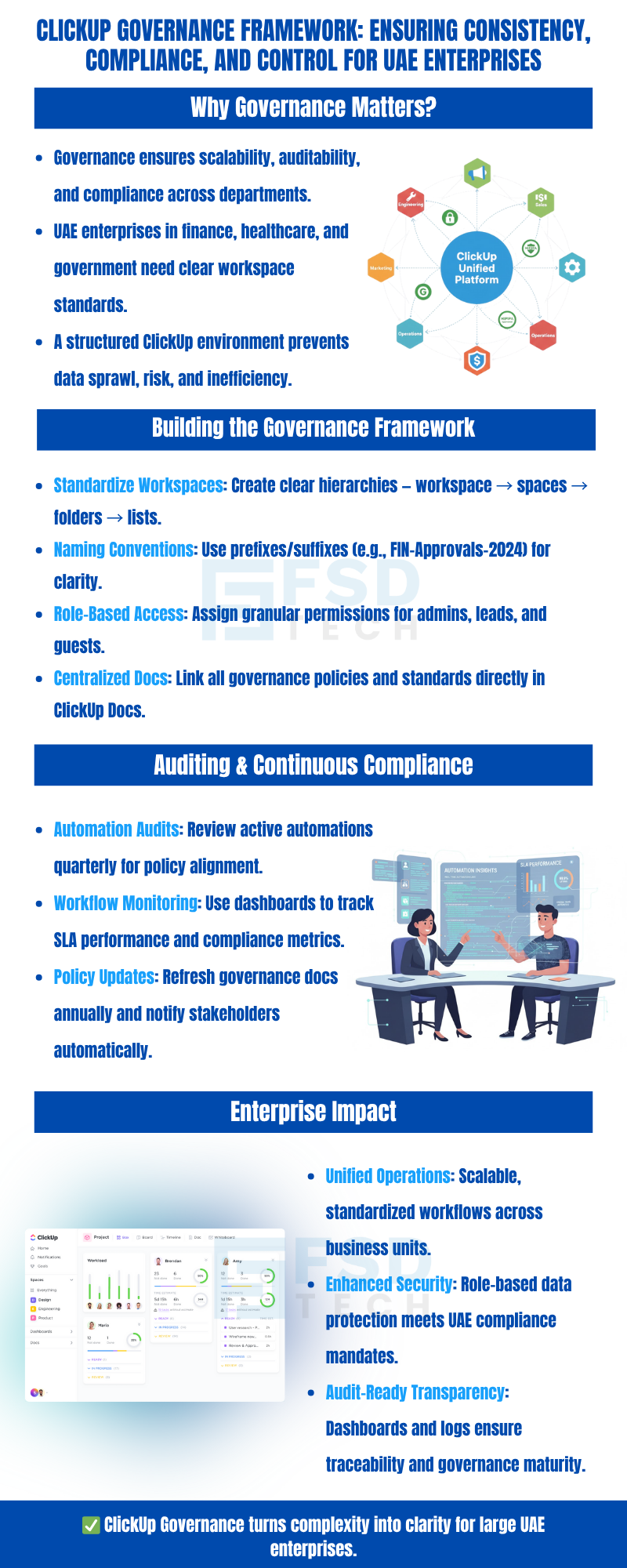
Enforcing naming conventions in ClickUp starts with creating standardized templates and onboarding guides. By embedding naming rules into templates for folders, lists, and tasks, admins can ensure consistency from the outset. Regular audits and automated reminders further reinforce compliance, making it easier to maintain order as your organization scales.
Managing permissions effectively requires defining clear roles and access levels for each workspace. Use ClickUp’s role-based controls to restrict sensitive lists and folders to authorized users. Private lists and granular sharing settings help ensure that only those who need access to confidential information can view or edit it, supporting both internal policies and UAE data protection standards.
To audit automations, document each automation’s purpose, triggers, and actions in a centralized ClickUp Doc. Schedule regular reviews—ideally quarterly—to verify that automations align with current governance policies. Dashboards can be configured to monitor automation activity, helping admins quickly identify unauthorized changes or process deviations.
Yes, ClickUp supports integration with ERP, CRM, and BI platforms via APIs and third-party connectors. This enables organizations to synchronize data, automate reporting, and maintain enterprise-wide governance. For UAE enterprises, aligning integration settings with local security and privacy requirements is essential.
Governance policies should be living documents. Assign recurring tasks for policy review, update documentation in ClickUp Docs, and use ClickUp’s notification features to alert stakeholders of changes. This ensures that all users are working from the latest standards and that compliance is maintained as regulations evolve.
Dashboards in ClickUp aggregate real-time data on compliance status, outstanding approvals, and automation activity. By customizing dashboards for different roles—such as compliance officers or department heads—organizations gain actionable insights to address issues proactively and demonstrate governance effectiveness during audits.
Custom templates standardize processes, reduce onboarding time, and minimize errors. By embedding governance requirements—such as naming conventions, required fields, and workflow steps—into templates, enterprises ensure consistency and compliance across all teams and projects.
ClickUp enables admins to set up automated archiving of completed projects and schedule regular reporting for audits. Data retention policies can be documented within ClickUp Docs, and notifications can alert stakeholders to upcoming data purges. These features support audit readiness and compliance with UAE data protection regulations.
Centralized documentation ensures that governance policies, process guides, and compliance requirements are accessible to all stakeholders. By linking Docs directly to relevant spaces and lists, organizations reduce confusion, accelerate onboarding, and support consistent policy enforcement.
Recurring reviews—such as monthly workspace audits and quarterly automation checks—help organizations adapt to changes in structure, personnel, or regulations. By scheduling these reviews in ClickUp, admins maintain oversight and ensure that governance frameworks remain effective and up-to-date.
ClickUp offers industry-specific templates and playbooks that align with sector regulations. For example, finance teams can use templates for audit trails and approvals, while healthcare providers can implement patient data workflows with strict access controls. These resources help regulated organizations reduce risk and maintain compliance.
Without standardized structures, organizations face increased risk of data silos, inconsistent processes, and compliance failures. This can lead to audit findings, regulatory penalties, and operational inefficiencies—especially in regulated sectors where traceability and data integrity are paramount.
By leveraging standardized templates, clear naming conventions, and centralized documentation, ClickUp accelerates onboarding for new users. This reduces the learning curve, minimizes errors, and ensures that new team members adhere to established governance practices from day one.
While ClickUp does not offer native SLA timers, custom fields and automations can be configured to simulate SLA tracking. Dashboards and filtered views highlight tasks approaching or breaching SLA thresholds, supporting compliance with internal and external service standards.
ClickUp’s flexible governance features and integration capabilities are well-suited to the needs of UAE-based enterprises. By supporting role-based access, data retention policies, and integration with local systems, ClickUp helps organizations meet GCC compliance requirements and adapt to regional regulatory changes.
Begin by assessing current workspace structures and identifying gaps in naming, permissions, and documentation. Deploy standardized templates, define clear roles, and set up recurring reviews. Leverage ClickUp’s dashboards, Docs, and automation features to enforce policies and monitor compliance, ensuring your governance framework evolves with your organization’s needs.

Nhaif is an AI Automation Engineer & Business Analyst focused on ClickUp, AI, Automation, and Workflow Optimization. He helps businesses shift from scattered processes to streamlined, data-driven operations. With hands-on expertise, he simplifies complex tools into clear, easy-to-apply solutions.
Share it with friends!




.webp&w=3840&q=75)






share your thoughts