HomeNext Gen IT-InfraMonitoring & ManagementCyber SecurityBCP / DRAutomationDecoded
Next Gen IT-Infra
Cato’s SASE Supports Cybersecurity Skills Development

How Cato’s SASE Supports Cybersecurity Skills Development

🕓 April 8, 2025

How SASE Supports the Security Needs of SMBs

How SASE Supports the Security Needs of SMBs

🕓 February 9, 2025

Attack Surface Reduction with Cato’s SASE

Attack Surface Reduction with Cato’s SASE

🕓 February 10, 2025

SASE for Digital Transformation in UAE

SASE for Digital Transformation in UAE

🕓 February 8, 2025

Monitoring & Management
Understanding Atera’s SLA Management

Understanding Atera’s SLA Management

🕓 February 7, 2025

Cost-Performance Ratio: Finding the Right Balance in IT Management Networks

Cost-Performance Ratio: Finding the Right Balance in IT Management Networks

🕓 June 16, 2025

Customizing Atera with APIs

Customizing Atera with APIs

🕓 March 3, 2025

Power Up Your IT Team’s Strategy with Atera’s Communication Tools

Power Up Your IT Team’s Strategy with Atera’s Communication Tools

🕓 February 8, 2025

Cyber Security
Illustration of the Cato Cloud architecture showing its role in delivering SASE for secure, optimized global connectivity.

Understanding the Cato Cloud and Its Role in SASE

🕓 January 29, 2025

Isometric illustration of professionals managing network performance, bandwidth analytics, and cloud-based optimization around the Cato Networks platform, symbolizing bandwidth control and QoS visibility.

Mastering Bandwidth Control and QoS in Cato Networks

🕓 July 26, 2025

Global network backbone powering Cato SASE solution for secure, high-performance connectivity across regions.

Global Backbone: The Engine Powering Cato’s SASE Solution

🕓 January 30, 2025

Illustration of team analyzing application traffic and usage insights on a large laptop screen using Cato’s dashboard, surrounded by network and cloud icons.

Cato Networks Application Visibility | Monitoring & Control

🕓 July 27, 2025

BCP / DR
Illustration showing diverse business and IT professionals collaborating with cloud, backup, and security icons, representing Vembu use cases for SMBs, MSPs, and IT teams.

Who Uses Vembu? Real-World Use Cases for SMBs, MSPs & IT Teams

🕓 July 12, 2025

Graphic showcasing Vembu’s all-in-one backup and disaster recovery platform with icons for cloud, data protection, and business continuity for IT teams and SMBs.

What Is Vembu? A Deep Dive Into the All in One Backup & Disaster Recovery Platform

🕓 July 6, 2025

Illustration showing Vembu backup and disaster recovery system with cloud storage, server racks, analytics dashboard, and IT professionals managing data.

The Rising Cost of Data Loss: Why Backup Is No Longer Optional?

🕓 August 14, 2025

3D isometric illustration of cloud backup and data recovery infrastructure with laptop, data center stack, and digital business icons — FSD Tech

RPO & RTO: The Heart of Business Continuity

🕓 August 15, 2025

Automation
Cross-Functional Collaboration with ClickUp

Fostering Cross-Functional Collaboration with ClickUp for Multi-Departmental Projects

🕓 February 11, 2025

ClickUp Project Reporting

Revolutionizing Enterprise Reporting with ClickUp’s Advanced Analytics and Dashboards

🕓 June 16, 2025

ClickUp’s Design Collaboration and Asset Management Tools

Empowering Creative Teams with ClickUp’s Design Collaboration and Asset Management Tools

🕓 February 26, 2025

ClickUp Communication and Collaboration Tools

ClickUp Communication and Collaboration Tools: Empowering Remote Teams

🕓 March 12, 2025

Decoded
Multi-Factor Authentication (MFA)

Multi-Factor Authentication (MFA): All You Need to Know

🕓 December 7, 2025

L3 Switch

What Is an L3 Switch? L2 vs L3 & Why You Need Layer 3?

🕓 December 8, 2025

IPSec

IPSec Explained: Protocols, Modes, IKE & VPN Security

🕓 December 3, 2025

 Datagram Transport Layer Security (DTLS)

What is Datagram Transport Layer Security (DTLS)? How it works?

🕓 December 4, 2025

    Subscribe to our newsletter!

    About Us

    Follow Us

    Copyright © 2024 | Powered by 

    Cato SASE Architecture

    Inside Cato’s SASE Architecture: A Blueprint for Modern Security

    🕓 January 26, 2025

    Enterprise Data Security and Privacy with ClickUp

    Ensuring Enterprise Data Security and Privacy with ClickUp

    🕓 February 9, 2025

    DDoS protection SASE

    DDoS Protection and Cato’s Defence Mechanisms

    🕓 February 11, 2025

    Table of Contents

    High Availability and Redundancy in Cato SASE

    Anas Abdu Rauf
    July 31, 2025
    Comments
    Illustration of a business professional analyzing upward bar graphs with cloud elements and paper planes, symbolizing growth, scalability, and cloud-driven success.

    Unplanned outages and network failures can disrupt operations, damage productivity, and hurt business continuity. To be honest, most of us have felt that sinking feeling when the "internet is down" at a major branch. Cato SASE addresses these challenges by offering built-in High Availability (HA) and redundancy features across your sites, edges, and links. You don't need complex setups or third-party failover solutions.


    The beauty of Cato lies in its simplicity. This blog explores how Cato supports seamless uptime through active-active tunnels, automatic failover, site-level HA, and cloud backbone resilience. Are you ready to stop worrying about the next fiber cut?


    Redundancy in Cato

    Cato’s architecture is designed with redundancy at multiple levels:


    • PoP-level Redundancy – Each Cato PoP is fully redundant and connected to multiple Tier-1 ISPs
    • Tunnel Redundancy – All SD-WAN tunnels are created in active-active mode by default
    • Edge Device Redundancy – You can deploy multiple Cato Socket devices per site for hardware-level HA
    • Link Redundancy – Sites can be connected via multiple internet connections (e.g., fiber + LTE backup)


    Get Started with Cato SASE

    Redundant Internet Links

    To prevent internet outages at branch or HQ sites:


    1. Connect multiple WAN interfaces to the Cato Socket (e.g., WAN1 and WAN2)
    2. Navigate to Site Configuration > Sockets > Interfaces
    3. Assign primary and secondary priorities to WAN links
    4. Enable Smart Link Selection, which uses real-time health data for tunnel routing


    When a link degrades, traffic is shifted seamlessly to the healthier path without user disruption.
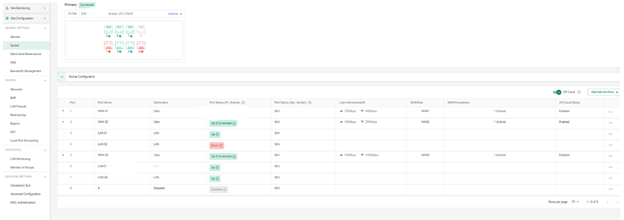
     

    Interface configuration dashboard showing multiple LAN ports, interface roles, real-time status indicators like 'Link Up' or 'Disconnected', and performance metrics such as link speed, MTU, and MAC addresses.


    Also Read: Simplifying IT Operations with Cato SASE: Reducing Complexity and Enhancing Performance


    Understanding Link Health and Tunnel Probes

    Cato uses continuous tunnel health monitoring to assess each link’s quality. Probes are sent every few seconds to measure:


    • Packet Loss – How many packets are dropped en route to a PoP
    • Jitter – Variation in delay affecting real-time traffic (e.g., VoIP)
    • Latency – Round-trip time between the site and Cato PoP
       

    These metrics are visible in:


    • Monitoring > Site Overview
    • Analytics > Network Analytics > Link Metrics
       

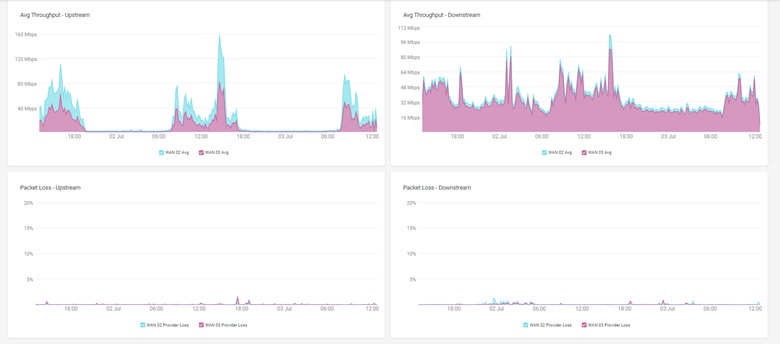
    Network monitoring dashboard displaying upstream and downstream throughput graphs, as well as packet loss statistics for WAN connections across a 24-hour period.


    Cato automatically routes critical traffic over the healthier path based on this telemetry, ensuring the best user experience at any moment.


    Experience Monitoring with Last-Mile Visibility

    Cato also offers End-to-End Experience Monitoring, particularly useful for identifying issues in the local ISP (last mile). Using synthetic probes and performance baselines, you can:
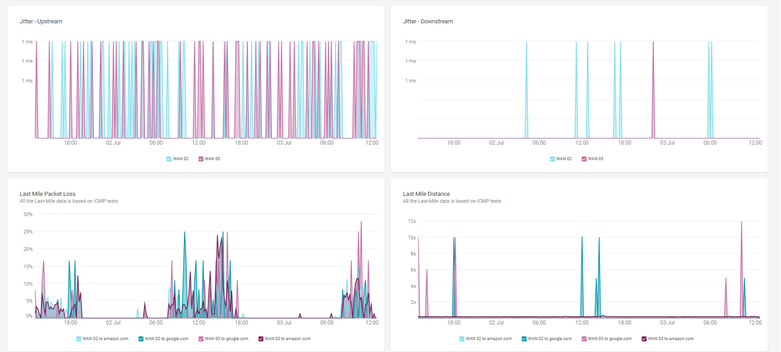
     

    • Detect if issues originate from user LAN, internet circuit, or PoP
    • Measure user experience consistency during off-hours and peak loads
    • Correlate app performance issues to tunnel health metrics
       

    Graphical dashboard showcasing jitter, last-mile packet loss, and last-mile distance metrics for WAN connections, with visual trend lines comparing WAN links and test destinations over time.


    This allows IT teams to validate SLA compliance and hold ISPs accountable during performance degradation.
     

    Deploying HA with Dual Cato Sockets

    For critical sites, Cato supports High Availability using two Sockets in Active/Standby mode:


    • Both Sockets are connected to the LAN and WAN
    • Only the active device forwards traffic; the standby takes over during hardware or power failure
    • Failover is automatic and occurs within seconds
       

    Steps:

    1. Deploy two Sockets in the same site configuration
    2. Under Site > High Availability, pair the Sockets as primary and secondary
    3. Connect them to separate power and network sources for full fault isolation


    Also Read: Preventing Insider Threats and Unauthorized Access with Cato SASE’s Context-Aware Security


    Real-World Use Case: HA at Regional HQ

    A regional headquarters in the GCC has two internet links and redundant Sockets:


    • Link 1: Dedicated fiber
    • Link 2: 5G LTE
    • Socket A (Primary) and Socket B (Secondary)


    During a power event, Socket A went offline. Socket B seamlessly took over, and Smart Link Selection routed voice traffic over the LTE backup while prioritizing ERP access.

    Business operations continued without any downtime or end-user impact.


    Monitoring and Verifying Redundancy Events

    You can monitor the health and performance of HA setups using:


    • Monitoring > Site Overview – See link health and tunnel status
    • Events > System Events – Track failovers, device status, and PoP changes
    • Analytics > Network Analytics – Compare performance between WAN links over time

    Tips for Effective HA Planning

    • Always connect Sockets to different power circuits or UPS systems
    • Use diverse ISPs (e.g., fiber + wireless) for internet resilience
    • Enable logging for all tunnel and interface events
    • Regularly test failover by simulating edge/power disconnections
    • Review Cato’s HA documentation before rollout
       

    FAQ Summary

    Can I use HA without dual Sockets?

    Yes. You can still achieve link-level redundancy with a single Socket and multiple WAN links.
     

    Is HA available at all sites?

    Yes, for any site with supported hardware and licensing.
     

    How fast is failover between Sockets?

    Typically occurs within seconds and does not require manual intervention.
     

    Can I prioritize which link to failover to?

    Yes. You can set link priorities and policies via Smart Link Selection.
     

    Is HA supported in mobile clients?

    No. HA is designed for site-level deployments, not individual client devices.


    High Availability and redundancy aren’t just checkboxes—they’re critical for keeping your business online and your users productive. With Cato, you get these capabilities natively, and setting them up is easier than ever.


    Conclusion

    High Availability and redundancy aren’t just checkboxes—they’re critical for keeping your business online. With Cato, you get these capabilities natively, making setup easier than ever. We believe in empowering IT teams with tools that just work, so you can focus on growth rather than troubleshooting.


    Click Here To Know More

    High Availability and Redundancy in Cato SASE

    About The Author

    Anas Abdu Rauf

    Anas is an Expert in Network and Security Infrastructure, With over seven years of industry experience, holding certifications Including CCIE- Enterprise, PCNSE, Cato SASE Expert, and Atera Certified Master. Anas provides his valuable insights and expertise to readers.

    Like This Story?

    Share it with friends!

    Subscribe to our newsletter!

    Atera

    (49)

    Cato Networks

    (120)

    ClickUp

    (70)

    FishOS

    (7)

    Miradore

    (21)

    PointGuard AI

    (9)

    Vembu

    (22)

    Xcitium

    (33)

    ZETA HRMS

    (79)

    Workflow Automation(8)

    Workforce Automation(1)

    AI Project Management(1)

    HR Data Automation(1)

    RMM(1)

    IT Workflow Automation(1)

    IT security(2)

    GCC compliance(4)

    Payroll Integration(2)

    IT support automation(3)

    procurement automation(1)

    lost device management(1)

    IT Management(5)

    IoT Security(2)

    Cato XOps(2)

    IT compliance(4)

    Workflow Management(1)

    Task Automation(1)

    Kubernetes lifecycle management(2)

    OpenStack automation(1)

    AI-powered cloud ops(1)

    SMB Security(8)

    Data Security(1)

    MDR (Managed Detection & Response)(4)

    MSP Automation(3)

    Atera Integrations(2)

    XDR Security(2)

    SMB Cyber Protection(1)

    Ransomware Defense(3)

    HR Tech Solutions(1)

    Zero Trust Network Access(3)

    Zero Trust Security(2)

    Endpoint Management(1)

    SaaS Security(1)

    Payroll Automation(5)

    IT Monitoring(2)

    Xcitium EDR SOC(15)

    Ransomware Protection GCC(1)

    Network Consolidation UAE(1)

    M&A IT Integration(1)

    MSSP for SMBs(1)

    SMB Cybersecurity GCC(1)

    Managed EDR FSD-Tech(1)

    Ransomware Protection(3)

    Antivirus vs EDR(1)

    FSD-Tech MSSP(25)

    Cybersecurity GCC(12)

    Endpoint Security(1)

    Endpoint Protection(1)

    Data Breach Costs(1)

    SMB Cybersecurity(8)

    Zero Dwell Containment(31)

    Managed Security Services(2)

    Xcitium EDR(30)

    Hybrid Backup(1)

    Cloud Backup(1)

    Backup & Recovery(1)

    pointguard ai(4)

    backup myths(1)

    disaster recovery myths(1)

    SMB data protection(9)

    vembu(9)

    Disaster Recovery(4)

    Vembu BDR Suite(19)

    GCCBusiness(1)

    DataProtection(1)

    Secure Access Service Edge(4)

    GCC HR software(20)

    Miradore EMM(15)

    Cato SASE(7)

    Cloud Security(8)

    Talent Development(1)

    AI Compliance(2)

    AI Security(2)

    AI Risk Management(1)

    AI Cybersecurity(12)

    AI Governance(4)

    GCC business security(1)

    GCC network integration(1)

    compliance automation(5)

    education security(1)

    GCC cybersecurity(2)

    Miradore EMM Premium+(5)

    App management UAE(1)

    BYOD security Dubai(8)

    MiddleEast(1)

    HealthcareSecurity(1)

    Team Collaboration(1)

    IT automation(12)

    Zscaler(1)

    SD-WAN(6)

    HR Integration(4)

    Cloud Networking(3)

    device management(9)

    VPN(1)

    RemoteWork(1)

    ZeroTrust(2)

    MPLS(1)

    Project Management(9)

    HR automation(16)

    share your thoughts

    Illustration showing identity-centric Zero Trust security with the Cato Client acting as a continuous identity signal, connecting users, devices, cloud resources, and OT systems through unified policy enforcement.”

    How the Cato Client Becomes the Identity Anchor for Zero Trust Access

    🕓 January 25, 2026

    Context-aware firewall enforcement in Cato SASE illustrating how device platform, country, and origin of connection enhance Zero Trust security beyond basic device context.

    Platforms, Countries, and Origin of Connection: Advanced Device Criteria in Cato Firewall

    🕓 January 24, 2026

    Cato SASE platform visual showing device-aware WAN firewall enforcement with centralized security controls, analytics dashboards, IPS, and Zero Trust policy monitoring across enterprise infrastructure.

    Device-Aware WAN Firewall Policies in Cato SASE

    🕓 January 23, 2026

    Decoded(93)

    Cyber Security(118)

    BCP / DR(22)

    Zeta HRMS(78)

    SASE(21)

    Automation(70)

    Next Gen IT-Infra(118)

    Monitoring & Management(70)

    ITSM(22)

    HRMS(21)

    Automation(24)