.webp&w=3840&q=75)
How ClickUp Enables Outcome-Based Project Management (Not Just Task Tracking)
🕓 February 15, 2026

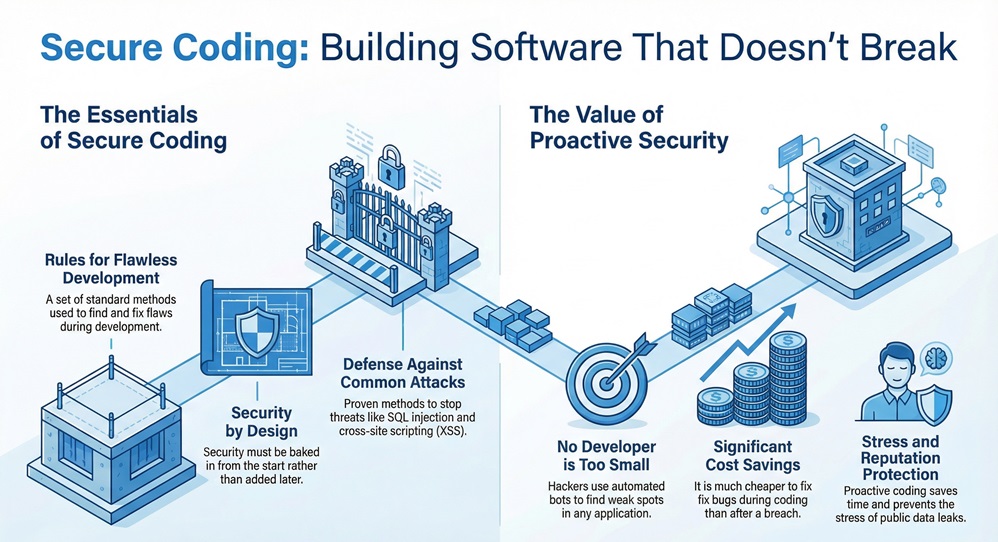
Secure coding practices are the basic building blocks you need to create software that stays safe from hackers and nasty bugs. Think of it like building a house with a solid lock on every door and a camera at every window. In my experience, most developers focus so much on making the app work that they forget to make it stay safe. But here is the thing: if you don't bake security in from the start, you're just leaving the front door wide open for trouble.
Have you ever wondered why some apps get hacked while others stay solid for years? It isn't just luck. It's about how the code was written on day one. To be honest, we've all been there—rushing to meet a deadline and skipping a few validation checks. But that tiny skip can lead to a massive data breach later. In this guide, we will look at how you can write code that protects itself.
When we talk about secure coding practices, we mean a set of rules that help you find and fix flaws during the development phase. These aren't just suggestions; they are standard methods used to stop common attacks like SQL injection or cross-site scripting (XSS). These practices apply to every part of your app, from how users log in to how your database stores their secrets.
You might think, "I'm just a small developer, who would target me?" Well, hackers often use automated bots to find any weak spot they can. If your code has a hole, they'll find it. Using SCP (Secure Coding Practices) saves you time, money, and a whole lot of stress. It’s much cheaper to fix a bug while writing the code than it is to fix a leak after it hits the news.
To build a strong app, we need to focus on a few key areas. Let's break these down into simple steps that even a fifth-grader could grasp.
1. Input Validation: Don't Trust Anyone
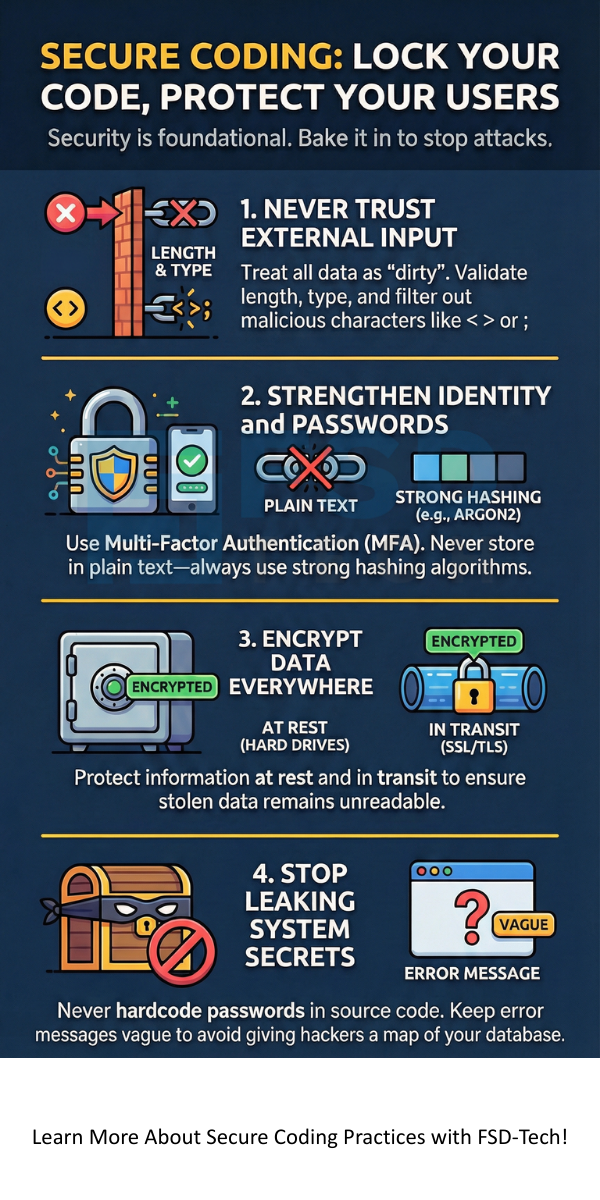
The first rule of secure coding practices is simple: never trust user input. Whether it's a search bar, a login form, or a file upload, treat every bit of data from the outside as "dirty."
In my view, input validation is the single most important wall you can build. If you get this right, you've already stopped half of the most common attacks.
2. Authentication and Password Management
We've all seen sites that let you use "password123." That is a huge mistake. Good security requires strong rules for how people prove who they are.
3. Data Protection and Encryption
Even if a hacker gets into your database, they shouldn't be able to read what's inside. This is where encryption comes in. Think of it as a secret code that only your app can read.
Also Read: What is SQL Injection (SQLi) Attack? Examples & Prevention
Even the best pros make mistakes. That said, knowing the common pitfalls helps you stay one step ahead.
The Danger of Hardcoded Secrets
I once saw a project where the developer left the database password right in the source code. It was sitting there for everyone to see on GitHub! We call this "hardcoding." Instead, use environment variables or secret management tools. It keeps your keys out of the code and in a safe vault.
Improper Error Handling
Have you ever seen an error message that shows the whole database structure? That’s a gift to a hacker. It’s like giving them a map of your house.
Keep your logs detailed for yourself, but keep your public messages vague.
If you're looking for a gold standard, look no further than the Open Web Application Security Project (OWASP). They provide a "Quick Reference Guide" that is a lifesaver for devs.
The OWASP guidelines cover everything from memory management to communication security. We can see these rules as a checklist. If you check every box, you're doing better than 90% of the apps out there. It’s not about being perfect; it’s about being harder to hit than the next guy.
In older languages like C or C++, it's easy to accidentally let data spill over its assigned spot. This "overflow" can crash the app or let a hacker run their own code. Modern languages handle this better, but you still need to be careful with how you handle arrays and buffers.
Also Read: What is Security Operations Center (SOC)?
How do we make this a habit? It shouldn't feel like a chore. It should just be part of how you work every day.
Code Reviews
Don't go it alone. Let a teammate look at your work. A fresh pair of eyes often catches the "logical holes" that we miss when we're too close to the project. We call this "peer review," and it's a powerful way to catch security flaws early.
Automated Testing
Use tools that scan your code for you. These are called Static Analysis Security Testing (SAST) tools. They look for patterns that look like bugs or security risks. While they aren't perfect, they're great at catching the obvious stuff while you focus on the complex logic.
At the end of the day, writing safe code is about taking pride in your craft. We want to build tools that help people, not tools that put them at risk. By following these secure coding practices, you aren't just a programmer—you're a protector of your users' data. It might seem like a lot to take in, but if you take it one step at a time, it becomes second nature.
FSD-Tech believes that everyone deserves safe software. We're here to help you build things that last and stay secure in a changing world. Let's make the web a safer place, one line of code at a time.
Let’s Build Something Secure, Book a Call
Injection attacks, like SQL injection, are still at the top of the list. They happen when you don't properly clean the data a user sends to your database.
It takes a bit more thought at first, but it saves you time later. It's just a different way of thinking about your logic.
No! You just need to follow the basic secure coding practices we've discussed. Most of it is just good common sense.
Check your libraries and practices at least once every few months. New vulnerabilities are found all the time, so keeping your "dependencies" updated is key.

Surbhi Suhane is an experienced digital marketing and content specialist with deep expertise in Getting Things Done (GTD) methodology and process automation. Adept at optimizing workflows and leveraging automation tools to enhance productivity and deliver impactful results in content creation and SEO optimization.
Share it with friends!




.webp&w=3840&q=75)






share your thoughts