HomeNext Gen IT-InfraMonitoring & ManagementCyber SecurityBCP / DRAutomationDecoded
Next Gen IT-Infra
Cato’s SASE Supports Cybersecurity Skills Development

How Cato’s SASE Supports Cybersecurity Skills Development

🕓 April 8, 2025

How SASE Supports the Security Needs of SMBs

How SASE Supports the Security Needs of SMBs

🕓 February 9, 2025

Attack Surface Reduction with Cato’s SASE

Attack Surface Reduction with Cato’s SASE

🕓 February 10, 2025

SASE for Digital Transformation in UAE

SASE for Digital Transformation in UAE

🕓 February 8, 2025

Monitoring & Management
Understanding Atera’s SLA Management

Understanding Atera’s SLA Management

🕓 February 7, 2025

Cost-Performance Ratio: Finding the Right Balance in IT Management Networks

Cost-Performance Ratio: Finding the Right Balance in IT Management Networks

🕓 June 16, 2025

Customizing Atera with APIs

Customizing Atera with APIs

🕓 March 3, 2025

Power Up Your IT Team’s Strategy with Atera’s Communication Tools

Power Up Your IT Team’s Strategy with Atera’s Communication Tools

🕓 February 8, 2025

Cyber Security
Visual guide showing Cato CMA interface for configuring Internet and WAN firewall rules, enabling threat protection, and monitoring security events in real time for UAE IT teams.

Enforcing Firewall and Threat Protection Policies in Cato

🕓 July 25, 2025

Isometric illustration of professionals managing network performance, bandwidth analytics, and cloud-based optimization around the Cato Networks platform, symbolizing bandwidth control and QoS visibility.

Mastering Bandwidth Control and QoS in Cato Networks

🕓 July 26, 2025

Illustration of the Cato Cloud architecture showing its role in delivering SASE for secure, optimized global connectivity.

Understanding the Cato Cloud and Its Role in SASE

🕓 January 29, 2025

Global network backbone powering Cato SASE solution for secure, high-performance connectivity across regions.

Global Backbone: The Engine Powering Cato’s SASE Solution

🕓 January 30, 2025

BCP / DR
Illustration showing diverse business and IT professionals collaborating with cloud, backup, and security icons, representing Vembu use cases for SMBs, MSPs, and IT teams.

Who Uses Vembu? Real-World Use Cases for SMBs, MSPs & IT Teams

🕓 July 12, 2025

Graphic showcasing Vembu’s all-in-one backup and disaster recovery platform with icons for cloud, data protection, and business continuity for IT teams and SMBs.

What Is Vembu? A Deep Dive Into the All in One Backup & Disaster Recovery Platform

🕓 July 6, 2025

Illustration showing Vembu backup and disaster recovery system with cloud storage, server racks, analytics dashboard, and IT professionals managing data.

The Rising Cost of Data Loss: Why Backup Is No Longer Optional?

🕓 August 14, 2025

3D isometric illustration of cloud backup and data recovery infrastructure with laptop, data center stack, and digital business icons — FSD Tech

RPO & RTO: The Heart of Business Continuity

🕓 August 15, 2025

Automation
Cross-Functional Collaboration with ClickUp

Fostering Cross-Functional Collaboration with ClickUp for Multi-Departmental Projects

🕓 February 11, 2025

ClickUp Project Reporting

Revolutionizing Enterprise Reporting with ClickUp’s Advanced Analytics and Dashboards

🕓 June 16, 2025

ClickUp’s Design Collaboration and Asset Management Tools

Empowering Creative Teams with ClickUp’s Design Collaboration and Asset Management Tools

🕓 February 26, 2025

ClickUp Communication and Collaboration Tools

ClickUp Communication and Collaboration Tools: Empowering Remote Teams

🕓 March 12, 2025

Decoded
Multi-Factor Authentication (MFA)

Multi-Factor Authentication (MFA): All You Need to Know

🕓 December 7, 2025

L3 Switch

What Is an L3 Switch? L2 vs L3 & Why You Need Layer 3?

🕓 December 8, 2025

IPSec

IPSec Explained: Protocols, Modes, IKE & VPN Security

🕓 December 3, 2025

 Datagram Transport Layer Security (DTLS)

What is Datagram Transport Layer Security (DTLS)? How it works?

🕓 December 4, 2025

    Subscribe to our newsletter!

    About Us

    Follow Us

    Copyright © 2024 | Powered by 

    Cato SASE Architecture

    Inside Cato’s SASE Architecture: A Blueprint for Modern Security

    🕓 January 26, 2025

    Enterprise Data Security and Privacy with ClickUp

    Ensuring Enterprise Data Security and Privacy with ClickUp

    🕓 February 9, 2025

    DDoS protection SASE

    DDoS Protection and Cato’s Defence Mechanisms

    🕓 February 11, 2025

    Table of Contents

    Understanding Threat Prevention Policies in Cato

    Anas Abdu Rauf
    September 20, 2025
    Comments
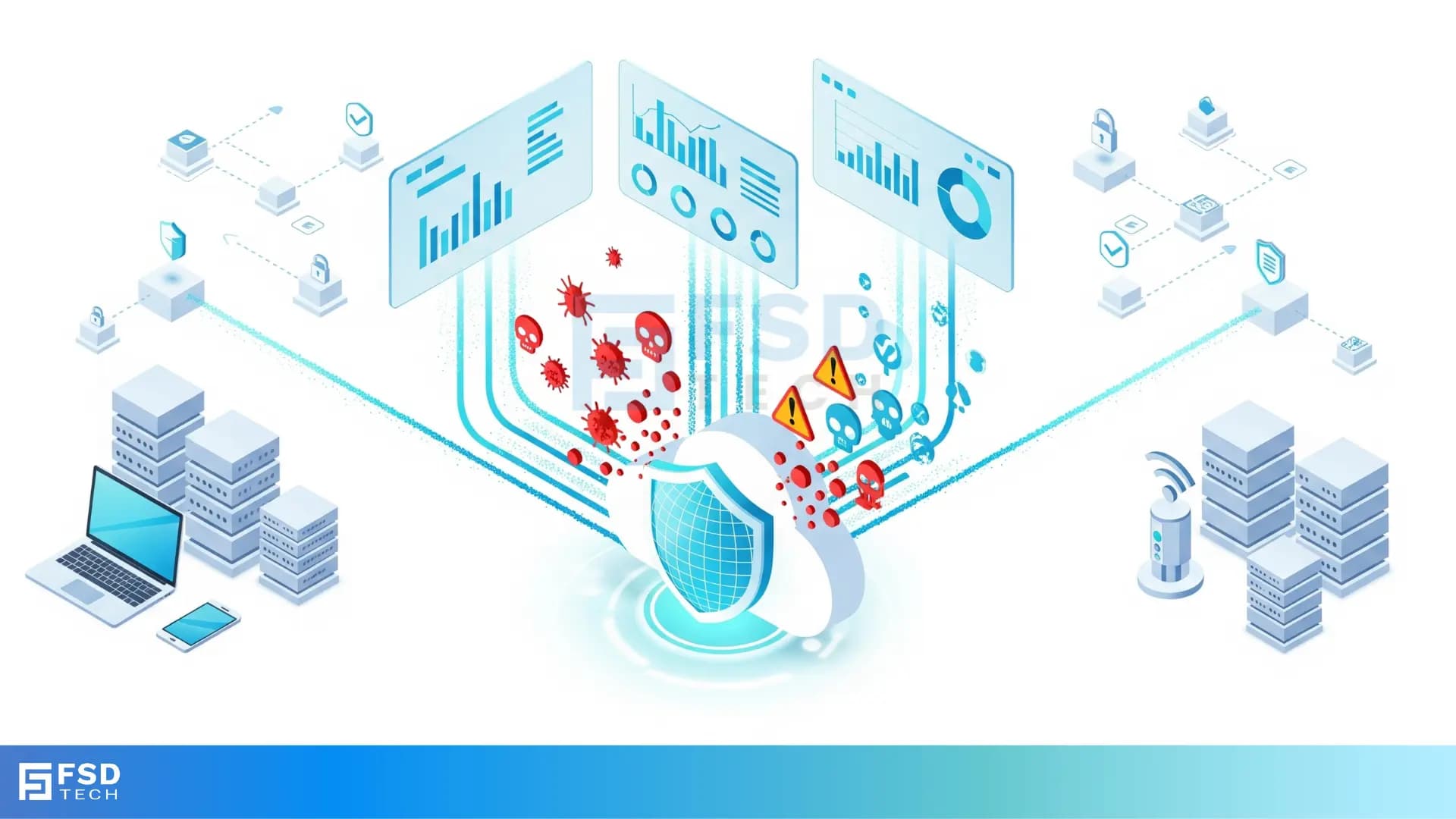
    FSD Tech Cato Networks threat prevention illustration showing shield blocking malware, ransomware, and phishing attacks with real-time dashboards, protecting hybrid IT, IoT, and cloud systems for GCC and Africa businesses.

    Introduction

    Cyberattacks are growing more sophisticated, and protecting your network requires more than just traditional firewalls. Cato SASE integrates advanced threat prevention policies natively into its global backbone. These policies combine next-generation firewalling, IPS (Intrusion Prevention System), Anti-Malware, DNS Security, and cloud-delivered intelligence to stop threats before they reach your users or applications.
     

    This blog explores how to configure and manage Cato’s threat prevention policies, leverage Managed Threat Intelligence, monitor blocked traffic, and align controls with your organization’s security posture.


    Key Takeways

    • What threat prevention policies in Cato are and how they work
    • Key inspection engines (IPS, Anti-Malware, DNS Security, TLS Inspection)
    • How Managed Threat Intelligence enhances protection
    • Configuring prevention profiles per site, user, or application
    • Using policy exceptions for business needs
    • Monitoring security events and threat logs
    • Real-world example of blocking ransomware traffic


    Core Elements of Threat Prevention in Cato

    Cato delivers multi-layered security across all traffic (WAN and internet) with the following engines:

    • Next-Gen Firewall (NGFW) – App- and identity-aware access controls.
    • IPS (Intrusion Prevention System) – Blocks exploits, vulnerabilities, tunneling, stealth protocols, and suspicious activity in real time.
    • Anti-Malware – Detects and prevents malware, ransomware, and file-based attacks using cloud signatures and heuristics.
    • DNS Security – Stops access to malicious, phishing, and newly registered domains; supports sinkholing.
    • TLS/SSL Inspection – Decrypts and inspects encrypted traffic for hidden threats.

    These engines operate inline, enforcing policies without adding noticeable latency.
     

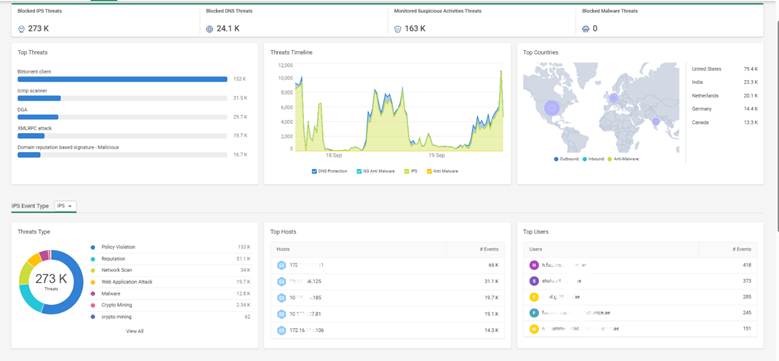
    Cybersecurity threat dashboard showing blocked IPS, DNS, and malware threats with timelines, heatmaps, and top countries. Key insights highlight ransomware, DNS, and malicious signatures targeting enterprises in GCC and Africa


    Managed Threat Intelligence

    Cato’s backbone leverages Managed Threat Intelligence (MTI) to strengthen prevention:

    • Ingests data from ~250 global sources.
    • Tracks 20 million IOCs (Indicators of Compromise).
    • Filters ~10% as false positives, enforcing ~18 million validated IOCs.
    • Updates continuously, approximately every 3 hours.

    This intelligence directly feeds IPS, DNS Security, Anti-Malware, and XDR for proactive protection.


    Configuring Threat Prevention Policies

    Threat prevention in Cato is profile-driven. Each site, socket, or user can inherit a prevention profile, which defines:

    • Which engines are enabled (IPS, DNS, Malware, TLS)
    • Enforcement action (Block, Alert, Allow)
    • Logging preferences for blocked/allowed traffic
    • Custom exceptions to allow trusted applications or domains

    Steps to configure:

    1. Navigate to Security > Threat Prevention in the management console.
    2. Select or create a Prevention Profile.
    3. Toggle engines such as IPS and Anti-Malware.
    4. Configure actions: Block, Alert, or Allow + Logging.
    5. Apply the profile to sites, users, or groups.


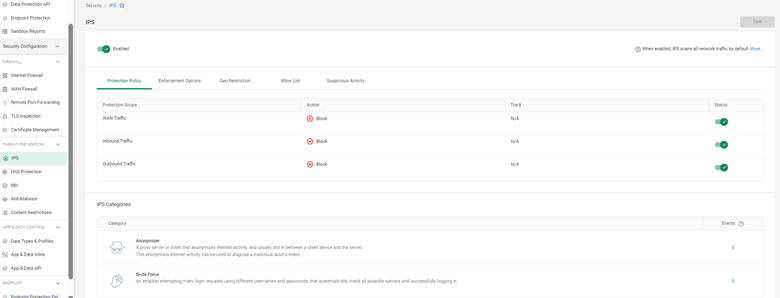
    Intrusion Prevention System (IPS) policy dashboard showing enabled protection for WAN, inbound, and outbound traffic. Displays categories like anonymizer and brute force with block actions. Enterprise security for networks in UAE, GCC, and Africa.


    Managing Exceptions

    Sometimes, legitimate applications may trigger false positives. To handle this:

    • Add exceptions for trusted apps, file hashes, or domains.
    • Narrow exceptions by user group or site instead of global.
    • Review exceptions quarterly to minimize exposure.


    DNS Protections Under IPS

    Cato’s IPS policy includes DNS protections for advanced control:
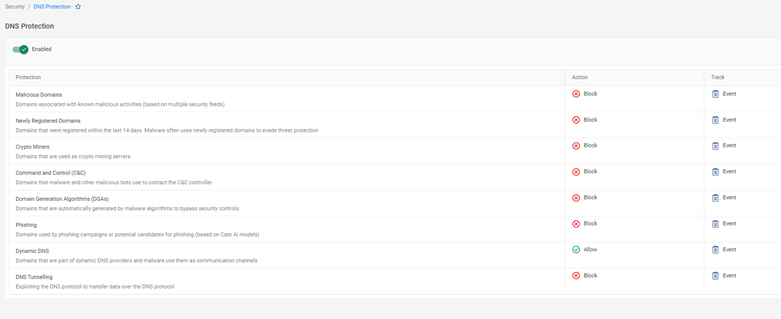
    • Block or sinkhole queries to malicious domains.
    • Enforce restrictions on **newly registered domains **
    • Allowlist trusted domains or DNS signatures to reduce false positives.
       

    DNS protection settings dashboard with rules blocking malicious domains, newly registered domains, crypto miners, phishing, and DNS tunneling. Cloud and network security tailored for enterprises in GCC and African regions.


    Monitoring Security Events

    Cato provides detailed visibility into all blocked or allowed threats via:

    • Events > Security Events – Shows IPS hits, malware blocks, DNS queries, TLS anomalies.
    • Analytics > Threat Analytics – Trends, top affected sites, and user breakdowns.
    • System Events – High-level prevention actions across the backbone.


    Real-World Use Case: Blocking Ransomware Traffic

    A financial services firm in Dubai deployed Cato SASE with IPS + Anti-Malware + DNS Security enabled. Within days:

    • IPS blocked exploit attempts against an outdated VPN service.
    • Anti-Malware prevented a ransomware dropper from downloading its payload.
    • DNS Security sinkholed traffic to a known C2 domain, allowing quick host identification.

    The SOC team used Threat Analytics to review all blocked attempts and reported zero successful breaches.
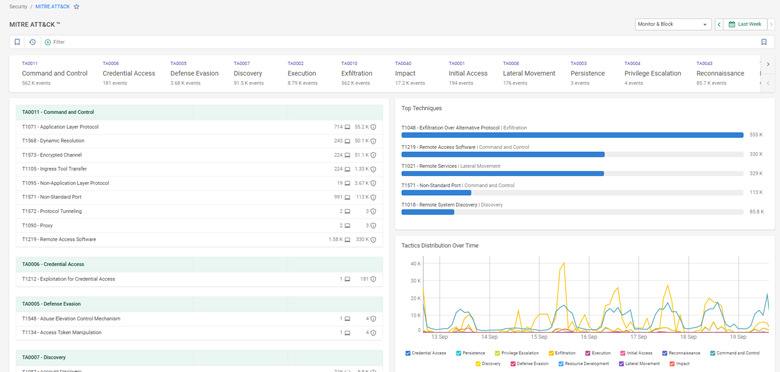
     

    MITRE ATT&CK framework dashboard tracking cyberattack techniques like credential access, command and control, and lateral movement. Real-time monitoring with tactics distribution for threat defense across UAE, GCC, and Africa businesses.


    Tips for Effective Threat Prevention

    • Enable TLS inspection for full visibility into encrypted traffic.
    • Apply different prevention profiles for HQ/datacenters vs. branch sites.
    • Use custom exceptions sparingly and review quarterly.
    • Correlate threat prevention logs with your SIEM for end-to-end visibility.
    • Test policies by running controlled red-team simulations.


    Book a free consultation with our experts to explore how Cato’s IPS, DNS Security, and TLS inspection can safeguard your network. Book Now
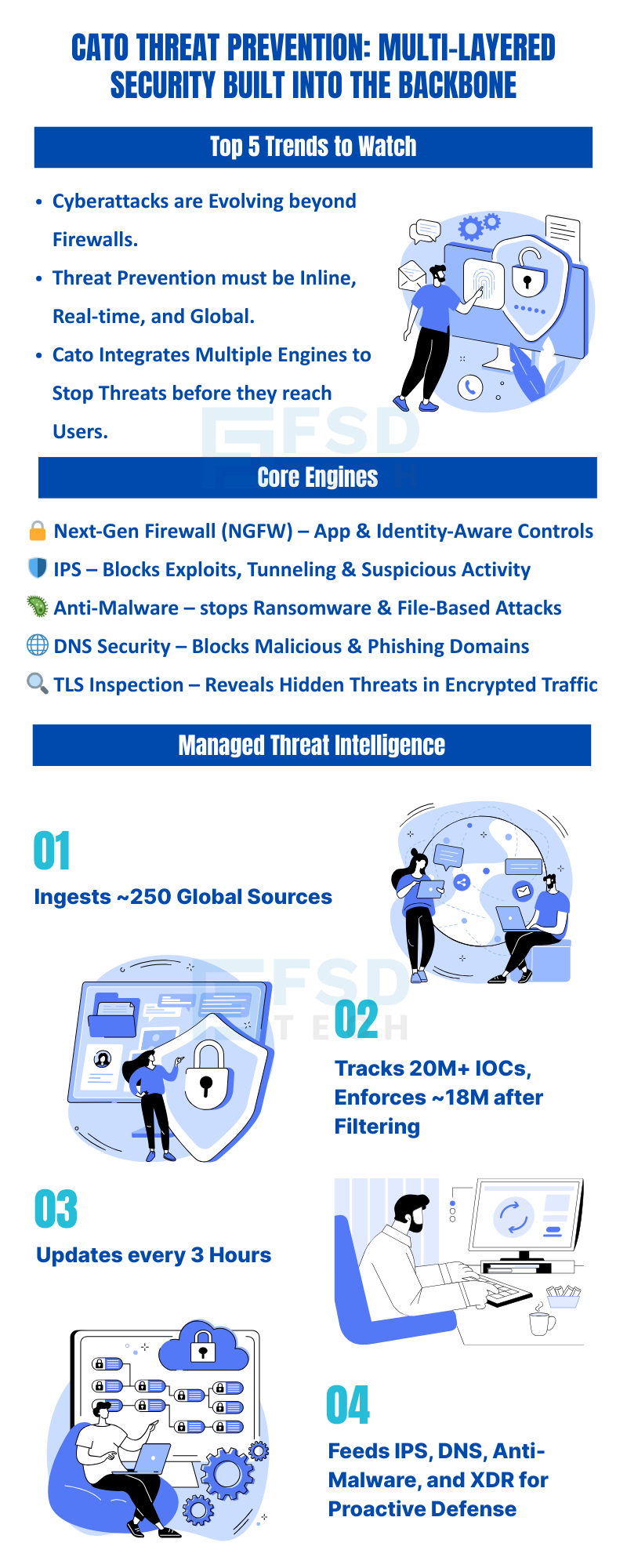
     

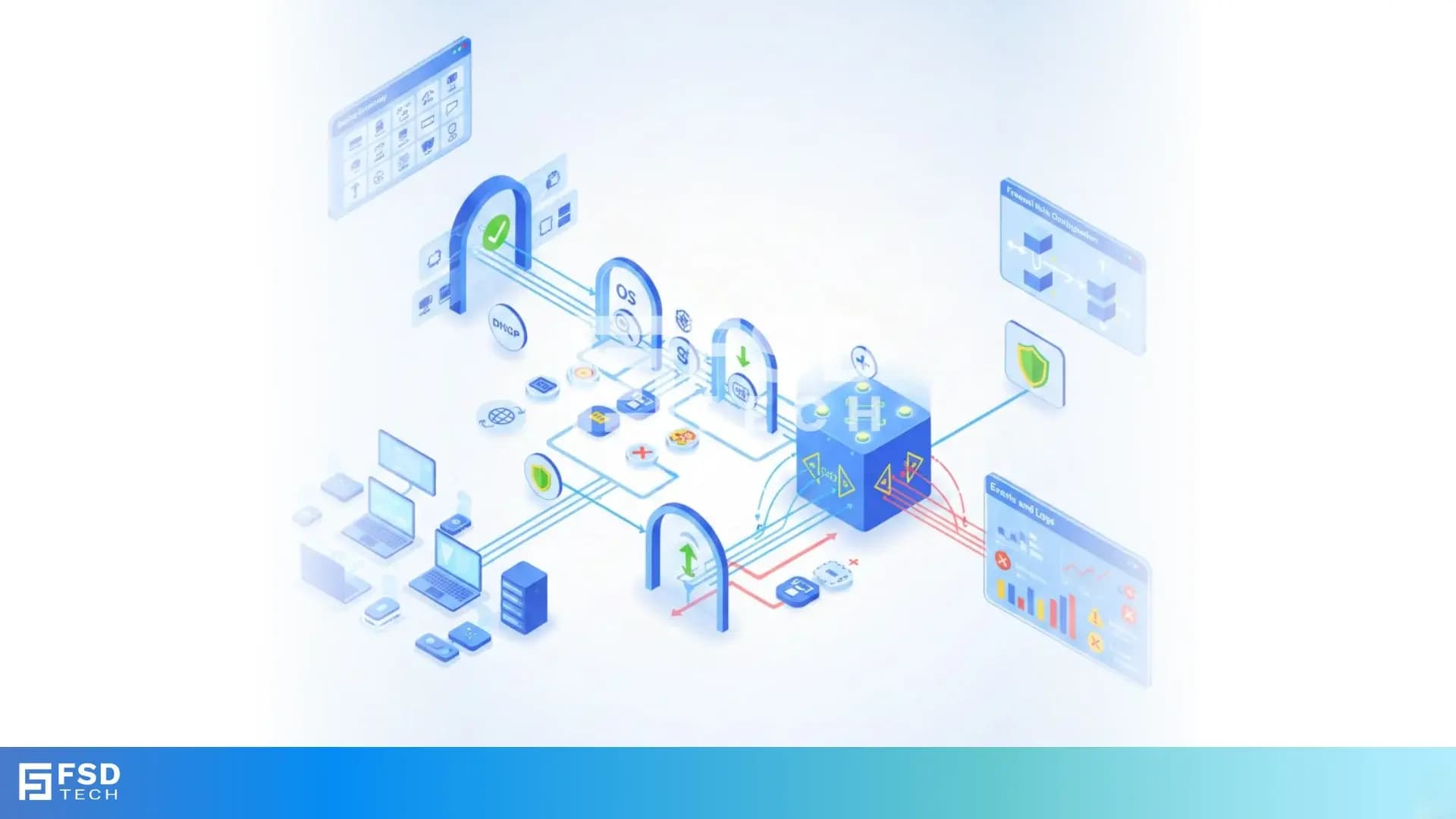
    Infographic by FSD Tech on Cato Networks threat prevention with NGFW, IPS, anti-malware, DNS security, and TLS inspection. Highlights global intelligence, 20M+ IOC tracking, 3-hour updates, and proactive defense for GCC and Africa SMBs.

    FAQ 

    What is Managed Threat Intelligence and how often is it updated?

    Cato ingests ~250 sources, totaling ~20 million IOCs. After filtering false positives, ~18 million validated IOCs are enforced, updated automatically every ~3 hours.
     

    Can I run IPS in monitor-only mode?

    Yes. IPS can be configured to alert without blocking, useful for testing before enforcement.
     

    How does DNS sinkholing help in threat response?

    When a domain is sinkholed, the malicious query resolves to an internal IP, enabling administrators to trace the compromised host and respond quickly.
     

    How are Anti-Malware exceptions configured?

    You can allow trusted domains, file hashes, or applications in the Anti-Malware policy. Exceptions should be reviewed regularly to avoid exposure.
     

    Does TLS inspection improve threat prevention?

    Yes. TLS inspection enables detection of hidden exploits, malware downloads, and stealth tunneling protocols inside encrypted traffic.

    Understanding Threat Prevention Policies in Cato

    About The Author

    Anas Abdu Rauf

    Anas is an Expert in Network and Security Infrastructure, With over seven years of industry experience, holding certifications Including CCIE- Enterprise, PCNSE, Cato SASE Expert, and Atera Certified Master. Anas provides his valuable insights and expertise to readers.

    Like This Story?

    Share it with friends!

    Subscribe to our newsletter!

    Atera

    (48)

    Cato Networks

    (111)

    ClickUp

    (63)

    FishOS

    (7)

    Miradore

    (21)

    PointGuard AI

    (9)

    Vembu

    (22)

    Xcitium

    (33)

    ZETA HRMS

    (66)

    Workflow Automation(4)

    Workforce Automation(1)

    AI Project Management(1)

    HR Data Automation(1)

    RMM(1)

    IT Workflow Automation(1)

    GCC compliance(4)

    IT security(2)

    Payroll Integration(2)

    IT support automation(2)

    procurement automation(1)

    lost device management(1)

    IT Management(5)

    IoT Security(2)

    Cato XOps(2)

    IT compliance(4)

    Task Automation(1)

    Workflow Management(1)

    OpenStack automation(1)

    AI-powered cloud ops(1)

    Kubernetes lifecycle management(2)

    SMB Security(8)

    Data Security(1)

    MDR (Managed Detection & Response)(4)

    MSP Automation(2)

    Atera Integrations(2)

    XDR Security(2)

    SMB Cyber Protection(1)

    Ransomware Defense(3)

    HR Tech Solutions(1)

    Zero Trust Network Access(3)

    Zero Trust Security(2)

    Endpoint Management(1)

    SaaS Security(1)

    Payroll Automation(5)

    IT Monitoring(2)

    Xcitium EDR SOC(15)

    Ransomware Protection GCC(1)

    M&A IT Integration(1)

    Network Consolidation UAE(1)

    MSSP for SMBs(1)

    Antivirus vs EDR(1)

    Managed EDR FSD-Tech(1)

    SMB Cybersecurity GCC(1)

    FSD-Tech MSSP(25)

    Ransomware Protection(3)

    Cybersecurity GCC(12)

    Endpoint Security(1)

    Data Breach Costs(1)

    Endpoint Protection(1)

    Managed Security Services(2)

    Xcitium EDR(30)

    SMB Cybersecurity(8)

    Zero Dwell Containment(31)

    Cloud Backup(1)

    Hybrid Backup(1)

    Backup & Recovery(1)

    pointguard ai(4)

    backup myths(1)

    vembu(9)

    disaster recovery myths(1)

    SMB data protection(9)

    Disaster Recovery(4)

    Vembu BDR Suite(19)

    GCCBusiness(1)

    DataProtection(1)

    Secure Access Service Edge(4)

    GCC HR software(14)

    Miradore EMM(15)

    Cato SASE(7)

    Cloud Security(8)

    Talent Development(1)

    AI Cybersecurity(12)

    AI Security(2)

    AI Risk Management(1)

    AI Governance(4)

    AI Compliance(2)

    GCC business security(1)

    GCC network integration(1)

    compliance automation(4)

    GCC cybersecurity(2)

    education security(1)

    App management UAE(1)

    Miradore EMM Premium+(5)

    BYOD security Dubai(8)

    HealthcareSecurity(1)

    MiddleEast(1)

    Team Collaboration(1)

    IT automation(9)

    Zscaler(1)

    SD-WAN(6)

    HR Integration(4)

    Cloud Networking(3)

    device management(9)

    RemoteWork(1)

    ZeroTrust(2)

    VPN(1)

    MPLS(1)

    Project Management(9)

    HR automation(16)

    share your thoughts

    Illustration showing the transition from manual spreadsheets and paper-based HR processes to the Zeta HRMS digital platform. Depicts HR teams moving data into a centralized, automated HR system with modules for payroll, attendance, compliance, and employee management, highlighting improved efficiency and collaboration. FSD Tech branding visible at the bottom.

    Cato SASE Implementation Roadmap 2025: A Step-by-Step Guide

    🕓 December 23, 2025

    Illustration showing Cato SASE’s global private backbone across the GCC region, with network nodes in Dubai, Riyadh, Jeddah, Kuwait, Muscat, and Bahrain. Depicts secure connectivity to cloud platforms such as AWS, Azure, and Google, with intelligent traffic routing, analytics, and high availability. FSD Tech branding visible at the bottom

    Strategies to Eliminate Network Downtime with Cato SASE’s Reliable Global Backbone

    🕓 December 19, 2025

    Illustration showing a transition from old, wired on-premise servers to a modern Cato SASE cloud network. The left side depicts multiple physical servers with tangled cables, while the right side shows a global cloud platform delivering secure connectivity, analytics, and networking across regions, with users connected worldwide. FSD Tech branding visible at the bottom.

    Beyond VPN Limitations: Why Cato SASE Is the Better Choice for Remote Workforces

    🕓 December 16, 2025

    Decoded(35)

    Cyber Security(112)

    BCP / DR(22)

    Zeta HRMS(65)

    SASE(21)

    Automation(63)

    Next Gen IT-Infra(111)

    Monitoring & Management(69)

    ITSM(22)

    HRMS(21)

    Automation(24)