HomeNext Gen IT-InfraMonitoring & ManagementCyber SecurityBCP / DRAutomationDecoded
Next Gen IT-Infra
Cato’s SASE Supports Cybersecurity Skills Development

How Cato’s SASE Supports Cybersecurity Skills Development

🕓 April 8, 2025

How SASE Supports the Security Needs of SMBs

How SASE Supports the Security Needs of SMBs

🕓 February 9, 2025

Attack Surface Reduction with Cato’s SASE

Attack Surface Reduction with Cato’s SASE

🕓 February 10, 2025

SASE for Digital Transformation in UAE

SASE for Digital Transformation in UAE

🕓 February 8, 2025

Monitoring & Management
Understanding Atera’s SLA Management

Understanding Atera’s SLA Management

🕓 February 7, 2025

Cost-Performance Ratio: Finding the Right Balance in IT Management Networks

Cost-Performance Ratio: Finding the Right Balance in IT Management Networks

🕓 June 16, 2025

Customizing Atera with APIs

Customizing Atera with APIs

🕓 March 3, 2025

Power Up Your IT Team’s Strategy with Atera’s Communication Tools

Power Up Your IT Team’s Strategy with Atera’s Communication Tools

🕓 February 8, 2025

Cyber Security
Illustration of the Cato Cloud architecture showing its role in delivering SASE for secure, optimized global connectivity.

Understanding the Cato Cloud and Its Role in SASE

🕓 January 29, 2025

Isometric illustration of professionals managing network performance, bandwidth analytics, and cloud-based optimization around the Cato Networks platform, symbolizing bandwidth control and QoS visibility.

Mastering Bandwidth Control and QoS in Cato Networks

🕓 July 26, 2025

Global network backbone powering Cato SASE solution for secure, high-performance connectivity across regions.

Global Backbone: The Engine Powering Cato’s SASE Solution

🕓 January 30, 2025

Illustration of team analyzing application traffic and usage insights on a large laptop screen using Cato’s dashboard, surrounded by network and cloud icons.

Cato Networks Application Visibility | Monitoring & Control

🕓 July 27, 2025

BCP / DR
Illustration showing diverse business and IT professionals collaborating with cloud, backup, and security icons, representing Vembu use cases for SMBs, MSPs, and IT teams.

Who Uses Vembu? Real-World Use Cases for SMBs, MSPs & IT Teams

🕓 July 12, 2025

Graphic showcasing Vembu’s all-in-one backup and disaster recovery platform with icons for cloud, data protection, and business continuity for IT teams and SMBs.

What Is Vembu? A Deep Dive Into the All in One Backup & Disaster Recovery Platform

🕓 July 6, 2025

Illustration showing Vembu backup and disaster recovery system with cloud storage, server racks, analytics dashboard, and IT professionals managing data.

The Rising Cost of Data Loss: Why Backup Is No Longer Optional?

🕓 August 14, 2025

3D isometric illustration of cloud backup and data recovery infrastructure with laptop, data center stack, and digital business icons — FSD Tech

RPO & RTO: The Heart of Business Continuity

🕓 August 15, 2025

Automation
Cross-Functional Collaboration with ClickUp

Fostering Cross-Functional Collaboration with ClickUp for Multi-Departmental Projects

🕓 February 11, 2025

ClickUp Project Reporting

Revolutionizing Enterprise Reporting with ClickUp’s Advanced Analytics and Dashboards

🕓 June 16, 2025

ClickUp’s Design Collaboration and Asset Management Tools

Empowering Creative Teams with ClickUp’s Design Collaboration and Asset Management Tools

🕓 February 26, 2025

ClickUp Communication and Collaboration Tools

ClickUp Communication and Collaboration Tools: Empowering Remote Teams

🕓 March 12, 2025

Decoded
Multi-Factor Authentication (MFA)

Multi-Factor Authentication (MFA): All You Need to Know

🕓 December 7, 2025

L3 Switch

What Is an L3 Switch? L2 vs L3 & Why You Need Layer 3?

🕓 December 8, 2025

IPSec

IPSec Explained: Protocols, Modes, IKE & VPN Security

🕓 December 3, 2025

 Datagram Transport Layer Security (DTLS)

What is Datagram Transport Layer Security (DTLS)? How it works?

🕓 December 4, 2025

    Subscribe to our newsletter!

    About Us

    Follow Us

    Copyright © 2024 | Powered by 

    Atera

    (59)

    Cato Networks

    (131)

    ClickUp

    (78)

    FishOS

    (7)

    Miradore

    (21)

    PointGuard AI

    (9)

    Vembu

    (22)

    Xcitium

    (33)

    ZETA HRMS

    (79)

    Table of Contents

    Enabling Cloud Access Security Broker (CASB) in Cato

    Anas Abdu Rauf
    September 22, 2025
    Comments
    FSD Tech illustration showing CASB in Cato: cloud shield blocking rogue tenants while allowing approved users. Visualizes tenant restrictions, data flow protection, compliance monitoring for secure SaaS adoption across GCC & Africa SMB environments.

    The average enterprise now uses over 130 SaaS applications. Each one is a potential data leak, a rogue access point, or a compliance gap — and traditional security tools weren't built to handle them.


    Firewalls don't understand SaaS context. VPNs create a false sense of perimeter security. Standalone CASB appliances add cost, complexity, and yet another management console to a stack that's already too fragmented.


    Cato's Cloud Access Security Broker (CASB) takes a different approach entirely. Built natively into the Cato SASE platform and enforced inline across the global backbone, it gives security teams unified visibility and granular policy control over every SaaS interaction — without bolting on additional hardware or agents.


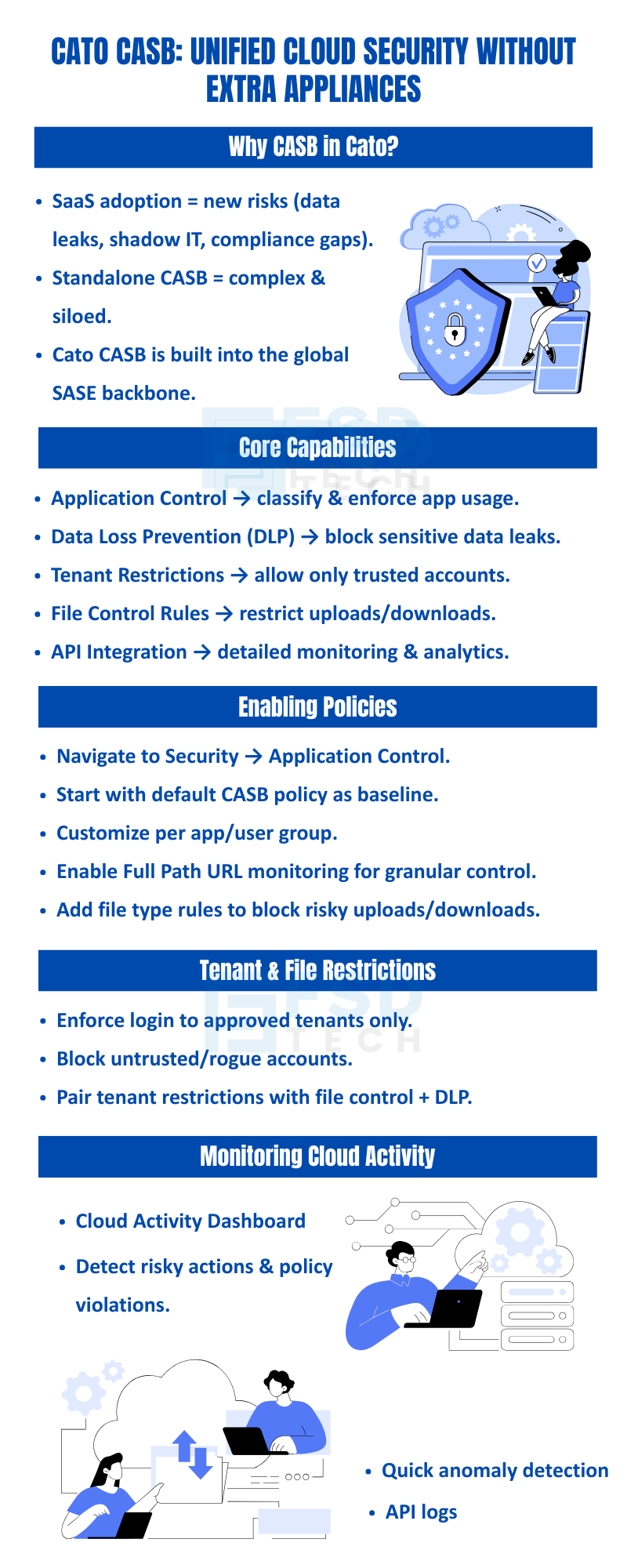
    This guide walks through exactly how to configure Cato CASB in 2025: from enabling application control policies and enforcing tenant restrictions to applying DLP rules, monitoring cloud activity, and integrating API-level visibility.


    Key Takeaways

    • Understand the role of CASB within Cato SASE
    • Enable and configure application control policies
    • Restrict access to specific SaaS tenants or users
    • Apply file control rules and DLP policies
    • Monitor cloud activity using dashboards and API integration
    • Real-world scenario: protecting sensitive finance data in SaaS apps


    What Is Cato CASB and How Does It Fit Into SASE?

    A Cloud Access Security Broker sits between users and cloud applications, enforcing security policies, monitoring activity, and preventing sensitive data from leaving the organization through SaaS channels.


    What makes Cato's implementation different from traditional CASB products is where it lives. Rather than operating as a standalone proxy or requiring API-only integration, Cato CASB is embedded natively into the Cato SASE platform — enforced at the same PoP (Point of Presence) that handles all other traffic inspection, including firewall, IPS, and TLS decryption.


    This means:


    • No additional appliances to deploy or manage
    • No separate policy consoles — SaaS controls live alongside your network and security policies
    • Full inline inspection — not just API-based shadow IT detection, but real-time traffic-level control


    Get started with Cato SASE

    Core CASB Capabilities in Cato

    CapabilityWhat It Does
    Application ControlIdentify, classify, and enforce policies on cloud app usage
    Data Loss Prevention (DLP)Block sensitive data from leaving via SaaS uploads or sharing
    Tenant RestrictionsLimit users to approved organizational accounts only
    File Control RulesRestrict upload/download of specific file types or categories
    API Activity MonitoringTrack user actions, logins, and file events via app APIs
    Cloud Activity DashboardReal-time visibility into SaaS usage across sites and users


    Step-by-Step: Configuring Application Control Policies in Cato

    Application control is the foundation of Cato CASB. It determines which applications users can access, under what conditions, and with what level of inspection.

    Step 1: Access Application Control

    In the Cato Management Application, navigate to Security → Application Control.

    Step 2: Start With the Default CASB Policy

    Cato provides a recommended baseline CASB policy covering common SaaS categories. This is the fastest way to establish coverage without starting from scratch. Review the default rules before customizing.

    Step 3: Customize Rules by Application or User Group

    Layer on specific rules for high-priority applications — such as Salesforce, Microsoft 365, Google Workspace, or Slack — and scope them to relevant user groups or departments. For example, you might allow full access for IT but restrict uploads for contractors.

    Step 4: Enable Full Path URL Monitoring

    This is a critical setting that many teams overlook. Full Path URL monitoring allows Cato to distinguish between:


    • Different subdomains of the same application
    • Specific tenants within a multi-tenant SaaS environment
    • Individual features or resources within an app (e.g., allowing read access but blocking file download)


    Without it, policies apply only at the domain level — far too broad for meaningful SaaS control.

    Step 5: Apply File Control Rules

    Define what types of files can be uploaded or downloaded across specific applications. Common configurations include:


    • Blocking uploads of files containing PII, financial data, or health records
    • Restricting downloads of executable files from unmanaged apps
    • Enforcing scanning of all uploaded documents against DLP policies

    Step 6: Review and Test

    Before pushing to enforcement, run policies in monitor mode to validate behavior against real traffic patterns. Promote to block mode once false positives are resolved.


    Also Read: Global Private Backbone: Why Your Business Needs It?


    Enforcing SaaS Tenant Restrictions

    One of the most common SaaS security gaps is tenant sprawl — users accessing personal or unauthorized versions of legitimate applications. An employee logging into their personal Google Drive or a contractor using an unapproved Dropbox account bypasses every corporate data control you have.


    Cato CASB addresses this through tenant restrictions, which enforce that users can only authenticate to approved organizational accounts within a given SaaS application.

    What Tenant Restrictions Prevent

    • Login to personal Google, Microsoft, or Slack accounts on corporate devices or networks
    • Data exfiltration through "bring your own tenant" techniques
    • Shadow IT via rogue or unmanaged SaaS instances

    How to Configure Tenant Restrictions in Cato

    1. Within the Application Control policy, select the target application (e.g., Microsoft 365).
    2. Enable tenant restriction enforcement.
    3. Specify the approved tenant identifiers (e.g., your Azure AD tenant ID or Google Workspace domain).
    4. Set the action for unapproved tenant access — Block or Alert.
    5. Combine with DLP rules for comprehensive data residency control.


    Best practice: Pair tenant restrictions with file control policies. Restricting the tenant prevents lateral account movement, while file control prevents data transfer even within approved tenants.


    Data Loss Prevention (DLP) in Cato CASB

    Cato's DLP engine operates inline on SaaS traffic, scanning content in real time against configurable data classifiers. When sensitive content is detected in an upload, share, or API transaction, policy enforcement triggers immediately.

    Common DLP Use Cases

    • Financial services: Prevent spreadsheets containing account numbers or financial models from being uploaded to unauthorized apps
    • Healthcare: Block uploads of documents containing PHI to non-compliant SaaS platforms
    • Legal: Restrict sharing of contract templates or NDA documents outside approved collaboration tools
    • HR: Prevent employee records from leaving via personal cloud storage

    DLP Configuration Tips

    • Use pre-built data classifiers (credit card numbers, SSNs, IBAN numbers) as a baseline.
    • Layer custom regex patterns for organization-specific sensitive data formats.
    • Apply DLP rules at the file-type level first (e.g., .xlsx, .csv, .pdf), then refine to content-based classifiers.
    • Set DLP to Alert mode initially to measure false positive rate before switching to Block.


    Also Read: SASE Point of Presence (PoP): The Heart of Cloud-Native Networking


    Monitoring Cloud Activity in Real Time

    Configuring policies is only half the job. Cato CASB provides two primary layers of ongoing visibility:

    Cloud Activity Dashboard

    Navigate to Analytics → Cloud Activity for a real-time overview of:


    • Top-used SaaS applications by site, department, or individual user
    • Risky actions (large uploads, unusual download patterns, off-hours access)
    • Policy violations and blocked events
    • Shadow IT applications detected but not yet covered by policy


    This dashboard is particularly useful for security operations teams during periodic access reviews and for identifying applications that should be added to formal policy coverage.

    API-Level Activity Monitoring

    For high-risk or business-critical applications, Cato supports direct API integration with major SaaS platforms. This provides event-level telemetry beyond what traffic inspection alone can surface — including:


    • Specific user actions within the application (file share events, permission changes, admin actions)
    • Login events and authentication anomalies
    • Data access patterns that may indicate insider threat behavior


    Integration tip: Forward Cato cloud activity logs to your SIEM (Splunk, Microsoft Sentinel, Chronicle, etc.) for correlation with endpoint and identity data. This creates a complete chain of custody for SaaS-related incidents.


    Real-World Use Case

    A UAE-based financial firm used Cato CASB to protect its Salesforce and Office 365 environment:

    • Restricted access to approved tenant accounts only.
    • Enforced file control to prevent sensitive finance spreadsheets from being uploaded to unauthorized apps.
    • Monitored user activity and detected a misconfigured API integration that could have exposed data.
    • Deployed policies across all branch offices without complex firewall or VPN setups.


    8 Best Practices for Cato CASB in 2026

    1. Start with the default CASB policy, then customize. The recommended baseline covers the most common risk scenarios. Use it as your starting point rather than building from scratch — it accelerates deployment and ensures no critical category is missed.

    2. Enable Full Path URL monitoring from day one. Domain-level visibility is insufficient for modern SaaS security. Full path monitoring is what unlocks tenant-level and feature-level control.

    3. Pair tenant restrictions with file control and DLP. Each control addresses a different attack vector. Together, they create overlapping protection that's much harder to bypass.

    4. Deploy DLP and file control in Alert mode before Block. Baseline your environment before enforcing. Premature blocking of legitimate file transfers creates business disruption and erodes trust in the security program.

    5. Use API monitoring for high-risk applications. Traffic inspection tells you what's moving. API monitoring tells you what's happening inside the application. Use both for sensitive platforms like Salesforce, Workday, or financial reporting tools.

    6. Review tenant restriction lists with HR and IT quarterly. Organizational changes — new subsidiaries, M&A activity, contractor onboarding — can make previously approved tenants invalid or introduce new legitimate tenants that need whitelisting.

    7. Audit DLP and file control rules periodically. Rules that made sense 12 months ago may block legitimate business workflows today. Quarterly reviews prevent the accumulation of exceptions and shadow workarounds.

    8. Correlate cloud activity logs with your SIEM. Cato's cloud activity data becomes significantly more powerful when joined with endpoint, identity, and email telemetry in a centralized SIEM for threat hunting and compliance reporting.


    Conclusion

    Cato CASB delivers the SaaS visibility and control that modern enterprises need — integrated natively into the SASE platform rather than added as another appliance in an already complex stack. When configured correctly with application control policies, tenant restrictions, DLP rules, file controls, and API monitoring, it provides comprehensive protection against the most common SaaS-related data loss and account compromise scenarios.


    For organizations in the GCC, UAE, and Africa markets that are scaling SaaS adoption rapidly while managing lean security teams, the operational simplicity of a single-platform approach is as important as the security outcome itself.


    See CASB in Action — 


    Book Your Free Consultation


    Schedule a Free session with our specialists to explore how Cato CASB can secure your SaaS applications, enforce tenant restrictions, and prevent data loss in real time.

    FSD Tech infographic on enabling CASB in Cato: unified cloud security without extra appliances. Highlights SaaS risk management, DLP, tenant restrictions, file control, API monitoring, anomaly detection. Designed for SMBs in GCC & Africa adopting cloud securely.

    FAQ 

    1. Can CASB restrict access to specific SaaS tenants?

    Yes. You can enforce tenant restrictions to allow only authorized accounts.
     

    2. How are file uploads/downloads controlled?

    Cato CASB allows administrators to define file control rules for specific file types or categories.
     

    3. Can application activity be monitored via APIs?

    Yes. Application Control via API enables tracking user actions, logins, and uploads/downloads.
     

    4. Do I need separate CASB appliances?

    No. Cato’s CASB is integrated into the SASE platform, eliminating the need for additional appliances.
     

    5. How is cloud activity visualized?

    The Cloud Activity Dashboard provides real-time analytics, showing app usage, policy violations, and top users.

    Enabling Cloud Access Security Broker (CASB) in Cato

    About The Author

    Anas Abdu Rauf

    Anas is an Expert in Network and Security Infrastructure, With over seven years of industry experience, holding certifications Including CCIE- Enterprise, PCNSE, Cato SASE Expert, and Atera Certified Master. Anas provides his valuable insights and expertise to readers.

    TRY OUR PRODUCTS

    Like This Story?

    Share it with friends!

    Subscribe to our newsletter!

    FishOSCato SASEVembuXcitiumZeta HRMSAtera
    Isometric illustration of a centralized performance platform connected to analytics dashboards and team members, representing goal alignment, measurable outcomes, risk visibility, and strategic project tracking within ClickUp.

    How ClickUp Enables Outcome-Based Project Management (Not Just Task Tracking)

    🕓 February 15, 2026

    Isometric illustration of a centralized executive dashboard platform connected to analytics panels, performance charts, security indicators, and strategic milestones, representing real-time business visibility and decision control within ClickUp.

    Executive Visibility in ClickUp – How CXOs Gain Real-Time Control Without Micromanaging

    🕓 February 13, 2026

    Cato SASE Architecture

    Inside Cato’s SASE Architecture: A Blueprint for Modern Security

    🕓 January 26, 2025

    Workflow Automation(8)

    Workforce Automation(1)

    AI Project Management(1)

    HR Data Automation(1)

    RMM(2)

    IT Workflow Automation(1)

    GCC compliance(4)

    IT security(2)

    Payroll Integration(2)

    IT support automation(3)

    procurement automation(1)

    lost device management(1)

    IT Management(5)

    IoT Security(3)

    Cato XOps(1)

    IT compliance(5)

    Task Automation(1)

    Workflow Management(1)

    OpenStack automation(1)

    Kubernetes lifecycle management(2)

    AI-powered cloud ops(1)

    SMB Security(8)

    Data Security(1)

    MDR (Managed Detection & Response)(3)

    MSP Automation(3)

    Atera Integrations(2)

    XDR Security(2)

    Threat Detection & Response(1)

    Ransomware Defense(3)

    SMB Cyber Protection(1)

    HR Tech Solutions(1)

    Zero Trust Network Access(3)

    Quantum Threat UAE & GCC(1)

    Post-Quantum Cryptography(1)

    Quantum Security(1)

    Zero Trust Security(2)

    Cloud IDE Security(1)

    Endpoint Management(1)

    SaaS Security(2)

    Payroll Automation(5)

    IT Monitoring(2)

    Xcitium EDR SOC(15)

    Ransomware Protection GCC(1)

    Network Consolidation UAE(1)

    M&A IT Integration(1)

    MSSP for SMBs(1)

    Managed EDR FSD-Tech(1)

    FSD-Tech MSSP(25)

    Ransomware Protection(3)

    Antivirus vs EDR(1)

    SMB Cybersecurity GCC(1)

    Endpoint Security(1)

    Cybersecurity GCC(15)

    Data Breach Costs(1)

    Endpoint Protection(1)

    SMB Cybersecurity(8)

    Managed Security Services(2)

    Xcitium EDR(30)

    Zero Dwell Containment(31)

    Hybrid Backup(1)

    Cloud Backup(1)

    Backup & Recovery(1)

    pointguard ai(4)

    vembu(9)

    SMB data protection(9)

    disaster recovery myths(1)

    backup myths(1)

    Disaster Recovery(4)

    Vembu BDR Suite(19)

    DataProtection(1)

    GCCBusiness(1)

    Secure Access Service Edge(4)

    GCC IT Solutions(1)

    Unified Network Management(1)

    GCC HR software(20)

    open banking(1)

    CC compliance(1)

    financial cybersecurity(2)

    Miradore EMM(15)

    Government Security(1)

    Cato SASE(9)

    Cloud Security(9)

    GCC Education(1)

    Hybrid Learning(1)

    Talent Development(1)

    AI Governance(4)

    AI Compliance(2)

    AI Security(2)

    AI Cybersecurity(13)

    AI Risk Management(1)

    Secure Remote Access(1)

    GCC business security(1)

    GCC network integration(1)

    compliance automation(5)

    education security(1)

    GCC cybersecurity(3)

    BYOD security Dubai(8)

    App management UAE(1)

    Miradore EMM Premium+(5)

    MiddleEast(1)

    share your thoughts

    Isometric diagram showing Cato SASE troubleshooting workflow where device inventory, DHCP mapping, posture validation, and firewall event logs are analyzed to diagnose device-based rule enforcement issues.

    Troubleshooting Device-Based Firewall Rules in Cato SASE

    🕓 March 13, 2026

    Isometric diagram showing Cato SASE device inventory analyzing network traffic, DHCP data, and device attributes to support WAN and Internet firewall enforcement and device-aware security policies.

    Understanding Device Identification Limitations in Cato Device Inventory

    🕓 March 8, 2026

    Isometric diagram showing Cato SASE cloud analyzing network traffic, DHCP data, and MAC address fingerprints to identify devices and enable accurate device-based firewall enforcement.

    Why DHCP Configuration Matters for Device-Based Firewall Enforcement in Cato SASE

    🕓 March 7, 2026

    Decoded(172)

    Cyber Security(128)

    BCP / DR(22)

    Zeta HRMS(78)

    SASE(21)

    Automation(78)

    Next Gen IT-Infra(128)

    Monitoring & Management(80)

    ITSM(22)

    HRMS(21)

    Automation(24)