.webp&w=3840&q=75)
How ClickUp Enables Outcome-Based Project Management (Not Just Task Tracking)
🕓 February 15, 2026

Ask any enterprise security or IT operations team what keeps them up at night, and incomplete device visibility ranks near the top of the list. The modern network is no longer a defined perimeter of corporate-issued laptops and managed servers. It is a sprawling, continuously shifting mix of managed endpoints, unmanaged personal devices, IoT sensors, OT equipment, collaboration tools, and cloud workloads — all connecting from offices, homes, factories, and everywhere in between.
The consequences of poor device visibility compound quickly. Blind spots in asset inventory mean unpatched devices go undetected. Unmanaged endpoints accessing sensitive applications create policy gaps that compliance auditors will flag. IoT and OT devices that are never properly classified sit quietly on the network as potential pivot points for attackers. And when an incident does occur, the absence of accurate, real-time device records turns a one-hour investigation into a multi-day forensic exercise.
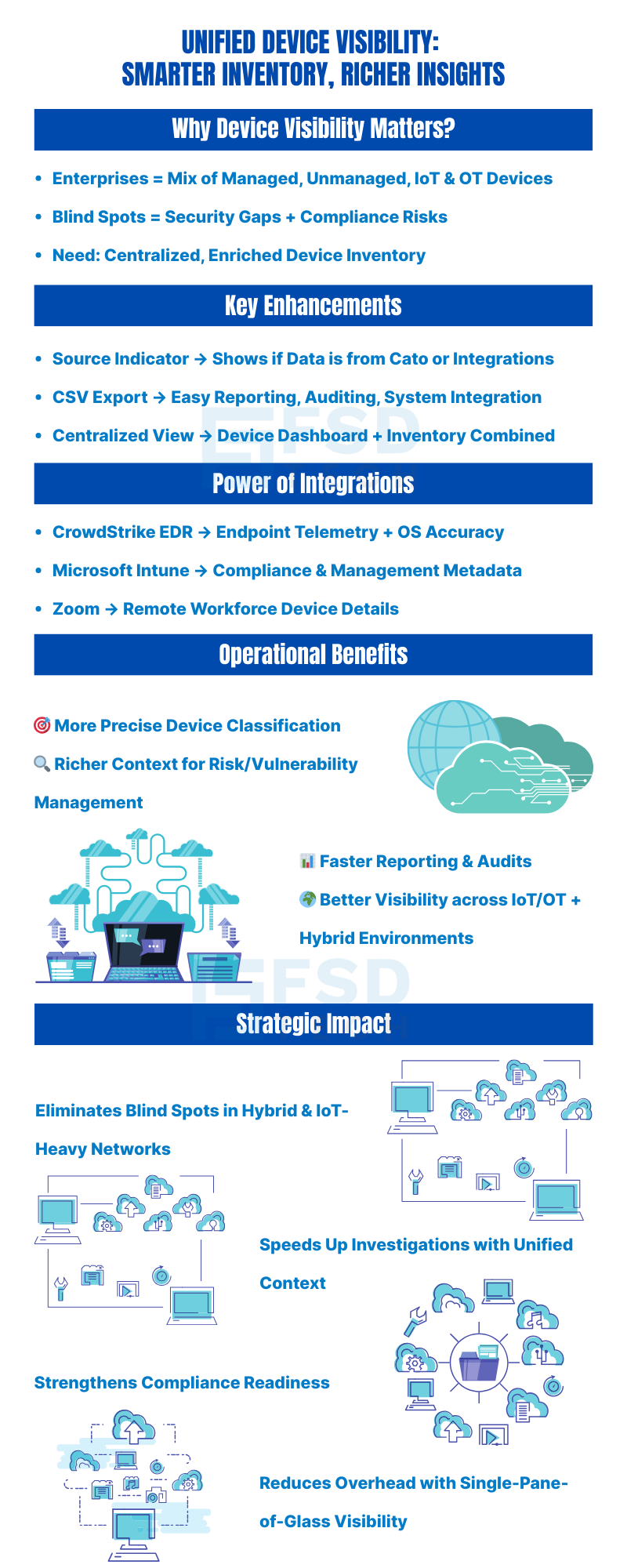
Cato Networks has responded to this challenge with a significant set of enhancements to the Device Inventory — bringing together improved classification, centralized management, richer device context through third-party integrations, and better reporting capabilities. The result is a more complete, accurate, and operationally useful view of every connected asset across the enterprise.
A new field in the Device Inventory named Source now provides context on how each device was discovered or classified — either by Cato directly, or through an integration like CrowdStrike, Intune, or Zoom. This helps admins evaluate classification accuracy and understand provenance of device data.
Admins can now export the full Device Inventory to CSV. The export includes device details, classification source, status, and other metadata. This makes it easier to integrate the data with external asset tracking systems or generate reports for audits and compliance.
The former Device Dashboard and Device Inventory are now combined into one unified page with two tabs. One tab shows discovery, classification, and device details; the other shows summary data, dashboards, or health‐related metrics. This reduces switching between pages, making device management more efficient.
CrowdStrike EDR device data can now be connected to the Device Inventory. When enabled, Cato pulls in metadata from CrowdStrike to enrich existing device entries or add devices discovered via CrowdStrike. This provides deeper visibility (for example, more accurate OS, managed/unmanaged status, and endpoint-level artifacts) and better device classification.
Integration with Microsoft Intune allows Cato to merge Intune metadata with device discovery. Intune's device metadata is merged with Cato’s native discovery under IoT/OT Security. The unified profiles appear on Device Inventory, giving admins a combined view of both managed and unmanaged devices, improving visibility and classification fidelity.
Prerequisites include certain Microsoft 365 / Intune licensing and setting up the appropriate API connectors.
Zoom device metadata (for example OS version or other Zoom client/device details) can now be merged into Cato’s Device Inventory. The Zoom integration allows Zoom device data to augment Cato’s discovery so that devices participating in Zoom are better classified and visible in the inventory. This helps in identifying managed devices, and understanding their status (client version, managed vs unmanaged, etc.).
Also Read: Understanding Device Identification Limitations in Cato Device Inventory
The cumulative impact of these enhancements extends across multiple organizational functions simultaneously.
Elimination of Asset Blind Spots The combination of CrowdStrike, Intune, and Zoom integrations — alongside Cato's own network discovery — means that devices which previously slipped through classification gaps now appear in the inventory with meaningful metadata. IoT devices, unmanaged endpoints, collaboration-only devices, and managed corporate assets all occupy a single, coherent record system.
Accelerated Incident Investigation When a security event occurs, investigators need device context immediately. Having endpoint telemetry, network activity, compliance status, and integration source data in a single inventory record — rather than spread across CrowdStrike, Intune, Zoom, and Cato separately — compresses investigation timelines significantly.
Strengthened Compliance Posture The CSV export capability combined with the Source field gives compliance teams the documented, attributable evidence they need for audits. Device records are no longer something that needs to be assembled manually before an audit. They exist, are exportable, and carry provenance data.
Reduced Administrative Overhead The consolidated interface eliminates page-switching. Automatic enrichment from integrations eliminates manual data correlation. The Source field eliminates the need to cross-reference multiple consoles to understand where device data originated. Each of these is a small efficiency gain individually. Collectively, across the daily workflows of IT operations and security teams, they represent meaningful reduction in administrative burden.
Better Risk Assessment and Patching Prioritization Richer device metadata — OS versions, compliance status, managed or unmanaged designations, endpoint telemetry — directly supports vulnerability management workflows. When you know which devices are running outdated operating systems, which are unmanaged, and which have failed compliance checks, patching prioritization becomes a data-driven exercise rather than an estimate.
Also Read: How Cato Uses TLS Inspection to Improve Device Classification Accuracy
These capabilities deliver the most immediate value for organizations in specific situations.
Organizations managing mixed-device environments — where managed corporate laptops, employee-owned personal devices, IoT sensors, and OT equipment all coexist on the same network — gain the most from the multi-source classification approach. The combination of Cato discovery with CrowdStrike, Intune, and Zoom integrations is specifically designed for this complexity.
Compliance obligations in regulated industries — financial services, healthcare, critical infrastructure, education — benefit directly from the CSV export capability and the Source field's audit trail value. The ability to produce a complete, attributable device inventory on demand is a compliance requirement in many regulatory frameworks.
Organizations already deploying CrowdStrike, Microsoft Intune, and Zoom — which describes a large proportion of enterprise environments — can activate these integrations against existing tool investments without additional vendor relationships or separate licensing for the integrations themselves.
Organizations implementing Zero Trust network access policies benefit from the Intune compliance status data flowing into Cato's device records, enabling compliance-based access decisions within the Cato platform.
All six enhancements covered in this guide — including the Source field, CSV export, consolidated interface, and all three third-party integrations — require an IoT/OT Security license from Cato Networks. Without this license, the Device Inventory remains limited to its basic functionality.
For organizations already managing IoT or OT devices, or those pursuing comprehensive unified device visibility across managed and unmanaged endpoints, the IoT/OT Security license is the enabling prerequisite for the full capability set described here.
For the Microsoft Intune integration specifically, appropriate Microsoft 365 and Intune licensing is also required on the Microsoft side, along with configuration of the relevant API connectors in the Cato Management Application.
The latest enhancements to the Device Inventory are a strong step toward a unified, enriched view of your network’s devices. With new source visibility, better export options, and integrations with CrowdStrike, Microsoft Intune, and Zoom, admins now get more accurate, richer information in a centralized location. For organizations seeking tighter control over their asset visibility—especially where IoT/OT and managed vs unmanaged devices mix—these features offer both clarity and efficiency.
Book a free consultation with our experts to see how unified device visibility can work in your environment.
All the new enhancements — including the Source field, CSV export, centralized tabs, and integrations with CrowdStrike, Microsoft Intune, and Zoom — require an IoT/OT Security license. Without this license, the Device Inventory remains limited to its basic functionality. If your organization is managing IoT/OT devices or aiming for unified device visibility, upgrading to this license is strongly recommended.
The Source field tells you whether a device’s data comes from:
Admins can use this to:
Yes, the Device Inventory can be exported to CSV. This feature is particularly useful for:
Best practice: Schedule regular exports (e.g., monthly) and archive them to maintain a historical record of device changes over time.
The Microsoft Intune integration merges device metadata from Intune with Cato’s own discovery. This means devices managed by Intune will appear in Device Inventory with enriched attributes like OS version, device compliance status, or managed/unmanaged state.
Admins should:
The Zoom integration adds metadata from devices using Zoom, such as client version, OS details, and whether the device is considered managed or unmanaged.
This is most valuable for organizations with a remote or hybrid workforce, where Zoom is a core collaboration tool. By merging Zoom data, admins can:
The CrowdStrike EDR integration enriches Device Inventory with endpoint telemetry, adding process, file, and user context to devices discovered on the network.
Operational use cases include:
Tip: Pair CrowdStrike enrichment with Response Policies in XOps for automated alerts on high-risk devices.
The new two-tabbed interface eliminates switching between separate pages. Best practice is to:

Anas is an Expert in Network and Security Infrastructure, With over seven years of industry experience, holding certifications Including CCIE- Enterprise, PCNSE, Cato SASE Expert, and Atera Certified Master. Anas provides his valuable insights and expertise to readers.
Share it with friends!




.webp&w=3840&q=75)





.webp&w=3840&q=75)
share your thoughts