HomeManaged ServicesNext Gen IT-InfraMonitoring & ManagementCyber SecurityBCP / DRAutomation
Managed Services
msp-dubai-accounting-firms-managed-it

Why accounting firms in Dubai need an MSP before they think they do?

🕓 April 24, 2026

Next Gen IT-Infra
Cato’s SASE Supports Cybersecurity Skills Development

How Cato’s SASE Supports Cybersecurity Skills Development

🕓 April 8, 2025

How SASE Supports the Security Needs of SMBs

How SASE Supports the Security Needs of SMBs

🕓 February 9, 2025

Attack Surface Reduction with Cato’s SASE

Attack Surface Reduction with Cato’s SASE

🕓 February 10, 2025

SASE for Digital Transformation in UAE

SASE for Digital Transformation in UAE

🕓 February 8, 2025

Monitoring & Management
Cost-Performance Ratio: Finding the Right Balance in IT Management Networks

Cost-Performance Ratio: Finding the Right Balance in IT Management Networks

🕓 June 16, 2025

Atera’s Communication Tools

Atera’s Communication Tools: Boosting IT Team Productivity in the UAE

🕓 February 8, 2025

Emerging Trends in IT Management

Emerging Trends in IT Management

🕓 February 10, 2025

Atera Disaster Recovery

Atera Disaster Recovery: Top Strategies for UAE IT Teams

🕓 February 9, 2025

Cyber Security
Illustration of the Cato Cloud architecture showing its role in delivering SASE for secure, optimized global connectivity.

Understanding the Cato Cloud and Its Role in SASE

🕓 January 29, 2025

Isometric illustration of professionals managing network performance, bandwidth analytics, and cloud-based optimization around the Cato Networks platform, symbolizing bandwidth control and QoS visibility.

Mastering Bandwidth Control and QoS in Cato Networks

🕓 July 26, 2025

Global network backbone powering Cato SASE solution for secure, high-performance connectivity across regions.

Global Backbone: The Engine Powering Cato’s SASE Solution

🕓 January 30, 2025

Illustration of team analyzing application traffic and usage insights on a large laptop screen using Cato’s dashboard, surrounded by network and cloud icons.

Cato Networks Application Visibility | Monitoring & Control

🕓 July 27, 2025

BCP / DR
Illustration showing diverse business and IT professionals collaborating with cloud, backup, and security icons, representing Vembu use cases for SMBs, MSPs, and IT teams.

Who Uses Vembu? Real-World Use Cases for SMBs, MSPs & IT Teams

🕓 July 12, 2025

Graphic showcasing Vembu’s all-in-one backup and disaster recovery platform with icons for cloud, data protection, and business continuity for IT teams and SMBs.

What Is Vembu? A Deep Dive Into the All in One Backup & Disaster Recovery Platform

🕓 July 6, 2025

Illustration showing Vembu backup and disaster recovery system with cloud storage, server racks, analytics dashboard, and IT professionals managing data.

The Rising Cost of Data Loss: Why Backup Is No Longer Optional?

🕓 August 14, 2025

3D isometric illustration of cloud backup and data recovery infrastructure with laptop, data center stack, and digital business icons — FSD Tech

RPO & RTO: The Heart of Business Continuity

🕓 August 15, 2025

Automation
Cross-Functional Collaboration with ClickUp

Fostering Cross-Functional Collaboration with ClickUp for Multi-Departmental Projects

🕓 February 11, 2025

ClickUp Project Reporting

Revolutionizing Enterprise Reporting with ClickUp’s Advanced Analytics and Dashboards

🕓 June 16, 2025

ClickUp’s Design Collaboration and Asset Management Tools

Empowering Creative Teams with ClickUp’s Design Collaboration and Asset Management Tools

🕓 February 26, 2025

ClickUp Communication and Collaboration Tools

ClickUp Communication and Collaboration Tools: Empowering Remote Teams

🕓 March 12, 2025

    Subscribe to our newsletter!

    About Us

    Follow Us

    Copyright © 2024 | Powered by 

    Atera

    (60)

    Cato Networks

    (131)

    ClickUp

    (78)

    FishOS

    (7)

    Miradore

    (21)

    PointGuard AI

    (9)

    Vembu

    (22)

    Xcitium

    (33)

    ZETA HRMS

    (79)

    Table of Contents

    Securing Your Perimeter: DMZ Exposed Services

    Surbhi Suhane
    May 1, 2026
    Comments
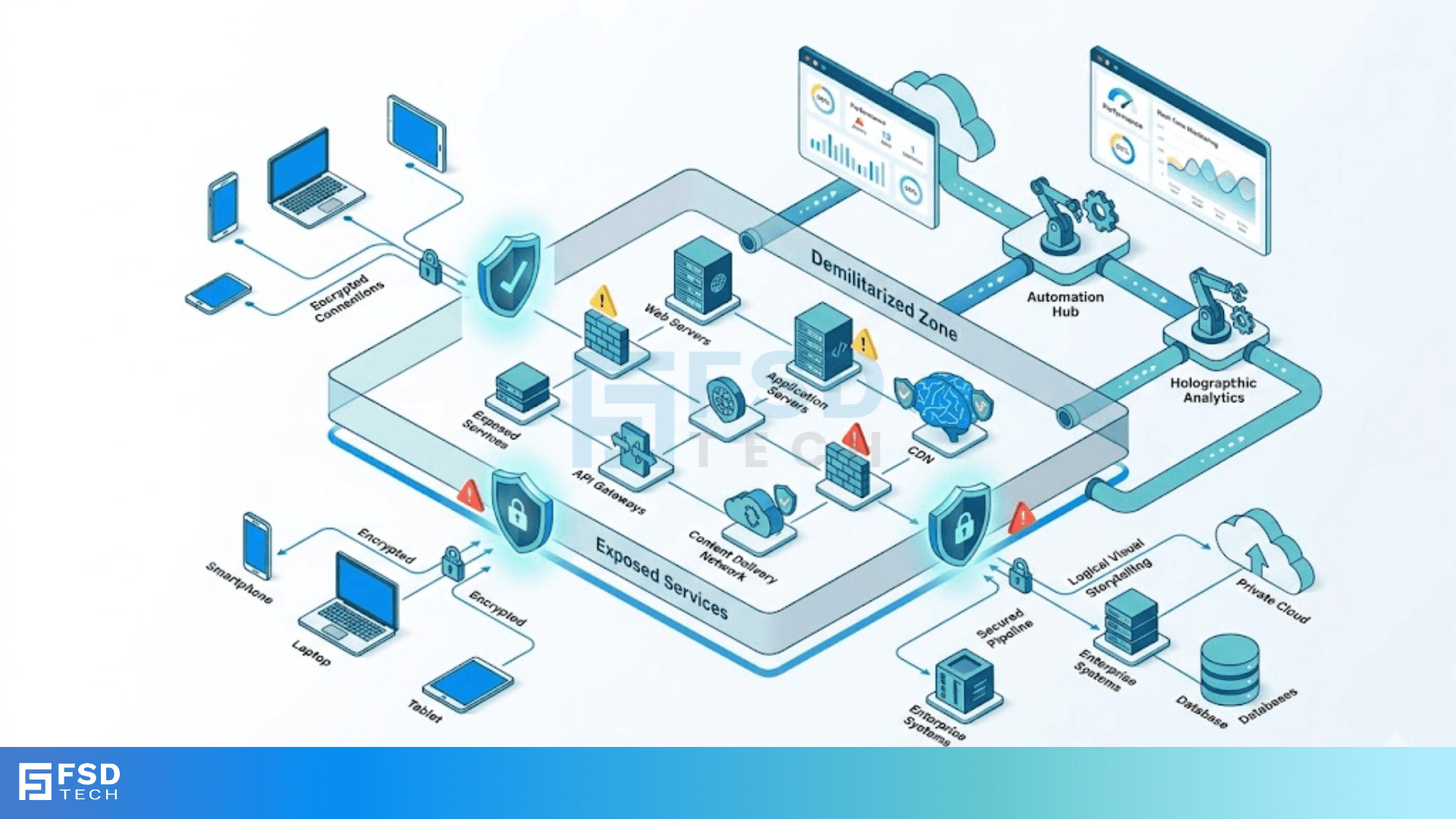
    DMZ Exposed Services

    Imagine you're running a busy shop. You want customers to walk in and browse, but you definitely don't want them wandering into your private office where you keep the safe. In the world of networking, DMZ exposed services act like that storefront. They provide a safe place for the public to interact with your digital business without ever touching your private data.


    Here's the thing: if you don't set this up correctly, you're basically leaving the office door wide open. In my experience, most small to mid-sized firms struggle with this balance. They want to be accessible, but they're terrified of a breach. That's why understanding the "Demilitarized Zone" (DMZ) is so vital for anyone managing a network today.


    But how does it actually work? Does a DMZ still matter in a world of cloud and "Zero Trust"? To be honest, the core principles haven't changed, even if the tools have. Let's look at why this buffer zone is your first line of defense.


    What are DMZ Exposed Services?

    At its heart, a DMZ exposed service is any application or server that you purposely place in a subnetwork that faces the public internet. Think of it as a "no man's land" between your secure internal network and the chaotic world of the web.


    When we talk about these services, we're usually referring to:


    • Web Servers: Your website that the whole world sees.
    • Email Servers: Systems that need to send and receive messages from outside.
    • FTP Servers: Used for sharing files with clients or partners.
    • DNS Servers: The "phonebooks" that tell the internet where your site lives.


    Secure Your Network Now


    Why Is Isolation Necessary?

    We've all been there—you think your firewall is enough, but then a single exploit in a web plugin gives a hacker access. If that server is on your main network, they have the keys to everything. By using DMZ exposed services, you ensure that even if a hacker compromises your website, they're still trapped in the storefront. They still have to break through another "door" (a second firewall) to get to your internal files.


    How DMZ Exposed Services Protect Your Data

    You might wonder, "If I'm exposing these services anyway, aren't they just sitting ducks?" Not exactly. A well-built DMZ uses a "sandwich" approach.


    The Dual Firewall Design

    In a typical setup, you have two firewalls. The first one (front-end) sits between the internet and the DMZ. It only allows traffic for the specific services you're hosting—like port 80 for web traffic.

    The second firewall (back-end) sits between the DMZ and your internal network. This one is much stricter. It only lets the DMZ talk to the internal network for very specific tasks, like a web server asking a database for a user's profile.


    Breaking the Connection

    One of the best parts about DMZ exposed services is that they prevent direct connections. A user from the internet never actually talks to your internal database. They talk to the web server, and the web server talks to the database on their behalf. This "proxy" effect is what keeps your crown jewels safe.


    Also Read: What is a Static Route Floating Strategy and How Does It Work?


    Common Services You'll Find in a DMZ

    Not everything belongs in the "buffer zone." You only want to put things there that must be accessed from the outside. Here’s a quick list of what we usually see:


    1. Web Servers (HTTP/HTTPS): These are the most common. Since they handle public requests, they are high-risk.
    2. Mail Relays: Instead of putting your actual Exchange server in the DMZ, you put a relay that scans for spam and viruses first.
    3. FTP/SFTP: If you allow customers to upload files, this is where that server lives.
    4. VoIP Gateways: For companies using internet-based phone systems.


    Pro Tip: Never put your primary database in the DMZ. Always keep your data on the internal network and use a middle-man service to fetch what's needed.


    Best Practices for Hardening Your DMZ

    Setting up the network is just the start. To keep your DMZ exposed services secure, you need to follow some "ground rules." In my view, simplicity is your best friend here.


    1. The Principle of Least Privilege

    Only open the ports that are absolutely required. If your server only hosts a website, why is the port for remote desktop (RDP) open to the world? Close everything else.

    2. Use Different Passwords

    It sounds simple, but you'd be surprised how many people use the same admin password for their DMZ servers as they do for their internal ones. If one falls, they all fall.

    3. Regular Patching

    Since these services are "exposed," they are being scanned by bots 24/7. A vulnerability that's only hours old will be found. You must keep these systems updated.

    4. Monitor and Log Everything

    You can't stop what you can't see. Use an Intrusion Detection System (IDS) to watch for weird traffic patterns. Are you suddenly getting thousands of requests from a country you don't do business in? That's a red flag.


    Also Read: NIC Duplex Modes: Guide to Half vs Full Duplex


    The Comparison: DMZ vs. Internal Network

    FeatureDMZ Exposed ServicesInternal Network (LAN)
    Trust LevelLow (Untrusted)High (Trusted)
    AccessibilityPublicly accessiblePrivate only
    Main GoalService deliveryData protection
    Security RiskHigh exposureLow exposure
    Firewall RulesPermissive for specific portsVery restrictive


    Is the DMZ Still Relevant?

    Fast-forward to today, and some people say the DMZ is dead. They point to Zero Trust Architecture (ZTA) and cloud services as the new way forward.


    Here is my take: The "physical" DMZ might be changing, but the concept is more alive than ever. Even in the cloud (like AWS or Azure), we use "Virtual Private Clouds" (VPCs) and subnets to create logical DMZs. Whether it's a physical box or a software-defined rule, you still need a place to put your public-facing stuff where it won't hurt your private stuff.


    Conclusion

    Securing your DMZ exposed services isn't just a technical chore—it's about peace of mind. By building a smart, segmented perimeter, you're telling the world that your business is open, but your data is off-limits. At our core, we believe that every organization deserves a network that is both accessible and iron-clad. We're committed to helping you navigate these complexities with a focus on your specific needs and long-term security.


    Get a Free Security Audit


    Key Takeaways on DMZ Exposed Services

    • Isolation is King: Always separate public-facing servers from your private data.
    • Dual Firewalls provide the best defense: Use one to guard the DMZ and another to guard the LAN.
    • Minimize the surface area: Only run the services you need. If you don't use FTP, don't have it.
    • The DMZ is a buffer: It doesn't just block attacks; it buys you time to react if a breach happens.


    Frequently Asked Questions (FAQs) on DMZ Exposed Services

    What happens if a DMZ server is hacked?

    If your DMZ exposed services are properly segmented, the hacker is stuck. They can control the compromised server, but the back-end firewall should block them from moving into your internal network.


    Do I need a DMZ for a small home network?

    Usually, no. Most home routers use a "Basic DMZ" feature that just forwards all traffic to one device (like a gaming console). This is actually risky. Only use it if you truly understand the risks.


    Can I use a single firewall for a DMZ?

    Yes, this is called a "three-legged" firewall. One port goes to the internet, one to the DMZ, and one to your LAN. It's cheaper but slightly less secure than the dual-firewall model.

    Securing Your Perimeter: DMZ Exposed Services

    About The Author

    Surbhi Suhane

    Surbhi Suhane is an experienced digital marketing and content specialist with deep expertise in Getting Things Done (GTD) methodology and process automation. Adept at optimizing workflows and leveraging automation tools to enhance productivity and deliver impactful results in content creation and SEO optimization.

    TRY OUR PRODUCTS

    Like This Story?

    Share it with friends!

    Subscribe to our newsletter!

    FishOSCato SASEVembuXcitiumZeta HRMSAtera
    Isometric illustration of a centralized performance platform connected to analytics dashboards and team members, representing goal alignment, measurable outcomes, risk visibility, and strategic project tracking within ClickUp.

    How ClickUp Enables Outcome-Based Project Management (Not Just Task Tracking)

    🕓 February 15, 2026
    Isometric illustration of a centralized executive dashboard platform connected to analytics panels, performance charts, security indicators, and strategic milestones, representing real-time business visibility and decision control within ClickUp.

    Executive Visibility in ClickUp – How CXOs Gain Real-Time Control Without Micromanaging

    🕓 February 13, 2026

    Cato SASE Architecture

    Inside Cato’s SASE Architecture: A Blueprint for Modern Security

    🕓 January 26, 2025

    Workflow Automation(8)

    Workforce Automation(1)

    AI Project Management(1)

    HR Data Automation(1)

    RMM(2)

    Firewall Security(1)

    IT Workflow Automation(1)

    GCC compliance(4)

    IT security(2)

    Payroll Integration(2)

    IT support automation(3)

    procurement automation(1)

    lost device management(1)

    IT Management(5)

    IoT Security(3)

    Cato XOps(1)

    IT compliance(5)

    Task Automation(1)

    Workflow Management(1)

    AI-powered cloud ops(1)

    OpenStack automation(1)

    Kubernetes lifecycle management(2)

    SMB Security(8)

    Data Security(1)

    MDR (Managed Detection & Response)(3)

    MSP Automation(3)

    Atera Integrations(2)

    Threat Detection & Response(1)

    XDR Security(2)

    SMB Cyber Protection(1)

    Ransomware Defense(3)

    HR Tech Solutions(1)

    Zero Trust Network Access(3)

    Post-Quantum Cryptography(1)

    Quantum Security(1)

    Quantum Threat UAE & GCC(1)

    Zero Trust Security(2)

    Cloud IDE Security(1)

    Endpoint Management(1)

    SaaS Security(2)

    Payroll Automation(5)

    IT Monitoring(2)

    Xcitium EDR SOC(15)

    Ransomware Protection GCC(1)

    Network Consolidation UAE(1)

    M&A IT Integration(1)

    MSSP for SMBs(1)

    SMB Cybersecurity GCC(1)

    FSD-Tech MSSP(25)

    Antivirus vs EDR(1)

    Managed EDR FSD-Tech(1)

    Ransomware Protection(3)

    Cybersecurity GCC(15)

    Endpoint Security(1)

    Data Breach Costs(1)

    Endpoint Protection(1)

    Xcitium EDR(30)

    SMB Cybersecurity(8)

    Managed Security Services(2)

    Zero Dwell Containment(31)

    Hybrid Backup(1)

    Cloud Backup(1)

    Backup & Recovery(1)

    pointguard ai(4)

    vembu(9)

    SMB data protection(9)

    disaster recovery myths(1)

    backup myths(1)

    Disaster Recovery(4)

    Vembu BDR Suite(19)

    GCCBusiness(1)

    DataProtection(1)

    Unified Network Management(1)

    Secure Access Service Edge(4)

    GCC IT Solutions(1)

    GCC HR software(20)

    financial cybersecurity(2)

    CC compliance(1)

    open banking(1)

    Miradore EMM(15)

    Government Security(1)

    Cato SASE(9)

    Cloud Security(9)

    Hybrid Learning(1)

    GCC Education(1)

    Talent Development(1)

    AI Governance(4)

    AI Risk Management(1)

    AI Compliance(2)

    AI Security(2)

    AI Cybersecurity(13)

    Secure Remote Access(1)

    GCC business security(1)

    GCC network integration(1)

    compliance automation(5)

    education security(1)

    GCC cybersecurity(3)

    BYOD security Dubai(8)

    App management UAE(1)

    Miradore EMM Premium+(5)

    share your thoughts

    VLAN ID Tagging

    What is VLAN ID Tagging? Guide to Network Segregation

    🕓 May 1, 2026

    DMZ Exposed Services

    Securing Your Perimeter: DMZ Exposed Services

    🕓 May 1, 2026

    IPv6 Hex Addressing:

    IPv6 Hex Addressing: Next Generation of the Internet

    🕓 April 29, 2026

    Managed Services(1)

    Decoded(231)

    Cyber Security(128)

    BCP / DR(22)

    Zeta HRMS(78)

    SASE(21)

    Automation(80)

    Next Gen IT-Infra(128)

    Monitoring & Management(81)

    ITSM(22)

    HRMS(21)

    Automation(24)









