.webp&w=3840&q=75)
How ClickUp Enables Outcome-Based Project Management (Not Just Task Tracking)
🕓 February 15, 2026
Patch management is not about installing updates.
It is about enforcing discipline across every endpoint - consistently, provably, and without chaos.
For MSPs and internal IT teams, patching sits at the center of:
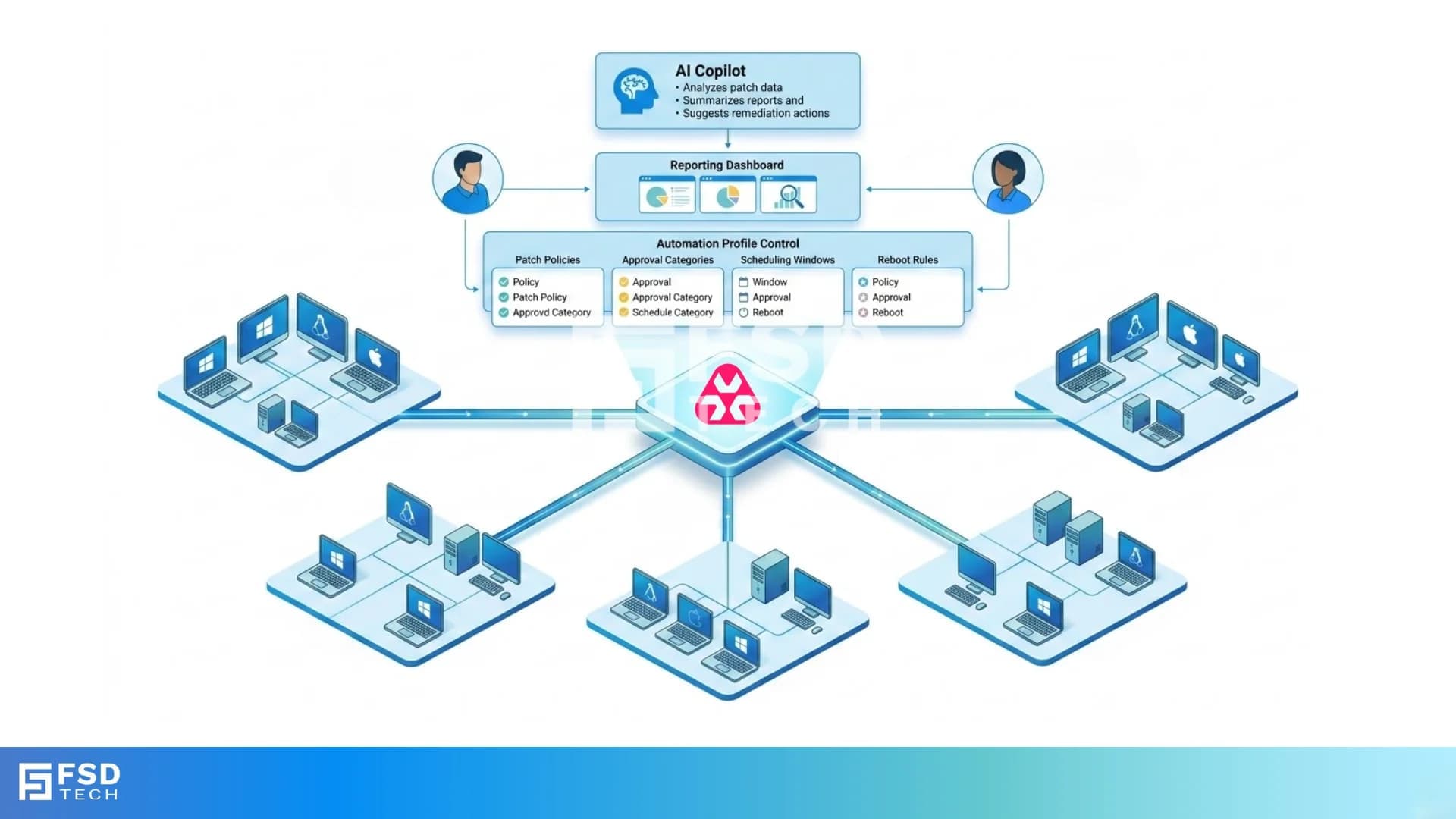
Atera approaches patching as an architectural layer inside its RMM platform - built around automation profiles, Windows Update integration, reporting validation, and increasingly, AI-assisted interpretation.
This is not patching as a task.
It is patching as an operational framework.
At its core, Atera Patch Management operates through three coordinated components:
These work together to form a structured lifecycle:
Scan → Approve → Deploy → Validate
Each step is documented, controlled, and auditable.
For Windows environments, Atera integrates with the Windows Update Agent (WUA) API.
This means:
Atera does not replace Microsoft’s update logic.
It orchestrates it — giving administrators central control over scheduling, approval categories, and reboot behavior.
This architecture reduces friction while maintaining compatibility with Windows patch mechanisms.
Atera supports macOS and Linux patch workflows with OS-aware handling.
For macOS:
For Linux:
Atera does not claim identical behavior across operating systems. It respects native update mechanisms while maintaining centralized visibility.
Automation profiles are the control center of Atera Patch Management.
Through profiles, administrators define:
Once assigned to:
The profile executes automatically according to schedule.
This shifts patching from manual intervention to policy enforcement.
Devices are scanned based on the automation profile schedule. Missing updates are identified using WUA or OS-level patch detection.
Approved updates are installed during configured maintenance windows. Reboot behavior follows profile rules to avoid unexpected downtime.
Execution outcomes are recorded in:
Patching without validation creates blind spots.
Atera records results so administrators can verify success or investigate failures.
The Patch & Automation Feedback report provides:
This reporting is frequently used during:
The system documents reality rather than assuming success.
Atera AI Copilot does not override automation profiles.
It does not independently approve patches.
It does not autonomously deploy updates.
Its role is assistive and contextual.
Officially documented capabilities include:
In practice, this means:
The automation remains rule-driven.
Copilot shortens the analysis cycle.
As Atera continues evolving its AI capabilities, patch intelligence is becoming more contextual — not more autonomous.
Today’s structure remains governance-first:
AI enhances visibility and clarity, but policy remains human-defined.
This balance is deliberate.
For MSPs, patching is contractual.
Clients expect:
Atera enables MSPs to:
Because pricing is technician-based, endpoint growth does not increase patch licensing costs.
Internal IT departments use patch architecture for:
Automation profiles reduce dependency on manual patch cycles and individual technician habits.
The result is repeatability.
Atera Patch Management is not built to be flashy.
It is built to be:
Automation profiles enforce discipline.
Reporting validates execution.
AI Copilot accelerates interpretation.
Together, they form a structured patch lifecycle — not just a scheduled update task.
Need help aligning patch management with security and compliance requirements? → Schedule a 30-minute Atera patch strategy session today.
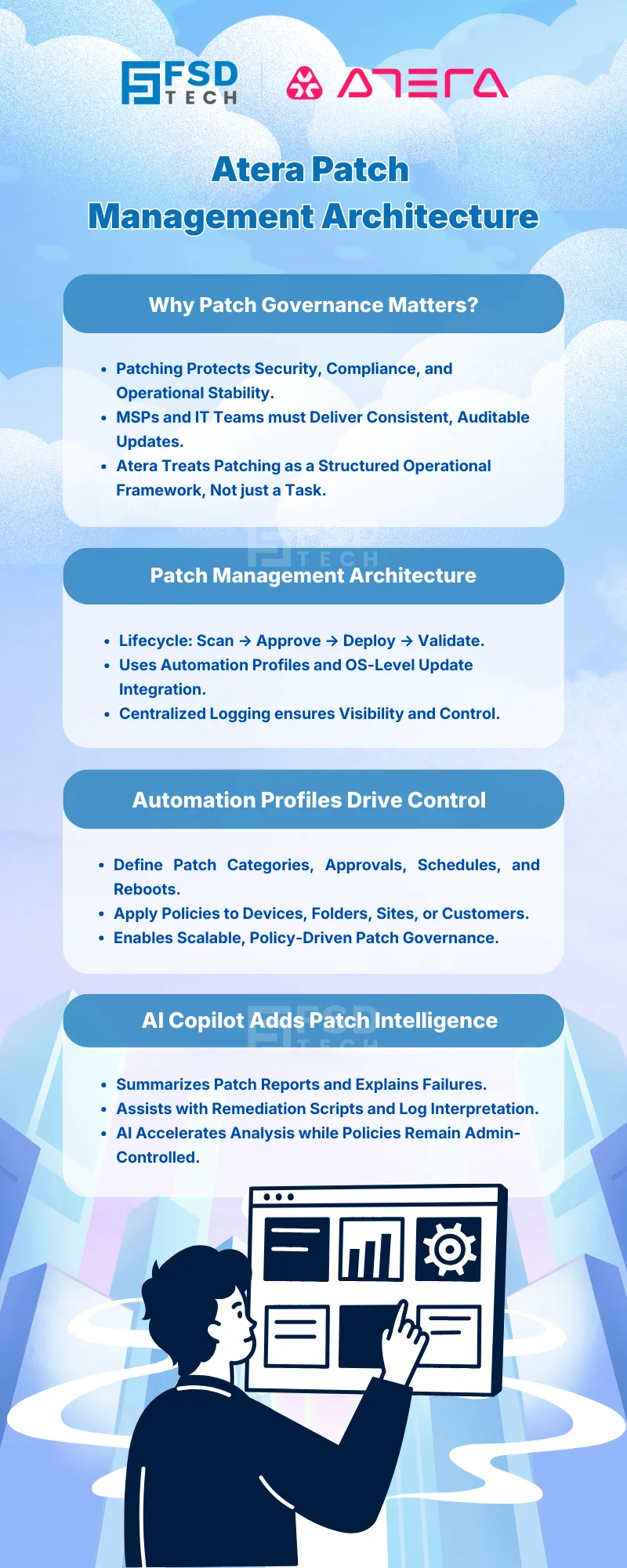
Atera Patch Management operates through automation profiles that control approval rules, scheduling, maintenance windows, and reboot behavior. For Windows devices, it integrates with the Windows Update Agent API to scan and deploy updates. Execution results are captured in Patch Status Summary and Patch & Automation Feedback reports.
No. Atera AI Copilot does not independently approve or deploy patches. Patch deployment is governed by administrator-configured automation profiles. Copilot assists by summarizing patch reports, explaining feedback results, and helping generate remediation scripts.
The three operational phases are:
This lifecycle ensures governance and auditability.
The Patch & Automation Feedback report records patch installation results, success rates, failures, and script outputs. This documentation helps MSPs and IT teams demonstrate compliance during audits and client reviews.
Yes. Automation profiles can be assigned at the device, folder, site, or customer level. This allows granular patch governance across different environments within Atera RMM.
Yes. Atera supports patch workflows for macOS and Linux, though automation capabilities differ from Windows due to OS-level update mechanisms. The platform maintains centralized visibility across supported operating systems.
Atera’s pay-per-technician pricing allows MSPs and IT teams to manage unlimited endpoints without device-based licensing increases. This supports patch scalability as device count grows.

Anas is an Expert in Network and Security Infrastructure, With over seven years of industry experience, holding certifications Including CCIE- Enterprise, PCNSE, Cato SASE Expert, and Atera Certified Master. Anas provides his valuable insights and expertise to readers.
Share it with friends!




.webp&w=3840&q=75)

.webp&w=3840&q=75)
🕓 March 25, 2026

🕓 March 22, 2026

🕓 March 20, 2026


share your thoughts