HomeNext Gen IT-InfraMonitoring & ManagementCyber SecurityBCP / DRAutomationDecoded
Next Gen IT-Infra
Cato’s SASE Supports Cybersecurity Skills Development

How Cato’s SASE Supports Cybersecurity Skills Development

🕓 April 8, 2025

How SASE Supports the Security Needs of SMBs

How SASE Supports the Security Needs of SMBs

🕓 February 9, 2025

Attack Surface Reduction with Cato’s SASE

Attack Surface Reduction with Cato’s SASE

🕓 February 10, 2025

SASE for Digital Transformation in UAE

SASE for Digital Transformation in UAE

🕓 February 8, 2025

Monitoring & Management
Understanding Atera’s SLA Management

Understanding Atera’s SLA Management

🕓 February 7, 2025

Cost-Performance Ratio: Finding the Right Balance in IT Management Networks

Cost-Performance Ratio: Finding the Right Balance in IT Management Networks

🕓 June 16, 2025

Customizing Atera with APIs

Customizing Atera with APIs

🕓 March 3, 2025

Power Up Your IT Team’s Strategy with Atera’s Communication Tools

Power Up Your IT Team’s Strategy with Atera’s Communication Tools

🕓 February 8, 2025

Cyber Security
Illustration of the Cato Cloud architecture showing its role in delivering SASE for secure, optimized global connectivity.

Understanding the Cato Cloud and Its Role in SASE

🕓 January 29, 2025

Isometric illustration of professionals managing network performance, bandwidth analytics, and cloud-based optimization around the Cato Networks platform, symbolizing bandwidth control and QoS visibility.

Mastering Bandwidth Control and QoS in Cato Networks

🕓 July 26, 2025

Global network backbone powering Cato SASE solution for secure, high-performance connectivity across regions.

Global Backbone: The Engine Powering Cato’s SASE Solution

🕓 January 30, 2025

Illustration of team analyzing application traffic and usage insights on a large laptop screen using Cato’s dashboard, surrounded by network and cloud icons.

Cato Networks Application Visibility | Monitoring & Control

🕓 July 27, 2025

BCP / DR
Illustration showing diverse business and IT professionals collaborating with cloud, backup, and security icons, representing Vembu use cases for SMBs, MSPs, and IT teams.

Who Uses Vembu? Real-World Use Cases for SMBs, MSPs & IT Teams

🕓 July 12, 2025

Graphic showcasing Vembu’s all-in-one backup and disaster recovery platform with icons for cloud, data protection, and business continuity for IT teams and SMBs.

What Is Vembu? A Deep Dive Into the All in One Backup & Disaster Recovery Platform

🕓 July 6, 2025

Illustration showing Vembu backup and disaster recovery system with cloud storage, server racks, analytics dashboard, and IT professionals managing data.

The Rising Cost of Data Loss: Why Backup Is No Longer Optional?

🕓 August 14, 2025

3D isometric illustration of cloud backup and data recovery infrastructure with laptop, data center stack, and digital business icons — FSD Tech

RPO & RTO: The Heart of Business Continuity

🕓 August 15, 2025

Automation
Cross-Functional Collaboration with ClickUp

Fostering Cross-Functional Collaboration with ClickUp for Multi-Departmental Projects

🕓 February 11, 2025

ClickUp Project Reporting

Revolutionizing Enterprise Reporting with ClickUp’s Advanced Analytics and Dashboards

🕓 June 16, 2025

ClickUp’s Design Collaboration and Asset Management Tools

Empowering Creative Teams with ClickUp’s Design Collaboration and Asset Management Tools

🕓 February 26, 2025

ClickUp Communication and Collaboration Tools

ClickUp Communication and Collaboration Tools: Empowering Remote Teams

🕓 March 12, 2025

Decoded
Multi-Factor Authentication (MFA)

Multi-Factor Authentication (MFA): All You Need to Know

🕓 December 7, 2025

L3 Switch

What Is an L3 Switch? L2 vs L3 & Why You Need Layer 3?

🕓 December 8, 2025

IPSec

IPSec Explained: Protocols, Modes, IKE & VPN Security

🕓 December 3, 2025

 Datagram Transport Layer Security (DTLS)

What is Datagram Transport Layer Security (DTLS)? How it works?

🕓 December 4, 2025

    Subscribe to our newsletter!

    About Us

    Follow Us

    Copyright © 2024 | Powered by 

    Atera

    (57)

    Cato Networks

    (131)

    ClickUp

    (78)

    FishOS

    (7)

    Miradore

    (21)

    PointGuard AI

    (9)

    Vembu

    (22)

    Xcitium

    (33)

    ZETA HRMS

    (79)

    Table of Contents

    Conversations That Continue: How Atera AI Copilot Multi-Chat Improves IT Troubleshooting Context

    Anas Abdu Rauf
    March 20, 2026
    Comments
    hIsometric diagram illustrating Atera AI Copilot supporting persistent AI conversations and multi-chat workflows, helping IT teams analyze infrastructure data, maintain troubleshooting context, and manage multiple technical investigations simultaneously.

    One of the biggest challenges in IT troubleshooting is not solving the issue.
    It is remembering the context.

    Technicians jump between tasks constantly:

    • investigating device alerts
    • reviewing automation results
    • answering service desk tickets
    • analyzing system reports

    Each task generates information. But when that information is scattered across different tools or sessions, valuable context disappears.


    Atera addressed this operational challenge by evolving AI Copilot into a persistent conversational assistant, where discussions do not disappear after a single prompt.

    Instead, conversations continue.

    This small design decision has a significant impact on how technicians interact with operational data.


    The Problem With Traditional “One-Question AI”

    Many AI assistants behave like a search box.

    You ask a question.
    You get an answer.
    Then the interaction resets.

    For IT operations, that approach creates friction.

    Troubleshooting rarely happens in a single step. It typically unfolds across multiple questions:

    • What caused this alert?
    • Which devices are affected?
    • What script could fix this?
    • Did automation already attempt remediation?

    If every interaction resets context, technicians must repeatedly restate the problem.

    Persistent conversations eliminate that repetition.


    How Atera AI Copilot Conversations Work

    Atera AI Copilot supports ongoing conversation threads that maintain context across interactions.

    This allows technicians to:

    • continue previous conversations
    • reopen earlier Copilot discussions
    • reference earlier responses while asking follow-up questions

    The conversation remains connected to the technician’s operational workflow rather than acting as a temporary prompt.

    In practice, this makes Copilot behave more like a collaborative assistant than a search engine.


    Multi-Chat: Managing Several Troubleshooting Threads Simultaneously

    IT work rarely happens in a single linear sequence.

    Technicians may be working on:

    • an endpoint performance issue
    • a patch deployment problem
    • a service desk escalation
    • a script debugging session

    Atera AI Copilot allows technicians to maintain multiple conversation threads simultaneously.

    Each thread can focus on a different operational topic.

    For example:

    Conversation 1 — investigating patch failures
    Conversation 2 — reviewing a PowerShell script
    Conversation 3 — summarizing a long ticket thread

    This allows technicians to switch between topics without losing context.


    Persistent Conversations Reduce Operational Friction

    Maintaining conversation history may seem simple, but it changes how technicians work with AI.

    Instead of repeatedly re-explaining a problem, technicians can:

    • build a troubleshooting dialogue
    • refine questions progressively
    • revisit earlier explanations
    • continue investigations later

    This mirrors how technicians actually think during complex troubleshooting processes.


    Real-World Workflow Example

    Imagine a technician investigating repeated patch failures on several devices.

    A typical Copilot conversation might progress like this:

    Step 1
    The technician asks Copilot to summarize the patch deployment feedback report.

    Step 2
    After reviewing the summary, the technician asks for help identifying potential root causes.

    Step 3
    Copilot suggests possible remediation approaches.

    Step 4
    The technician asks Copilot to generate a script for verifying update services.

    Step 5
    Later in the day, the technician reopens the same conversation to continue investigation.

    Without persistent conversations, each step would require starting over.

    With multi-chat history, the investigation remains connected.


    How Persistent Conversations Support Automation Workflows

    Automation often involves multiple stages:

    • identifying an issue
    • selecting remediation scripts
    • verifying automation results
    • reviewing execution logs

    Persistent conversations allow technicians to maintain dialogue across these steps.

    For example, Copilot may assist with:

    • interpreting automation feedback results
    • explaining script output
    • suggesting additional troubleshooting steps

    The AI does not execute automation itself, but it accelerates the technician’s ability to interpret system data.


    AI Copilot and Script Assistance

    Atera AI Copilot can assist technicians in generating scripts using natural language prompts.

    Technicians may ask Copilot to:

    • create PowerShell scripts
    • review existing scripts
    • explain script behavior
    • suggest improvements

    When this occurs inside persistent conversations, the technician can continue refining the script in follow-up prompts.

    This iterative approach improves script accuracy while reducing development time.


    Benefits for MSP Operations

    For Managed Service Providers, persistent AI conversations help maintain context across multiple customer environments.

    Technicians can maintain separate Copilot discussions related to:

    • different client infrastructures
    • different troubleshooting scenarios
    • automation development tasks

    This improves efficiency without mixing operational context across customers.


    Benefits for Internal IT Teams

    Internal IT departments benefit from persistent conversations when managing complex environments.

    Technicians often return to unresolved issues later in the day or week.

    Conversation history allows them to:

    • revisit prior investigations
    • resume troubleshooting quickly
    • avoid repeating analysis steps

    This reduces cognitive load during busy operational periods.


    Why Conversation Continuity Matters for AI in IT

    Many AI tools focus on generating answers.

    Atera AI Copilot focuses on supporting ongoing operational dialogue.

    Persistent conversations and multi-chat capability allow AI assistance to align more closely with how technicians actually work.

    The goal is not replacing decision-making.

    The goal is maintaining context.

    And in IT operations, context is everything.


    Want to see how Atera AI Copilot can streamline your IT troubleshooting workflows? →Book a 30-minute Atera AI operations consultation with our experts.


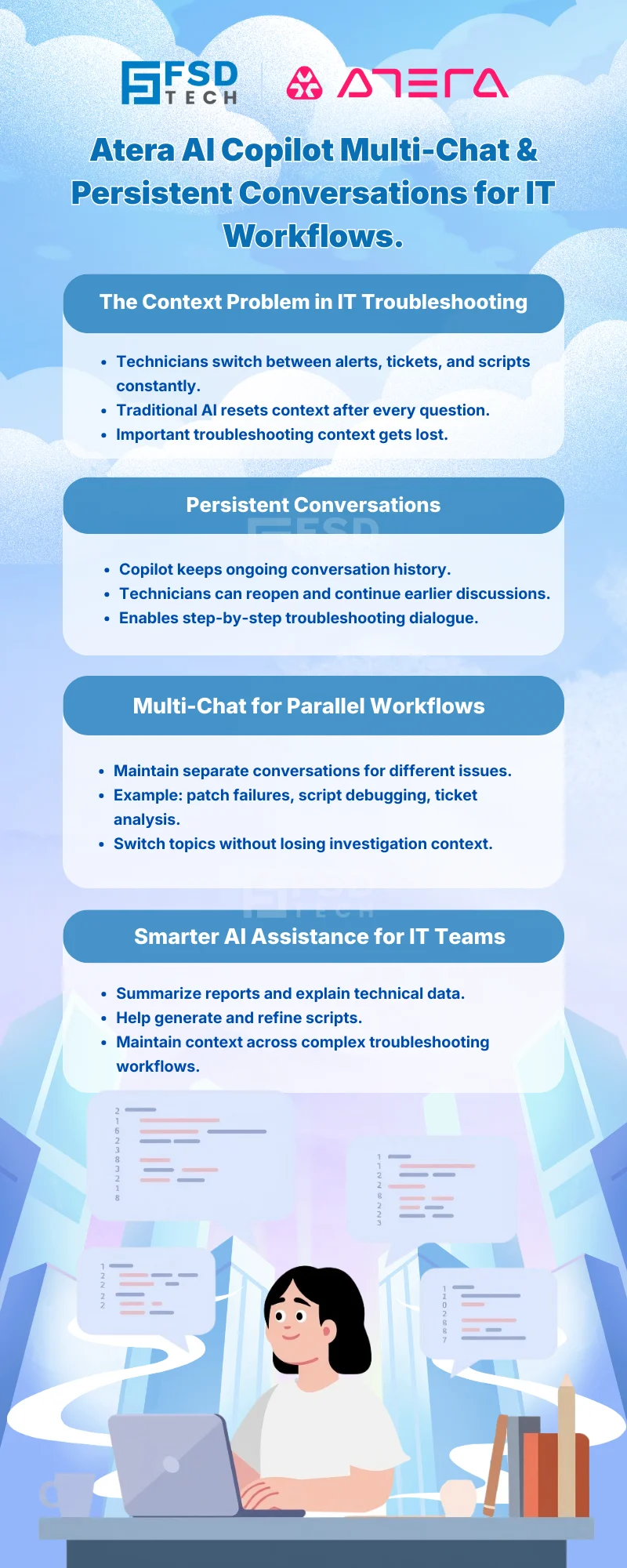
    Infographic explaining Atera AI Copilot multi-chat and persistent conversations for IT workflows, showing how technicians maintain ongoing troubleshooting context across alerts, tickets, scripts, and parallel investigations.


    Frequently Asked Questions

    What is Atera AI Copilot multi-chat functionality?

    Atera AI Copilot multi-chat functionality allows technicians to maintain multiple conversation threads simultaneously. Each conversation can focus on different troubleshooting tasks, automation questions, or ticket investigations.


    What are persistent conversations in Atera AI Copilot?

    Persistent conversations allow technicians to reopen previous Copilot discussions and continue the same troubleshooting dialogue without losing context. This improves continuity across operational workflows.


    How does Atera AI Copilot help with troubleshooting workflows?

    Atera AI Copilot assists technicians by summarizing reports, interpreting technical information, generating scripts, and helping explain system behavior during troubleshooting.


    Can Atera AI Copilot generate scripts during conversations?

    Yes. Atera AI Copilot can generate PowerShell or other scripting examples based on technician prompts. Persistent conversations allow technicians to refine those scripts through iterative dialogue.


    Is Atera AI Copilot automation fully autonomous?

    No. Atera AI Copilot assists technicians with analysis and script suggestions but does not independently execute system changes or automation tasks without technician action.


    How does multi-chat improve MSP operational efficiency?

    Multi-chat allows MSP technicians to maintain separate Copilot conversations related to different customers or incidents, preventing context overlap and improving troubleshooting organization.


    Can internal IT teams use Atera AI Copilot conversations for ongoing investigations?

    Yes. Internal IT teams often revisit unresolved issues. Persistent conversations allow technicians to reopen earlier investigations and continue analysis without restarting the discussion.


    Does Atera AI Copilot store conversation context for future reference?

    Yes. Conversation threads remain available for technicians to revisit and continue, enabling ongoing troubleshooting workflows rather than isolated AI interactions.

    Conversations That Continue: How Atera AI Copilot Multi-Chat Improves IT Troubleshooting Context

    About The Author

    Anas Abdu Rauf

    Anas is an Expert in Network and Security Infrastructure, With over seven years of industry experience, holding certifications Including CCIE- Enterprise, PCNSE, Cato SASE Expert, and Atera Certified Master. Anas provides his valuable insights and expertise to readers.

    TRY OUR PRODUCTS

    Like This Story?

    Share it with friends!

    Subscribe to our newsletter!

    FishOSCato SASEVembuXcitiumZeta HRMSAtera
    Isometric illustration of a centralized performance platform connected to analytics dashboards and team members, representing goal alignment, measurable outcomes, risk visibility, and strategic project tracking within ClickUp.

    How ClickUp Enables Outcome-Based Project Management (Not Just Task Tracking)

    🕓 February 15, 2026

    Isometric illustration of a centralized executive dashboard platform connected to analytics panels, performance charts, security indicators, and strategic milestones, representing real-time business visibility and decision control within ClickUp.

    Executive Visibility in ClickUp – How CXOs Gain Real-Time Control Without Micromanaging

    🕓 February 13, 2026

    Cato SASE Architecture

    Inside Cato’s SASE Architecture: A Blueprint for Modern Security

    🕓 January 26, 2025

    Workflow Automation(8)

    Workforce Automation(1)

    AI Project Management(1)

    HR Data Automation(1)

    RMM(2)

    IT Workflow Automation(1)

    GCC compliance(4)

    IT security(2)

    Payroll Integration(2)

    IT support automation(3)

    procurement automation(1)

    lost device management(1)

    IT Management(5)

    IoT Security(2)

    Cato XOps(1)

    IT compliance(4)

    Task Automation(1)

    Workflow Management(1)

    Kubernetes lifecycle management(2)

    AI-powered cloud ops(1)

    OpenStack automation(1)

    SMB Security(8)

    Data Security(1)

    MDR (Managed Detection & Response)(3)

    MSP Automation(3)

    Atera Integrations(2)

    Threat Detection & Response(1)

    XDR Security(2)

    SMB Cyber Protection(1)

    Ransomware Defense(3)

    HR Tech Solutions(1)

    Zero Trust Network Access(3)

    Quantum Security(1)

    Quantum Threat UAE & GCC(1)

    Post-Quantum Cryptography(1)

    Cloud IDE Security(1)

    Zero Trust Security(2)

    Endpoint Management(1)

    SaaS Security(2)

    Payroll Automation(5)

    IT Monitoring(2)

    Xcitium EDR SOC(15)

    Ransomware Protection GCC(1)

    Network Consolidation UAE(1)

    M&A IT Integration(1)

    MSSP for SMBs(1)

    Antivirus vs EDR(1)

    SMB Cybersecurity GCC(1)

    Ransomware Protection(3)

    Managed EDR FSD-Tech(1)

    FSD-Tech MSSP(25)

    Endpoint Security(1)

    Cybersecurity GCC(14)

    Data Breach Costs(1)

    Endpoint Protection(1)

    SMB Cybersecurity(8)

    Zero Dwell Containment(31)

    Xcitium EDR(30)

    Managed Security Services(2)

    Hybrid Backup(1)

    Cloud Backup(1)

    Backup & Recovery(1)

    pointguard ai(4)

    vembu(9)

    backup myths(1)

    SMB data protection(9)

    disaster recovery myths(1)

    Disaster Recovery(4)

    Vembu BDR Suite(19)

    GCCBusiness(1)

    DataProtection(1)

    Secure Access Service Edge(4)

    GCC IT Solutions(1)

    Unified Network Management(1)

    GCC HR software(20)

    open banking(1)

    financial cybersecurity(2)

    CC compliance(1)

    Miradore EMM(15)

    Government Security(1)

    Cato SASE(9)

    GCC Education(1)

    Hybrid Learning(1)

    Cloud Security(9)

    Talent Development(1)

    AI Governance(4)

    AI Compliance(2)

    AI Cybersecurity(13)

    AI Risk Management(1)

    AI Security(2)

    Secure Remote Access(1)

    GCC business security(1)

    GCC network integration(1)

    compliance automation(5)

    GCC cybersecurity(3)

    education security(1)

    App management UAE(1)

    BYOD security Dubai(8)

    Miradore EMM Premium+(5)

    MiddleEast(1)

    share your thoughts

    hIsometric diagram illustrating Atera AI Copilot supporting persistent AI conversations and multi-chat workflows, helping IT teams analyze infrastructure data, maintain troubleshooting context, and manage multiple technical investigations simultaneously.

    Conversations That Continue: How Atera AI Copilot Multi-Chat Improves IT Troubleshooting Context

    🕓 March 20, 2026

    Isometric diagram illustrating Atera patch management architecture where AI Copilot analyzes patch data, automation profiles manage approvals and scheduling, and centralized dashboards control patch deployment across multiple endpoint environments.

    Beyond Scheduled Updates: How Atera Patch Management Combines Governance and Intelligence

    🕓 March 15, 2026

    Isometric illustration showing a centralized IT monitoring and automation platform connecting cloud services, servers, laptops, and dashboards, representing thresholds, alerts, secure data flow, and automated remediation across distributed systems.

    Thresholds, Alerts & Auto-Healing in Atera (and where AI Copilot helps)

    🕓 February 11, 2026

    Decoded(164)

    Cyber Security(128)

    BCP / DR(22)

    Zeta HRMS(78)

    SASE(21)

    Automation(78)

    Next Gen IT-Infra(128)

    Monitoring & Management(78)

    ITSM(22)

    HRMS(21)

    Automation(24)