In 2024, two mid-sized companies in Nairobi were hit by the same ransomware attack within the same week.
Company A had all its backups stored online, connected to their main systems. When ransomware struck, it didn’t just lock the live files — it also infected and encrypted every connected backup. Their IT team had no clean copies to restore from. They were forced to shut down operations for weeks and eventually paid a huge ransom just to get their data back.
Company B had a different setup. They kept one copy of their backups completely offline — disconnected from the internet and their main network. This is called an air-gapped backup. The ransomware couldn’t reach it. Within hours, Company B restored all systems from their offline backup and was running again by the next day.
The only difference? Company B’s offline, air-gapped backup gave them a safety net that hackers couldn’t touch.
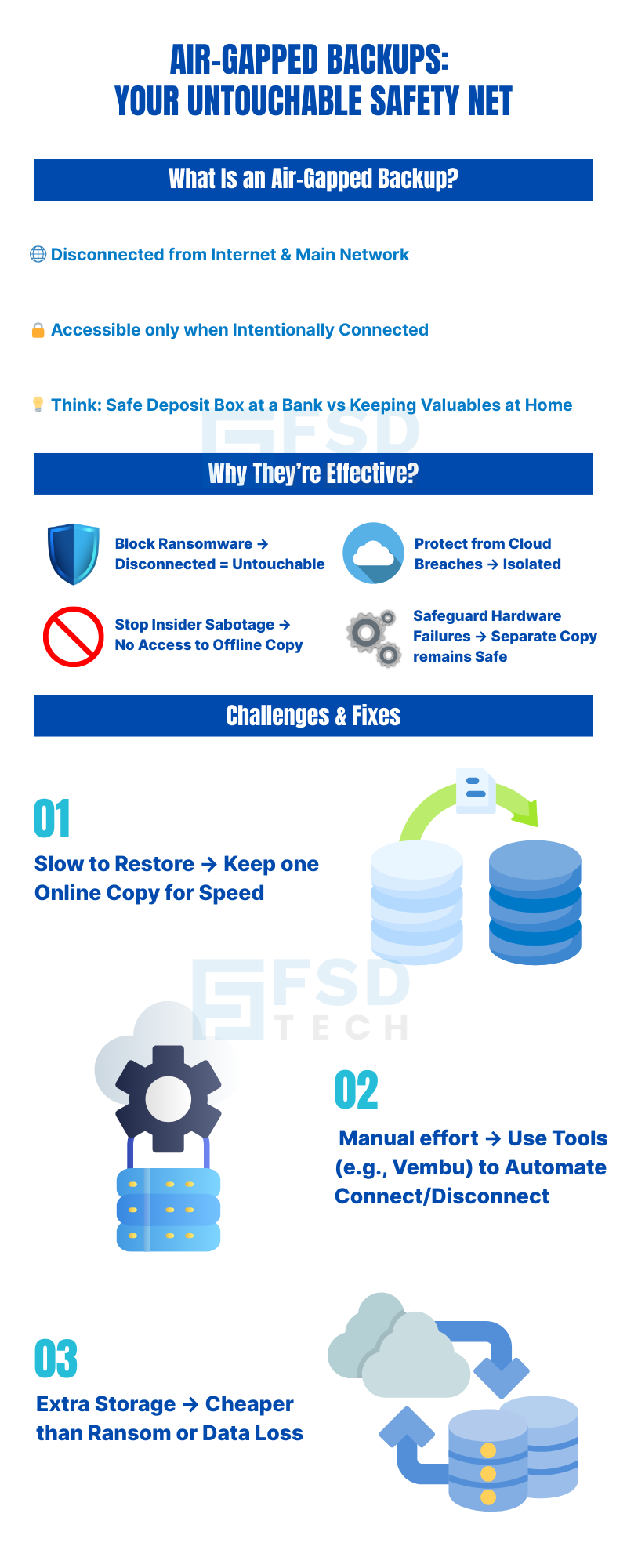
What Exactly Is an Air-Gapped Backup?
An air-gapped backup is a copy of your important data that is stored in such a way that it’s physically or logically separated from your main systems.
This means:
It’s not connected to the internet most of the time.
It’s not accessible through your company’s regular network unless you intentionally connect it.
The name “air gap” comes from the idea that there is literally a “gap of air” between your backup and anything that could harm it — hackers, ransomware, or even accidental deletions.
Think of it like keeping your family’s important documents in a safe deposit box at the bank. No matter what happens at home — a fire, break-in, or flood — those documents remain safe in the bank’s vault.
Why Air-Gapped Backups Are So Effective
They Block Ransomware Ransomware can only encrypt files it can reach. If the backup is offline and disconnected, the ransomware can’t touch it.
They Protect Against Insider Threats If a malicious employee tries to delete backups, they can’t access the offline copy.
They Provide Safety from Cloud Breaches If your online storage account is hacked, your offline backup is still completely safe.
They Defend Against Hardware Failures If your main server crashes, the offline copy is still available.
The Two Types of Air-Gaps
1. Physical Air Gap
Backups are stored on physical devices like external hard drives, tapes, or removable media.
After backup is complete, the device is physically disconnected and stored in a safe place.
Example: Backing up your files onto an external drive, unplugging it, and locking it in a cabinet.
2. Logical Air Gap
Backups are stored on systems that are not constantly connected to your main network.
Special credentials or processes are required to access them.
Example: A cloud account that requires separate logins and is not linked to your main network.
Challenges with Air-Gapped Backups (and How to Solve Them)
They Can Be Manual and Time-Consuming Physical air gaps often require someone to plug and unplug drives. Solution: Use backup software like Vembu that can automate connection and disconnection after backups run.
They May Be Slower to Restore Offline backups take a bit longer to access compared to always-online copies. Solution: Keep a fast, online backup for quick recovery and use the air-gapped copy as your last-resort safety net.
Don’t let ransomware dictate your recovery timeline. Secure your data with Vembu’s air-gapped solutions. [Fill out the form to get started]
Air-Gapped Backups + The 3-2-1-1-0 Rule = Maximum Security
Air-gapped backups are even more powerful when combined with the 3-2-1-1-0 strategy:
3 copies of your data.
2 different types of storage.
1 off-site copy.
1 immutable or air-gapped copy.
0 errors after verification.
This ensures you have both speed and security — an online copy for quick fixes, and an offline copy for emergencies.
How Vembu BDR Suite Makes Air-Gapping Easy
Works with both physical (hard drives, tapes) and logical (secure cloud) air-gaps.
Automates backup schedules so you don’t forget.
Automatically disconnects backups from your main network after they’re complete.
Combines air-gapping with immutable backups for double protection.
Runs automatic verification so you know the backup is clean and usable.
Ready to experience effortless, automated air-gapped backups?Click Here
Real-World Success Story
A law firm in Muscat suffered a ransomware attack that locked their main systems and every online backup they had. But they had one cloud account that was set up with a logical air gap — different credentials and no constant connection to the main network. That account contained an untouched backup.
Within 24 hours, they restored all client files, avoided paying the ransom, and didn’t lose a single case file.
The Key Lesson
Air-gapped backups are like your “emergency parachute” — you hope you’ll never need them, but when disaster strikes, they can save your business. In 2025, with cyberattacks becoming smarter and faster, having an offline, untouchable copy of your data is no longer optional — it’s a must-have.
If every backup you have is connected to the internet or your main network, you’re giving hackers a straight path to your data. Let’s add an air-gapped layer with Vembu BDR Suite to keep your business safe. [Book your free consultation today]
FAQ
1. What exactly is an air-gapped backup?
An air-gapped backup is a special kind of backup that is kept completely separate from your main systems and the internet.
This separation means it’s safe from most cyber threats, including ransomware, because it’s simply not connected when you don’t need it.
It’s like having a spare car that you keep locked in a garage, far away from busy roads — it’s untouched by traffic accidents, weather, or theft until you decide to take it out.
2. Why is it called “air-gapped”?
The term “air-gapped” comes from the idea that there is a gap of air between your backup and your network or the internet. This gap is not literal air — it just means there’s no direct link.
This gap acts as a barrier that viruses, hackers, or ransomware cannot cross. If the backup isn’t connected, there’s no “door” for threats to enter.
3. How does an air-gapped backup protect against ransomware?
Ransomware is like a burglar who breaks into your house and locks all your valuables in a safe you can’t open unless you pay.
If your valuables (data) are in another locked building (offline backup) that the burglar can’t access, they remain safe.
Ransomware can only encrypt files it can reach — so if your backup is disconnected, it’s untouchable.
4. What is the difference between physical and logical air-gaps?
Physical Air Gap:
You back up your data onto a device like an external hard drive, tape, or removable disk.
After the backup is done, you unplug it and store it safely — in a locked cabinet, fireproof safe, or another building.
Hackers can’t touch it because it’s not connected at all.
Logical Air Gap:
Your backup is stored in a system (often a cloud service) that’s not connected to your main network all the time.
You need special credentials or extra security steps to access it.
Even if hackers get into your main system, they can’t “jump” to the backup.
5. Is an air-gapped backup the same as an immutable backup?
No, but they are complementary.
Immutable backup: The data cannot be changed or deleted for a set period of time.
Air-gapped backup: The data is unreachable most of the time because it’s disconnected.
Using both gives you double protection — hackers can’t reach it, and even if they did, they couldn’t change it.
6. Why do I need air-gapped backups if I already have online backups?
Online backups are convenient and fast to restore, but if they’re connected to your main system, ransomware can attack them too.
Air-gapped backups act as a last-resort safety net when online backups fail or get infected.
7. Are there any challenges with air-gapped backups?
Yes, there can be:
Slower to access: It takes extra steps to connect and restore.
Extra effort to manage: Physical devices must be plugged in and disconnected, or cloud air-gaps must be set up with the right security rules.
However, these small inconveniences are worth it compared to losing all your data.
8. How often should I update my air-gapped backup?
It depends on your business:
If you can’t afford to lose more than a day’s work — update daily.
If your data changes constantly, update multiple times a day. The more frequent your updates, the more current your “emergency copy” will be.
9. Where should I store a physical air-gapped backup?
Some best practices include:
A fireproof, waterproof safe at your office.
A secure, climate-controlled storage room.
A different physical location altogether — like a branch office or secure storage facility.
10. How does a logical air gap work in the cloud?
A cloud air gap is set up so it’s not “always on” or directly linked to your main systems. You may need:
Separate login credentials.
Two-factor authentication (a password plus a code sent to your phone).
Network restrictions so it can’t be accessed from your main network.
11. How does an air-gapped backup fit into the 3-2-1-1-0 backup strategy?
In the 3-2-1-1-0 rule:
The “1” in “immutable or air-gapped” is exactly what we’re talking about here.
It’s the backup that’s completely safe from attacks because it’s either offline or untouchable.
12. Can small businesses afford air-gapped backups?
Yes. You can start small — even with an external hard drive you disconnect after backups — and grow into more automated solutions as needed.
It’s far cheaper than paying a ransom or losing months of business records.
13. How does Vembu BDR Suite help with air-gapped backups?
Works with physical (hard drives, tapes) and logical (secure cloud) air-gaps.
Automates backup schedules and even automates disconnection after backups are complete.
Combines air-gapping with immutable backup options for maximum safety.
Verifies backups so you know they’ll work when you need them.
14. Should I have both immutable and air-gapped backups?
Yes. This is like having two locks on your most valuable safe — one that can’t be opened for a certain time (immutability) and one that’s in a different building (air gap). Together, they provide the highest level of protection.
15. What’s the first step to setting up an air-gapped backup?
Decide whether you want physical or cloud-based logical air gaps.
Choose how often you’ll update them.
Work with a trusted backup provider like Vembu to automate as much as possible so you never forget to update it.
About The Author
Nasmal
Nasmal is a Solution Architect & Business Analyst focused on AI, Data, Automation, BCP, and Process Optimization. He helps businesses evolve from reactive to proactive, data-driven, and resilient operations. With hands-on expertise, he simplifies complex tech into clear, easy-to-understand blogs.





.webp&w=3840&q=75)



.webp&w=3840&q=75)


share your thoughts