HomeNext Gen IT-InfraMonitoring & ManagementCyber SecurityBCP / DRAutomationDecoded
Next Gen IT-Infra
Cato’s SASE Supports Cybersecurity Skills Development

How Cato’s SASE Supports Cybersecurity Skills Development

🕓 April 8, 2025

How SASE Supports the Security Needs of SMBs

How SASE Supports the Security Needs of SMBs

🕓 February 9, 2025

Attack Surface Reduction with Cato’s SASE

Attack Surface Reduction with Cato’s SASE

🕓 February 10, 2025

SASE for Digital Transformation in UAE

SASE for Digital Transformation in UAE

🕓 February 8, 2025

Monitoring & Management
Understanding Atera’s SLA Management

Understanding Atera’s SLA Management

🕓 February 7, 2025

Cost-Performance Ratio: Finding the Right Balance in IT Management Networks

Cost-Performance Ratio: Finding the Right Balance in IT Management Networks

🕓 June 16, 2025

Customizing Atera with APIs

Customizing Atera with APIs

🕓 March 3, 2025

Power Up Your IT Team’s Strategy with Atera’s Communication Tools

Power Up Your IT Team’s Strategy with Atera’s Communication Tools

🕓 February 8, 2025

Cyber Security
Visual guide showing Cato CMA interface for configuring Internet and WAN firewall rules, enabling threat protection, and monitoring security events in real time for UAE IT teams.

Enforcing Firewall and Threat Protection Policies in Cato

🕓 July 25, 2025

Isometric illustration of professionals managing network performance, bandwidth analytics, and cloud-based optimization around the Cato Networks platform, symbolizing bandwidth control and QoS visibility.

Mastering Bandwidth Control and QoS in Cato Networks

🕓 July 26, 2025

Illustration of the Cato Cloud architecture showing its role in delivering SASE for secure, optimized global connectivity.

Understanding the Cato Cloud and Its Role in SASE

🕓 January 29, 2025

Global network backbone powering Cato SASE solution for secure, high-performance connectivity across regions.

Global Backbone: The Engine Powering Cato’s SASE Solution

🕓 January 30, 2025

BCP / DR
Illustration showing diverse business and IT professionals collaborating with cloud, backup, and security icons, representing Vembu use cases for SMBs, MSPs, and IT teams.

Who Uses Vembu? Real-World Use Cases for SMBs, MSPs & IT Teams

🕓 July 12, 2025

Graphic showcasing Vembu’s all-in-one backup and disaster recovery platform with icons for cloud, data protection, and business continuity for IT teams and SMBs.

What Is Vembu? A Deep Dive Into the All in One Backup & Disaster Recovery Platform

🕓 July 6, 2025

Illustration showing Vembu backup and disaster recovery system with cloud storage, server racks, analytics dashboard, and IT professionals managing data.

The Rising Cost of Data Loss: Why Backup Is No Longer Optional?

🕓 August 14, 2025

3D isometric illustration of cloud backup and data recovery infrastructure with laptop, data center stack, and digital business icons — FSD Tech

RPO & RTO: The Heart of Business Continuity

🕓 August 15, 2025

Automation
Cross-Functional Collaboration with ClickUp

Fostering Cross-Functional Collaboration with ClickUp for Multi-Departmental Projects

🕓 February 11, 2025

ClickUp Project Reporting

Revolutionizing Enterprise Reporting with ClickUp’s Advanced Analytics and Dashboards

🕓 June 16, 2025

ClickUp’s Design Collaboration and Asset Management Tools

Empowering Creative Teams with ClickUp’s Design Collaboration and Asset Management Tools

🕓 February 26, 2025

ClickUp Communication and Collaboration Tools

ClickUp Communication and Collaboration Tools: Empowering Remote Teams

🕓 March 12, 2025

Decoded
Multi-Factor Authentication (MFA)

Multi-Factor Authentication (MFA): All You Need to Know

🕓 December 7, 2025

L3 Switch

What Is an L3 Switch? L2 vs L3 & Why You Need Layer 3?

🕓 December 8, 2025

IPSec

IPSec Explained: Protocols, Modes, IKE & VPN Security

🕓 December 3, 2025

 Datagram Transport Layer Security (DTLS)

What is Datagram Transport Layer Security (DTLS)? How it works?

🕓 December 4, 2025

    Subscribe to our newsletter!

    About Us

    Follow Us

    Copyright © 2024 | Powered by 

    Cato SASE Architecture

    Inside Cato’s SASE Architecture: A Blueprint for Modern Security

    🕓 January 26, 2025

    Enterprise Data Security and Privacy with ClickUp

    Ensuring Enterprise Data Security and Privacy with ClickUp

    🕓 February 9, 2025

    DDoS protection SASE

    DDoS Protection and Cato’s Defence Mechanisms

    🕓 February 11, 2025

    Table of Contents

    Role-Based Access Control in Miradore – Secure Delegation Made Easy

    Anas Abdu Rauf
    August 30, 2025
    Comments
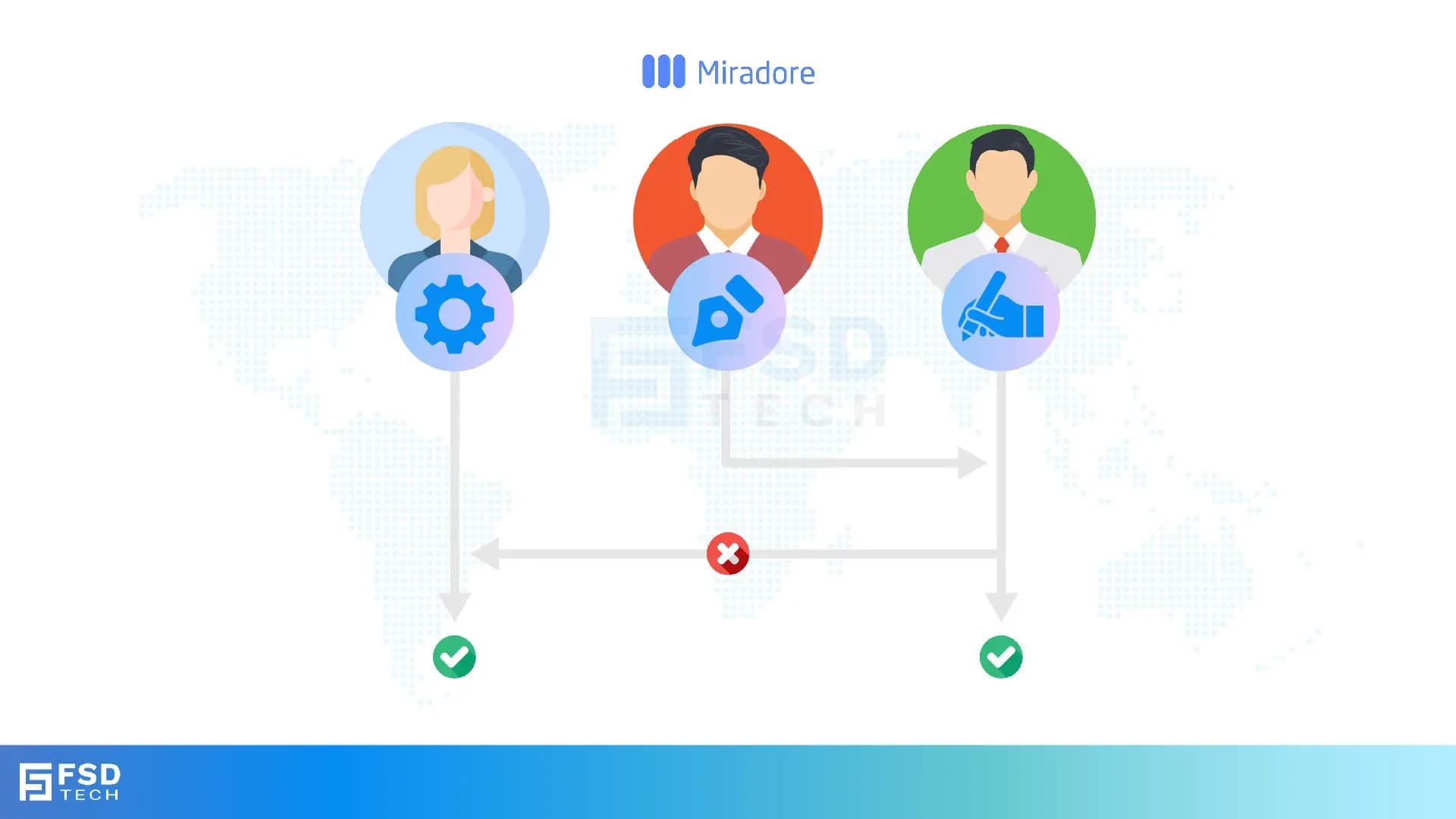
    FSD Tech illustration of Miradore role-based access control (RBAC). Depicts three user roles—administrator, designer, and manager—with secure delegation paths. Highlights how Miradore enforces proper permissions, prevents unauthorized access, and simplifies IT policy management across global teams.

    Introduction

    When organizations scale device fleets across multiple departments, locations, and administrators, centralized access becomes a liability. A single super-admin model introduces unnecessary risk: what if someone misconfigures a profile, or a junior admin gains access to devices or data beyond their responsibility?

    Role-Based Access Control (RBAC) solves this by delegating administrative tasks based on job role, department, or location. Miradore provides a secure and structured way to assign management privileges — giving your IT staff just the access they need, and nothing more.

    In this blog, we’ll break down how Miradore enables granular permission control, minimizes insider risk, and supports multi-tenant teams in regulated or high-growth environments.


    Key Takeaways

    • Assign roles to control who can view or manage devices, apps, or policies
    • Limit access by platform, organization, region, or custom tags
    • Reduce risk of unauthorized actions or accidental misconfiguration
    • Enable departmental admins without exposing global settings
    • Maintain full audit logs of all user actions for compliance


    Why Role-Based Access Matters in Device Management

    Device management platforms often require multiple IT personnel working across offices, countries, or business units. Without role controls, every admin sees and can manage every device — even if it’s irrelevant to their scope.

    The risk?

    • An intern wipes a CEO’s device
    • A contractor sees HR’s device activity
    • Someone unknowingly changes a global policy

    RBAC eliminates these risks by defining who can do what — and where.


    Don’t let admin mistakes compromise your fleet security. Fill out the form to explore Miradore’s RBAC features today.

    How RBAC Works in Miradore

    Miradore allows you to create and assign roles based on:

    • Permission Scope – View-only, full admin, or restricted actions
    • Platform Type – Limit access to Android, iOS, Windows, or macOS
    • Organizational Group – Assign access by department, region, or business unit
    • Device Tags / Custom Fields – Target users based on tag-based logic

    Admins can assign these roles from the Miradore console, with changes taking effect immediately.

    Example: A school IT lead can manage tablets used by students, but cannot access teacher laptops or corporate-owned iPhones.


    Built-In Roles vs Custom Roles

    Miradore provides predefined roles for common use cases:
     

    Built-In RolePermissions Summary
    Site AdminFull access to all devices and policies
    Device AdminManage devices but not system-wide settings
    Application ManagerApp deployment and app restrictions only
    Compliance OfficerView-only access to compliance dashboards and reports


    Need something more tailored?

    Create custom roles that mix and match:

    • Access rights (read/edit/delete)
    • Functional areas (apps, policies, locations)
    • Device groups or tags


    Role Assignment by Organizational Unit

    Miradore lets you segment devices into logical units using:

    • Tags (e.g., “Dubai-HR”, “KSA-Sales”)
    • Enrollment groups
    • Ownership types (BYOD vs Corporate)

    Roles can then be tied to these units so that a regional admin sees only what’s relevant to their scope.

    Scenario: A compliance lead in Saudi Arabia has access only to SAMA-related reporting dashboards and cannot view or alter UAE endpoints.


    Auditing Admin Activity

    To meet internal and external compliance requirements, Miradore logs every admin action — from device wipes to policy changes.

    You can:

    • Export logs for audit trails
    • Filter actions by admin, role, or affected device
    • Set alerts for high-risk operations (e.g., remote wipe or role changes)

    These logs are essential for incident response and regulatory documentation (e.g., ISO 27001, GDPR, or GCC-specific policies).


    Use Case: Global MSP Delegating Access by Region

    A managed service provider (MSP) supports clients across five GCC countries. They structured Miradore as follows:

    • Created device groups per client (e.g., Client-A-UAE, Client-B-KSA)
    • Assigned regional technicians to those device groups only
    • Gave billing admins access to licensing and usage reports
    • Provided client HR with view-only dashboards

    This RBAC model reduced data exposure risks and ensured every stakeholder only saw the information relevant to their function.


    Next Steps

    Centralizing management is useful—but centralizing risk is dangerous. With Miradore’s RBAC features, you get the best of both worlds: a unified console with finely tuned access per user, region, or responsibility.

    Empower your IT team without losing control.


    Want to see RBAC in action for your organization? Book a Free session with our Miradore experts. Schedule your consultation today.
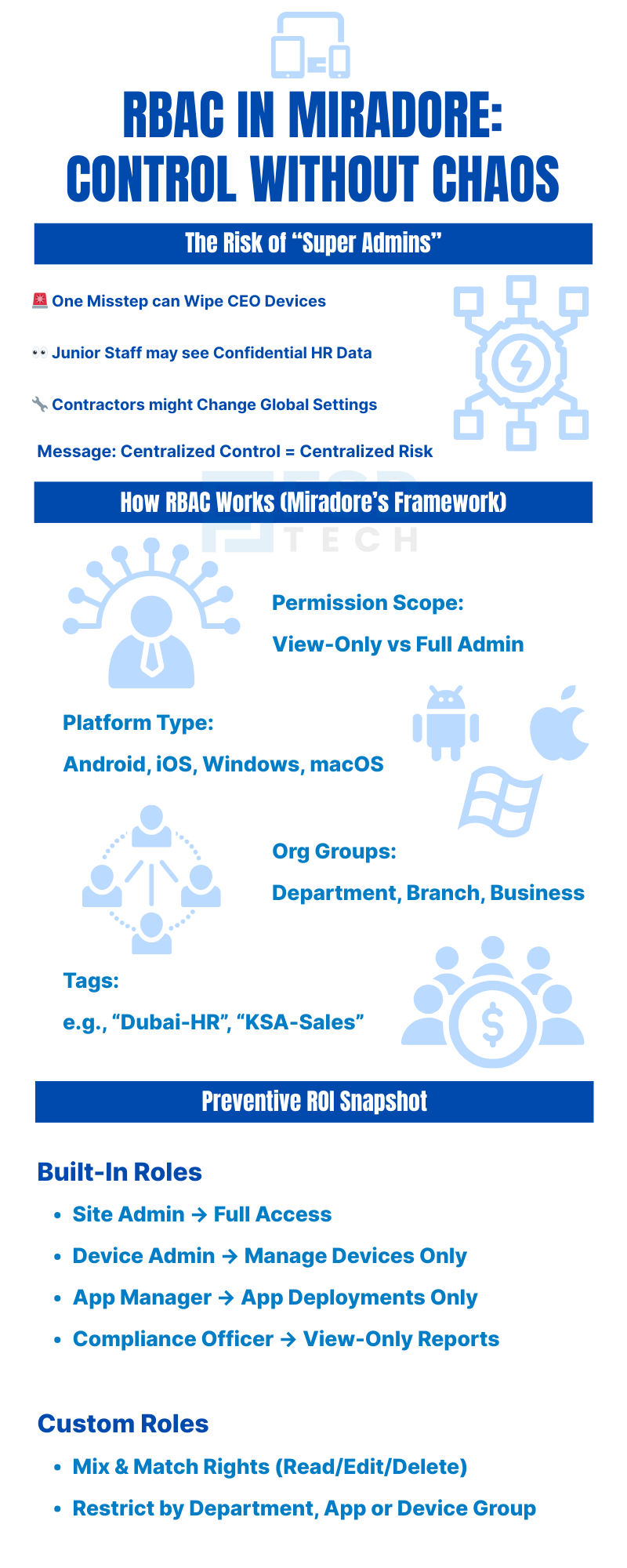
     

    FSD Tech infographic on role-based access control (RBAC) in Miradore. Explains risks of super admins such as accidental device wipes, HR data exposure, or contractor misconfigurations. Outlines Miradore’s RBAC framework with permission scopes, platform support for Android, iOS, Windows, and macOS, and org groups by department or branch. Highlights preventive ROI with built-in roles like site admin, device admin, app manager, and compliance officer, plus custom roles for granular security.

    FAQs

    Can I assign different roles for Android and Windows separately?

    Yes. Miradore lets you define access by platform, so an admin can be restricted to managing only Android devices while another oversees Windows endpoints. This is useful when responsibilities are divided between mobile and desktop teams.
     

    Is Miradore’s RBAC compatible with MSP multi-client environments?

    Yes. Miradore’s multi-tenant architecture allows managed service providers to set up isolated environments for each client. Within each site, roles can be created and assigned separately—ensuring complete segregation of access.
     

    Can I audit who performed an action on a device?

    Absolutely. Miradore maintains a detailed activity log that records every admin action—including who made the change, what was changed, when it occurred, and the affected device(s). This is vital for compliance audits and post-incident investigations.
     

    What’s the difference between built-in and custom roles?

    Built-in roles provide predefined permission sets for common administrative needs. Custom roles offer flexibility to define specific capabilities, allowing organizations to match access precisely to job responsibilities. You can even restrict certain UI elements or hide modules.
     

    Can one admin have multiple roles?

    Yes. Miradore supports role stacking, which allows a user to inherit privileges from multiple assigned roles. This is useful when someone needs overlapping access—for example, a compliance officer who also manages applications in a certain department.
     

    Is RBAC useful for compliance in regulated industries?

    Yes. RBAC supports least-privilege principles required by standards like ISO 27001, NESA, and SAMA. By controlling access to sensitive data and maintaining audit trails, it helps satisfy both internal and external regulatory requirements.
     

    How quickly do role changes take effect?

    Changes in roles and permissions are applied immediately. As soon as an update is saved, the affected user’s session reflects the new permissions. This helps in swiftly onboarding new staff or revoking access for offboarding scenarios.
     

    Can RBAC limit access to just compliance reports?

    Yes. You can create read-only roles with access restricted only to specific areas of the dashboard, such as compliance reports. This allows auditors or non-technical personnel to review data without exposing broader device management functions.

    Role-Based Access Control in Miradore – Secure Delegation Made Easy

    About The Author

    Anas Abdu Rauf

    Anas is an Expert in Network and Security Infrastructure, With over seven years of industry experience, holding certifications Including CCIE- Enterprise, PCNSE, Cato SASE Expert, and Atera Certified Master. Anas provides his valuable insights and expertise to readers.

    Like This Story?

    Share it with friends!

    Subscribe to our newsletter!

    Atera

    (48)

    Cato Networks

    (113)

    ClickUp

    (68)

    FishOS

    (7)

    Miradore

    (21)

    PointGuard AI

    (9)

    Vembu

    (22)

    Xcitium

    (33)

    ZETA HRMS

    (71)

    Workflow Automation(5)

    Workforce Automation(1)

    AI Project Management(1)

    HR Data Automation(1)

    RMM(1)

    IT Workflow Automation(1)

    GCC compliance(4)

    IT security(2)

    Payroll Integration(2)

    IT support automation(3)

    procurement automation(1)

    lost device management(1)

    IT Management(5)

    IoT Security(2)

    Cato XOps(2)

    IT compliance(4)

    Task Automation(1)

    Workflow Management(1)

    Kubernetes lifecycle management(2)

    OpenStack automation(1)

    AI-powered cloud ops(1)

    SMB Security(8)

    Data Security(1)

    MDR (Managed Detection & Response)(4)

    Atera Integrations(2)

    MSP Automation(3)

    XDR Security(2)

    SMB Cyber Protection(1)

    Ransomware Defense(3)

    HR Tech Solutions(1)

    Zero Trust Network Access(3)

    Zero Trust Security(2)

    Endpoint Management(1)

    SaaS Security(1)

    Payroll Automation(5)

    IT Monitoring(2)

    Xcitium EDR SOC(15)

    Ransomware Protection GCC(1)

    M&A IT Integration(1)

    Network Consolidation UAE(1)

    MSSP for SMBs(1)

    FSD-Tech MSSP(25)

    Ransomware Protection(3)

    Antivirus vs EDR(1)

    SMB Cybersecurity GCC(1)

    Managed EDR FSD-Tech(1)

    Cybersecurity GCC(12)

    Endpoint Security(1)

    Data Breach Costs(1)

    Endpoint Protection(1)

    Managed Security Services(2)

    Xcitium EDR(30)

    SMB Cybersecurity(8)

    Zero Dwell Containment(31)

    Cloud Backup(1)

    Hybrid Backup(1)

    Backup & Recovery(1)

    pointguard ai(4)

    backup myths(1)

    vembu(9)

    SMB data protection(9)

    disaster recovery myths(1)

    Vembu BDR Suite(19)

    Disaster Recovery(4)

    DataProtection(1)

    GCCBusiness(1)

    Secure Access Service Edge(4)

    GCC HR software(16)

    Miradore EMM(15)

    Cato SASE(7)

    Cloud Security(8)

    Talent Development(1)

    AI Cybersecurity(12)

    AI Security(2)

    AI Governance(4)

    AI Risk Management(1)

    AI Compliance(2)

    GCC business security(1)

    GCC network integration(1)

    compliance automation(4)

    education security(1)

    GCC cybersecurity(2)

    Miradore EMM Premium+(5)

    BYOD security Dubai(8)

    App management UAE(1)

    HealthcareSecurity(1)

    MiddleEast(1)

    Team Collaboration(1)

    IT automation(10)

    Zscaler(1)

    SD-WAN(6)

    HR Integration(4)

    Cloud Networking(3)

    device management(9)

    RemoteWork(1)

    ZeroTrust(2)

    VPN(1)

    MPLS(1)

    Project Management(9)

    HR automation(16)

    share your thoughts

    Isometric illustration showing Atera Copilot generating AI-powered remote session summaries, connecting multiple devices, dashboards, and IT teams to automate documentation, improve visibility, and support MSP operations.

    AI-Driven Remote Session Summaries in Atera: Turning Hands-On Support Into Instant Documentation

    🕓 January 1, 2026

    Illustration showing Atera’s AI Diagnostic Core performing automated health checks, root-cause analysis, and device actions across multiple endpoints for IT teams and MSP environments.

    Health Checks & Device Actions in Atera: From Detection to Autonomous Remediation

    🕓 December 15, 2025

    Illustration showing Atera’s AI automation hub with a glowing blue sphere connected to multiple screens displaying tickets, device data, scripts, instant response times, and technician dashboards. Two IT technicians sit at workstations monitoring hours saved and ticket analytics.

    AI Copilot 3.0 and Action Mode: From Recommendations to Fully Autonomous IT

    🕓 December 12, 2025

    Decoded(64)

    Cyber Security(112)

    BCP / DR(22)

    Zeta HRMS(70)

    SASE(21)

    Automation(68)

    Next Gen IT-Infra(113)

    Monitoring & Management(69)

    ITSM(22)

    HRMS(21)

    Automation(24)