.webp&w=3840&q=75)
How ClickUp Enables Outcome-Based Project Management (Not Just Task Tracking)
🕓 February 15, 2026

Almost every organization offers some form of guest Wi-Fi — for visitors, contractors, event attendees, or customers waiting in a lobby. It feels like a basic courtesy. In practice, it is one of the most consistently undermanaged attack surfaces in the enterprise network.
An open guest network with no controls means anyone in range can connect. There is no consent, no identification, no visibility, and no mechanism to enforce behavioral boundaries. A rogue device, a user consuming excessive bandwidth, or an attacker conducting reconnaissance — the network cannot distinguish between them.
The traditional response has been to layer in complexity: separate SSIDs, VLAN segmentation, bandwidth throttling, and manual access control lists. These approaches work partially, but they are operationally heavy and disconnected from broader security policy frameworks.
Cato Networks addresses this with a purpose-built Captive Portal that sits natively within the Cato SASE platform — combining access control, brand customization, policy enforcement, and real-time monitoring in a single, centrally managed solution.
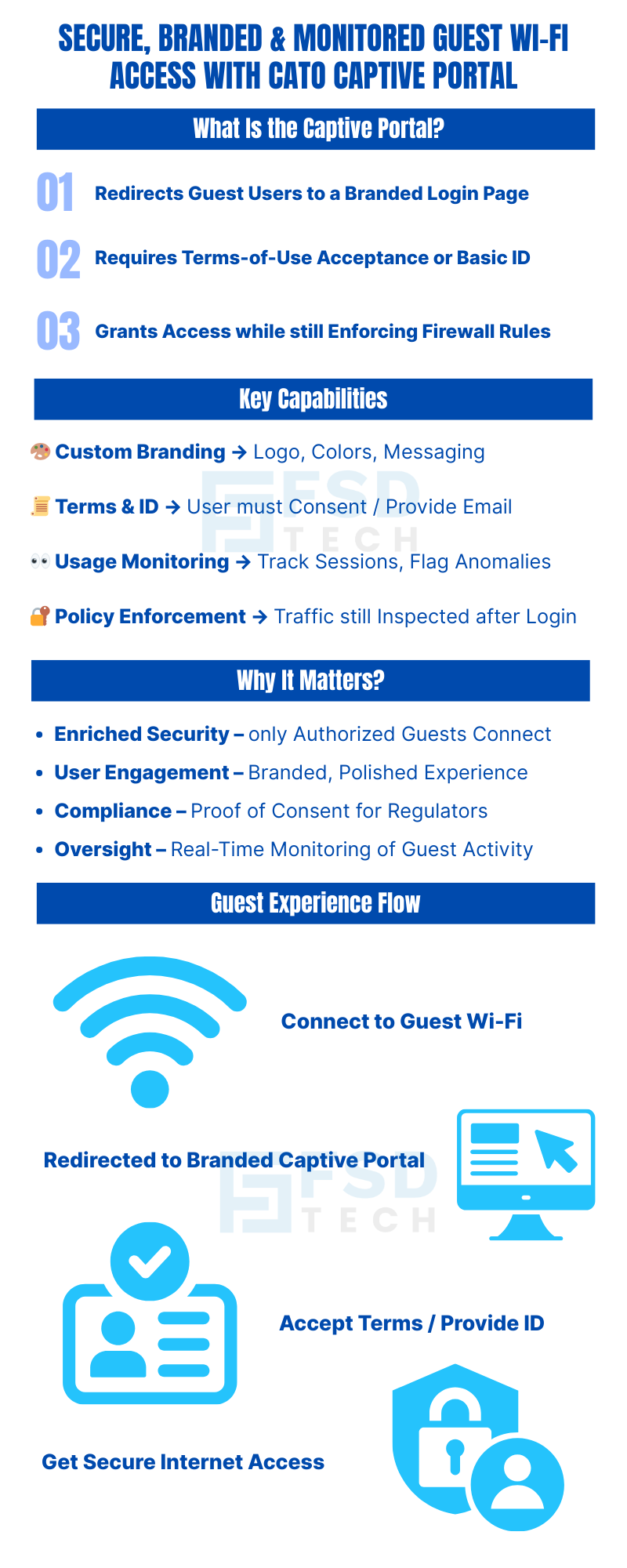
The Cato Captive Portal is a gateway mechanism integrated directly into the Cato Management Application. When a visitor or guest attempts to access the Internet through a designated guest network, the portal intercepts that traffic and redirects the user to a customizable landing page before any access is permitted.
On that landing page, the guest must either accept your organization's terms of use, provide an identifying detail such as an email address, or both — depending on how the portal is configured.
Only after this interaction is completed does the portal grant Internet access, at which point the traffic is passed to the standard Internet Firewall rule chain for continued inspection and policy enforcement. Guest access never bypasses your security stack — it simply enters through a controlled, documented gate.
This architecture matters. It means the Cato Captive Portal is not a workaround bolted onto the side of your network. It is a first-class component of the same platform managing your WAN connectivity, cloud security, and Zero Trust access policies.
Custom Branding Upload your company logo, define your color scheme, and configure the layout and button text of the portal page. Guests see a polished, on-brand experience that reflects organizational professionalism — not a generic router login screen.
Terms of Service Acceptance Require guests to actively acknowledge acceptable use policies before access is granted. This creates a documented record of consent, which carries legal and compliance value in regulated industries.
User Identification Optionally require visitors to provide an email address or other identifier before proceeding. This links network sessions to individual users, enabling accountability and meaningful audit trails.
Network Usage Monitoring Track when guest sessions begin and end, how long they last, and what Internet activity occurs during them. Administrators gain real-time visibility into guest behavior, enabling proactive policy enforcement and anomaly detection.
Session Duration Control Define precisely how long a guest session remains valid after terms are accepted. Duration changes apply to new sessions immediately and take effect on existing sessions after their current period expires.
Firewall Integration After portal acceptance, guest traffic continues through the standard Internet Firewall rule sequence. Policy controls — including content filtering, threat prevention, and application-level inspection — remain fully active.
Also Read: Understanding Threat Prevention Policies in Cato
The most immediate benefit is the elimination of anonymous, unconsented network access. Every connected guest has passed through a defined interaction point. Unauthorized devices, casual opportunistic users, and individuals unwilling to consent to terms are naturally filtered before they access the network.
A guest Wi-Fi login page is a brand touchpoint. A generic router interface or an unstyled acceptance screen communicates carelessness. A branded portal with your logo, colors, and clear language communicates that your organization takes both design and security seriously — a meaningful signal for enterprise visitors, healthcare patients, retail customers, and event attendees alike.
Requiring explicit terms-of-use acceptance creates a documented record that guests were informed of acceptable use conditions before accessing your network. In regulated industries — healthcare, hospitality, financial services, education — this record carries genuine compliance and liability value. It also establishes the legal basis for terminating access if policy violations occur.
Real-time monitoring of guest sessions gives administrators the data they need to detect unusual activity, enforce fair-use limits, and investigate incidents retroactively. When a security event is traced to a guest network, having session records with timestamps and identifiers can be the difference between a resolved incident and an open investigation.
Want to see how the Cato Captive Portal can secure and customize guest access for your business?
Setting up the Cato Captive Portal involves three straightforward configuration stages within the Cato Management Application.
In the Internet Firewall settings, create a high-priority rule where the traffic source is your guest network. Set the action for this rule to "Captive Portal." This ensures that any guest attempting to reach the Internet is redirected to the portal landing page before further traffic processing occurs. Once the guest completes the portal interaction, their subsequent traffic flows normally through the remaining firewall rules.
Navigate to the Captive Portal settings in the Cato Management Application. From here you can:
Set the session validity window that fits your operational context. A corporate visitor lounge might warrant an eight-hour session. A public event space might use a two-hour window. A co-working environment might prefer 24-hour or rolling sessions. Changes to duration settings apply to new sessions immediately and migrate existing sessions to new parameters once their current window expires.
Session management is one of the more operationally important aspects of the Cato Captive Portal, and it deserves specific attention.
When an administrator sets or changes the session duration, the behavior is straightforward: new sessions start using the updated duration immediately. Existing sessions run to their natural expiration and then transition to the new duration parameters on the next acceptance. This means changes never abruptly terminate active guest sessions — a sensible design that avoids disrupting legitimate users mid-session.
For environments with high guest turnover — trade show floors, airport lounges, retail stores — shorter session durations reduce the window of residual access from devices that connected earlier in the day. For environments with known, recurring visitors, longer sessions reduce the friction of repeated portal interactions.
The right session duration is a policy decision, not a technical one. The Cato platform makes it easy to revisit and adjust that decision as operational needs evolve.
Also Read: Unified Device Visibility: Enhancements to Cato’s Device Inventory
Guest network monitoring through the Cato Captive Portal gives administrators a clear view of:
This visibility serves multiple functions simultaneously. From a security standpoint, it enables proactive anomaly detection — an unusual session duration, unexpected traffic volume, or access to atypical destinations can trigger review before a minor issue becomes a significant incident.
From a compliance standpoint, session logs with identifiers and timestamps provide the documented evidence that audit teams, legal teams, and regulators may request in the event of a network security review.
From an operational standpoint, usage data informs capacity planning, bandwidth allocation decisions, and SSID policy adjustments over time.
Also Read: Bypassing the Cato Cloud Using Predefined Applications: Simplify Secure Egress for Key Traffic
If any of the following describe your environment, the Cato Captive Portal directly addresses your challenge:
You offer guest Wi-Fi with no current mechanism to enforce terms of use or document consent. You have experienced guest network incidents — abuse, unauthorized access, or excessive consumption — with no audit trail to investigate them. Your organization operates in a regulated industry where guest network access creates compliance exposure. Your brand standards require consistency across every customer touchpoint, including network access flows. You manage multiple locations or sites and need centralized, uniform guest access policy management.
The Cato Captive Portal is not a standalone product. It is one component of the broader Cato SASE platform, which means it benefits from the same centralized management, global PoP infrastructure, and integrated security stack that governs the rest of your network. If you are already a Cato customer, enabling the captive portal is a configuration exercise, not a deployment project.
Guest network access is not a minor IT courtesy — it is a defined security perimeter with real risk exposure if left unmanaged. The Cato Captive Portal transforms that perimeter from an open door into a controlled, branded, documented entry point.
Organizations that deploy it gain stronger security posture, clearer compliance documentation, a better brand experience for visitors, and the operational visibility needed to manage guest activity with confidence. All of this is delivered through the same management interface that runs the rest of the Cato platform — no additional vendors, no separate consoles, no integration overhead.
If your current approach to guest Wi-Fi is "it just works" rather than "we know exactly who is on it, when, and under what terms," this is the right moment to change that.
Ready to implement secure and branded guest access? Book a free consultation with our team and see the Cato Captive Portal in action.
Ready to implement secure and branded guest access?
Book a free consultation with our experts
The portal enforces terms-of-use, reduces unauthorized access, enhances network visibility, and mitigates security risk.
Yes. You may customize the portal with a company logo, color scheme, confirmation button text, and layout.
You can require visitors to provide a user identifier—such as an email address—before granting access.
Session duration is configurable. If the duration is modified, it affects new sessions and existing sessions transfer to new parameters once they expire.
Yes. Administrators can track usage to ensure compliance and identify potential security issues in guest activity.
Yes. Once terms are accepted, the traffic is further evaluated against sequential firewall rules—meaning policy controls still apply.

Anas is an Expert in Network and Security Infrastructure, With over seven years of industry experience, holding certifications Including CCIE- Enterprise, PCNSE, Cato SASE Expert, and Atera Certified Master. Anas provides his valuable insights and expertise to readers.
Share it with friends!




.webp&w=3840&q=75)




.webp&w=3840&q=75)
share your thoughts