HomeManaged ServicesNext Gen IT-InfraMonitoring & ManagementCyber SecurityBCP / DRAutomation
Managed Services
msp-dubai-accounting-firms-managed-it

Why accounting firms in Dubai need an MSP before they think they do?

🕓 April 24, 2026

How FSD-Tech Deploys Xcitium Managed Security in the GCC

How FSD-Tech Deploys Xcitium Managed Security in the GCC

🕓 May 11, 2026

Next Gen IT-Infra
Cato’s SASE Supports Cybersecurity Skills Development

How Cato’s SASE Supports Cybersecurity Skills Development

🕓 April 8, 2025

How SASE Supports the Security Needs of SMBs

How SASE Supports the Security Needs of SMBs

🕓 February 9, 2025

Attack Surface Reduction with Cato’s SASE

Attack Surface Reduction with Cato’s SASE

🕓 February 10, 2025

SASE for Digital Transformation in UAE

SASE for Digital Transformation in UAE

🕓 February 8, 2025

Monitoring & Management
Cost-Performance Ratio: Finding the Right Balance in IT Management Networks

Cost-Performance Ratio: Finding the Right Balance in IT Management Networks

🕓 June 16, 2025

Atera’s Communication Tools

Atera’s Communication Tools: Boosting IT Team Productivity in the UAE

🕓 February 8, 2025

Emerging Trends in IT Management

Emerging Trends in IT Management

🕓 February 10, 2025

Atera Disaster Recovery

Atera Disaster Recovery: Top Strategies for UAE IT Teams

🕓 February 9, 2025

Cyber Security
Illustration of the Cato Cloud architecture showing its role in delivering SASE for secure, optimized global connectivity.

Understanding the Cato Cloud and Its Role in SASE

🕓 January 29, 2025

Isometric illustration of professionals managing network performance, bandwidth analytics, and cloud-based optimization around the Cato Networks platform, symbolizing bandwidth control and QoS visibility.

Mastering Bandwidth Control and QoS in Cato Networks

🕓 July 26, 2025

Global network backbone powering Cato SASE solution for secure, high-performance connectivity across regions.

Global Backbone: The Engine Powering Cato’s SASE Solution

🕓 January 30, 2025

Illustration of team analyzing application traffic and usage insights on a large laptop screen using Cato’s dashboard, surrounded by network and cloud icons.

Cato Networks Application Visibility | Monitoring & Control

🕓 July 27, 2025

BCP / DR
Illustration showing diverse business and IT professionals collaborating with cloud, backup, and security icons, representing Vembu use cases for SMBs, MSPs, and IT teams.

Who Uses Vembu? Real-World Use Cases for SMBs, MSPs & IT Teams

🕓 July 12, 2025

Graphic showcasing Vembu’s all-in-one backup and disaster recovery platform with icons for cloud, data protection, and business continuity for IT teams and SMBs.

What Is Vembu? A Deep Dive Into the All in One Backup & Disaster Recovery Platform

🕓 July 6, 2025

Illustration showing Vembu backup and disaster recovery system with cloud storage, server racks, analytics dashboard, and IT professionals managing data.

The Rising Cost of Data Loss: Why Backup Is No Longer Optional?

🕓 August 14, 2025

3D isometric illustration of cloud backup and data recovery infrastructure with laptop, data center stack, and digital business icons — FSD Tech

RPO & RTO: The Heart of Business Continuity

🕓 August 15, 2025

Automation
Cross-Functional Collaboration with ClickUp

Fostering Cross-Functional Collaboration with ClickUp for Multi-Departmental Projects

🕓 February 11, 2025

ClickUp Project Reporting

Revolutionizing Enterprise Reporting with ClickUp’s Advanced Analytics and Dashboards

🕓 June 16, 2025

ClickUp’s Design Collaboration and Asset Management Tools

Empowering Creative Teams with ClickUp’s Design Collaboration and Asset Management Tools

🕓 February 26, 2025

ClickUp Communication and Collaboration Tools

ClickUp Communication and Collaboration Tools: Empowering Remote Teams

🕓 March 12, 2025

    Subscribe to our newsletter!

    About Us

    Follow Us

    Copyright © 2024 | Powered by 

    Atera

    (60)

    Cato Networks

    (131)

    ClickUp

    (78)

    FishOS

    (7)

    Miradore

    (21)

    PointGuard AI

    (9)

    Vembu

    (26)

    Xcitium

    (35)

    ZETA HRMS

    (79)

    Table of Contents

    Bluetooth Pairing Modes: Guide to Secure Connections

    Surbhi Suhane
    May 4, 2026
    Comments
    Bluetooth Pairing Modes

    Bluetooth pairing modes might seem like a simple "click and connect" task, but there's a lot of clever engineering happening under the hood. Have you ever wondered why your phone sometimes asks for a code while your earbuds just link up instantly? Or why some older gear feels like it’s speaking a different language? 


    It's all about how devices shake hands to keep your data safe. In this guide, we'll peel back the layers of how these gadgets talk to each other.


    What are Bluetooth Pairing Modes?

    At its core, Bluetooth pairing modes refer to the specific protocols two devices use to establish a trusted connection. Think of it as a digital handshake. Before any music or files move between your phone and your speaker, they need to agree on a secret key. This key ensures that no one else can "listen in" on your wireless conversation.


    Over the years, the Bluetooth Special Interest Group (SIG) has updated these modes to make them faster and more secure. We started with basic PIN codes and moved toward complex encryption that happens without us even noticing.


    Browse Our Secure Bluetooth Collection


    The Evolution of Bluetooth Pairing Modes

    Bluetooth has come a long way since the early 2000s. Originally, we used "Legacy Pairing," which often required a 4-digit PIN like 0000 or 1234. Fast-forward to today, and most of us use Secure Simple Pairing (SSP).


    Why the change? Well, Legacy Pairing was roughly as secure as a screen door in a storm. Modern Bluetooth pairing modes are designed to stop hackers from jumping into the middle of your connection.


    Understanding Legacy Pairing Modes

    If you're using a device made before 2007 (Bluetooth 2.0 or older), you're likely using Legacy Pairing. We've all been there—fumbling through a paper manual to find a default code. This mode uses a fixed PIN to create a link key.


    Here’s the catch: because the PIN is often hardcoded, it's vulnerable to passive eavesdropping. If a hacker is nearby with the right tools, they can intercept the exchange and figure out your key.


    Why Legacy Modes Still Exist

    • Backwards Compatibility: Your new phone can still talk to that 15-year-old car stereo.
    • Simple Hardware: Some cheap gadgets don't have the "brains" for newer encryption.


    Also Read: Repeater Signal Boosting: How to Improve Your Wireless Coverage Instantly


    The Rise of Secure Simple Pairing (SSP)

    With the release of Bluetooth 2.1, we got Secure Simple Pairing. SSP changed the game by using Elliptic Curve Diffie-Hellman (ECDH) cryptography. Don't let the math scare you; it basically means the devices create a unique key that never actually travels through the air.


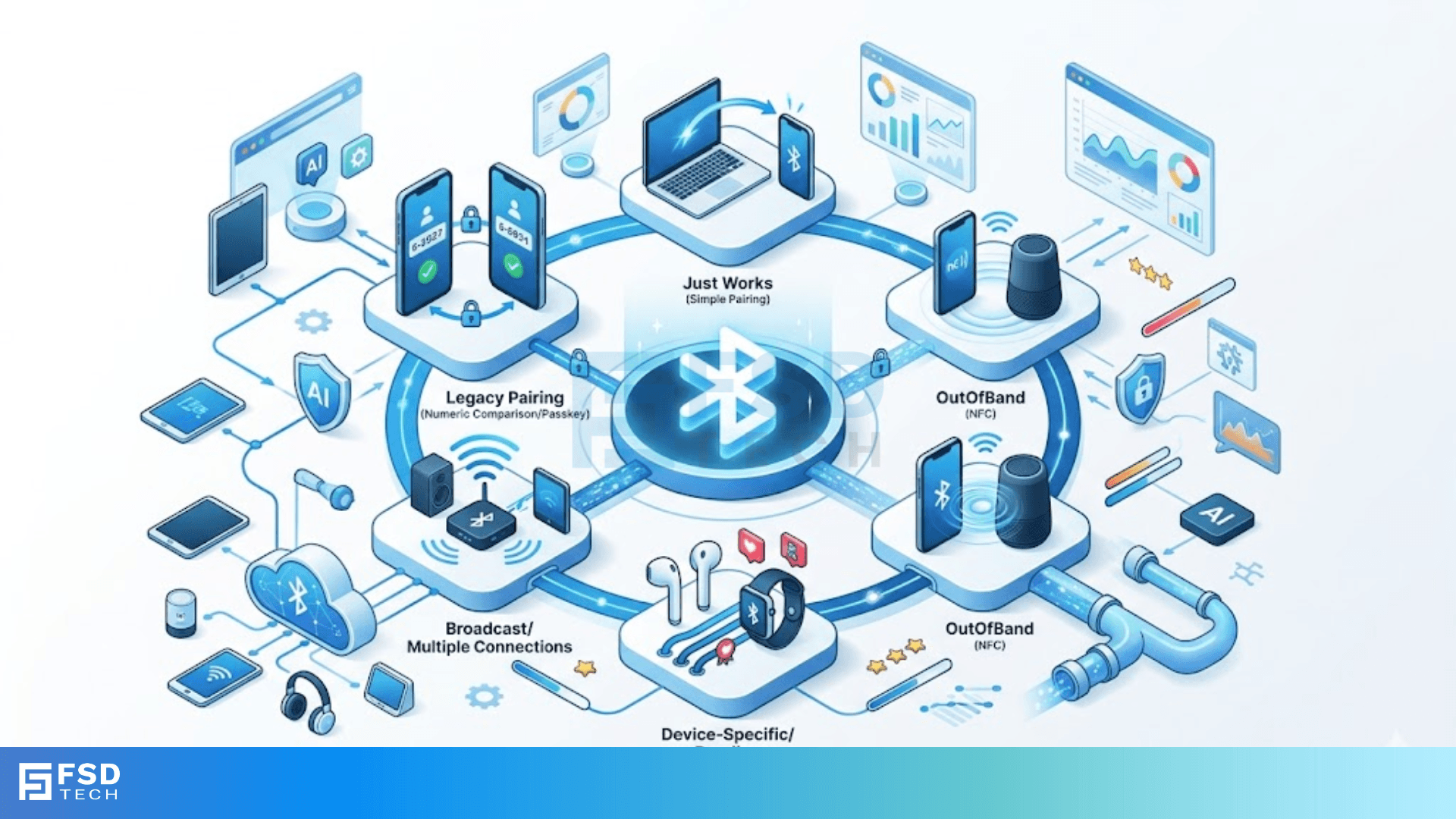
    SSP offers four distinct "association models" based on what the device can do (like having a screen or a keyboard).


    1. Just Works

    This is exactly what it sounds like. It’s the primary Bluetooth pairing mode for devices with no display or buttons, like most earbuds.


    • How it works: The devices bond automatically without user input.
    • The downside: It offers no protection against Man-in-the-Middle (MITM) attacks. It's fine for your gym headphones, but maybe not for a top-secret wireless keyboard.


    2. Numeric Comparison

    This is arguably the most common mode for modern smartphones. You'll see a six-digit code pop up on both screens.


    • Your Job: You just check if the numbers match and hit "Yes."
    • Security Level: It provides great protection against MITM attacks because an attacker would have to guess that exact six-digit code in real-time.


    3. Passkey Entry

    We often see this when pairing a Bluetooth keyboard to a tablet.


    • The Process: One device shows a code, and you type it into the other.
    • The Logic: This ensures that the person holding the keyboard is the one actually trying to connect.


    4. Out of Band (OOB)

    This is the "cool" mode. It uses a different wireless technology—usually NFC (Near Field Communication)—to exchange pairing info.


    • The User Experience: You tap your phone against a speaker, and they pair instantly.
    • Why it's secure: NFC only works over a few centimeters, so a hacker would have to be standing right on top of you to intercept it.


    Bluetooth Low Energy (BLE) Pairing

    If you wear a fitness tracker or use a smart home sensor, you’re using Bluetooth Low Energy. Bluetooth pairing modes for BLE are slightly different to save battery. In the early days (BLE 4.0 and 4.1), the security was a bit weak.


    However, BLE 4.2 introduced LE Secure Connections. This brought the high-end ECDH encryption of SSP to the low-energy world. It was a massive win for privacy in the "Internet of Things" (IoT).


    Also Read: Modem Modulation Roles: How Digital Data Travels


    Comparing Different Pairing Methods

    To be honest, it can be hard to keep track of which mode does what. Here is a simple breakdown of how these Bluetooth pairing modes stack up:


    ModeInput Needed?Security LevelBest For...
    Just WorksNoLow (No MITM protection)Earbuds, Basic Speakers
    Numeric ComparisonYes (Confirm)HighPhones, Laptops, Cars
    Passkey EntryYes (Type)HighKeyboards, Input devices
    Out of Band (OOB)Yes (Proximity)HighestNFC-enabled gear


    Common Issues with Bluetooth Pairing Modes

    Have you ever had a device simply refuse to connect? In my experience, it's usually because the devices can't agree on a pairing mode. This is called a "Capability Mismatch."


    For example, if one device requires a Passkey Entry but the other has no keyboard, the handshake fails. This is why manufacturers usually default to "Just Works" for accessories—it ensures the broadest compatibility, even if it sacrifices a tiny bit of security.


    Troubleshooting Tips

    • Reset the Bond: Sometimes old keys get "stuck." Delete the device from your settings and start over.
    • Check the Version: If you're trying to use LE Secure Connections, both devices must support Bluetooth 4.2 or higher.
    • Clear the Cache: On Android, clearing the "Bluetooth System App" cache often fixes weird pairing bugs.


    Conclusion

    Understanding Bluetooth pairing modes helps you make better choices about your digital privacy. We've seen how the technology moved from simple PINs to complex cryptographic exchanges that keep our smart homes and personal gadgets safe. At the end of the day, Bluetooth is all about making your life easier without leaving the door open to intruders.


    At our core, we believe that technology should be accessible, secure, and reliable. We are dedicated to helping you navigate the complexities of the digital world with ease. If you're looking for gear that prioritizes both user experience and high-end security, you've come to the right place.


    Contact an Expert for Your Tech Setup


    Key Takeaways on Bluetooth Pairing Modes

    • Security varies: "Just Works" is convenient but least secure; "Numeric Comparison" is the gold standard for daily use.
    • Legacy is fading: Most modern gear uses Secure Simple Pairing (SSP) for better encryption.
    • Hardware dictates the mode: A device with no screen will almost always use "Just Works."
    • BLE is efficient: Bluetooth Low Energy uses specific modes to save your battery while staying safe.


    Frequently Asked Questions (FAQs) on Bluetooth Pairing Modes

    Which Bluetooth pairing mode is the most secure?

    The Out of Band (OOB) mode is technically the most secure because it requires physical proximity and uses a separate communication channel. For most people, Numeric Comparison is plenty safe for daily tasks.


    Can I change the pairing mode on my device?

    Usually, no. The mode is determined by the "I/O Capabilities" (Input/Output) defined by the manufacturer. You can't force a pair of earbuds to use a Passkey Entry if they don't have a screen or buttons.


    Why does my car ask for a 4-digit PIN?

    This is a sign of Legacy Pairing. Many older car infotainment systems were built on Bluetooth 2.0. In these cases, the "handshake" is less advanced than your modern phone, so it falls back to the old PIN method.


    Is "Just Works" pairing dangerous?

    Not necessarily. While it doesn't protect against a sophisticated hacker standing nearby during the exact moment of pairing, it still encrypts your data once the connection is made. For public places, though, it's a small risk.

    Bluetooth Pairing Modes: Guide to Secure Connections

    About The Author

    Surbhi Suhane

    Surbhi Suhane is an experienced digital marketing and content specialist with deep expertise in Getting Things Done (GTD) methodology and process automation. Adept at optimizing workflows and leveraging automation tools to enhance productivity and deliver impactful results in content creation and SEO optimization.

    TRY OUR PRODUCTS

    Like This Story?

    Share it with friends!

    Subscribe to our newsletter!

    FishOSCato SASEVembuXcitiumZeta HRMSAtera
    Isometric illustration of a centralized performance platform connected to analytics dashboards and team members, representing goal alignment, measurable outcomes, risk visibility, and strategic project tracking within ClickUp.

    How ClickUp Enables Outcome-Based Project Management (Not Just Task Tracking)

    🕓 February 15, 2026
    Isometric illustration of a centralized executive dashboard platform connected to analytics panels, performance charts, security indicators, and strategic milestones, representing real-time business visibility and decision control within ClickUp.

    Executive Visibility in ClickUp – How CXOs Gain Real-Time Control Without Micromanaging

    🕓 February 13, 2026

    Cato SASE Architecture

    Inside Cato’s SASE Architecture: A Blueprint for Modern Security

    🕓 January 26, 2025

    Workflow Automation(8)

    Workforce Automation(1)

    AI Project Management(1)

    HR Data Automation(1)

    RMM(2)

    Firewall Security(1)

    IT Workflow Automation(1)

    GCC compliance(4)

    IT security(2)

    Payroll Integration(2)

    IT support automation(3)

    procurement automation(1)

    lost device management(1)

    IT Management(5)

    IoT Security(3)

    Cato XOps(1)

    IT compliance(5)

    Workflow Management(1)

    Task Automation(1)

    AI-powered cloud ops(1)

    OpenStack automation(1)

    Kubernetes lifecycle management(2)

    SMB Security(8)

    Data Security(1)

    MDR (Managed Detection & Response)(3)

    Atera Integrations(2)

    MSP Automation(3)

    Threat Detection & Response(1)

    XDR Security(2)

    SMB Cyber Protection(1)

    Ransomware Defense(3)

    HR Tech Solutions(1)

    Zero Trust Network Access(3)

    Quantum Security(1)

    Quantum Threat UAE & GCC(1)

    Post-Quantum Cryptography(1)

    Cloud IDE Security(1)

    Zero Trust Security(2)

    Endpoint Management(1)

    SaaS Security(2)

    Payroll Automation(5)

    IT Monitoring(2)

    Xcitium EDR SOC(15)

    Ransomware Protection GCC(1)

    M&A IT Integration(1)

    Network Consolidation UAE(1)

    MSSP for SMBs(1)

    Managed EDR FSD-Tech(1)

    SMB Cybersecurity GCC(1)

    Antivirus vs EDR(1)

    FSD-Tech MSSP(25)

    Ransomware Protection(3)

    Endpoint Security(1)

    Cybersecurity GCC(15)

    Data Breach Costs(1)

    Endpoint Protection(1)

    Managed Security Services(2)

    SMB Cybersecurity(8)

    Zero Dwell Containment(31)

    Xcitium EDR(30)

    Cloud Backup(1)

    Hybrid Backup(1)

    Backup & Recovery(1)

    pointguard ai(4)

    vembu(9)

    backup myths(1)

    disaster recovery myths(1)

    SMB data protection(9)

    Disaster Recovery(4)

    Vembu BDR Suite(19)

    DataProtection(1)

    GCCBusiness(1)

    Unified Network Management(1)

    GCC IT Solutions(1)

    Secure Access Service Edge(4)

    GCC HR software(20)

    open banking(1)

    financial cybersecurity(2)

    CC compliance(1)

    Miradore EMM(15)

    Cato SASE(9)

    Government Security(1)

    Cloud Security(9)

    Hybrid Learning(1)

    GCC Education(1)

    Talent Development(1)

    AI Compliance(2)

    AI Risk Management(1)

    AI Governance(4)

    AI Security(2)

    AI Cybersecurity(13)

    Secure Remote Access(1)

    GCC business security(1)

    GCC network integration(1)

    compliance automation(5)

    education security(1)

    GCC cybersecurity(3)

    Miradore EMM Premium+(5)

    App management UAE(1)

    BYOD security Dubai(8)

    share your thoughts

    SLIP Serial Encapsulation

    What is SLIP Serial Encapsulation? How it works?

    🕓 May 9, 2026

    PPP Authentication CHAP

    What is PPP Authentication CHAP? Dive into Secure Networking

    🕓 May 9, 2026

    HDLC Bit-Oriented Framing

    HDLC Bit-Oriented Framing: Guide to Data Link Control

    🕓 May 8, 2026

    Managed Services(2)

    Decoded(245)

    Cyber Security(129)

    BCP / DR(26)

    Zeta HRMS(78)

    SASE(21)

    Automation(80)

    Next Gen IT-Infra(128)

    Monitoring & Management(81)

    ITSM(22)

    HRMS(21)

    Automation(24)









